
Chọn ngôn ngữ

Form 26Q – Quarterly TDS Statement (Fillable PDF)

  1. Ngôn ngữ Tiếng Anh
  2. Quốc gia Ấn Độ
  3. Hoạt động thuế
Form 26Q – Quarterly TDS Statement (Fillable PDF)

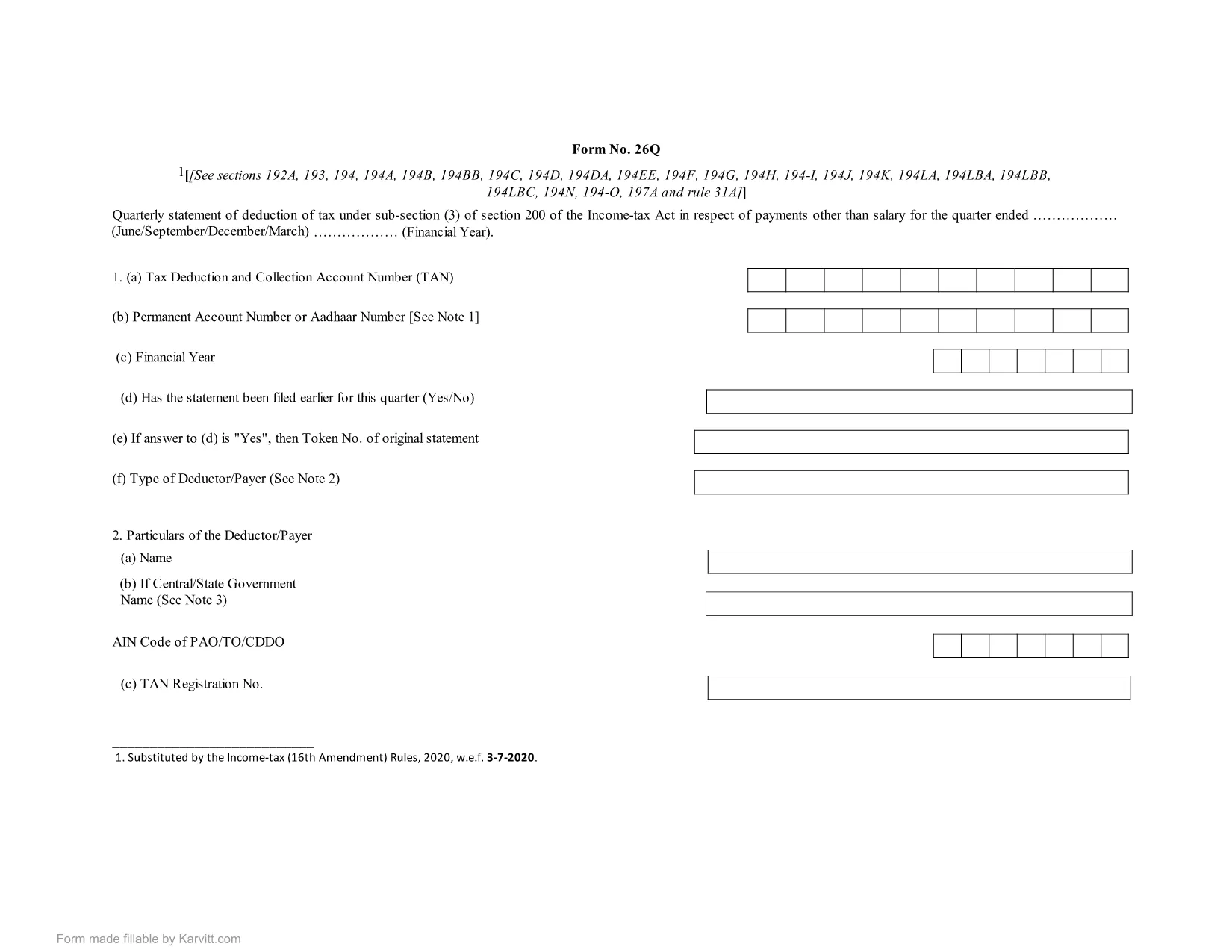
Form 26Q is the quarterly statement of tax deducted at source (TDS) that deductors must file under sub‑section (3) of Section 200 of the Income Tax Act, India. It details the TDS on payments such as salaries, interest, rent, and professional fees for a specific quarter.

Using a fillable PDF saves time, eliminates manual errors, and ensures the format matches the official requirement. With Formize’s built‑in PDF Filler, you can complete the form directly in your browser—no extra software needed.

What is Form 26Q?

  • Quarterly return for TDS deductors.
  • Covers all payments made in the quarter and the tax deducted.
  • Submitted to the Income Tax Department for each quarter of the financial year.

How to Fill Form 26Q Online

Simply click the "Fill out this form" button on this page. The Formize PDF Filler will load, presenting you with editable fields that mirror the original form.

Common Mistakes to Avoid

  • Entering the wrong PAN for deductees – double‑check each PAN.
  • Mismatching the quarter dates – use the exact fiscal quarter (Q1: Apr‑Jun, Q2: Jul‑Sep, etc.).
  • Leaving mandatory fields blank – the filler highlights required fields.
  • Using an outdated version of the form – the download link always provides the latest PDF.

Download & Use the Fillable PDF

For offline work, you can download the official fillable PDF below. Open it in any modern PDF reader (Adobe Acrobat Reader 9+ or a compatible browser) and fill it manually, or use the online Formize filler for a smoother experience.

Download Form 26Q Fillable PDF

CÂU HỎI THƯỜNG GẶP
  • Who needs to file Form 26Q?

    Any deductor who has deducted tax at source on payments like salary, interest, rent, or professional fees must file Form 26Q for each quarter.

  • Can I edit the PDF on my phone?

    Yes. The fillable PDF works on modern mobile browsers and the Formize online filler is fully responsive.

  • Is there a fee to download the fillable PDF?

    No. The PDF is available for free download for personal and business use.

  • What should I do if I make a mistake after submission?

    Correct the error in a revised Form 26Q and file it as a revised return for the same quarter, following the Income Tax Department’s guidelines.

  • Do I need Adobe Acrobat to fill the form?

    Not necessarily. While Adobe Acrobat Reader works, you can also fill the form directly in the Formize PDF Filler without any additional software.

  • How often is the PDF updated?

    The PDF is updated whenever the Income Tax Department releases a new version. Our download link always points to the latest official file.

LÀM THẾ NÀO ĐỂ

Cách điền Form 26Q miễn phí, trực tuyến trong 5 bước đơn giản:

  1. 1
    Click the Fill button
    Press the “Fill out this form” button on the page to launch the Formize PDF Filler.
  2. 2
    Wait for the filler to load
    The web app loads the fillable PDF in a few seconds. All fields become editable.
  3. 3
    Enter your details
    Complete each highlighted field with the required information, such as PAN, amounts, and dates.
  4. 4
    Validate and review
    Use the built‑in validation to check for missing or incorrect entries, then review the entire form.
  5. 5
    Download the completed form
    When you’re satisfied, click “Save” to download the filled PDF for your records or submission.
Định dạng ứng dụng PDF Filler
TRONG KHOẢNG

Đơn thuế

Form 26Q là một trong những Biểu mẫu khai thuế là văn bản dùng để khai báo các thông tin liên quan đến thuế với cơ quan thuế liên quan. Có nhiều loại biểu mẫu thuế khác nhau, bao gồm biểu mẫu thuế liên bang, tiểu bang và địa phương, có thể khác nhau tùy thuộc vào hoàn cảnh và địa điểm của người nộp thuế.

ĐẶC TRƯNG

Trình điền PDF

Cách dễ nhất để điền vào các mẫu PDF trực tuyến

  • Nhanh chóng điền vào Form 26Q
    Bạn đang tìm cách điền nhanh Form 26Q trực tuyến? Với trình điền biểu mẫu PDF miễn phí trực tuyến của chúng tôi, bạn sẽ biết cách chỉnh sửa và điền vào tài liệu pdf này trong vòng chưa đầy một phút.
  • Trình chỉnh sửa PDF trực tuyến dễ sử dụng
    Chán nản với việc in ra các tệp PDF để bạn có thể chỉnh sửa chúng trước khi quét lại và gửi lại? Chỉnh sửa tài liệu PDF trực tuyến miễn phí. Sử dụng trình chỉnh sửa pdf trực tuyến của chúng tôi để tiết kiệm thời gian và giấy.
  • Công cụ tuyệt vời, tất cả các nền tảng
    Bạn muốn biết cách điền Form 26Q trên máy Mac hoặc có thể là cách sử dụng trình điền PDF miễn phí? Các công cụ PDF trực tuyến của chúng tôi hoạt động trên tất cả các nền tảng.
  • Lưu trữ tệp an toàn
    Các tệp "Form 26Q" đã hoàn thành được lưu trữ trong cơ sở dữ liệu bảo mật do dịch vụ lưu trữ Amazon Cloud quản lý. Bạn có thể xóa các tệp của mình khỏi hệ thống của chúng tôi bất cứ lúc nào. Trong mọi trường hợp, các tệp này sẽ tự động bị xóa sau 24 giờ.
  • Trò chuyện với Form 26Q
    Trò chuyện với "Form 26Q" trên Trò chuyện, một trợ lý đọc PDF miễn phí. Đặt câu hỏi và nhận câu trả lời từ "Form 26Q". Chỉ cần nhấp vào nút Trò chuyện với tài liệu ở trên.

Xóa phiên điền

Xóa phiên điền đã chọn? Trong trường hợp này, tiến độ của bạn trong việc hoàn thành biểu mẫu sẽ bị mất.

Xóa phiên chỉnh sửa

Xóa phiên chỉnh sửa đã chọn? Trong trường hợp này, tiến trình tạo và chỉnh sửa biểu mẫu của bạn sẽ bị mất.