
Chọn ngôn ngữ

Form 1065 Schedule B-1 – Fillable PDF Download

  1. Quốc gia Hoa Kỳ
  2. Ngôn ngữ Tiếng Anh
  3. Hoạt động thuế
  4. Phòng Internal Revenue Service
Form 1065 Schedule B-1 – Fillable PDF Download

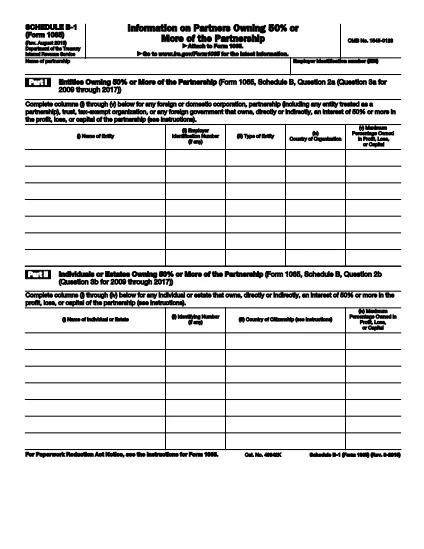
Schedule B-1 (Form 1065) is an IRS attachment used by partnerships to disclose ownership of partnership interests by entities and individuals that own 50% or more of the profit, loss, or capital. Whether you are a general partner, limited partner, or an estate, accurate reporting on this schedule is critical for compliance with IRS Schedule B-1 requirements.

What Is Schedule B-1 (Form 1065)?

Schedule B-1 collects detailed information about owners who hold a significant stake (50% or more) in a partnership. The form asks for the owner’s name, taxpayer identification number, type of entity, and the percentage of ownership. This data helps the IRS track partnership structures and enforce tax rules on large ownership positions.

Who Must Complete Schedule B-1?

  • Any partnership filing Form 1065 that has an individual, estate, or entity owning 50% +  of the partnership’s profit, loss, or capital.
  • Foreign partners are also required to be listed if they meet the ownership threshold.
  • Partnerships that do not have any 50% +  owners can leave Schedule B-1 blank, but the form must still be attached to the return.

How to Fill Out Schedule B-1 Online with Formize

Instead of printing, scanning, or using a separate PDF editor, you can complete Schedule B-1 directly in your browser:

  1. Click the **"Fill out this form"** button below.
  2. Wait a few seconds while the Formize PDF Filler app loads the fillable PDF.
  3. Enter the required information in each field – the interface works like a web form.
  4. Use the **Save** button to store a copy on your device or in the cloud.
  5. When finished, download the completed PDF or submit it electronically with your Form 1065 filing.

Common Mistakes to Avoid on Schedule B-1

  • Incorrect ownership percentage: Double‑check the % of profit, loss, and capital for each owner.
  • Missing Taxpayer Identification Number (TIN): The IRS will reject the return if a TIN is omitted.
  • Using the wrong entity type: Choose the exact classification (e.g., corporation, partnership, trust).
  • Leaving blank rows: If an owner does not meet the 50% threshold, do not list them; leave the row empty.

Download the Fillable PDF Instantly

Ready to start? Click the button below to open the official IRS Schedule B-1 (Form 1065) fillable PDF in the Formize PDF Filler. No additional software required.

Fill out this form

Hướng dẫn

CÂU HỎI THƯỜNG GẶP
  • What is the purpose of Schedule B-1 on Form 1065?

    Schedule B-1 reports owners who have a 50% or greater interest in a partnership’s profit, loss, or capital. It helps the IRS track significant ownership stakes.

  • Do I need to file Schedule B-1 if no partner owns 50% or more?

    If no individual, estate, or entity meets the 50% threshold, you can leave Schedule B-1 blank, but the schedule must still be attached to the Form 1065 filing.

  • Can I edit Schedule B-1 on a mobile device?

    Yes. The Formize PDF Filler works on all modern browsers, including mobile Safari and Chrome, allowing you to complete the form on a phone or tablet.

  • What happens if I omit a partner’s TIN on Schedule B-1?

    Missing or incorrect TINs cause the IRS to reject the partnership return. Always verify each TIN before submitting.

  • Is there a fee to use the Formize PDF Filler for Schedule B-1?

    No. Formize provides a free, secure online filler for IRS PDFs, including Schedule B-1.

  • How do I correct a mistake after I’ve submitted Schedule B-1?

    File an amended partnership return (Form 1065‑X) and attach a corrected Schedule B-1 with the updated information.

  • Do foreign partners need to be listed on Schedule B-1?

    Yes, any foreign partner that owns 50% or more must be reported, including their foreign tax identification number if applicable.

  • Can I print Schedule B-1 after filling it online?

    Absolutely. After completing the form, use the Download button to save a PDF, then print it for your records or for paper filing.

LÀM THẾ NÀO ĐỂ

Cách điền Form 1065 Schedule B-1 miễn phí, trực tuyến trong 4 bước đơn giản:

  1. 1
    Open the Fillable Form
    Click the "Fill out this form" button above. The Formize PDF Filler will load the Schedule B-1 PDF directly in your browser.
  2. 2
    Enter Owner Information
    Type the name, TIN, entity type, and ownership percentages for each partner that owns 50% or more.
  3. 3
    Review and Save
    Use the built‑in review tools to check for missing fields, then click Save to store a copy on your device.
  4. 4
    Download or Submit
    When the form is complete, download the filled PDF or attach it to your electronic Form 1065 filing.
Định dạng ứng dụng PDF Filler
TRONG KHOẢNG

Đơn thuế

Form 1065 Schedule B-1 là một trong các Biểu mẫu thuế là tài liệu dùng để báo cáo thông tin về thu nhập, các khoản khấu trừ và nghĩa vụ thuế của cá nhân hoặc doanh nghiệp với cơ quan thuế có liên quan. Những biểu mẫu này là cần thiết để tuân thủ luật thuế và thực hiện nghĩa vụ thuế. Các hình thức thuế khác nhau tùy thuộc vào quốc gia và các yêu cầu về thuế cụ thể được áp dụng. Dưới đây là một số loại biểu mẫu thuế phổ biến:

Biểu mẫu thuế cá nhân: Những biểu mẫu này được người nộp thuế cá nhân sử dụng để báo cáo thu nhập cá nhân của họ và yêu cầu các khoản khấu trừ, tín dụng và miễn trừ. Các ví dụ bao gồm biểu mẫu 1040 ở Hoa Kỳ hoặc biểu mẫu Tờ khai thuế tự định ở Vương quốc Anh.

Biểu mẫu thuế doanh nghiệp: Biểu mẫu thuế doanh nghiệp được các công ty, công ty hợp danh hoặc cá nhân tự kinh doanh sử dụng để báo cáo thu nhập, chi phí kinh doanh và các thông tin liên quan đến thuế khác của họ. Ví dụ bao gồm biểu mẫu Phụ lục C (Lãi hoặc lỗ từ kinh doanh) ở Hoa Kỳ hoặc biểu mẫu CT600 (Khai thuế công ty) ở Vương quốc Anh.

Biểu mẫu thuế tiền lương: Những biểu mẫu này được người sử dụng lao động sử dụng để báo cáo tiền lương, tiền công và các khoản thuế được khấu trừ từ tiền lương của nhân viên. Ví dụ bao gồm mẫu W-2 ở Hoa Kỳ hoặc mẫu P60 ở Vương quốc Anh.

Biểu mẫu thuế bán hàng: Các doanh nghiệp sử dụng biểu mẫu thuế bán hàng để báo cáo và nộp thuế bán hàng thu được đối với hàng hóa hoặc dịch vụ chịu thuế. Các biểu mẫu thuế bán hàng cụ thể khác nhau tùy theo khu vực pháp lý.

Biểu mẫu thuế giá trị gia tăng (VAT): Biểu mẫu VAT được sử dụng ở các quốc gia áp dụng thuế giá trị gia tăng để báo cáo và nộp VAT thu được khi bán hàng và yêu cầu khấu trừ VAT khi mua hàng. Ví dụ bao gồm các biểu mẫu hoàn thuế VAT được sử dụng ở nhiều quốc gia.

Biểu mẫu thuế ước tính: Biểu mẫu thuế ước tính được sử dụng để báo cáo và nộp thuế ước tính đối với thu nhập không bị khấu lưu, chẳng hạn như thu nhập từ hoạt động tư doanh hoặc thu nhập từ đầu tư.

Đây chỉ là một vài ví dụ về nhiều hình thức thuế có thể tồn tại. Các biểu mẫu cụ thể được yêu cầu tùy thuộc vào luật và quy định về thuế ở quốc gia hoặc khu vực pháp lý của bạn. Điều quan trọng là phải tham khảo hướng dẫn của cơ quan thuế hoặc tìm kiếm lời khuyên chuyên môn để xác định hình thức nào có thể áp dụng cho trường hợp của bạn.

ĐẶC TRƯNG

Trình điền PDF

Cách dễ nhất để điền vào các mẫu PDF trực tuyến

  • Nhanh chóng điền vào Form 1065 Schedule B-1
    Bạn đang tìm cách điền nhanh Form 1065 Schedule B-1 trực tuyến? Với trình điền biểu mẫu PDF miễn phí trực tuyến của chúng tôi, bạn sẽ biết cách chỉnh sửa và điền vào tài liệu pdf này trong vòng chưa đầy một phút.
  • Trình chỉnh sửa PDF trực tuyến dễ sử dụng
    Chán nản với việc in ra các tệp PDF để bạn có thể chỉnh sửa chúng trước khi quét lại và gửi lại? Chỉnh sửa tài liệu PDF trực tuyến miễn phí. Sử dụng trình chỉnh sửa pdf trực tuyến của chúng tôi để tiết kiệm thời gian và giấy.
  • Công cụ tuyệt vời, tất cả các nền tảng
    Bạn muốn biết cách điền Form 1065 Schedule B-1 trên máy Mac hoặc có thể là cách sử dụng trình điền PDF miễn phí? Các công cụ PDF trực tuyến của chúng tôi hoạt động trên tất cả các nền tảng.
  • Lưu trữ tệp an toàn
    Các tệp "Form 1065 Schedule B-1" đã hoàn thành được lưu trữ trong cơ sở dữ liệu bảo mật do dịch vụ lưu trữ Amazon Cloud quản lý. Bạn có thể xóa các tệp của mình khỏi hệ thống của chúng tôi bất cứ lúc nào. Trong mọi trường hợp, các tệp này sẽ tự động bị xóa sau 24 giờ.
  • Trò chuyện với Form 1065 Schedule B-1
    Trò chuyện với "Form 1065 Schedule B-1" trên Trò chuyện, một trợ lý đọc PDF miễn phí. Đặt câu hỏi và nhận câu trả lời từ "Form 1065 Schedule B-1". Chỉ cần nhấp vào nút Trò chuyện với tài liệu ở trên.

Xóa phiên điền

Xóa phiên điền đã chọn? Trong trường hợp này, tiến độ của bạn trong việc hoàn thành biểu mẫu sẽ bị mất.

Xóa phiên chỉnh sửa

Xóa phiên chỉnh sửa đã chọn? Trong trường hợp này, tiến trình tạo và chỉnh sửa biểu mẫu của bạn sẽ bị mất.