
Chọn ngôn ngữ

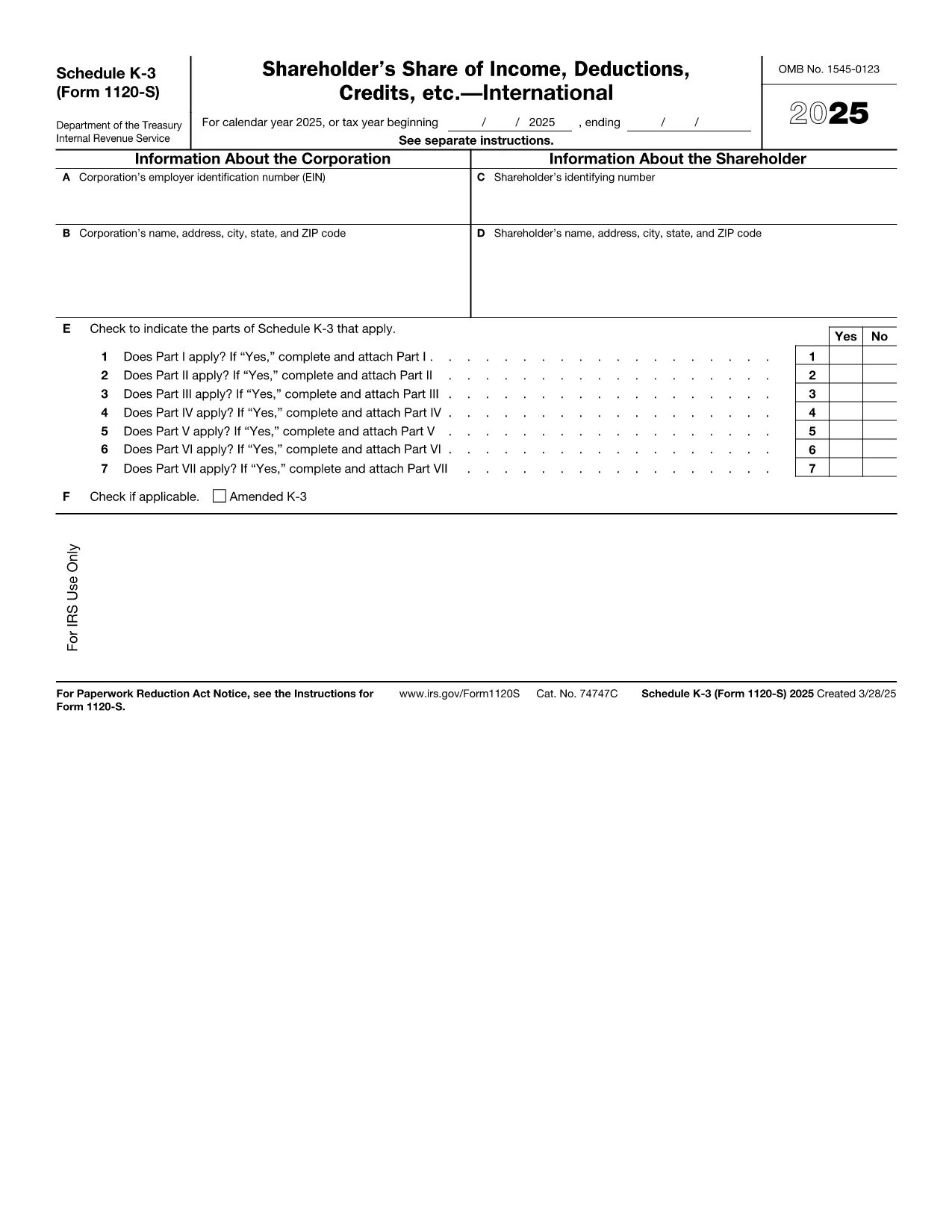
Form 1120‑S Schedule K‑3 Fillable PDF

  1. Quốc gia Hoa Kỳ
  2. Ngôn ngữ Tiếng Anh
  3. Hoạt động thuế
  4. Phòng Internal Revenue Service
Form 1120‑S Schedule K‑3 Fillable PDF

Schedule K‑3 (Form 1120‑S) is the IRS’s dedicated worksheet for reporting a corporation’s international tax items that flow through to each shareholder’s Schedule K‑1. If your S corporation has foreign income, taxes paid, or other cross‑border activities, you must complete this form.

What Is Schedule K‑3 and Who Needs It?

Schedule K‑3 expands on Schedule K‑2 to capture detailed foreign tax credit limitations, foreign source income, and other international items. All S corporations that report foreign activities on their Form 1120‑S must file Schedule K‑3, and shareholders use the information to claim foreign tax credits on their personal returns.

How to Complete Schedule K‑3 Online

Instead of printing, editing, and rescanning, you can fill the official IRS PDF directly in your browser with Formize’s PDF Filler. The process is simple:

  1. Click the "Fill out this form" button on this page.
  2. Wait a few seconds while the Formize PDF Filler app loads the fillable version of Schedule K‑3.
  3. Enter the required numbers in each field – the form automatically validates dates and numeric formats.
  4. Review every line for accuracy; the filler highlights missing or inconsistent entries.
  5. When you’re satisfied, click Save to download a completed PDF or Export to Cloud for secure storage.

Common Mistakes to Avoid on Schedule K‑3

  • Leaving foreign tax credit limitation fields blank – the IRS treats blanks as zero, which can under‑report credits.
  • Mismatching the currency conversion rate – use the rate applicable to the tax year, not a rounded estimate.
  • Omitting Schedule K‑2 reference numbers – Schedule K‑3 must reference the corresponding Schedule K‑2 lines.
  • Incorrect shareholder identification – ensure the name and SSN/EIN match the Schedule K‑1.

Download the Official IRS Fillable PDF

The PDF linked below is the exact version published by the Internal Revenue Service. It is fully fillable and compatible with Formize’s online editor.

Download Schedule K‑3 (Form 1120‑S) – IRS PDF

FAQs About Form 1120‑S Schedule K‑3

Below are the most common questions taxpayers ask about this schedule. Click each question to view the answer.

Hướng dẫn

CÂU HỎI THƯỜNG GẶP
  • Do I need Schedule K‑3 if my S corporation has no foreign activity?

    No. Schedule K‑3 is required only when the corporation reports foreign income, taxes, or other international items on Schedule K‑2.

  • Can I use the same PDF for multiple tax years?

    Each tax year has its own version of Schedule K‑3. Use the PDF that matches the year you are filing (e.g., 2025 version for 2025 returns).

  • Is the Formize PDF Filler free to use?

    Yes, filling out the Schedule K‑3 online with Formize’s basic filler is free. Advanced features such as cloud storage may require a paid plan.

  • How do I report foreign tax credits on my personal return?

    The amounts from Schedule K‑3 flow to the shareholder’s Schedule K‑1. Use those figures on Form 1116 (or the appropriate line on Form 1040) to claim the credit.

  • What if I make a mistake after saving the PDF?

    Open the saved PDF again in Formize’s filler, correct the fields, and re‑save. The fillable PDF preserves all form fields for easy editing.

  • Where can I get help if I’m unsure about any line?

    The IRS instructions for Form 1120‑S and Schedule K‑3 provide detailed guidance. You can also consult a tax professional familiar with international S‑corp reporting.

LÀM THẾ NÀO ĐỂ

Cách điền Form 1120-S Schedule K-3 miễn phí, trực tuyến trong 5 bước đơn giản:

  1. 1
    Click the Fill Out Button
    Press the "Fill out this form" button on the page to launch the Formize PDF Filler.
  2. 2
    Wait for the Filler to Load
    A few seconds later the fillable Schedule K‑3 PDF appears in your browser.
  3. 3
    Enter Required Information
    Type the numbers and text into each highlighted field. The filler checks formats automatically.
  4. 4
    Review for Accuracy
    Use the built‑in validation to spot any missing or inconsistent entries before finalizing.
  5. 5
    Save or Export the Completed Form
    Click "Save" to download the finished PDF or choose "Export to Cloud" for secure storage.
Định dạng ứng dụng PDF Filler
TRONG KHOẢNG

Đơn thuế

Form 1120-S Schedule K-3 là một trong các Biểu mẫu thuế là tài liệu dùng để báo cáo thu nhập, các khoản khấu trừ và nghĩa vụ thuế cho cơ quan thuế có liên quan. Những biểu mẫu này là một phần thiết yếu của quy trình khai thuế và được sử dụng để đảm bảo các cá nhân và doanh nghiệp tuân thủ luật thuế và tính toán chính xác nghĩa vụ thuế của họ.

Các biểu mẫu thuế cụ thể được yêu cầu có thể khác nhau tùy thuộc vào các yếu tố như tình trạng nộp đơn của cá nhân, nguồn thu nhập và luật thuế của quốc gia. Tuy nhiên, dưới đây là một số loại biểu mẫu thuế phổ biến:

Biểu mẫu thuế thu nhập cá nhân: Những biểu mẫu này, chẳng hạn như loạt 1040 ở Hoa Kỳ, được sử dụng bởi các cá nhân để báo cáo thu nhập của họ, yêu cầu các khoản khấu trừ và tín dụng cũng như tính toán nghĩa vụ thuế của họ.

Biểu mẫu thuế doanh nghiệp: Các doanh nghiệp, bao gồm doanh nghiệp tư nhân, công ty hợp danh, công ty và cá nhân tự kinh doanh, có thể phải nộp nhiều biểu mẫu khác nhau để báo cáo thu nhập, chi phí và thuế còn nợ của mình. Các ví dụ bao gồm Biểu C (Lãi hoặc lỗ từ kinh doanh) và Biểu mẫu 1120 (Tờ khai thuế thu nhập doanh nghiệp Hoa Kỳ).

Biểu mẫu thuế việc làm: Người sử dụng lao động phải báo cáo tiền lương của nhân viên cũng như khấu trừ và nộp thuế tiền lương. Các biểu mẫu như W-2 (Bản kê khai tiền lương và thuế) và 941 (Bản khai thuế liên bang hàng quý của người sử dụng lao động) được sử dụng cho mục đích này.

Biểu mẫu tài khoản đầu tư và hưu trí: Các biểu mẫu này được sử dụng để báo cáo thu nhập đầu tư, lãi và lỗ vốn cũng như các khoản đóng góp và phân bổ từ tài khoản hưu trí. Ví dụ bao gồm Biểu mẫu 1099-DIV (Cổ tức và Phân phối) và Mẫu 5498 (Thông tin đóng góp IRA).

Biểu mẫu thuế tài sản và quà tặng: Khi một người qua đời hoặc tặng những món quà quan trọng, các biểu mẫu cụ thể như Biểu mẫu 706 (Bản khai thuế bất động sản (và chuyển nhượng thế hệ) tại Hoa Kỳ) và Mẫu 709 (Quà tặng Hoa Kỳ (và thế hệ- Bỏ qua Chuyển khoản) Tờ khai thuế) được sử dụng để báo cáo và tính toán mọi khoản thuế bất động sản hoặc quà tặng hiện hành.

Điều quan trọng cần lưu ý là luật và biểu mẫu thuế có thể thay đổi theo thời gian, vì vậy các cá nhân và doanh nghiệp nên tham khảo ý kiến ​​của cơ quan thuế có liên quan hoặc tìm kiếm tư vấn thuế chuyên nghiệp để đảm bảo tuân thủ các yêu cầu hiện hành.

ĐẶC TRƯNG

Trình điền PDF

Cách dễ nhất để điền vào các mẫu PDF trực tuyến

  • Nhanh chóng điền vào Form 1120-S Schedule K-3
    Bạn đang tìm cách điền nhanh Form 1120-S Schedule K-3 trực tuyến? Với trình điền biểu mẫu PDF miễn phí trực tuyến của chúng tôi, bạn sẽ biết cách chỉnh sửa và điền vào tài liệu pdf này trong vòng chưa đầy một phút.
  • Trình chỉnh sửa PDF trực tuyến dễ sử dụng
    Chán nản với việc in ra các tệp PDF để bạn có thể chỉnh sửa chúng trước khi quét lại và gửi lại? Chỉnh sửa tài liệu PDF trực tuyến miễn phí. Sử dụng trình chỉnh sửa pdf trực tuyến của chúng tôi để tiết kiệm thời gian và giấy.
  • Công cụ tuyệt vời, tất cả các nền tảng
    Bạn muốn biết cách điền Form 1120-S Schedule K-3 trên máy Mac hoặc có thể là cách sử dụng trình điền PDF miễn phí? Các công cụ PDF trực tuyến của chúng tôi hoạt động trên tất cả các nền tảng.
  • Lưu trữ tệp an toàn
    Các tệp "Form 1120-S Schedule K-3" đã hoàn thành được lưu trữ trong cơ sở dữ liệu bảo mật do dịch vụ lưu trữ Amazon Cloud quản lý. Bạn có thể xóa các tệp của mình khỏi hệ thống của chúng tôi bất cứ lúc nào. Trong mọi trường hợp, các tệp này sẽ tự động bị xóa sau 24 giờ.
  • Trò chuyện với Form 1120-S Schedule K-3
    Trò chuyện với "Form 1120-S Schedule K-3" trên Trò chuyện, một trợ lý đọc PDF miễn phí. Đặt câu hỏi và nhận câu trả lời từ "Form 1120-S Schedule K-3". Chỉ cần nhấp vào nút Trò chuyện với tài liệu ở trên.

Xóa phiên điền

Xóa phiên điền đã chọn? Trong trường hợp này, tiến độ của bạn trong việc hoàn thành biểu mẫu sẽ bị mất.

Xóa phiên chỉnh sửa

Xóa phiên chỉnh sửa đã chọn? Trong trường hợp này, tiến trình tạo và chỉnh sửa biểu mẫu của bạn sẽ bị mất.