
Chọn ngôn ngữ

IRS Form 2350 – Fillable PDF for Tax Extension Abroad

  1. Quốc gia Hoa Kỳ
  2. Ngôn ngữ Tiếng Anh
  3. Hoạt động thuế
  4. Phòng Internal Revenue Service
IRS Form 2350 – Fillable PDF for Tax Extension Abroad

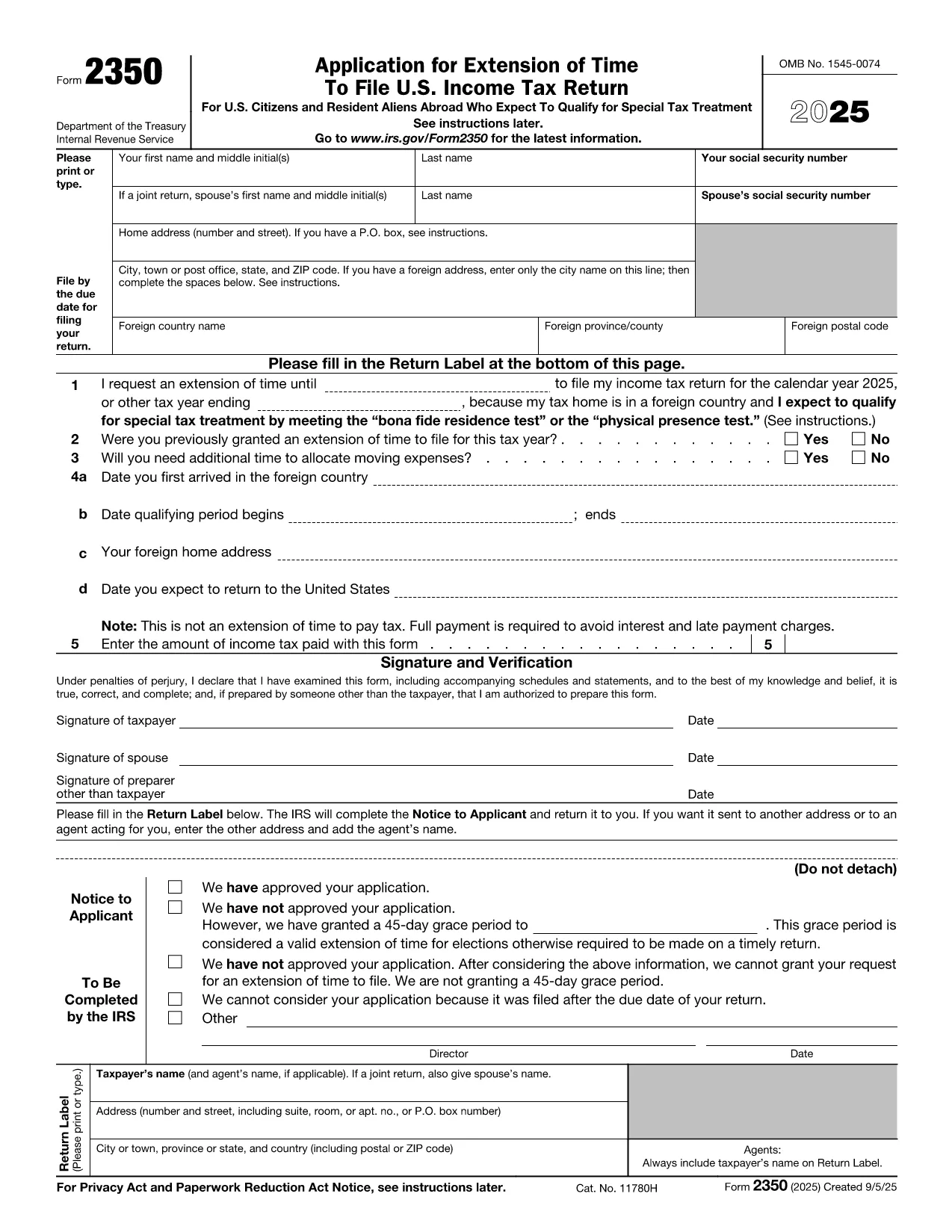
U.S. citizens and resident aliens who live outside the United States often need extra time to meet the presence requirements for the foreign earned income exclusion or foreign housing exclusion. IRS Form 2350 is the official request for a two‑month filing extension when you are abroad.

When to Use Form 2350

File Form 2350 if you:

  • Expect to claim the foreign earned income exclusion (Form 2555) or foreign housing exclusion.
  • Need additional time to meet the bona fide residence test or the physical presence test.
  • Require extra days to allocate moving expenses.

How to Complete the Fillable PDF

Our online Formize fillable PDF loads instantly – just click the "Fill out this form" button and the Formize PDF Filler app will appear. Follow these steps:

  • Enter your personal information (name, SSN, home and foreign addresses).
  • Specify the date you need the extension for (Line 1).
  • Answer whether you have previously received an extension (Line 2).
  • Provide the qualifying period dates for the bona fide residence or physical presence test (Lines 4a‑4b).
  • Indicate any payment you are sending with the extension request (Line 5).
  • Sign and date the form electronically.

Common Mistakes to Avoid

  • Wrong qualifying dates: The extension date must be 12 months + 30 days from the start of your qualifying period.
  • Missing foreign address details: Include city, country, province/state, and postal code.
  • Forgetting the payment: The extension does not extend the payment deadline. Include any tax due to avoid interest.
  • Incorrect signatures: Both spouses must sign on a joint return.

Where to Submit Your Extension Request

After filling out the form, you can:

  • Mail the completed PDF to the IRS address listed in the instructions.
  • Bring it to a local IRS representative office.
  • Keep a digital copy for your records and attach it to an electronic filing if you later e‑file your return.

Need the official PDF? Download Form 2350 (PDF) directly from the IRS.

CÂU HỎI THƯỜNG GẶP
  • What is the purpose of IRS Form 2350?

    Form 2350 requests a two‑month extension to file your U.S. individual income tax return when you are living abroad and need extra time to meet the foreign earned income or housing exclusion tests.

  • Who must file Form 2350?

    U.S. citizens or resident aliens abroad who expect to claim the foreign earned income exclusion (Form 2555) or foreign housing exclusion and need more time to meet the qualifying tests.

  • Does Form 2350 extend the payment deadline?

    No. The extension only applies to filing the return. Any tax due must still be paid by the original filing deadline to avoid interest and penalties.

  • Can I file Form 2350 electronically?

    The IRS does not accept an electronic submission for Form 2350. You must mail the completed form or deliver it to a local IRS office.

  • What is the difference between the bona fide residence test and the physical presence test?

    The bona fide residence test requires you to be a resident of a foreign country for an uninterrupted period that includes an entire tax year. The physical presence test requires you to be physically present in a foreign country for at least 330 full days in any 12‑month period.

  • How long is the extension granted by Form 2350?

    Typically, the IRS grants a two‑month extension, but you can request additional days for moving expenses, up to a total of 12 months + 30 days from the start of your qualifying period.

  • What happens if I miss the extended filing deadline?

    If you miss the extension deadline, the IRS may assess a failure‑to‑file penalty and continue to charge interest on any unpaid tax.

  • Do I need to attach Form 2555 with my Form 2350?

    No. Form 2555 is filed with your tax return after the extension is granted. Form 2350 only requests more time to file.

LÀM THẾ NÀO ĐỂ

Cách điền IRS Form 2350 miễn phí, trực tuyến trong 7 bước đơn giản:

  1. 1
    Open the Fillable Form
    Click the “Fill out this form” button on the page. The Formize PDF Filler app loads directly in your browser.
  2. 2
    Enter Personal Information
    Type your name, Social Security number, home address, and foreign address exactly as they appear on your tax documents.
  3. 3
    Set the Extension Date
    In Line 1, enter the date that is 12 months + 30 days after the first day of your qualifying period (or add 90 days if you have moving expenses).
  4. 4
    Answer Eligibility Questions
    Complete Lines 2‑4, indicating prior extensions, moving expenses, and the dates you arrived in and will leave the foreign country.
  5. 5
    Include Your Payment (If Any)
    Enter the amount of tax you are sending with the extension request on Line 5. Remember the extension does not postpone payment.
  6. 6
    Sign Electronically
    Use the built‑in signature field to sign. If filing jointly, both spouses must sign.
  7. 7
    Save and Submit
    Save the completed PDF, print it, and mail it to the IRS address provided in the instructions, or keep a digital copy for your records.
Định dạng ứng dụng PDF Filler
TRONG KHOẢNG

Biểu mẫu của Sở Thuế vụ (IRS)

IRS Form 2350 là một trong những biểu mẫu thuế chính thức được sử dụng ở Hoa Kỳ để báo cáo thu nhập, yêu cầu khấu trừ và tín dụng, tính nghĩa vụ thuế và thực hiện các nghĩa vụ khác liên quan đến thuế. IRS là cơ quan liên bang chịu trách nhiệm quản lý và thực thi luật thu nhập nội bộ tại Hoa Kỳ.

Dưới đây là một số ví dụ về các biểu mẫu của Sở Thuế Vụ:

Mẫu 1040: Đây là mẫu khai thuế thu nhập cá nhân chính được hầu hết người nộp thuế sử dụng. Nó được sử dụng để báo cáo các loại thu nhập khác nhau, yêu cầu khấu trừ và tín dụng, tính toán nghĩa vụ thuế và xác định xem người nộp thuế có nợ thuế bổ sung hay có quyền được hoàn lại tiền hay không.

Biểu mẫu 1099: Có nhiều biến thể khác nhau của Biểu mẫu 1099, chẳng hạn như 1099-MISC, 1099-INT, 1099-DIV, v.v. Những biểu mẫu này được sử dụng để báo cáo thu nhập mà các cá nhân hoặc doanh nghiệp nhận được từ nhiều nguồn khác nhau ngoài việc làm, chẳng hạn như tự kinh doanh thu nhập, thu nhập từ lãi, thu nhập từ cổ tức và thu nhập cho thuê.

Mẫu W-2: Biểu mẫu này được người sử dụng lao động sử dụng để báo cáo tiền lương trả cho nhân viên và các khoản thuế bị giữ lại từ tiền lương của họ. Nhân viên sử dụng thông tin trên Mẫu W-2 để hoàn thành tờ khai thuế cá nhân của họ.

Mẫu 941: Người sử dụng lao động sử dụng biểu mẫu này để báo cáo thuế lao động, bao gồm thuế thu nhập liên bang bị khấu trừ, thuế An sinh xã hội và thuế Medicare cho nhân viên của họ.

Biểu mẫu 1065: Biểu mẫu này được các đối tác sử dụng để báo cáo thu nhập, các khoản khấu trừ và nghĩa vụ thuế của họ. Bản thân các công ty hợp danh không phải nộp thuế thu nhập; thay vào đó, các đối tác báo cáo phần thu nhập của đối tác trên tờ khai thuế cá nhân của họ.

Mẫu 1120: Đây là mẫu tờ khai thuế thu nhập doanh nghiệp được các công ty C sử dụng để báo cáo thu nhập của họ, các khoản khấu trừ và nghĩa vụ thuế.

Biểu mẫu 990: Biểu mẫu này được các tổ chức được miễn thuế, chẳng hạn như tổ chức phi lợi nhuận và tổ chức từ thiện, sử dụng để báo cáo thông tin tài chính, hoạt động và tuân thủ pháp luật về thuế.

Biểu mẫu 8862: Biểu mẫu này được sử dụng bởi những người đóng thuế trước đây đã yêu cầu Tín dụng Thuế Thu nhập kiếm được (EITC) nhưng đã không được phép và bây giờ muốn yêu cầu lại.

Đây chỉ là một vài ví dụ về nhiều biểu mẫu IRS tồn tại để thực hiện các nghĩa vụ khác nhau liên quan đến thuế. Các biểu mẫu cụ thể cần thiết cho một cá nhân hoặc doanh nghiệp tùy thuộc vào hoàn cảnh riêng, nguồn thu nhập và các khoản khấu trừ của họ. Bạn nên tham khảo trang web chính thức của Sở Thuế Vụ (www.irs.gov) hoặc tìm kiếm lời khuyên về thuế chuyên nghiệp để có được thông tin chính xác và cập nhật về IRS cụ thể các biểu mẫu liên quan đến tình hình thuế của bạn.

ĐẶC TRƯNG

Trình điền PDF

Cách dễ nhất để điền vào các mẫu PDF trực tuyến

  • Nhanh chóng điền vào IRS Form 2350
    Bạn đang tìm cách điền nhanh IRS Form 2350 trực tuyến? Với trình điền biểu mẫu PDF miễn phí trực tuyến của chúng tôi, bạn sẽ biết cách chỉnh sửa và điền vào tài liệu pdf này trong vòng chưa đầy một phút.
  • Trình chỉnh sửa PDF trực tuyến dễ sử dụng
    Chán nản với việc in ra các tệp PDF để bạn có thể chỉnh sửa chúng trước khi quét lại và gửi lại? Chỉnh sửa tài liệu PDF trực tuyến miễn phí. Sử dụng trình chỉnh sửa pdf trực tuyến của chúng tôi để tiết kiệm thời gian và giấy.
  • Công cụ tuyệt vời, tất cả các nền tảng
    Bạn muốn biết cách điền IRS Form 2350 trên máy Mac hoặc có thể là cách sử dụng trình điền PDF miễn phí? Các công cụ PDF trực tuyến của chúng tôi hoạt động trên tất cả các nền tảng.
  • Lưu trữ tệp an toàn
    Các tệp "IRS Form 2350" đã hoàn thành được lưu trữ trong cơ sở dữ liệu bảo mật do dịch vụ lưu trữ Amazon Cloud quản lý. Bạn có thể xóa các tệp của mình khỏi hệ thống của chúng tôi bất cứ lúc nào. Trong mọi trường hợp, các tệp này sẽ tự động bị xóa sau 24 giờ.
  • Trò chuyện với IRS Form 2350
    Trò chuyện với "IRS Form 2350" trên Trò chuyện, một trợ lý đọc PDF miễn phí. Đặt câu hỏi và nhận câu trả lời từ "IRS Form 2350". Chỉ cần nhấp vào nút Trò chuyện với tài liệu ở trên.

Xóa phiên điền

Xóa phiên điền đã chọn? Trong trường hợp này, tiến độ của bạn trong việc hoàn thành biểu mẫu sẽ bị mất.

Xóa phiên chỉnh sửa

Xóa phiên chỉnh sửa đã chọn? Trong trường hợp này, tiến trình tạo và chỉnh sửa biểu mẫu của bạn sẽ bị mất.