
Chọn ngôn ngữ

IRS Form 433‑B – Fillable PDF Collection Statement for Businesses

  1. Quốc gia Hoa Kỳ
  2. Ngôn ngữ Tiếng Anh
  3. Hoạt động thuế
  4. Phòng Internal Revenue Service
IRS Form 433‑B – Fillable PDF Collection Statement for Businesses

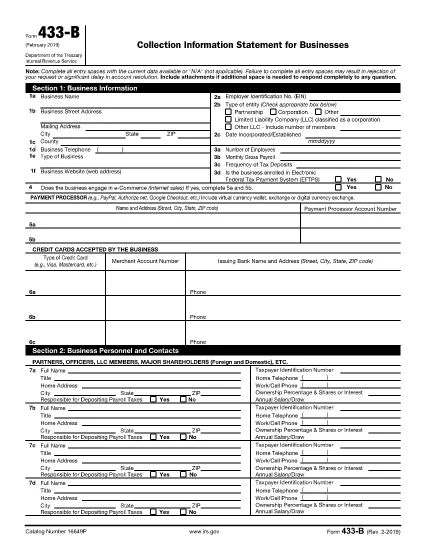
Form 433‑B, Collection Information Statement for Businesses, is the IRS’s standard form for gathering detailed financial data from corporations, partnerships, LLCs, and other business entities that owe tax. Completing this form accurately is essential when you are pursuing an Offer in Compromise, requesting a payment plan, or negotiating any other tax‑relief option.

What Is Form 433‑B and Who Needs It?

The form captures business information, assets, income, expenses, and the minimum offer amount the IRS will accept. It is required for:

  • Corporations (C‑corp, S‑corp)
  • Partnerships
  • LLCs taxed as corporations or partnerships
  • Any other entity with unpaid federal tax liabilities

Step‑by‑Step Guide to Fill Out Form 433‑B

Follow these simple steps using Formize’s built‑in PDF filler:

  1. Open the Fillable Form – Click the “Fill out this form” button on this page. The Formize PDF Filler loads automatically.
  2. Enter Business Information – Provide the legal name, EIN, address, phone, and a brief description of your business.
  3. Provide Officer/Owner Details – List each partner, officer, or member with name, title, ownership percentage, and salary.
  4. Report Assets – Include cash, bank accounts, real‑estate, equipment, vehicles, and any other valuable assets.
  5. Report Income & Expenses – Fill in monthly gross receipts, cost of goods sold, payroll, rent, utilities, and other operating costs.
  6. Calculate Minimum Offer – The form automatically totals the data; use the built‑in calculator to see the IRS‑required minimum offer amount.
  7. Review & Sign – Double‑check every field, then add the authorized signature and date.

Common Mistakes to Avoid

  • Leaving required fields blank – the IRS will reject the form.
  • Using outdated asset valuations – provide current market values.
  • Misclassifying the business entity – select the correct box for corporation, partnership, or LLC.
  • Forgetting to attach supporting documents – statements, depreciation schedules, and loan agreements are often required.

How to Submit the Completed Form

Once you finish, you have three options:

  • Download PDF and mail it to the IRS address indicated in the instructions.
  • Print & fax a hard copy to the appropriate IRS office.
  • Save securely and upload it through your IRS online account if you are working with a tax professional.

Using Formize ensures the PDF stays fillable and printable without losing formatting.

CÂU HỎI THƯỜNG GẶP
  • What types of businesses must use Form 433‑B?

    Corporations, partnerships, and LLCs (taxed as corporations or partnerships) with unpaid federal tax liabilities are required to complete Form 433‑B.

  • Can I use Form 433‑B for a sole proprietorship?

    No. Sole proprietors should use Form 433‑A, the collection statement for wage earners and self‑employed individuals.

  • Is the PDF on Formize really fillable?

    Yes. The PDF retains all fillable fields, and the Formize online filler lets you type, save, and print without altering the original layout.

  • Do I need to attach supporting documents?

    Attach recent bank statements, asset appraisals, loan balances, and depreciation schedules as referenced in the form’s instructions.

  • How long does the IRS take to process a completed Form 433‑B?

    Processing time varies, but expect 30‑60 days for the IRS to review the information and respond to your request.

  • Can I submit the form electronically?

    The IRS does not accept an electronic upload for Form 433‑B directly. You must mail or fax the printed form, or provide it to your tax professional for electronic submission through the IRS portal.

  • What happens if I make a mistake on the form?

    Correct any errors before signing. If you discover a mistake after submission, send a revised form with “Amended” noted at the top of the first page.

LÀM THẾ NÀO ĐỂ

Cách điền IRS Form 433-B miễn phí, trực tuyến trong 5 bước đơn giản:

  1. 1
    Open the Fillable Form
    Click the “Fill out this form” button on this page. The Formize PDF Filler loads in your browser, no download required.
  2. 2
    Enter Business Information
    Type the legal name, EIN, address, phone number, and a short description of your business into the highlighted fields.
  3. 3
    Add Asset and Income Details
    Provide current values for cash, bank accounts, real‑estate, equipment, and vehicles. Then enter monthly income and expense figures.
  4. 4
    Review Calculations
    Use the built‑in calculator to verify the minimum offer amount and ensure all totals are correct.
  5. 5
    Submit or Print
    When you’re satisfied, click “Save PDF” to download a completed copy, or print directly from the filler to mail to the IRS.
Định dạng ứng dụng PDF Filler
TRONG KHOẢNG

Đơn thuế

IRS Form 433-B là một trong các Biểu mẫu thuế là tài liệu dùng để báo cáo thu nhập, các khoản khấu trừ và nghĩa vụ thuế cho cơ quan thuế có liên quan. Những biểu mẫu này là một phần thiết yếu của quy trình khai thuế và được sử dụng để đảm bảo các cá nhân và doanh nghiệp tuân thủ luật thuế và tính toán chính xác nghĩa vụ thuế của họ.

Các biểu mẫu thuế cụ thể được yêu cầu có thể khác nhau tùy thuộc vào các yếu tố như tình trạng nộp đơn của cá nhân, nguồn thu nhập và luật thuế của quốc gia. Tuy nhiên, dưới đây là một số loại biểu mẫu thuế phổ biến:

Biểu mẫu thuế thu nhập cá nhân: Những biểu mẫu này, chẳng hạn như loạt 1040 ở Hoa Kỳ, được sử dụng bởi các cá nhân để báo cáo thu nhập của họ, yêu cầu các khoản khấu trừ và tín dụng cũng như tính toán nghĩa vụ thuế của họ.

Biểu mẫu thuế doanh nghiệp: Các doanh nghiệp, bao gồm doanh nghiệp tư nhân, công ty hợp danh, công ty và cá nhân tự kinh doanh, có thể phải nộp nhiều biểu mẫu khác nhau để báo cáo thu nhập, chi phí và thuế còn nợ của mình. Các ví dụ bao gồm Biểu C (Lãi hoặc lỗ từ kinh doanh) và Biểu mẫu 1120 (Tờ khai thuế thu nhập doanh nghiệp Hoa Kỳ).

Biểu mẫu thuế việc làm: Người sử dụng lao động phải báo cáo tiền lương của nhân viên cũng như khấu trừ và nộp thuế tiền lương. Các biểu mẫu như W-2 (Bản kê khai tiền lương và thuế) và 941 (Bản khai thuế liên bang hàng quý của người sử dụng lao động) được sử dụng cho mục đích này.

Biểu mẫu tài khoản đầu tư và hưu trí: Các biểu mẫu này được sử dụng để báo cáo thu nhập đầu tư, lãi và lỗ vốn cũng như các khoản đóng góp và phân bổ từ tài khoản hưu trí. Ví dụ bao gồm Biểu mẫu 1099-DIV (Cổ tức và Phân phối) và Mẫu 5498 (Thông tin đóng góp IRA).

Biểu mẫu thuế tài sản và quà tặng: Khi một người qua đời hoặc tặng những món quà quan trọng, các biểu mẫu cụ thể như Biểu mẫu 706 (Bản khai thuế bất động sản (và chuyển nhượng thế hệ) tại Hoa Kỳ) và Mẫu 709 (Quà tặng Hoa Kỳ (và thế hệ- Bỏ qua Chuyển khoản) Tờ khai thuế) được sử dụng để báo cáo và tính toán mọi khoản thuế bất động sản hoặc quà tặng hiện hành.

Điều quan trọng cần lưu ý là luật và biểu mẫu thuế có thể thay đổi theo thời gian, vì vậy các cá nhân và doanh nghiệp nên tham khảo ý kiến ​​của cơ quan thuế có liên quan hoặc tìm kiếm tư vấn thuế chuyên nghiệp để đảm bảo tuân thủ các yêu cầu hiện hành.

ĐẶC TRƯNG

Trình điền PDF

Cách dễ nhất để điền vào các mẫu PDF trực tuyến

  • Nhanh chóng điền vào IRS Form 433-B
    Bạn đang tìm cách điền nhanh IRS Form 433-B trực tuyến? Với trình điền biểu mẫu PDF miễn phí trực tuyến của chúng tôi, bạn sẽ biết cách chỉnh sửa và điền vào tài liệu pdf này trong vòng chưa đầy một phút.
  • Trình chỉnh sửa PDF trực tuyến dễ sử dụng
    Chán nản với việc in ra các tệp PDF để bạn có thể chỉnh sửa chúng trước khi quét lại và gửi lại? Chỉnh sửa tài liệu PDF trực tuyến miễn phí. Sử dụng trình chỉnh sửa pdf trực tuyến của chúng tôi để tiết kiệm thời gian và giấy.
  • Công cụ tuyệt vời, tất cả các nền tảng
    Bạn muốn biết cách điền IRS Form 433-B trên máy Mac hoặc có thể là cách sử dụng trình điền PDF miễn phí? Các công cụ PDF trực tuyến của chúng tôi hoạt động trên tất cả các nền tảng.
  • Lưu trữ tệp an toàn
    Các tệp "IRS Form 433-B" đã hoàn thành được lưu trữ trong cơ sở dữ liệu bảo mật do dịch vụ lưu trữ Amazon Cloud quản lý. Bạn có thể xóa các tệp của mình khỏi hệ thống của chúng tôi bất cứ lúc nào. Trong mọi trường hợp, các tệp này sẽ tự động bị xóa sau 24 giờ.
  • Trò chuyện với IRS Form 433-B
    Trò chuyện với "IRS Form 433-B" trên Trò chuyện, một trợ lý đọc PDF miễn phí. Đặt câu hỏi và nhận câu trả lời từ "IRS Form 433-B". Chỉ cần nhấp vào nút Trò chuyện với tài liệu ở trên.

Xóa phiên điền

Xóa phiên điền đã chọn? Trong trường hợp này, tiến độ của bạn trong việc hoàn thành biểu mẫu sẽ bị mất.

Xóa phiên chỉnh sửa

Xóa phiên chỉnh sửa đã chọn? Trong trường hợp này, tiến trình tạo và chỉnh sửa biểu mẫu của bạn sẽ bị mất.