
Chọn ngôn ngữ

Form 5500‑EZ – Fillable PDF for Single‑Participant Retirement Plans

  1. Quốc gia Hoa Kỳ
  2. Ngôn ngữ Tiếng Anh
  3. Hoạt động thuế
  4. Phòng Internal Revenue Service
Form 5500‑EZ – Fillable PDF for Single‑Participant Retirement Plans

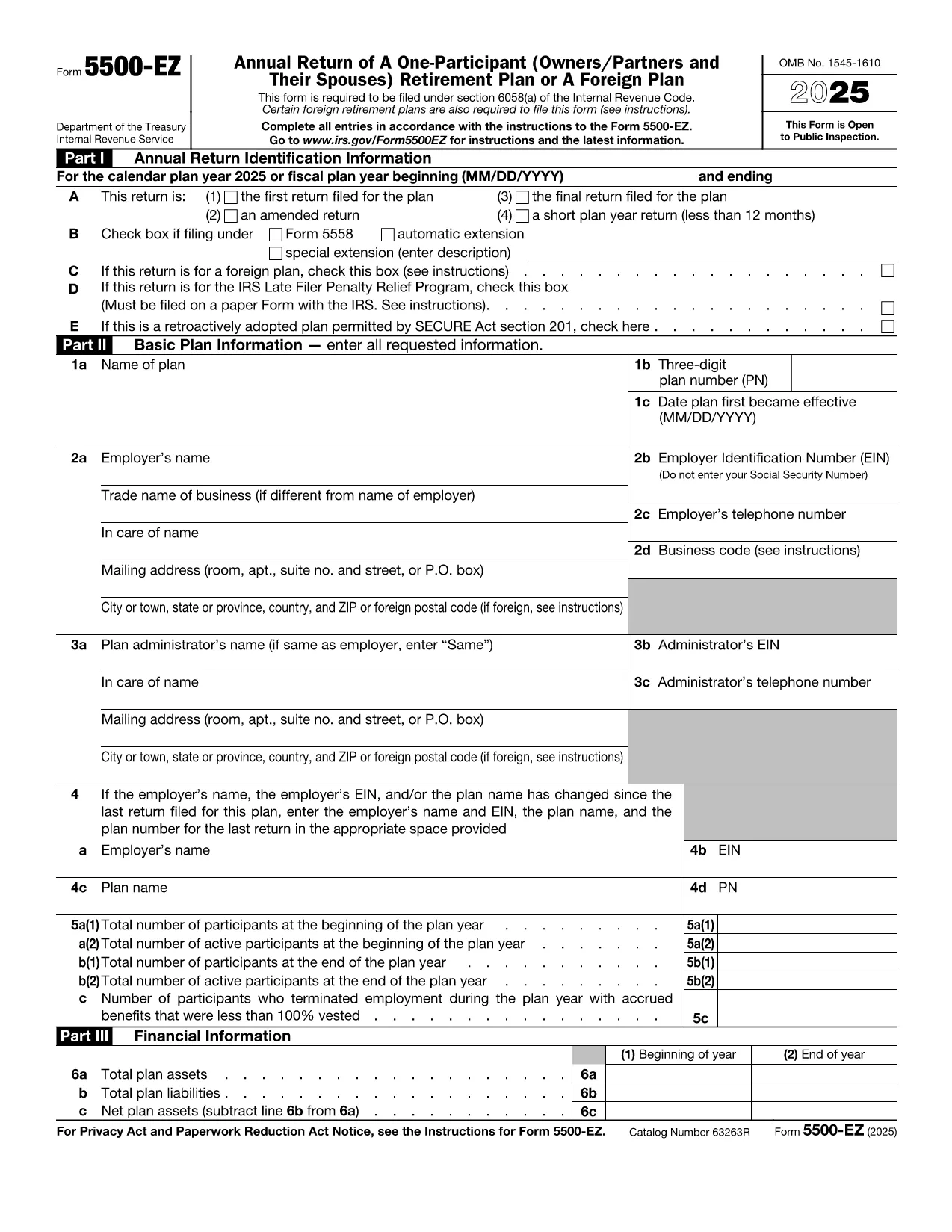
Form 5500‑EZ is the streamlined annual reporting form used by the Internal Revenue Service (IRS) for small retirement plans that have only one participant or are foreign plans. It replaces the longer Form 5500 series and includes basic plan information, number of participants, contributions, benefits, and other required details.

What Is Form 5500‑EZ?

This form is required for:

  • One‑participant pension plans (e.g., solo 401(k) or SIMPLE IRA)
  • Foreign retirement plans that meet the IRS definition of a small plan
  • Plans that do not need to file Schedule MB or Schedule SB

Filing Form 5500‑EZ on time helps you avoid penalties and keeps your retirement plan in good standing.

How to Fill Out the Form Online with Formize

Instead of downloading the PDF and editing it manually, you can complete the form directly on our site:

  1. Click the "Fill out this form" button below.
  2. The Formize PDF Filler app loads the official fillable PDF.
  3. Enter the required information in each field – the form validates data as you type.
  4. When you’re done, add your electronic signature, then save or download the completed PDF.

All changes are saved automatically, so you never lose your work.

Common Mistakes & Tips for a Smooth Filing

  • Incorrect plan year: Verify the plan year on the first page; a mismatch triggers an IRS notice.
  • Missing participant count: Even a single‑participant plan must list the exact number of participants.
  • Wrong contribution totals: Double‑check employer and employee contributions – they must equal the amounts reported on Schedule A.
  • Signature errors: Use the built‑in electronic signature tool; hand‑written signatures on a printed PDF are not accepted for e‑filings.

Download the Official IRS PDF

If you prefer the original IRS version, you can download it directly from the link below. The file is the same one used by Formize, ensuring full compatibility with the online filler.

Download Form 5500‑EZ (PDF)

Hướng dẫn

CÂU HỎI THƯỜNG GẶP
  • Who must file Form 5500‑EZ?

    Any one‑participant retirement plan or foreign plan that meets the IRS definition of a small plan must file Form 5500‑EZ annually.

  • Can I file Form 5500‑EZ electronically?

    Yes. Use the IRS e‑file system or a compliant online filler like Formize, then submit the completed PDF through the FIRE system.

  • What is the filing deadline?

    The form is due by the last day of the seventh month after the plan year ends (typically July 31 for calendar‑year plans).

  • Do I need Schedule MB or Schedule SB?

    No. Form 5500‑EZ does not require Schedule MB (Money‑Based) or Schedule SB (Service‑Based).

  • What if I make a mistake after filing?

    You can file an amended Form 5500‑EZ using the same fillable PDF. Mark the form as "Amended" and include an explanation of the changes.

  • Is there a fee to use Formize's filler?

    Formize offers a free basic fillable version for Form 5500‑EZ. Advanced features may require a subscription, but the core filing process is free.

  • Can I print the completed form for a paper filing?

    Yes. After completing the form online, download the PDF and print it. Sign the printed copy if you are filing by paper.

LÀM THẾ NÀO ĐỂ

Cách điền Form 5500 EZ miễn phí, trực tuyến trong 4 bước đơn giản:

  1. 1
    Open the Fillable Form
    Click the "Fill out this form" button on the page. The Formize PDF Filler will load the official Form 5500‑EZ.
  2. 2
    Enter Your Information
    Complete each field. The filler validates entries in real time, helping you avoid common errors.
  3. 3
    Add Your Electronic Signature
    Use the built‑in signature tool to sign the form securely.
  4. 4
    Save or Download
    When all sections are complete, click "Save" to store the file in your account or "Download" to get the finished PDF.
Định dạng ứng dụng PDF Filler
TRONG KHOẢNG

Đơn thuế

Form 5500 EZ là một trong những Biểu mẫu khai thuế là văn bản dùng để khai báo các thông tin liên quan đến thuế với cơ quan thuế liên quan. Có nhiều loại biểu mẫu thuế khác nhau, bao gồm biểu mẫu thuế liên bang, tiểu bang và địa phương, có thể khác nhau tùy thuộc vào hoàn cảnh và địa điểm của người nộp thuế.

ĐẶC TRƯNG

Trình điền PDF

Cách dễ nhất để điền vào các mẫu PDF trực tuyến

  • Nhanh chóng điền vào Form 5500 EZ
    Bạn đang tìm cách điền nhanh Form 5500 EZ trực tuyến? Với trình điền biểu mẫu PDF miễn phí trực tuyến của chúng tôi, bạn sẽ biết cách chỉnh sửa và điền vào tài liệu pdf này trong vòng chưa đầy một phút.
  • Trình chỉnh sửa PDF trực tuyến dễ sử dụng
    Chán nản với việc in ra các tệp PDF để bạn có thể chỉnh sửa chúng trước khi quét lại và gửi lại? Chỉnh sửa tài liệu PDF trực tuyến miễn phí. Sử dụng trình chỉnh sửa pdf trực tuyến của chúng tôi để tiết kiệm thời gian và giấy.
  • Công cụ tuyệt vời, tất cả các nền tảng
    Bạn muốn biết cách điền Form 5500 EZ trên máy Mac hoặc có thể là cách sử dụng trình điền PDF miễn phí? Các công cụ PDF trực tuyến của chúng tôi hoạt động trên tất cả các nền tảng.
  • Lưu trữ tệp an toàn
    Các tệp "Form 5500 EZ" đã hoàn thành được lưu trữ trong cơ sở dữ liệu bảo mật do dịch vụ lưu trữ Amazon Cloud quản lý. Bạn có thể xóa các tệp của mình khỏi hệ thống của chúng tôi bất cứ lúc nào. Trong mọi trường hợp, các tệp này sẽ tự động bị xóa sau 24 giờ.
  • Trò chuyện với Form 5500 EZ
    Trò chuyện với "Form 5500 EZ" trên Trò chuyện, một trợ lý đọc PDF miễn phí. Đặt câu hỏi và nhận câu trả lời từ "Form 5500 EZ". Chỉ cần nhấp vào nút Trò chuyện với tài liệu ở trên.

Xóa phiên điền

Xóa phiên điền đã chọn? Trong trường hợp này, tiến độ của bạn trong việc hoàn thành biểu mẫu sẽ bị mất.

Xóa phiên chỉnh sửa

Xóa phiên chỉnh sửa đã chọn? Trong trường hợp này, tiến trình tạo và chỉnh sửa biểu mẫu của bạn sẽ bị mất.