
Chọn ngôn ngữ

IRS Form 8038‑G Fillable PDF

  1. Quốc gia Hoa Kỳ
  2. Ngôn ngữ Tiếng Anh
  3. Hoạt động thuế
  4. Phòng Internal Revenue Service
IRS Form 8038‑G Fillable PDF

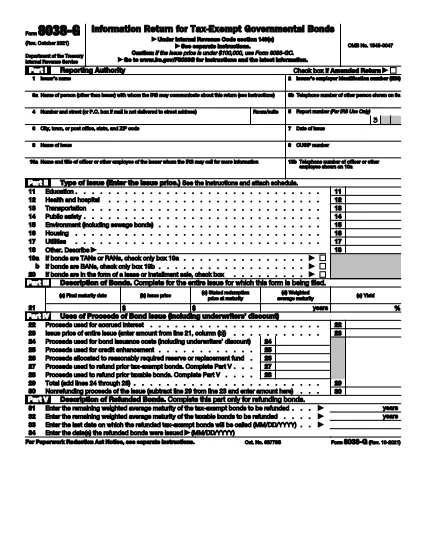
The IRS Form 8038‑G is the official document used by governmental entities to report the issuance of tax‑exempt bonds under Internal Revenue Code §149(e). Accurate reporting on this form helps maintain the bond’s tax‑exempt status and keeps the issuer compliant with federal regulations.

What Is Form 8038‑G?

Form 8038‑G collects essential details such as the issuer’s name, bond issue date, CUSIP number, amount of interest, and the purpose of the bond. The IRS uses this information to verify that the bonds meet the requirements for tax exemption.

How to Complete the Form Online

Instead of printing and scanning, you can fill out Form 8038‑G directly in your browser:

  1. Click the "Fill out this form" button on this page.
  2. Our Formize PDF Filler app loads the fillable PDF instantly.
  3. Enter the required information in each field. The form automatically validates dates and numeric entries.
  4. When all fields are complete, use the built‑in e‑signature tool to sign the form.
  5. Save a copy for your records or submit the PDF to the IRS as instructed.

Common Mistakes to Avoid

  • Incorrect CUSIP number: Double‑check the 9‑digit identifier before saving.
  • Missing officer contact info: The IRS may request clarification; incomplete contact details cause delays.
  • Wrong issue date: The form must reflect the actual issuance date, not the resolution date.
  • Failure to sign: An unsigned form is considered incomplete and will be rejected.

Download the Fillable PDF

Need a local copy? The official, fillable PDF is available from the IRS:

Download Form 8038‑G (PDF)

Whether you choose to edit offline or use Formize’s online filler, you’ll have a fully interactive version ready for submission.

Frequently Asked Questions

Below are the most common queries about Form 8038‑G.

Hướng dẫn

CÂU HỎI THƯỜNG GẶP
  • Who must file Form 8038‑G?

    Any governmental entity that issues tax‑exempt bonds under IRC §149(e) is required to file Form 8038‑G with the IRS.

  • When is the filing deadline?

    The form must be filed within 90 days of the bond issuance date, unless an extension is granted.

  • Can I file Form 8038‑G electronically?

    Yes. After completing the fillable PDF, you can submit it electronically through the IRS e‑file system or mail a printed copy.

  • Is a signature required on the form?

    An authorized officer’s signature is mandatory. The Formize PDF Filler provides a secure e‑signature option.

  • What happens if I submit an incomplete form?

    The IRS will reject the submission, which can delay bond issuance and may result in penalties or loss of tax‑exempt status.

  • Do I need to attach supporting documents?

    Typically, you must attach the bond resolution, financial statements, and any other documentation that explains the bond’s purpose.

  • Is there a cost to download the fillable PDF?

    No. The IRS provides the fillable PDF for free, and Formize’s online filler is also free to use for this form.

LÀM THẾ NÀO ĐỂ

Cách điền IRS Form 8038-G miễn phí, trực tuyến trong 4 bước đơn giản:

  1. 1
    Open the Form
    Visit this landing page and click the "Fill out this form" button to launch the Formize PDF Filler.
  2. 2
    Enter Required Information
    Fill each highlighted field with accurate data—issuer details, bond issue date, CUSIP, interest amount, and officer contact info.
  3. 3
    Review and e‑Sign
    Check all entries for errors, then use the built‑in e‑signature tool to sign where required.
  4. 4
    Save or Submit
    Download the completed PDF for your records or follow IRS instructions to submit it electronically or by mail.
Định dạng ứng dụng PDF Filler
TRONG KHOẢNG

Đơn thuế

IRS Form 8038-G là một trong những Biểu mẫu khai thuế là văn bản dùng để khai báo các thông tin liên quan đến thuế với cơ quan thuế liên quan. Có nhiều loại biểu mẫu thuế khác nhau, bao gồm biểu mẫu thuế liên bang, tiểu bang và địa phương, có thể khác nhau tùy thuộc vào hoàn cảnh và địa điểm của người nộp thuế.

ĐẶC TRƯNG

Trình điền PDF

Cách dễ nhất để điền vào các mẫu PDF trực tuyến

  • Nhanh chóng điền vào IRS Form 8038-G
    Bạn đang tìm cách điền nhanh IRS Form 8038-G trực tuyến? Với trình điền biểu mẫu PDF miễn phí trực tuyến của chúng tôi, bạn sẽ biết cách chỉnh sửa và điền vào tài liệu pdf này trong vòng chưa đầy một phút.
  • Trình chỉnh sửa PDF trực tuyến dễ sử dụng
    Chán nản với việc in ra các tệp PDF để bạn có thể chỉnh sửa chúng trước khi quét lại và gửi lại? Chỉnh sửa tài liệu PDF trực tuyến miễn phí. Sử dụng trình chỉnh sửa pdf trực tuyến của chúng tôi để tiết kiệm thời gian và giấy.
  • Công cụ tuyệt vời, tất cả các nền tảng
    Bạn muốn biết cách điền IRS Form 8038-G trên máy Mac hoặc có thể là cách sử dụng trình điền PDF miễn phí? Các công cụ PDF trực tuyến của chúng tôi hoạt động trên tất cả các nền tảng.
  • Lưu trữ tệp an toàn
    Các tệp "IRS Form 8038-G" đã hoàn thành được lưu trữ trong cơ sở dữ liệu bảo mật do dịch vụ lưu trữ Amazon Cloud quản lý. Bạn có thể xóa các tệp của mình khỏi hệ thống của chúng tôi bất cứ lúc nào. Trong mọi trường hợp, các tệp này sẽ tự động bị xóa sau 24 giờ.
  • Trò chuyện với IRS Form 8038-G
    Trò chuyện với "IRS Form 8038-G" trên Trò chuyện, một trợ lý đọc PDF miễn phí. Đặt câu hỏi và nhận câu trả lời từ "IRS Form 8038-G". Chỉ cần nhấp vào nút Trò chuyện với tài liệu ở trên.

Xóa phiên điền

Xóa phiên điền đã chọn? Trong trường hợp này, tiến độ của bạn trong việc hoàn thành biểu mẫu sẽ bị mất.

Xóa phiên chỉnh sửa

Xóa phiên chỉnh sửa đã chọn? Trong trường hợp này, tiến trình tạo và chỉnh sửa biểu mẫu của bạn sẽ bị mất.