
Chọn ngôn ngữ

IRS Form 8329 – Fillable PDF for Mortgage Credit Certificates

  1. Quốc gia Hoa Kỳ
  2. Ngôn ngữ Tiếng Anh
  3. Hoạt động thuế
  4. Phòng Internal Revenue Service
IRS Form 8329 – Fillable PDF for Mortgage Credit Certificates

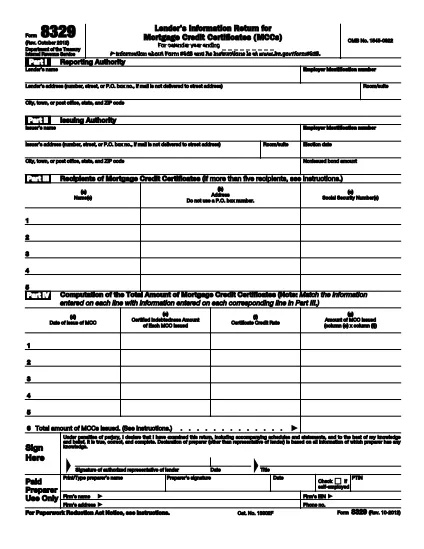
The IRS Form 8329 is the official document lenders use to report the issuance of Mortgage Credit Certificates (MCCs) to the Internal Revenue Service. Accurate reporting helps borrowers claim the tax credit on their returns and keeps lenders compliant with federal tax rules.

Formize offers a free, fully fillable, and e‑sign‑ready version of Form 8329. You can complete the form directly in your browser—no Adobe Acrobat or other PDF editor required.

Key benefits of using the Formize fillable PDF:

  • Instant online editing and auto‑save.
  • Secure e‑signature that meets ESIGN standards.
  • One‑click download or direct email to the IRS.
  • Accessible version for users with disabilities.

Below you’ll find everything you need to know about the form, who should file it, and step‑by‑step instructions to finish it quickly and correctly.

CÂU HỎI THƯỜNG GẶP
  • What is the purpose of IRS Form 8329?

    Form 8329 is used by lenders to report the issuance of Mortgage Credit Certificates (MCCs) to the IRS, allowing borrowers to claim a tax credit for mortgage interest.

  • Who is required to file Form 8329?

    Any lender that issues MCCs must file Form 8329 for each calendar year in which the certificates were issued.

  • When is the filing deadline for Form 8329?

    Form 8329 must be filed by January 31 of the year following the calendar year in which the MCCs were issued.

  • Can I file Form 8329 electronically?

    Yes. By using Formize’s fillable PDF you can complete, e‑sign, and download the form for electronic submission to the IRS.

  • Do I need special software to fill out Form 8329?

    No. The Formize fillable PDF works in any modern web browser—no Adobe Acrobat or other PDF editor is required.

  • Is the Formize filler secure?

    Absolutely. All data is processed over HTTPS, and the e‑signature feature meets federal ESIGN compliance standards.

  • What common mistakes should I avoid?

    Typical errors include missing the lender’s EIN, incomplete MCC details, and forgetting the authorized representative’s signature. Use Formize’s validation prompts to catch these before submission.

  • Can I save my progress and return later?

    Yes. Formize automatically saves your entries in the browser session, allowing you to pause and resume without losing data.

  • Where do I send the completed Form 8329?

    Mail the completed form to the IRS Center in Ogden, UT, or follow any electronic filing instructions provided by your state or lender’s compliance department.

  • Is there a cost to download the fillable PDF?

    No. Formize provides this fillable version of Form 8329 completely free of charge.

LÀM THẾ NÀO ĐỂ

Cách điền IRS Form 8329 miễn phí, trực tuyến trong 5 bước đơn giản:

  1. 1
    Open the Fillable Form
    Click the “Fill out this form” button on the page. The Formize PDF Filler app loads directly in your browser.
  2. 2
    Enter Required Information
    Type the lender’s name, EIN, MCC details, borrower information, and any other fields highlighted in red.
  3. 3
    Add Your Electronic Signature
    Use the built‑in e‑sign tool to place a legally binding signature. The signature complies with the IRS’s ESIGN requirements.
  4. 4
    Review & Validate
    Double‑check every entry for accuracy. Formize automatically validates common formatting errors.
  5. 5
    Download or Email
    When you’re satisfied, click “Download PDF” to save a copy or use the “Email” option to send the completed form directly to the IRS or your internal compliance team.
Định dạng ứng dụng PDF Filler
TRONG KHOẢNG

Đơn thuế

IRS Form 8329 là một trong những Biểu mẫu khai thuế là văn bản dùng để khai báo các thông tin liên quan đến thuế với cơ quan thuế liên quan. Có nhiều loại biểu mẫu thuế khác nhau, bao gồm biểu mẫu thuế liên bang, tiểu bang và địa phương, có thể khác nhau tùy thuộc vào hoàn cảnh và địa điểm của người nộp thuế.

ĐẶC TRƯNG

Trình điền PDF

Cách dễ nhất để điền vào các mẫu PDF trực tuyến

  • Nhanh chóng điền vào IRS Form 8329
    Bạn đang tìm cách điền nhanh IRS Form 8329 trực tuyến? Với trình điền biểu mẫu PDF miễn phí trực tuyến của chúng tôi, bạn sẽ biết cách chỉnh sửa và điền vào tài liệu pdf này trong vòng chưa đầy một phút.
  • Trình chỉnh sửa PDF trực tuyến dễ sử dụng
    Chán nản với việc in ra các tệp PDF để bạn có thể chỉnh sửa chúng trước khi quét lại và gửi lại? Chỉnh sửa tài liệu PDF trực tuyến miễn phí. Sử dụng trình chỉnh sửa pdf trực tuyến của chúng tôi để tiết kiệm thời gian và giấy.
  • Công cụ tuyệt vời, tất cả các nền tảng
    Bạn muốn biết cách điền IRS Form 8329 trên máy Mac hoặc có thể là cách sử dụng trình điền PDF miễn phí? Các công cụ PDF trực tuyến của chúng tôi hoạt động trên tất cả các nền tảng.
  • Lưu trữ tệp an toàn
    Các tệp "IRS Form 8329" đã hoàn thành được lưu trữ trong cơ sở dữ liệu bảo mật do dịch vụ lưu trữ Amazon Cloud quản lý. Bạn có thể xóa các tệp của mình khỏi hệ thống của chúng tôi bất cứ lúc nào. Trong mọi trường hợp, các tệp này sẽ tự động bị xóa sau 24 giờ.
  • Trò chuyện với IRS Form 8329
    Trò chuyện với "IRS Form 8329" trên Trò chuyện, một trợ lý đọc PDF miễn phí. Đặt câu hỏi và nhận câu trả lời từ "IRS Form 8329". Chỉ cần nhấp vào nút Trò chuyện với tài liệu ở trên.

Xóa phiên điền

Xóa phiên điền đã chọn? Trong trường hợp này, tiến độ của bạn trong việc hoàn thành biểu mẫu sẽ bị mất.

Xóa phiên chỉnh sửa

Xóa phiên chỉnh sửa đã chọn? Trong trường hợp này, tiến trình tạo và chỉnh sửa biểu mẫu của bạn sẽ bị mất.