
Chọn ngôn ngữ

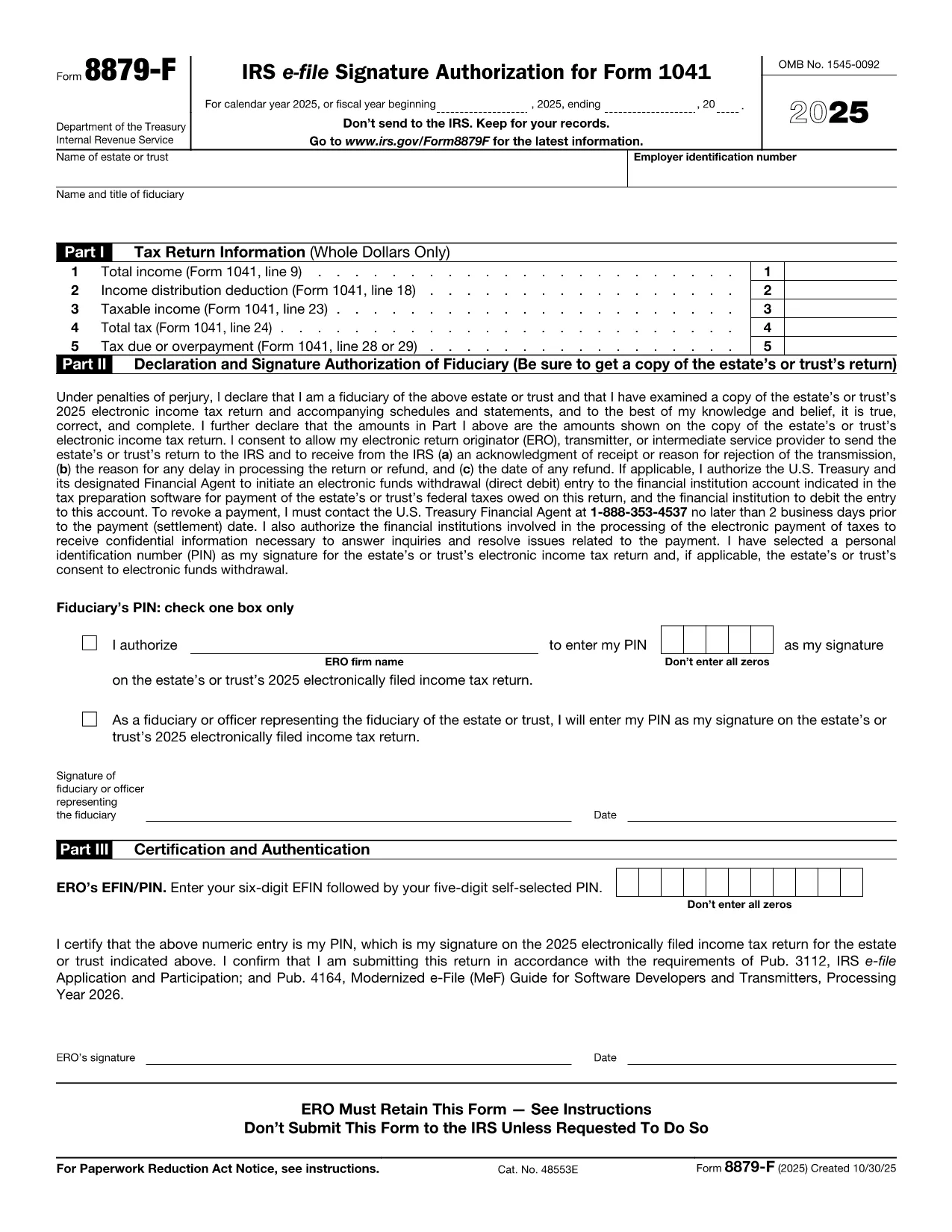
Form 8879‑F – Fillable IRS E‑File Signature Authorization

  1. Quốc gia Hoa Kỳ
  2. Ngôn ngữ Tiếng Anh
  3. Hoạt động thuế
  4. Phòng Internal Revenue Service
Form 8879‑F – Fillable IRS E‑File Signature Authorization

Form 8879‑F, IRS E‑File Signature Authorization for Form 1041, is used by fiduciaries of estates and trusts to give their tax professional permission to electronically sign and file the income‑tax return (Form 1041). This one‑page, fillable PDF lets you securely provide the required information without printing or scanning.

What Is Form 8879‑F?

The form consists of three parts:

  • Part I – Tax Return Information: Copies key figures from the 1041 (total income, taxable income, tax due, etc.).
  • Part II – Declaration and Signature Authorization: The fiduciary declares under penalty of perjury that the return is true and authorizes the electronic return originator (ERO) to sign.
  • Part III – Certification and Authorization: The tax professional certifies that the return was reviewed and that the fiduciary’s PIN is correct.

How to Complete the Fillable PDF with Formize

Instead of downloading the PDF and editing it in a separate editor, you can fill it out directly on our site using the Formize PDF Filler app. Follow the steps below.

Common Mistakes & Tips for Fiduciaries

Being a fiduciary carries legal responsibility. Avoid these pitfalls:

  • Enter the exact Fiscal Year dates – a mismatch will cause the IRS to reject the filing.
  • Double‑check the EIN and trust name; typos trigger processing delays.
  • Use a five‑digit PIN that you can remember but is not easily guessable.
  • Sign the form only after you have reviewed the entire Form 1041 for accuracy.

Where to Submit the Completed Form

After you finish the fillable form, you can:

  • Save a PDF copy for your records.
  • Send the signed PDF to your tax preparer – they will upload it with the electronic return.
  • Retain the form for at least three years in case the IRS requests it.

Remember, the IRS only requires the form when the ERO specifically asks for it. Otherwise, keep it on file.

CÂU HỎI THƯỜNG GẶP
  • Do I need to print Form 8879‑F after filling it online?

    No. The fillable PDF can be saved and sent electronically. Printing is only required if the IRS explicitly asks for a hard copy.

  • Can I use the same PIN for multiple tax years?

    Yes, but it’s recommended to change the PIN each year for added security.

  • What if my estate uses a fiscal year that isn’t January 1 – December 31?

    Enter the exact beginning and ending dates of the fiscal year in the top section of Part I. The IRS will reject the form if the dates don’t match the return.

  • Who is allowed to act as the Electronic Return Originator (ERO)?

    A licensed tax professional, an authorized e‑file service provider, or an intermediate service provider that the fiduciary has hired.

  • Is Form 8879‑F required for every Form 1041 filing?

    It is required only when the fiduciary authorizes an ERO to sign the return electronically. If you file a paper return, the form isn’t needed.

  • What happens if I make a mistake on the form?

    Correct the error in the Formize filler, re‑sign, and resend the updated PDF to your preparer. The IRS will not accept a form with incorrect data.

  • Can I submit Form 8879‑F directly to the IRS?

    No. The form is sent to the tax professional who includes it with the electronic filing. The IRS receives it as part of the e‑file package.

LÀM THẾ NÀO ĐỂ

Cách điền Form 8879-F miễn phí, trực tuyến trong 5 bước đơn giản:

  1. 1
    Open the Fillable Form
    Click the **"Fill out this form"** button on the page. The Formize PDF Filler app loads in your browser.
  2. 2
    Enter Required Information
    Fill in Part I with the figures from your Form 1041, then complete Part II and Part III. Use the drop‑down menus and date pickers for accurate entry.
  3. 3
    Set Your PIN
    Choose a five‑digit Personal Identification Number (PIN). You can let the ERO enter it for you or type it yourself.
  4. 4
    Review and Sign
    Review all fields for accuracy. Click the **"Sign"** button to apply an electronic signature that complies with IRS regulations.
  5. 5
    Save or Send
    After signing, download the completed PDF for your records or email it directly to your tax professional using the **"Send to preparer"** option.
Định dạng ứng dụng PDF Filler
TRONG KHOẢNG

Đơn thuế

Form 8879-F là một trong các Biểu mẫu thuế là tài liệu dùng để báo cáo thông tin về thu nhập, các khoản khấu trừ và nghĩa vụ thuế của cá nhân hoặc doanh nghiệp với cơ quan thuế có liên quan. Những biểu mẫu này là cần thiết để tuân thủ luật thuế và thực hiện nghĩa vụ thuế. Các hình thức thuế khác nhau tùy thuộc vào quốc gia và các yêu cầu về thuế cụ thể được áp dụng. Dưới đây là một số loại biểu mẫu thuế phổ biến:

Biểu mẫu thuế cá nhân: Những biểu mẫu này được người nộp thuế cá nhân sử dụng để báo cáo thu nhập cá nhân của họ và yêu cầu các khoản khấu trừ, tín dụng và miễn trừ. Các ví dụ bao gồm biểu mẫu 1040 ở Hoa Kỳ hoặc biểu mẫu Tờ khai thuế tự định ở Vương quốc Anh.

Biểu mẫu thuế doanh nghiệp: Biểu mẫu thuế doanh nghiệp được các công ty, công ty hợp danh hoặc cá nhân tự kinh doanh sử dụng để báo cáo thu nhập, chi phí kinh doanh và các thông tin liên quan đến thuế khác của họ. Ví dụ bao gồm biểu mẫu Phụ lục C (Lãi hoặc lỗ từ kinh doanh) ở Hoa Kỳ hoặc biểu mẫu CT600 (Khai thuế công ty) ở Vương quốc Anh.

Biểu mẫu thuế tiền lương: Những biểu mẫu này được người sử dụng lao động sử dụng để báo cáo tiền lương, tiền công và các khoản thuế được khấu trừ từ tiền lương của nhân viên. Ví dụ bao gồm mẫu W-2 ở Hoa Kỳ hoặc mẫu P60 ở Vương quốc Anh.

Biểu mẫu thuế bán hàng: Các doanh nghiệp sử dụng biểu mẫu thuế bán hàng để báo cáo và nộp thuế bán hàng thu được đối với hàng hóa hoặc dịch vụ chịu thuế. Các biểu mẫu thuế bán hàng cụ thể khác nhau tùy theo khu vực pháp lý.

Biểu mẫu thuế giá trị gia tăng (VAT): Biểu mẫu VAT được sử dụng ở các quốc gia áp dụng thuế giá trị gia tăng để báo cáo và nộp VAT thu được khi bán hàng và yêu cầu khấu trừ VAT khi mua hàng. Ví dụ bao gồm các biểu mẫu hoàn thuế VAT được sử dụng ở nhiều quốc gia.

Biểu mẫu thuế ước tính: Biểu mẫu thuế ước tính được sử dụng để báo cáo và nộp thuế ước tính đối với thu nhập không bị khấu lưu, chẳng hạn như thu nhập từ hoạt động tư doanh hoặc thu nhập từ đầu tư.

Đây chỉ là một vài ví dụ về nhiều hình thức thuế có thể tồn tại. Các biểu mẫu cụ thể được yêu cầu tùy thuộc vào luật và quy định về thuế ở quốc gia hoặc khu vực pháp lý của bạn. Điều quan trọng là phải tham khảo hướng dẫn của cơ quan thuế hoặc tìm kiếm lời khuyên chuyên môn để xác định hình thức nào có thể áp dụng cho trường hợp của bạn.

ĐẶC TRƯNG

Trình điền PDF

Cách dễ nhất để điền vào các mẫu PDF trực tuyến

  • Nhanh chóng điền vào Form 8879-F
    Bạn đang tìm cách điền nhanh Form 8879-F trực tuyến? Với trình điền biểu mẫu PDF miễn phí trực tuyến của chúng tôi, bạn sẽ biết cách chỉnh sửa và điền vào tài liệu pdf này trong vòng chưa đầy một phút.
  • Trình chỉnh sửa PDF trực tuyến dễ sử dụng
    Chán nản với việc in ra các tệp PDF để bạn có thể chỉnh sửa chúng trước khi quét lại và gửi lại? Chỉnh sửa tài liệu PDF trực tuyến miễn phí. Sử dụng trình chỉnh sửa pdf trực tuyến của chúng tôi để tiết kiệm thời gian và giấy.
  • Công cụ tuyệt vời, tất cả các nền tảng
    Bạn muốn biết cách điền Form 8879-F trên máy Mac hoặc có thể là cách sử dụng trình điền PDF miễn phí? Các công cụ PDF trực tuyến của chúng tôi hoạt động trên tất cả các nền tảng.
  • Lưu trữ tệp an toàn
    Các tệp "Form 8879-F" đã hoàn thành được lưu trữ trong cơ sở dữ liệu bảo mật do dịch vụ lưu trữ Amazon Cloud quản lý. Bạn có thể xóa các tệp của mình khỏi hệ thống của chúng tôi bất cứ lúc nào. Trong mọi trường hợp, các tệp này sẽ tự động bị xóa sau 24 giờ.
  • Trò chuyện với Form 8879-F
    Trò chuyện với "Form 8879-F" trên Trò chuyện, một trợ lý đọc PDF miễn phí. Đặt câu hỏi và nhận câu trả lời từ "Form 8879-F". Chỉ cần nhấp vào nút Trò chuyện với tài liệu ở trên.

Xóa phiên điền

Xóa phiên điền đã chọn? Trong trường hợp này, tiến độ của bạn trong việc hoàn thành biểu mẫu sẽ bị mất.

Xóa phiên chỉnh sửa

Xóa phiên chỉnh sửa đã chọn? Trong trường hợp này, tiến trình tạo và chỉnh sửa biểu mẫu của bạn sẽ bị mất.