
Chọn ngôn ngữ

IRS Form W‑4 (Russian) – Fillable PDF

  1. Quốc gia Hoa Kỳ
  2. Ngôn ngữ tiếng Nga
  3. Hoạt động thuế
  4. Phòng Internal Revenue Service
IRS Form W‑4 (Russian) – Fillable PDF

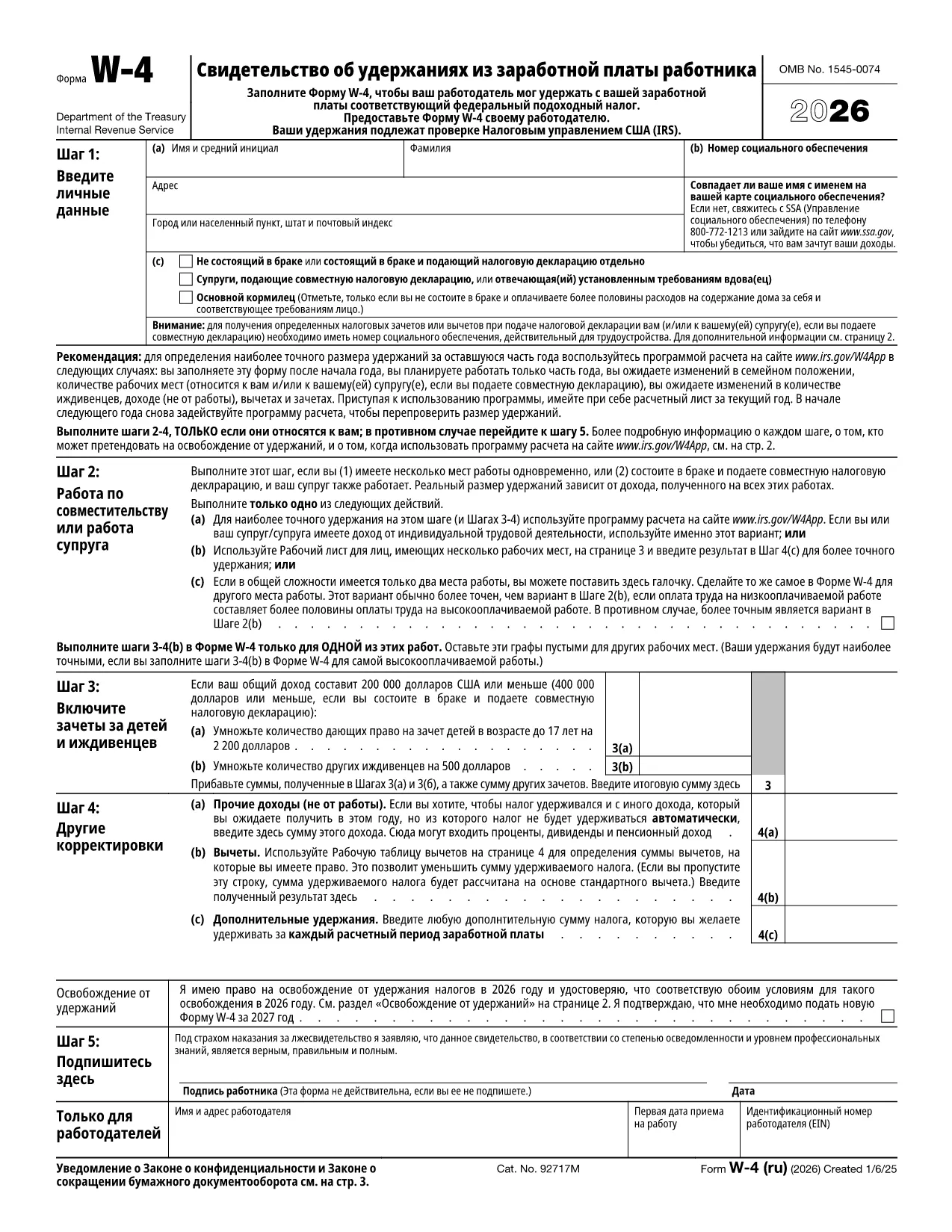
The IRS Form W‑4 (Russian) – also known as fw4ru.pdf – is the employee’s withholding certificate translated for Russian‑speaking workers in the United States. By completing this form, you tell your employer how much federal income tax to withhold from each paycheck.

Using a fillable PDF means you can type directly into the fields, calculate credits instantly, and sign electronically without ever printing a paper copy. This saves time, reduces errors, and keeps your Social Security Number secure.

Below you’ll find everything you need to know: what the form covers, step‑by‑step instructions for filling it out with Formize’s PDF Filler, common pitfalls to watch for, and a direct download link to the official IRS version.

When you’re ready, simply click the “Fill out this form” button on the page. The Formize PDF Filler app will load, presenting the Russian W‑4 ready for you to complete and submit to your HR department.

CÂU HỎI THƯỜNG GẶP
  • Is the Russian version of Form W‑4 official?

    Yes. The IRS provides an official Russian translation (fw4ru.pdf) which is accepted by employers for tax withholding purposes.

  • Can I submit a digital signature on the Russian W‑4?

    The IRS allows electronic signatures on Form W‑4 as long as the employer’s system meets IRS requirements. Formize’s signature tool complies with these standards.

  • Do I need to fill out a new W‑4 every year?

    You only need a new W‑4 when your personal or financial situation changes (e.g., marriage, new child, additional job). Otherwise, the existing form stays valid.

  • What happens if I make a mistake on the form?

    Correct any errors before submitting. If you discover a mistake after submission, provide a new W‑4 to your employer to update the withholding.

  • Is my Social Security Number safe in a fillable PDF?

    Formize encrypts the PDF and allows you to password‑protect the file before sharing, keeping your SSN secure from unauthorized access.

  • Can I use the English version instead of the Russian one?

    Yes, the English version (fw4.pdf) is also accepted. Choose the language you’re most comfortable with; the tax calculations are identical.

  • Where can I find instructions for the Russian W‑4?

    The IRS Publication 505 provides detailed guidance on withholding. The fillable PDF includes tooltips for each field to help you complete it correctly.

LÀM THẾ NÀO ĐỂ

Cách điền Form W-4 Russian miễn phí, trực tuyến trong 5 bước đơn giản:

  1. 1
    Open the Fillable Form
    Click the “Fill out this form” button on the page. The Formize PDF Filler app will open in a new browser tab.
  2. 2
    Enter Your Information
    Type your name, address, Social Security Number, and filing status directly into the highlighted fields.
  3. 3
    Calculate Withholding
    Use the built‑in calculator to add dependents, other income, or deductions. The form updates totals automatically.
  4. 4
    Add an Electronic Signature
    When you reach the signature line, click “Sign” and draw or type your signature. The app saves it securely.
  5. 5
    Submit to Your Employer
    Download the completed PDF or share the secure link with your HR department. No printing required.
Định dạng ứng dụng PDF Filler
TRONG KHOẢNG

Đơn thuế

Form W-4 Russian là một trong những Biểu mẫu khai thuế là văn bản dùng để khai báo các thông tin liên quan đến thuế với cơ quan thuế liên quan. Có nhiều loại biểu mẫu thuế khác nhau, bao gồm biểu mẫu thuế liên bang, tiểu bang và địa phương, có thể khác nhau tùy thuộc vào hoàn cảnh và địa điểm của người nộp thuế.

ĐẶC TRƯNG

Trình điền PDF

Cách dễ nhất để điền vào các mẫu PDF trực tuyến

  • Nhanh chóng điền vào Form W-4 Russian
    Bạn đang tìm cách điền nhanh Form W-4 Russian trực tuyến? Với trình điền biểu mẫu PDF miễn phí trực tuyến của chúng tôi, bạn sẽ biết cách chỉnh sửa và điền vào tài liệu pdf này trong vòng chưa đầy một phút.
  • Trình chỉnh sửa PDF trực tuyến dễ sử dụng
    Chán nản với việc in ra các tệp PDF để bạn có thể chỉnh sửa chúng trước khi quét lại và gửi lại? Chỉnh sửa tài liệu PDF trực tuyến miễn phí. Sử dụng trình chỉnh sửa pdf trực tuyến của chúng tôi để tiết kiệm thời gian và giấy.
  • Công cụ tuyệt vời, tất cả các nền tảng
    Bạn muốn biết cách điền Form W-4 Russian trên máy Mac hoặc có thể là cách sử dụng trình điền PDF miễn phí? Các công cụ PDF trực tuyến của chúng tôi hoạt động trên tất cả các nền tảng.
  • Lưu trữ tệp an toàn
    Các tệp "Form W-4 Russian" đã hoàn thành được lưu trữ trong cơ sở dữ liệu bảo mật do dịch vụ lưu trữ Amazon Cloud quản lý. Bạn có thể xóa các tệp của mình khỏi hệ thống của chúng tôi bất cứ lúc nào. Trong mọi trường hợp, các tệp này sẽ tự động bị xóa sau 24 giờ.
  • Trò chuyện với Form W-4 Russian
    Trò chuyện với "Form W-4 Russian" trên Trò chuyện, một trợ lý đọc PDF miễn phí. Đặt câu hỏi và nhận câu trả lời từ "Form W-4 Russian". Chỉ cần nhấp vào nút Trò chuyện với tài liệu ở trên.

Xóa phiên điền

Xóa phiên điền đã chọn? Trong trường hợp này, tiến độ của bạn trong việc hoàn thành biểu mẫu sẽ bị mất.

Xóa phiên chỉnh sửa

Xóa phiên chỉnh sửa đã chọn? Trong trường hợp này, tiến trình tạo và chỉnh sửa biểu mẫu của bạn sẽ bị mất.