
Chọn ngôn ngữ

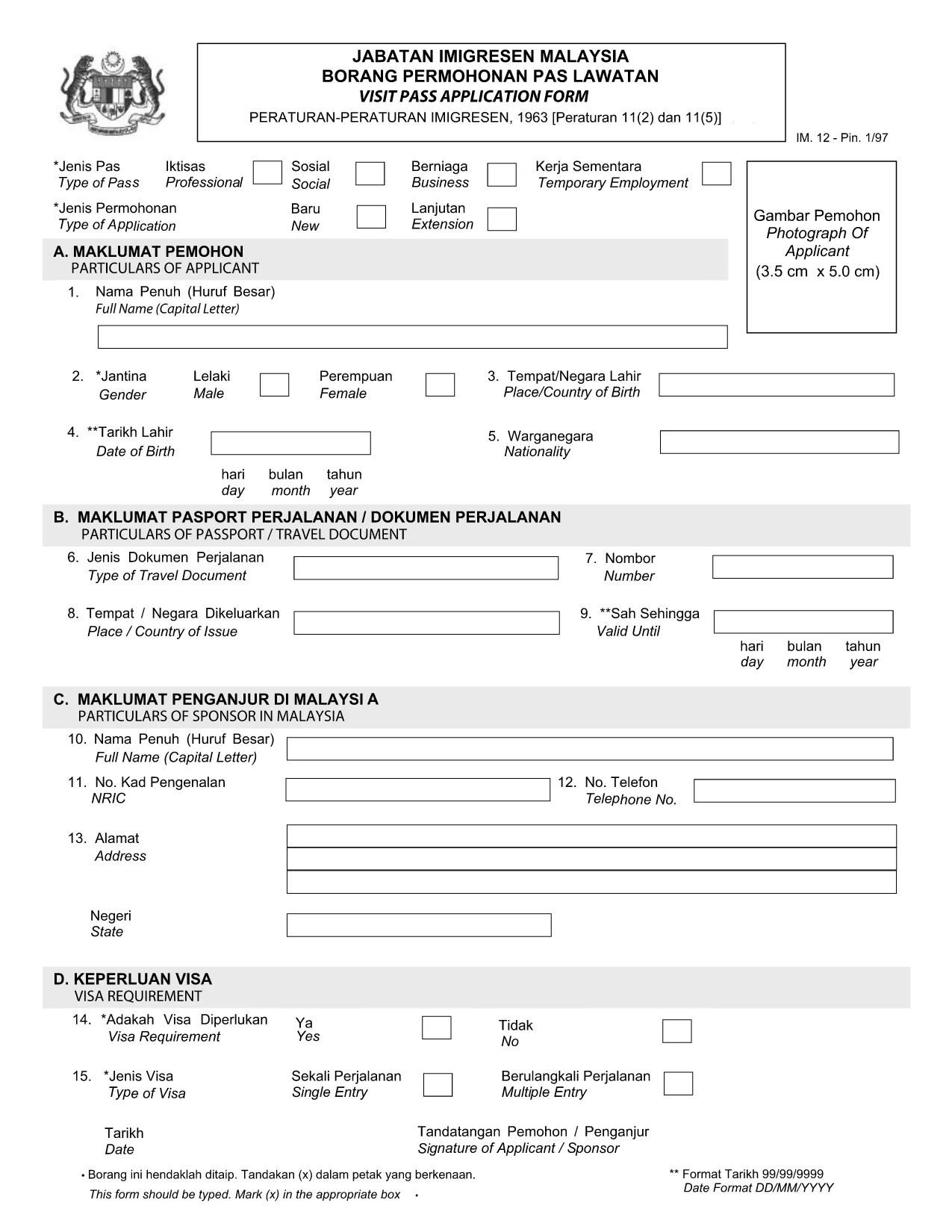
Visit Pass Application Form – Malay Version (Online Fillable)

  1. Ngôn ngữ Tiếng Anh
  2. Quốc gia Malaysia
  3. Hoạt động thị thực
  4. Phòng MOTAC
Visit Pass Application Form – Malay Version (Online Fillable)

Looking for the official Visit Pass application form in Malay? You’ve come to the right place. Formize.com hosts a secure, fillable PDF that lets you complete the MOTAC Visit Pass (IMM.12) form directly in your browser—no extra software required.

Our step‑by‑step guide walks you through every field, highlights common pitfalls, and provides quick answers to the most asked questions. Whether you’re applying for a short‑term visit or a long‑stay pass, the online filler saves you time and ensures your submission meets the Ministry of Tourism, Arts and Culture (MOTAC) requirements.

Why Use the Online Fillable Visit Pass Form

  • Instant access: Click “Fill out this form” and the Formize PDF Filler loads automatically.
  • Save paper: Complete and submit digitally, reducing the need for printed copies.
  • Auto‑validation: The filler checks mandatory fields and format, reducing rejections.
  • Secure storage: Your data stays encrypted on our platform until you download the completed PDF.

How to Complete the Form in Minutes

  1. Click the Fill out this form button below.
  2. Wait a few seconds while the Formize PDF Filler loads the official IMM.12 PDF.
  3. Enter your details exactly as they appear on your passport and supporting documents.
  4. Use the built‑in navigation to jump between sections (Personal Details, Travel History, etc.).
  5. When finished, click Download Completed PDF and submit it to MOTAC as instructed.

Common Mistakes to Avoid

  • Leaving mandatory fields blank – the filler will highlight them in red.
  • Using abbreviations that do not match official IDs (e.g., “MY” instead of “Malaysia”).
  • Uploading an outdated passport photo – ensure the image meets size requirements.
  • Mismatched dates – travel dates must fall within the validity period of your pass.

Download the Official PDF (Malay)

If you prefer to work offline, you can download the original MOTAC Visit Pass form (Malay version) directly from the Ministry’s website. The link below points to the official PDF used by the online filler.

Download Visit Pass Application Form (IMM.12) – PDF

Frequently Asked Questions

Find quick answers to the most common queries about the Visit Pass application process.

CÂU HỎI THƯỜNG GẶP
  • Is the Visit Pass form available in Malay?

    Yes. The official MOTAC form is published in both English and Malay. The fillable version on Formize includes the Malay labels.

  • Do I need any special software to use the online filler?

    No. The Formize PDF Filler works in all modern browsers – Chrome, Firefox, Edge, and Safari.

  • Can I save my progress and return later?

    Yes. Use the “Save Draft” button within the filler to download a partially completed PDF, then reload it later.

  • What documents do I need to attach to the form?

    Typically you’ll need a passport copy, recent photograph, and proof of travel itinerary. Check the MOTAC checklist for your specific case.

  • How long does the online filling process take?

    Most users complete the form in 5‑10 minutes, provided all required information is ready.

  • Is there a fee for submitting the Visit Pass application?

    Yes, MOTAC charges a processing fee. The amount varies by nationality and duration of stay. Refer to the official MOTAC fee schedule.

LÀM THẾ NÀO ĐỂ

Cách điền Visit Pass application form miễn phí, trực tuyến trong 4 bước đơn giản:

  1. 1
    Open the Fillable Form
    Click the “Fill out this form” button on the page. The Formize PDF Filler will open in a new tab.
  2. 2
    Load the Official PDF
    Wait a few seconds while the system loads the Visit Pass application PDF (IMM.12) from MOTAC.
  3. 3
    Enter Your Information
    Fill in each field using the on‑screen prompts. Required fields are marked with an asterisk.
  4. 4
    Download or Submit
    When all sections are complete, click “Download Completed PDF”. Save the file and follow MOTAC’s submission instructions.
Định dạng ứng dụng PDF Filler
TRONG KHOẢNG

mẫu đơn thị thực

Visit Pass application form là một trong những mẫu Visa là giấy tờ dùng để xin visa nhập cảnh nước ngoài. Thị thực là một tài liệu cho phép người nước ngoài nhập cảnh, lưu trú và đôi khi làm việc ở nước ngoài trong một khoảng thời gian nhất định. Các hình thức và yêu cầu chính xác để xin thị thực khác nhau tùy theo quốc gia và loại thị thực.

Các mẫu đơn thị thực thường yêu cầu thông tin cá nhân như tên, ngày sinh và thông tin hộ chiếu, cũng như thông tin về mục đích và thời gian của chuyến đi, điểm đến dự định và liệu người nộp đơn trước đó đã bị từ chối cấp thị thực hay bị trục xuất khỏi một quốc gia. Các biểu mẫu cũng có thể yêu cầu các tài liệu hỗ trợ như hộ chiếu, ảnh và bằng chứng hỗ trợ tài chính.

Tại Hoa Kỳ, các mẫu đơn xin thị thực phổ biến nhất là mẫu đơn DS-160 và DS-260. Mẫu DS-160 được sử dụng để xin thị thực không định cư, trong khi mẫu DS-260 được sử dụng để xin thị thực định cư. Các biểu mẫu này yêu cầu thông tin chi tiết về lịch sử cá nhân và du lịch của người nộp đơn, cũng như các tài liệu hỗ trợ như hộ chiếu, hành trình du lịch và hồ sơ tài chính.

Các quốc gia khác có thể có các yêu cầu và mẫu thị thực khác nhau, nhưng quy trình cơ bản thường bao gồm hoàn thành đơn xin thị thực, cung cấp tài liệu hỗ trợ và tham dự cuộc phỏng vấn với viên chức lãnh sự tại đại sứ quán hoặc lãnh sự quán Hoa Kỳ. Điều quan trọng cần lưu ý là quy trình xin thị thực có thể phức tạp và tốn thời gian, và các cá nhân xin thị thực nên tham khảo ý kiến ​​của luật sư nhập cư hoặc chuyên gia có trình độ khác để đảm bảo rằng tất cả các mẫu và yêu cầu cần thiết đều được đáp ứng.

ĐẶC TRƯNG

Trình điền PDF

Cách dễ nhất để điền vào các mẫu PDF trực tuyến

  • Nhanh chóng điền vào Visit Pass application form
    Bạn đang tìm cách điền nhanh Visit Pass application form trực tuyến? Với trình điền biểu mẫu PDF miễn phí trực tuyến của chúng tôi, bạn sẽ biết cách chỉnh sửa và điền vào tài liệu pdf này trong vòng chưa đầy một phút.
  • Trình chỉnh sửa PDF trực tuyến dễ sử dụng
    Chán nản với việc in ra các tệp PDF để bạn có thể chỉnh sửa chúng trước khi quét lại và gửi lại? Chỉnh sửa tài liệu PDF trực tuyến miễn phí. Sử dụng trình chỉnh sửa pdf trực tuyến của chúng tôi để tiết kiệm thời gian và giấy.
  • Công cụ tuyệt vời, tất cả các nền tảng
    Bạn muốn biết cách điền Visit Pass application form trên máy Mac hoặc có thể là cách sử dụng trình điền PDF miễn phí? Các công cụ PDF trực tuyến của chúng tôi hoạt động trên tất cả các nền tảng.
  • Lưu trữ tệp an toàn
    Các tệp "Visit Pass application form" đã hoàn thành được lưu trữ trong cơ sở dữ liệu bảo mật do dịch vụ lưu trữ Amazon Cloud quản lý. Bạn có thể xóa các tệp của mình khỏi hệ thống của chúng tôi bất cứ lúc nào. Trong mọi trường hợp, các tệp này sẽ tự động bị xóa sau 24 giờ.
  • Trò chuyện với Visit Pass application form
    Trò chuyện với "Visit Pass application form" trên Trò chuyện, một trợ lý đọc PDF miễn phí. Đặt câu hỏi và nhận câu trả lời từ "Visit Pass application form". Chỉ cần nhấp vào nút Trò chuyện với tài liệu ở trên.

Xóa phiên điền

Xóa phiên điền đã chọn? Trong trường hợp này, tiến độ của bạn trong việc hoàn thành biểu mẫu sẽ bị mất.

Xóa phiên chỉnh sửa

Xóa phiên chỉnh sửa đã chọn? Trong trường hợp này, tiến trình tạo và chỉnh sửa biểu mẫu của bạn sẽ bị mất.