Chọn ngôn ngữ

R.1/1 Application Form – Fillable PDF Download

  1. Quốc gia nước Thái Lan
  2. Ngôn ngữ Tiếng Anh
  3. Hoạt động Animal Import/Export
  4. Phòng Department of Livestock Development
R.1/1 Application Form – Fillable PDF Download

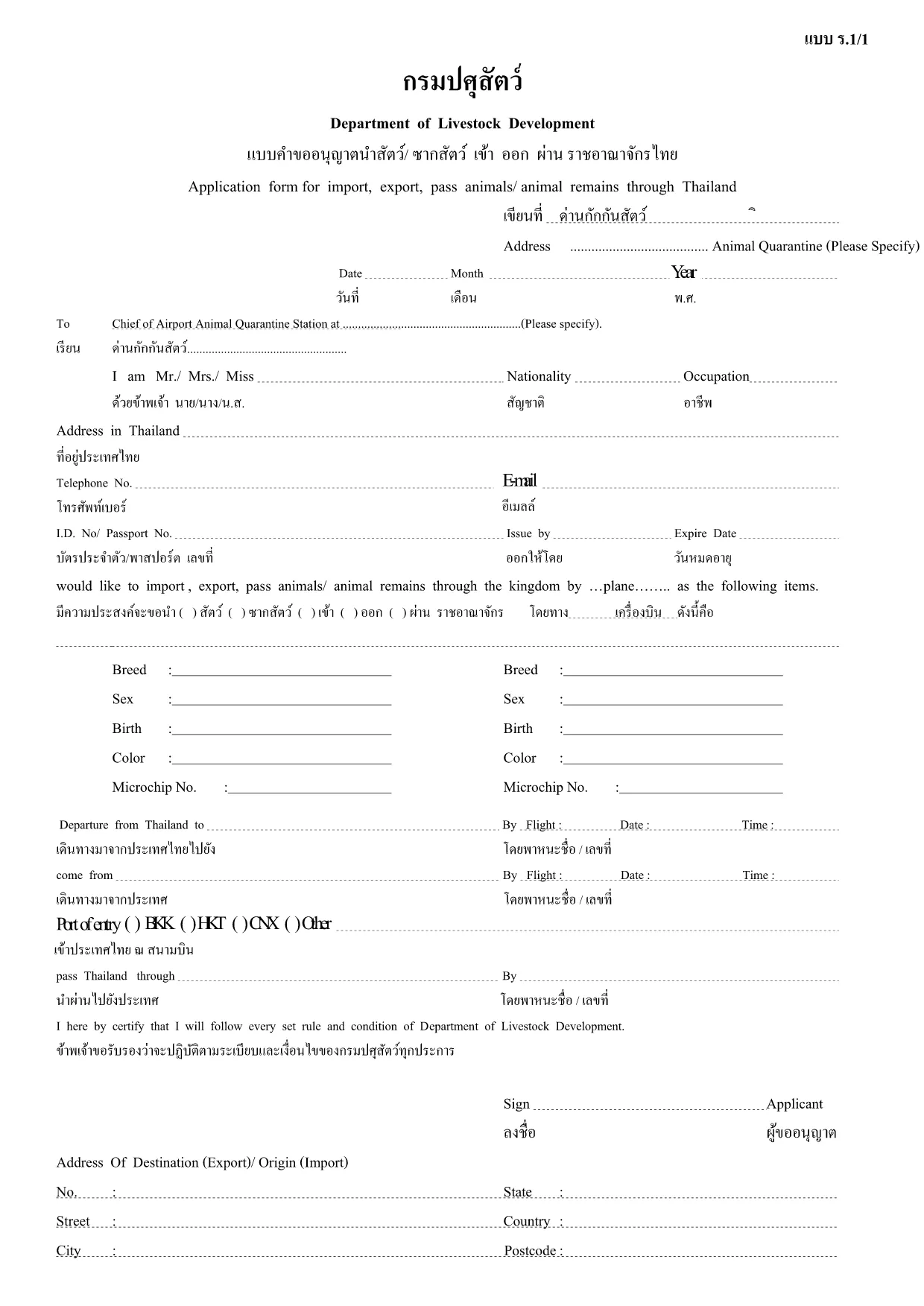
The R.1/1 application form is the official document used by Thailand's Department of Livestock Development for requesting permission to import, export, or transport animals and animal products. This fillable PDF lets you complete the form quickly, accurately, and without printing.

What Is the R.1/1 Form?

R.1/1 (sometimes written as ร.1/1) is a regulatory form required for:

  • Importing live animals, livestock, or animal products into Thailand.
  • Exporting animals or animal by‑products out of Thailand.
  • Transporting animals across provincial borders.

The form captures details such as species, quantity, origin, destination, health certificates, and the applicant’s contact information.

How to Complete the R.1/1 Form Online

Instead of downloading the PDF and using a separate editor, simply click the "Fill out this form" button on this page. The Formize PDF Filler app will load directly in your browser, providing a smooth, interactive experience.

Common Mistakes to Avoid

  • Leaving required fields blank – the filler highlights missing information.
  • Using the wrong animal classification – double‑check the species list provided by the Department.
  • Submitting an outdated health certificate – ensure the certificate matches the date of the intended shipment.

Where to Submit Your Completed Form

After you have filled and saved the PDF, submit it to the Department of Livestock Development via one of the following methods:

  • Online submission through the department’s e‑service portal.
  • Mail to the address indicated on the form.
  • In‑person delivery at any regional livestock office.

Download the Fillable PDF

Ready to start? Click the button below, fill out the form in seconds, and download the completed PDF for your records.

CÂU HỎI THƯỜNG GẶP
  • Is the R.1/1 form available in languages other than Thai?

    The official version is in Thai, but the fillable PDF can be completed using English characters for names and addresses. Translation assistance is recommended for detailed sections.

  • Can I edit the form after I have downloaded it?

    Yes. Using the Formize PDF Filler you can reopen the saved file, make changes, and re‑download the updated version.

  • Do I need a digital signature?

    A digital signature is accepted if the department’s e‑service portal is used. Otherwise, print the form, sign manually, and scan it before submission.

  • How long does it take to process an R.1/1 application?

    Processing time varies by request type, but typically 5‑10 business days after the department receives a complete application.

  • What documents must accompany the R.1/1 form?

    Attach a valid health certificate, import/export permit (if applicable), and any supporting documents such as invoices or transport permits.

  • Is there a fee for submitting the R.1/1 form?

    Yes, a processing fee is required. The exact amount is listed on the form’s fee schedule and must be paid before submission.

  • Can I submit the form directly from the Formize filler?

    The Formize filler only creates the PDF. You must upload the completed file to the Department of Livestock Development’s online portal or send it by mail.

LÀM THẾ NÀO ĐỂ

Cách điền R.1/1 application form miễn phí, trực tuyến trong 5 bước đơn giản:

  1. 1
    Click the Fill button
    Press the "Fill out this form" button on the page. The Formize PDF Filler will open in a new tab.
  2. 2
    Wait for the filler to load
    A few seconds later the interactive PDF appears. All fields are ready for data entry.
  3. 3
    Enter required information
    Type or select values for each highlighted field – species, quantity, origin, health certificates, and contact details.
  4. 4
    Save or download the completed form
    When finished, click "Save" to store it in your browser or "Download" to get a copy on your computer.
  5. 5
    Submit to the Department
    Follow the submission instructions on the form (online portal, mail, or in‑person) to complete your application.
Định dạng ứng dụng PDF Filler
TRONG KHOẢNG

mẫu R.1/1 application form

Với bộ tính năng truyền thống để xem và điền vào tài liệu PDF, kết hợp với các lợi ích của ứng dụng web và bố cục đáp ứng, bạn có thể hoàn thành R.1/1 application form trong vài phút.

ĐẶC TRƯNG

Trình điền PDF

Cách dễ nhất để điền vào các mẫu PDF trực tuyến

  • Nhanh chóng điền vào R.1/1 application form
    Bạn đang tìm cách điền nhanh R.1/1 application form trực tuyến? Với trình điền biểu mẫu PDF miễn phí trực tuyến của chúng tôi, bạn sẽ biết cách chỉnh sửa và điền vào tài liệu pdf này trong vòng chưa đầy một phút.
  • Trình chỉnh sửa PDF trực tuyến dễ sử dụng
    Chán nản với việc in ra các tệp PDF để bạn có thể chỉnh sửa chúng trước khi quét lại và gửi lại? Chỉnh sửa tài liệu PDF trực tuyến miễn phí. Sử dụng trình chỉnh sửa pdf trực tuyến của chúng tôi để tiết kiệm thời gian và giấy.
  • Công cụ tuyệt vời, tất cả các nền tảng
    Bạn muốn biết cách điền R.1/1 application form trên máy Mac hoặc có thể là cách sử dụng trình điền PDF miễn phí? Các công cụ PDF trực tuyến của chúng tôi hoạt động trên tất cả các nền tảng.
  • Lưu trữ tệp an toàn
    Các tệp "R.1/1 application form" đã hoàn thành được lưu trữ trong cơ sở dữ liệu bảo mật do dịch vụ lưu trữ Amazon Cloud quản lý. Bạn có thể xóa các tệp của mình khỏi hệ thống của chúng tôi bất cứ lúc nào. Trong mọi trường hợp, các tệp này sẽ tự động bị xóa sau 24 giờ.
  • Trò chuyện với R.1/1 application form
    Trò chuyện với "R.1/1 application form" trên Trò chuyện, một trợ lý đọc PDF miễn phí. Đặt câu hỏi và nhận câu trả lời từ "R.1/1 application form". Chỉ cần nhấp vào nút Trò chuyện với tài liệu ở trên.

Xóa phiên điền

Xóa phiên điền đã chọn? Trong trường hợp này, tiến độ của bạn trong việc hoàn thành biểu mẫu sẽ bị mất.

Xóa phiên chỉnh sửa

Xóa phiên chỉnh sửa đã chọn? Trong trường hợp này, tiến trình tạo và chỉnh sửa biểu mẫu của bạn sẽ bị mất.