Chọn ngôn ngữ

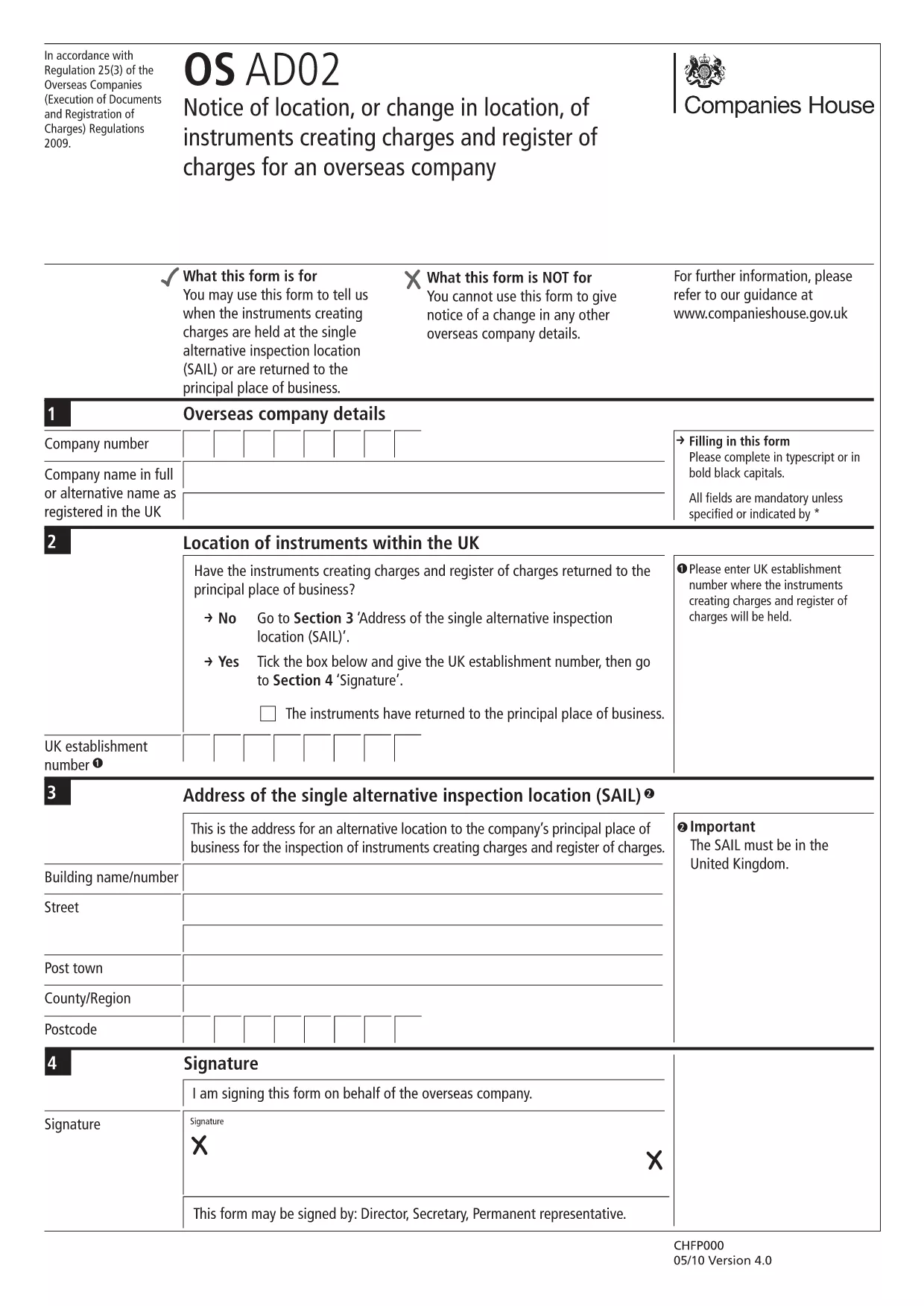
OS AD02 – Notice of Location or Change in Location of Charges

  1. Ngôn ngữ Tiếng Anh
  2. Quốc gia United Kingdom
  3. Hoạt động Company Charges
  4. Phòng Companies House
OS AD02 – Notice of Location or Change in Location of Charges

The OS AD02 (also referenced as en‑ad.02) is the official Companies House form used by overseas companies to notify a change of location for instruments that create charges, and to update the register of charges. This form is required whenever a charge‑creating instrument moves to a new jurisdiction or when the location details need correction.

What is the OS AD02 Form?

OS AD02 captures essential information about the charge, the instrument, and its new location. It ensures the public register remains accurate and that creditors can trace the security interests tied to a company.

How to Complete the OS AD02 Online

Instead of downloading the PDF and editing it manually, simply click the "Fill out this form" button on this page. The Formize PDF Filler app will load the fillable version of the OS AD02, allowing you to enter data directly in your browser.

  • Step 1: Click Fill out this form and wait for the Formize PDF Filler to load.
  • Step 2: Enter the company details, charge reference, and the new location information in the highlighted fields.
  • Step 3: Review each section for accuracy – the filler highlights required fields.
  • Step 4: Click Save & Download to obtain a completed PDF ready for submission.

Common Mistakes & Tips

To avoid delays, watch out for these frequent errors:

  • Leaving the date of change blank – the field is mandatory.
  • Mismatching the charge reference number with the one on the original filing.
  • Using an outdated address format for the new jurisdiction.
  • Failing to sign the form or attach a digital signature where required.

Tip: Use the built‑in validation in the Formize filler; it will flag incomplete or incorrectly formatted entries before you download.

Where to Submit the Completed Form

Once you have the finished PDF, submit it to Companies House via their online filing portal or by post to the address indicated on the form. Keep a copy for your records.

Need help? Refer to the Companies House guidance notes linked at the bottom of the form.

CÂU HỎI THƯỜNG GẶP
  • What is the purpose of the OS AD02 form?

    It notifies Companies House of a change in location for instruments that create charges, keeping the public register up‑to‑date.

  • Can I edit the OS AD02 after downloading it?

    Yes, but using the Formize fillable version is faster and reduces errors compared to editing a static PDF.

  • Is a digital signature accepted on the OS AD02?

    Companies House accepts a digital signature if it complies with their e‑signing standards; the Formize filler supports adding a digital signature.

  • How long does it take for Companies House to process the OS AD02?

    Processing typically takes 5‑7 business days after a correct submission, but you can track the status online.

  • What should I do if I make a mistake after submission?

    Submit an amended OS AD02 with the corrected details, clearly marking it as an amendment.

  • Do I need to pay a fee to file OS AD02?

    No, filing the OS AD02 notice of location is free of charge.

  • Can I submit the form on behalf of another company?

    Yes, provided you have proper authorisation and include the authorised signatory’s details.

  • Is the OS AD02 form available in languages other than English?

    The official version is only in English; however, you may attach a certified translation if required.

LÀM THẾ NÀO ĐỂ

Cách điền OS AD02 miễn phí, trực tuyến trong 5 bước đơn giản:

  1. 1
    Open the Fillable Form
    Click the "Fill out this form" button on the page. The Formize PDF Filler app will load the OS AD02 directly in your browser.
  2. 2
    Enter Required Information
    Complete each highlighted field: company details, charge reference, old and new locations, and the effective date of the change.
  3. 3
    Validate Your Entries
    Use the built‑in validation to ensure all mandatory fields are filled and formatted correctly.
  4. 4
    Save and Download
    When all data is correct, click "Save & Download" to get a completed PDF ready for submission to Companies House.
  5. 5
    Submit the Form
    Upload the PDF via the Companies House online portal or mail it to the address shown on the form.
Định dạng ứng dụng PDF Filler
TRONG KHOẢNG

mẫu OS AD02

Với bộ tính năng truyền thống để xem và điền vào tài liệu PDF, kết hợp với các lợi ích của ứng dụng web và bố cục đáp ứng, bạn có thể hoàn thành OS AD02 trong vài phút.

ĐẶC TRƯNG

Trình điền PDF

Cách dễ nhất để điền vào các mẫu PDF trực tuyến

  • Nhanh chóng điền vào OS AD02
    Bạn đang tìm cách điền nhanh OS AD02 trực tuyến? Với trình điền biểu mẫu PDF miễn phí trực tuyến của chúng tôi, bạn sẽ biết cách chỉnh sửa và điền vào tài liệu pdf này trong vòng chưa đầy một phút.
  • Trình chỉnh sửa PDF trực tuyến dễ sử dụng
    Chán nản với việc in ra các tệp PDF để bạn có thể chỉnh sửa chúng trước khi quét lại và gửi lại? Chỉnh sửa tài liệu PDF trực tuyến miễn phí. Sử dụng trình chỉnh sửa pdf trực tuyến của chúng tôi để tiết kiệm thời gian và giấy.
  • Công cụ tuyệt vời, tất cả các nền tảng
    Bạn muốn biết cách điền OS AD02 trên máy Mac hoặc có thể là cách sử dụng trình điền PDF miễn phí? Các công cụ PDF trực tuyến của chúng tôi hoạt động trên tất cả các nền tảng.
  • Lưu trữ tệp an toàn
    Các tệp "OS AD02" đã hoàn thành được lưu trữ trong cơ sở dữ liệu bảo mật do dịch vụ lưu trữ Amazon Cloud quản lý. Bạn có thể xóa các tệp của mình khỏi hệ thống của chúng tôi bất cứ lúc nào. Trong mọi trường hợp, các tệp này sẽ tự động bị xóa sau 24 giờ.
  • Trò chuyện với OS AD02
    Trò chuyện với "OS AD02" trên Trò chuyện, một trợ lý đọc PDF miễn phí. Đặt câu hỏi và nhận câu trả lời từ "OS AD02". Chỉ cần nhấp vào nút Trò chuyện với tài liệu ở trên.

Xóa phiên điền

Xóa phiên điền đã chọn? Trong trường hợp này, tiến độ của bạn trong việc hoàn thành biểu mẫu sẽ bị mất.

Xóa phiên chỉnh sửa

Xóa phiên chỉnh sửa đã chọn? Trong trường hợp này, tiến trình tạo và chỉnh sửa biểu mẫu của bạn sẽ bị mất.