Chọn ngôn ngữ

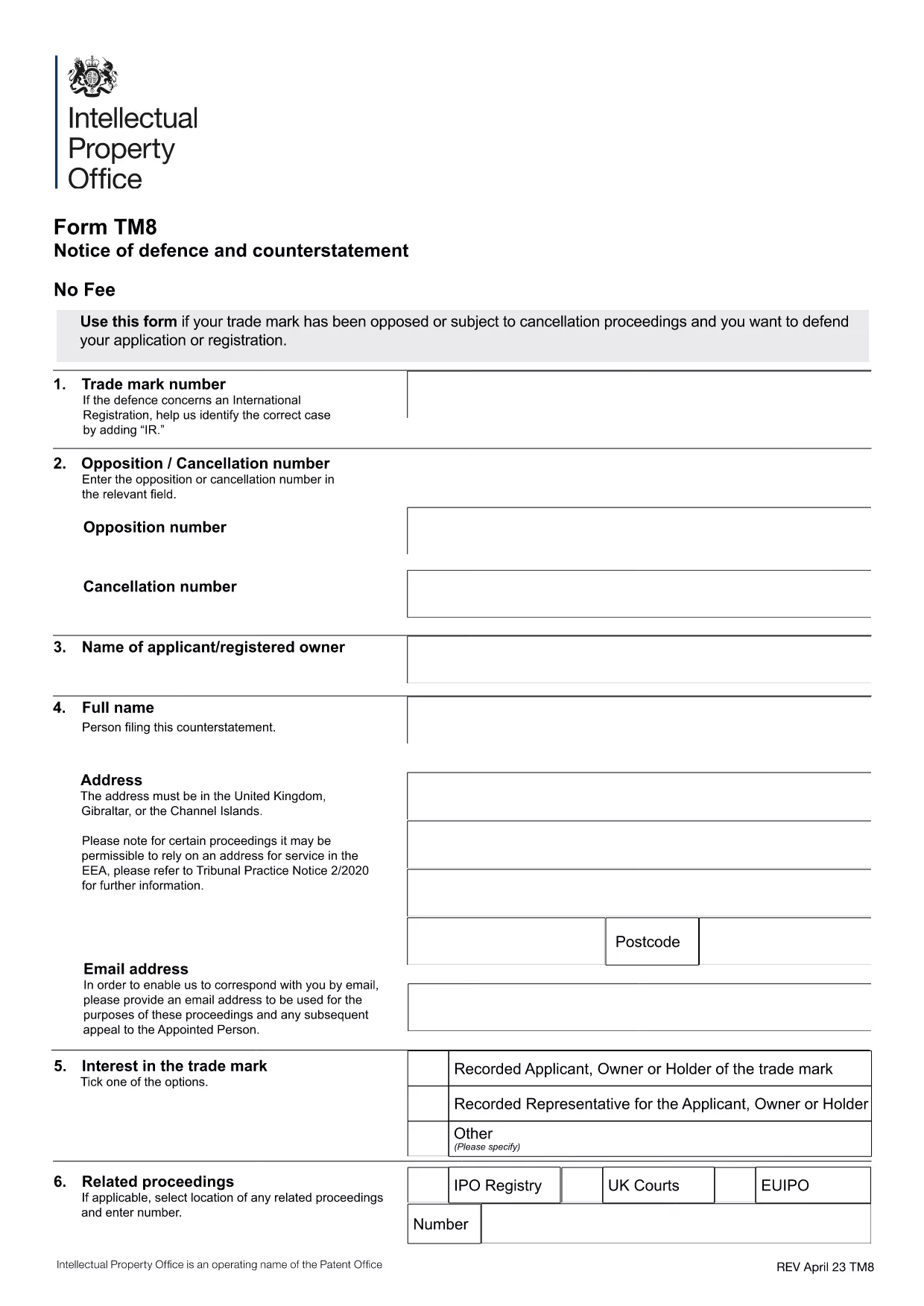
Form TM8 – Notice of Defence and Counterstatement (UK Trademark)

  1. Quốc gia United Kingdom
  2. Ngôn ngữ Tiếng Anh
  3. Hoạt động Trademarks
  4. Phòng Intellectual Property Office
Form TM8 – Notice of Defence and Counterstatement (UK Trademark)

The Form TM8 is the official UK Intellectual Property Office (IPO) document used to submit a defence and counter‑statement when you are challenged on a trademark registration. Whether you are responding to a notice of opposition or a cancellation request, TM8 lets you set out the legal reasons why your trademark should remain protected.

What is Form TM8 and When Is It Required?

TM8 is filed by the trademark owner (or a licensed user) after receiving a formal objection from an opponent. It must detail the factual and legal basis of your defence, and may include any counter‑claims you wish to raise.

Key Sections of the TM8 Form Explained

  • Section 1 – Applicant Details: Name, address, and registration number of the trademark.
  • Section 2 – Grounds of Defence: List each ground you rely on, such as prior use, lack of similarity, or procedural errors.
  • Section 3 – Evidence: Attach supporting documents, screenshots, or contracts.
  • Section 4 – Counter‑Statement (if any): State any claims you are making against the opponent.
  • Section 5 – Signature: Certified declaration by the owner or authorised representative.

How to Complete TM8 Online with Formize

Instead of downloading, printing, and scanning, you can fill the form directly in your browser. Simply click the “Fill out this form” button below, and the Formize PDF Filler will load the official TM8 template ready for editing.

Common Mistakes to Avoid

  • Leaving any mandatory field blank – the IPO will reject the submission.
  • Submitting outdated contact details – you may miss important communications.
  • Failing to attach all referenced evidence – unsupported arguments are dismissed.
  • Using an unsigned PDF – the declaration must be signed electronically or manually before filing.

Where to Submit Your Completed Form

Once you have saved the filled PDF, upload it through the UK IPO online portal or send it by post to the address listed on the form. Keep a copy for your records.

CÂU HỎI THƯỜNG GẶP
  • What is the deadline for filing Form TM8?

    The deadline is usually 28 days from the date you receive the opposition or cancellation notice, but always check the specific notice for the exact timeframe.

  • Can I submit a partially completed TM8?

    No. The IPO will reject any TM8 that has empty mandatory fields or missing signatures.

  • Do I need a lawyer to fill out TM8?

    A lawyer is not required, but legal advice can help ensure your defence is robust, especially for complex grounds.

  • Is an electronic signature accepted?

    Yes. The IPO accepts a qualified electronic signature or a scanned handwritten signature attached to the PDF.

  • Can I edit the TM8 after I have saved it?

    Yes. Open the saved PDF again in Formize or any PDF editor, make the changes, and re‑save before submission.

  • What evidence should I attach?

    Include any documents that prove prior use, ownership, or that counter the opponent’s claims – such as invoices, marketing material, or correspondence.

  • Is there a fee for filing TM8?

    Filing a defence does not incur a separate fee, but the original trademark application or opposition may have associated costs.

  • Where can I find the official TM8 PDF?

    The official version is available for download via the link below, hosted by the UK government.

LÀM THẾ NÀO ĐỂ

Cách điền Form TM8 miễn phí, trực tuyến trong 5 bước đơn giản:

  1. 1
    Open the Fillable Form
    Click the “Fill out this form” button on the page. The Formize PDF Filler app will load the official TM8 template instantly.
  2. 2
    Enter Your Details
    Complete each section – applicant information, grounds of defence, evidence, and counter‑statement – using the on‑screen fields.
  3. 3
    Add Attachments
    Use the “Add File” button to upload supporting documents (e.g., contracts, screenshots) directly into the PDF.
  4. 4
    Review & Sign
    Double‑check all entries for accuracy, then apply your electronic signature in the final declaration field.
  5. 5
    Save and Submit
    Save the completed PDF to your computer. Upload it to the UK IPO portal or mail it as instructed on the form.
Định dạng ứng dụng PDF Filler
TRONG KHOẢNG

mẫu Form TM8

Với bộ tính năng truyền thống để xem và điền vào tài liệu PDF, kết hợp với các lợi ích của ứng dụng web và bố cục đáp ứng, bạn có thể hoàn thành Form TM8 trong vài phút.

ĐẶC TRƯNG

Trình điền PDF

Cách dễ nhất để điền vào các mẫu PDF trực tuyến

  • Nhanh chóng điền vào Form TM8
    Bạn đang tìm cách điền nhanh Form TM8 trực tuyến? Với trình điền biểu mẫu PDF miễn phí trực tuyến của chúng tôi, bạn sẽ biết cách chỉnh sửa và điền vào tài liệu pdf này trong vòng chưa đầy một phút.
  • Trình chỉnh sửa PDF trực tuyến dễ sử dụng
    Chán nản với việc in ra các tệp PDF để bạn có thể chỉnh sửa chúng trước khi quét lại và gửi lại? Chỉnh sửa tài liệu PDF trực tuyến miễn phí. Sử dụng trình chỉnh sửa pdf trực tuyến của chúng tôi để tiết kiệm thời gian và giấy.
  • Công cụ tuyệt vời, tất cả các nền tảng
    Bạn muốn biết cách điền Form TM8 trên máy Mac hoặc có thể là cách sử dụng trình điền PDF miễn phí? Các công cụ PDF trực tuyến của chúng tôi hoạt động trên tất cả các nền tảng.
  • Lưu trữ tệp an toàn
    Các tệp "Form TM8" đã hoàn thành được lưu trữ trong cơ sở dữ liệu bảo mật do dịch vụ lưu trữ Amazon Cloud quản lý. Bạn có thể xóa các tệp của mình khỏi hệ thống của chúng tôi bất cứ lúc nào. Trong mọi trường hợp, các tệp này sẽ tự động bị xóa sau 24 giờ.
  • Trò chuyện với Form TM8
    Trò chuyện với "Form TM8" trên Trò chuyện, một trợ lý đọc PDF miễn phí. Đặt câu hỏi và nhận câu trả lời từ "Form TM8". Chỉ cần nhấp vào nút Trò chuyện với tài liệu ở trên.

Xóa phiên điền

Xóa phiên điền đã chọn? Trong trường hợp này, tiến độ của bạn trong việc hoàn thành biểu mẫu sẽ bị mất.

Xóa phiên chỉnh sửa

Xóa phiên chỉnh sửa đã chọn? Trong trường hợp này, tiến trình tạo và chỉnh sửa biểu mẫu của bạn sẽ bị mất.