
Chọn ngôn ngữ

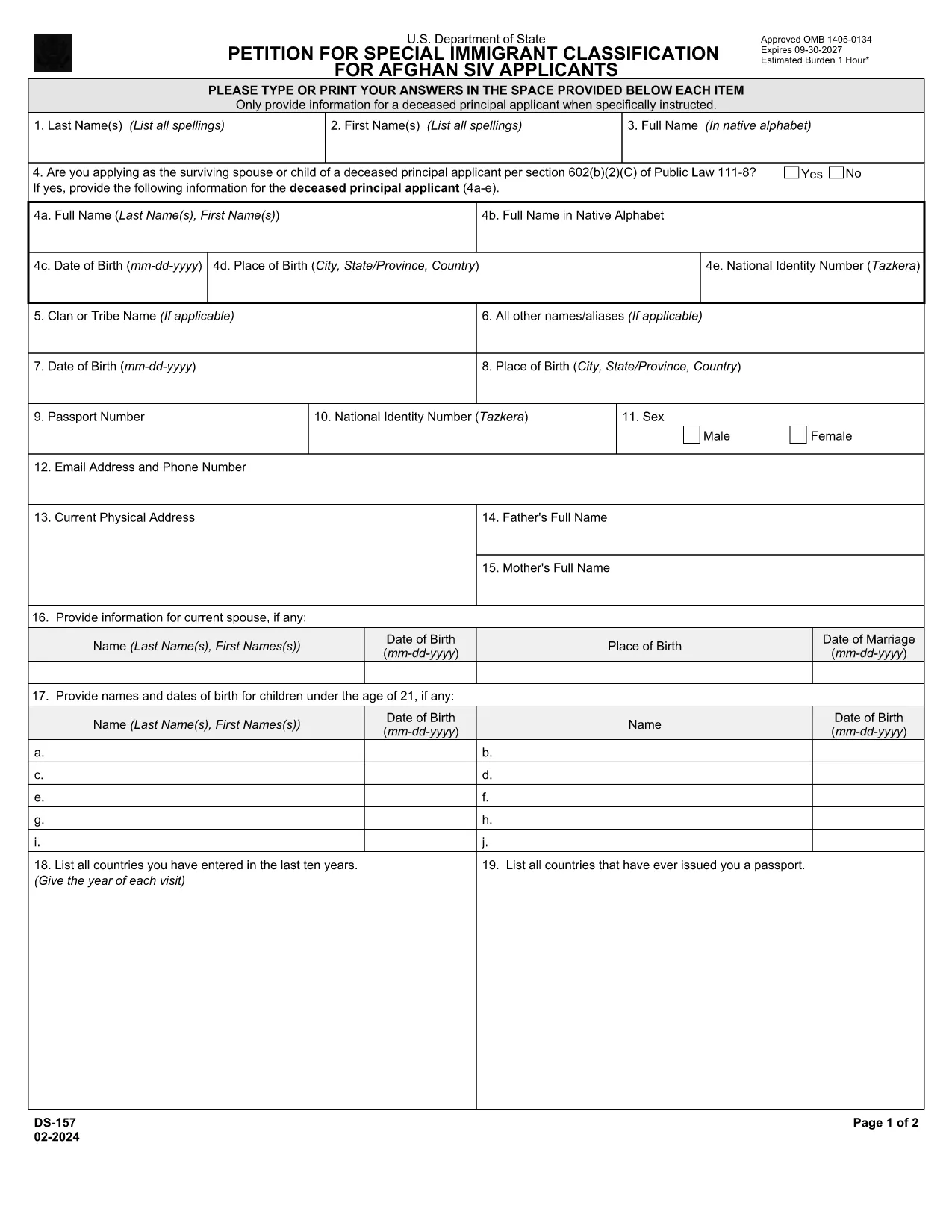
DS-157 Supplemental Nonimmigrant Visa Application – Fillable PDF

  1. Ngôn ngữ Tiếng Anh
  2. Quốc gia Hoa Kỳ
  3. Phòng bộ ngoại giao
  4. Hoạt động thị thực
DS-157 Supplemental Nonimmigrant Visa Application – Fillable PDF

The DS-157 (Supplemental Nonimmigrant Visa Application) is required for certain male visa applicants, especially Afghan Special Immigrant Visa (SIV) candidates. It collects detailed personal, employment, and travel information that supports the main DS-160 application.

What is the DS-157 Form?

Issued by the U.S. Department of State, the DS-157 is a supplemental questionnaire that must be submitted with your visa packet. It is a fillable PDF that can be completed electronically, printed, signed, and attached to your visa interview documents.

How to Fill the DS-157 Online with Formize

Formize provides a secure, browser‑based PDF filler so you never need to download, print, or scan the form. Follow these steps:

  • Click the **"Fill out this form"** button on this page.
  • Wait a few seconds while the Formize PDF Filler app loads.
  • Enter your information in the highlighted fields. Use the tab key or click to move between sections.
  • When finished, click **"Save & Download"** to get a copy you can print or email.
  • Sign the form with your finger (touchscreen) or type your signature, then download the completed PDF.

Common Mistakes to Avoid

  • Leaving fields blank – every question must be answered, even if the answer is “None” or “N/A”.
  • Incorrect dates – double‑check birth dates, travel dates, and employment periods.
  • Illegible signatures – use the built‑in e‑signature tool for a clear, legal signature.
  • Mismatched information – ensure details match those on your DS‑160 and supporting documents.

Where to Submit the Completed Form

Print the filled DS-157, sign it in ink if you printed a hard copy, and attach it to your visa interview packet. Submit the package to the U.S. Embassy or Consulate handling your case. Some posts now accept the PDF electronically; verify the specific instructions on your appointment notice.

Download the Official PDF

For reference or offline use, you can download the official, government‑issued PDF directly from the Department of State:

Download DS-157 PDF

Using Formize’s online filler saves you time, reduces errors, and eliminates the need for a scanner.

CÂU HỎI THƯỜNG GẶP
  • Who must complete the DS-157 form?

    All male non‑immigrant visa applicants between ages 16‑45, including Afghan SIV applicants, must submit a DS-157 in addition to the DS‑160.

  • Is the DS-157 form available in languages other than English?

    The official form is only provided in English. If you need translation assistance, you must provide an accurate English version for the U.S. Embassy.

  • Can I submit the DS-157 electronically?

    Some U.S. posts accept an electronic PDF, but most still require a printed, signed copy. Check the instructions on your appointment notice.

  • Do I need a notarized signature on the DS-157?

    No notarization is required. A regular signature (ink or e‑signature) is sufficient as long as it matches the signature on your other visa documents.

  • What happens if I make a mistake on the DS-157?

    Correct the error by crossing out the mistake neatly, writing the correct information, and initialing the change. If the mistake is extensive, download a fresh copy and refill the form.

  • How long is the DS-157 valid?

    The DS-157 is tied to a specific visa application. If your application is withdrawn or denied, you must obtain a new form for any future applications.

LÀM THẾ NÀO ĐỂ

Cách điền ds-157 miễn phí, trực tuyến trong 4 bước đơn giản:

  1. 1
    Open the Formize filler
    Click the "Fill out this form" button on the page. The Formize PDF Filler will open in a new tab.
  2. 2
    Enter your information
    Type directly into each highlighted field. Use the tab key or click to move to the next question.
  3. 3
    Add your signature
    Use the built‑in e‑signature tool to sign with your finger or mouse. The signature is legally binding.
  4. 4
    Save and download
    When all fields are complete, click "Save & Download" to get a copy of the filled PDF. Print it if a hard copy is required.
Định dạng ứng dụng PDF Filler
TRONG KHOẢNG

mẫu đơn thị thực

ds-157 là một trong những mẫu Visa là giấy tờ dùng để xin visa nhập cảnh nước ngoài. Thị thực là một tài liệu cho phép người nước ngoài nhập cảnh, lưu trú và đôi khi làm việc ở nước ngoài trong một khoảng thời gian nhất định. Các hình thức và yêu cầu chính xác để xin thị thực khác nhau tùy theo quốc gia và loại thị thực.

Các mẫu đơn thị thực thường yêu cầu thông tin cá nhân như tên, ngày sinh và thông tin hộ chiếu, cũng như thông tin về mục đích và thời gian của chuyến đi, điểm đến dự định và liệu người nộp đơn trước đó đã bị từ chối cấp thị thực hay bị trục xuất khỏi một quốc gia. Các biểu mẫu cũng có thể yêu cầu các tài liệu hỗ trợ như hộ chiếu, ảnh và bằng chứng hỗ trợ tài chính.

Tại Hoa Kỳ, các mẫu đơn xin thị thực phổ biến nhất là mẫu đơn DS-160 và DS-260. Mẫu DS-160 được sử dụng để xin thị thực không định cư, trong khi mẫu DS-260 được sử dụng để xin thị thực định cư. Các biểu mẫu này yêu cầu thông tin chi tiết về lịch sử cá nhân và du lịch của người nộp đơn, cũng như các tài liệu hỗ trợ như hộ chiếu, hành trình du lịch và hồ sơ tài chính.

Các quốc gia khác có thể có các yêu cầu và mẫu thị thực khác nhau, nhưng quy trình cơ bản thường bao gồm hoàn thành đơn xin thị thực, cung cấp tài liệu hỗ trợ và tham dự cuộc phỏng vấn với viên chức lãnh sự tại đại sứ quán hoặc lãnh sự quán Hoa Kỳ. Điều quan trọng cần lưu ý là quy trình xin thị thực có thể phức tạp và tốn thời gian, và các cá nhân xin thị thực nên tham khảo ý kiến ​​của luật sư nhập cư hoặc chuyên gia có trình độ khác để đảm bảo rằng tất cả các mẫu và yêu cầu cần thiết đều được đáp ứng.

ĐẶC TRƯNG

Trình điền PDF

Cách dễ nhất để điền vào các mẫu PDF trực tuyến

  • Nhanh chóng điền vào ds-157
    Bạn đang tìm cách điền nhanh ds-157 trực tuyến? Với trình điền biểu mẫu PDF miễn phí trực tuyến của chúng tôi, bạn sẽ biết cách chỉnh sửa và điền vào tài liệu pdf này trong vòng chưa đầy một phút.
  • Trình chỉnh sửa PDF trực tuyến dễ sử dụng
    Chán nản với việc in ra các tệp PDF để bạn có thể chỉnh sửa chúng trước khi quét lại và gửi lại? Chỉnh sửa tài liệu PDF trực tuyến miễn phí. Sử dụng trình chỉnh sửa pdf trực tuyến của chúng tôi để tiết kiệm thời gian và giấy.
  • Công cụ tuyệt vời, tất cả các nền tảng
    Bạn muốn biết cách điền ds-157 trên máy Mac hoặc có thể là cách sử dụng trình điền PDF miễn phí? Các công cụ PDF trực tuyến của chúng tôi hoạt động trên tất cả các nền tảng.
  • Lưu trữ tệp an toàn
    Các tệp "ds-157" đã hoàn thành được lưu trữ trong cơ sở dữ liệu bảo mật do dịch vụ lưu trữ Amazon Cloud quản lý. Bạn có thể xóa các tệp của mình khỏi hệ thống của chúng tôi bất cứ lúc nào. Trong mọi trường hợp, các tệp này sẽ tự động bị xóa sau 24 giờ.
  • Trò chuyện với ds-157
    Trò chuyện với "ds-157" trên Trò chuyện, một trợ lý đọc PDF miễn phí. Đặt câu hỏi và nhận câu trả lời từ "ds-157". Chỉ cần nhấp vào nút Trò chuyện với tài liệu ở trên.

Xóa phiên điền

Xóa phiên điền đã chọn? Trong trường hợp này, tiến độ của bạn trong việc hoàn thành biểu mẫu sẽ bị mất.

Xóa phiên chỉnh sửa

Xóa phiên chỉnh sửa đã chọn? Trong trường hợp này, tiến trình tạo và chỉnh sửa biểu mẫu của bạn sẽ bị mất.