Chọn ngôn ngữ

Virginia DMV CRD 93 Information Request Form (Fillable PDF)

  1. Quốc gia Hoa Kỳ
  2. Ngôn ngữ Tiếng Anh
  3. Hoạt động Bằng lái xe
  4. Tiểu bang Virginia
Virginia DMV CRD 93 Information Request Form (Fillable PDF)

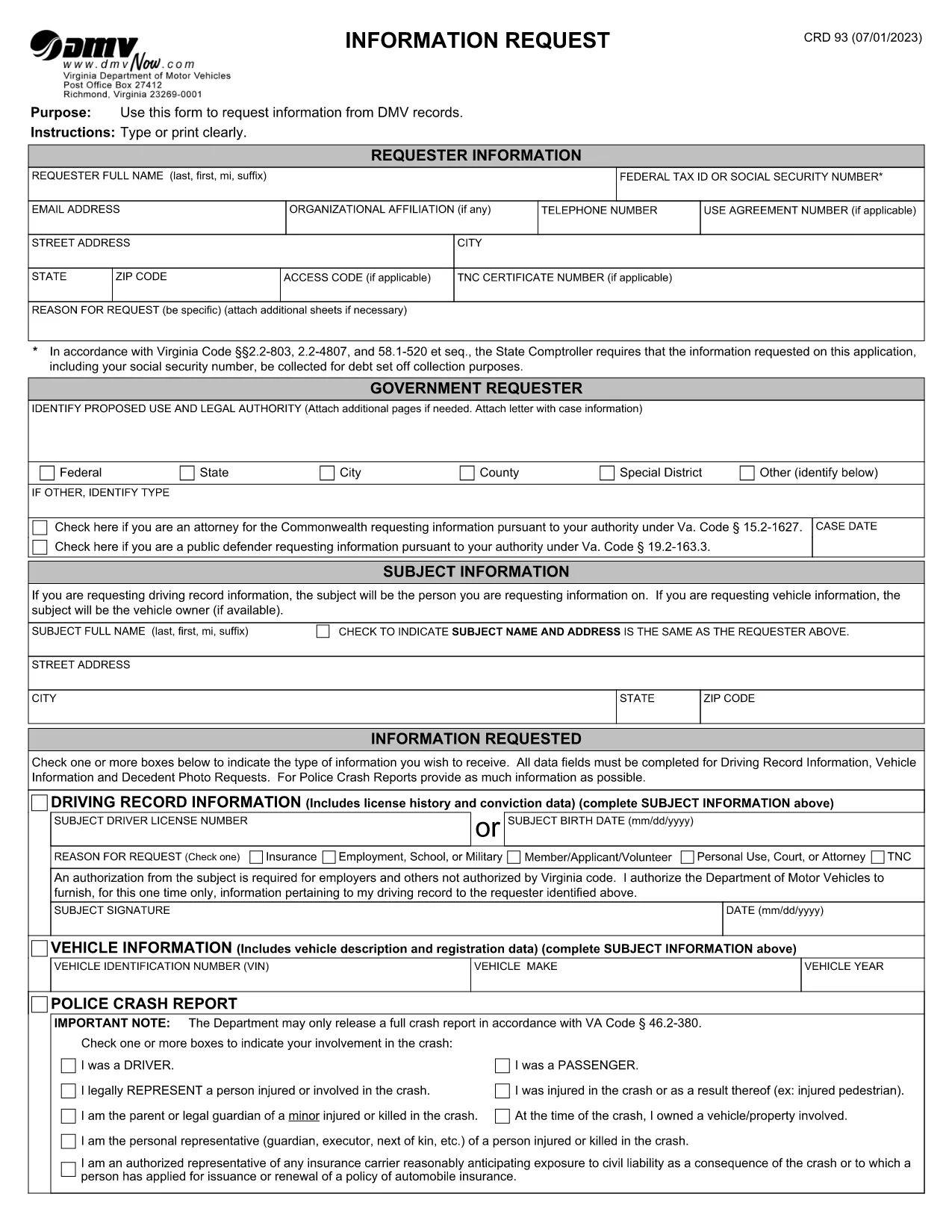
The CRD 93 is Virginia’s official Information Request form used to obtain driving records, vehicle data, crash reports, and other DMV‑maintained information. Traditionally you would print, fill, sign, and mail the form, but with Formize you can complete the same document entirely online – faster, error‑free, and fully fillable PDF ready.

What Is the CRD 93 Form?

Issued by the Virginia Department of Motor Vehicles (DMV), the CRD 93 allows individuals, businesses, and law‑enforcement agencies to request specific records such as:

  • Driver’s license history
  • Vehicle registration details
  • Police crash reports
  • Decedent photographs and other special‑request items

Because the form contains sensitive personal data, the DMV requires a clear statement of purpose and, in many cases, a fee.

How to Complete the CRD 93 Online with Formize

Instead of downloading, printing, and scanning, simply click the “Fill out this form” button below. Formize will load the official PDF into its secure PDF Filler app, letting you type, sign, and save directly in your browser.

Common Mistakes to Avoid

  • Leaving required fields blank: The DMV will reject incomplete requests.
  • Incorrect identification numbers: Double‑check Social Security or Tax ID numbers.
  • Vague reason for request: Provide a specific, lawful purpose (e.g., “court‑ordered driver‑record review”).
  • Missing signatures: Use the electronic signature tool; a handwritten signature on a printed copy is no longer required.

Where to Submit Your Request

After completing the form, download the signed PDF and mail it to:

Virginia Department of Motor Vehicles
Information Request Division
P.O. Box 27412
Richmond, VA 23269‑7412

Include any required fees (check or money order) as instructed on the last page of the form.

Download the Official Fillable PDF

Ready to start? Click the button below to open the official CRD 93 PDF in Formize’s filler.

Fill out this form

CÂU HỎI THƯỜNG GẶP
  • What is the purpose of the CRD 93 form?

    The CRD 93 is used to request specific DMV records in Virginia, such as driver histories, vehicle registrations, crash reports, and decedent photos.

  • Can I submit the CRD 93 electronically?

    Virginia DMV still requires a mailed PDF with any applicable fees, but you can complete the form electronically using Formize and then print or email the PDF to yourself for mailing.

  • Do I need a Virginia address to use this form?

    No. The form can be used by anyone who has a lawful reason to request the records, regardless of residency, as long as the request complies with Virginia law.

  • How long does it take to receive the requested records?

    Processing times vary. Standard requests typically take 10‑15 business days after the DMV receives your completed form and payment.

  • What fees are associated with a CRD 93 request?

    Fees depend on the type of record requested (e.g., driver history, crash report). The fee schedule is listed on the last page of the form.

  • Is a handwritten signature still required?

    No. An electronic signature created in the Formize PDF Filler satisfies the DMV’s signature requirement.

  • Can I request records for someone else?

    Yes, but you must provide a valid reason, proof of authority (e.g., power of attorney), and the subject’s identifying information.

  • What should I do if I make a mistake on the form?

    Because the PDF is fillable, you can edit any field before saving. If you’ve already downloaded the PDF, simply open it again in Formize, correct the error, and re‑save.

LÀM THẾ NÀO ĐỂ

Cách điền CRD 93 miễn phí, trực tuyến trong 5 bước đơn giản:

  1. 1
    Open the Fillable Form
    Click the “Fill out this form” button above. The official CRD 93 PDF loads instantly in Formize’s secure PDF Filler.
  2. 2
    Enter Your Information
    Type your name, Tax ID or Social Security Number, address, and detailed reason for the request directly into the fields.
  3. 3
    Add Subject Details
    Provide the driver’s license number, vehicle VIN, or other identifiers for the record you are requesting.
  4. 4
    Sign Electronically
    Use the built‑in signature tool to add a digital signature. No printer or scanner needed.
  5. 5
    Save and Submit
    Download the completed PDF, attach the required fee, and mail it to the Virginia DMV address shown on the form.
Định dạng ứng dụng PDF Filler
TRONG KHOẢNG

Mẫu đơn xin giấy phép lái xe

Ở hầu hết các quốc gia, bắt buộc phải có bằng lái xe trước khi bạn có thể lên đường. Nhận giấy phép lái xe là một cột mốc quan trọng đối với bất kỳ ai muốn lái xe ô tô.

CRD 93 là một trong các biểu mẫu Đơn xin cấp Giấy phép Lái ​​xe, là tài liệu được sử dụng để thu thập thông tin từ những người muốn đăng ký cấp giấy phép lái xe. Nó thường chứa các trường về tên, ngày sinh, số ID, thông tin liên hệ của người nộp đơn, cũng như lịch sử và kinh nghiệm bằng lái xe của họ.

ĐẶC TRƯNG

Trình điền PDF

Cách dễ nhất để điền vào các mẫu PDF trực tuyến

  • Nhanh chóng điền vào CRD 93
    Bạn đang tìm cách điền nhanh CRD 93 trực tuyến? Với trình điền biểu mẫu PDF miễn phí trực tuyến của chúng tôi, bạn sẽ biết cách chỉnh sửa và điền vào tài liệu pdf này trong vòng chưa đầy một phút.
  • Trình chỉnh sửa PDF trực tuyến dễ sử dụng
    Chán nản với việc in ra các tệp PDF để bạn có thể chỉnh sửa chúng trước khi quét lại và gửi lại? Chỉnh sửa tài liệu PDF trực tuyến miễn phí. Sử dụng trình chỉnh sửa pdf trực tuyến của chúng tôi để tiết kiệm thời gian và giấy.
  • Công cụ tuyệt vời, tất cả các nền tảng
    Bạn muốn biết cách điền CRD 93 trên máy Mac hoặc có thể là cách sử dụng trình điền PDF miễn phí? Các công cụ PDF trực tuyến của chúng tôi hoạt động trên tất cả các nền tảng.
  • Lưu trữ tệp an toàn
    Các tệp "CRD 93" đã hoàn thành được lưu trữ trong cơ sở dữ liệu bảo mật do dịch vụ lưu trữ Amazon Cloud quản lý. Bạn có thể xóa các tệp của mình khỏi hệ thống của chúng tôi bất cứ lúc nào. Trong mọi trường hợp, các tệp này sẽ tự động bị xóa sau 24 giờ.
  • Trò chuyện với CRD 93
    Trò chuyện với "CRD 93" trên Trò chuyện, một trợ lý đọc PDF miễn phí. Đặt câu hỏi và nhận câu trả lời từ "CRD 93". Chỉ cần nhấp vào nút Trò chuyện với tài liệu ở trên.

Xóa phiên điền

Xóa phiên điền đã chọn? Trong trường hợp này, tiến độ của bạn trong việc hoàn thành biểu mẫu sẽ bị mất.

Xóa phiên chỉnh sửa

Xóa phiên chỉnh sửa đã chọn? Trong trường hợp này, tiến trình tạo và chỉnh sửa biểu mẫu của bạn sẽ bị mất.