
Chọn ngôn ngữ

Virginia DL 569 Emergency Contact Application (Fillable PDF)

  1. Quốc gia Hoa Kỳ
  2. Ngôn ngữ Tiếng Anh
  3. Hoạt động Bằng lái xe
  4. Tiểu bang Virginia
Virginia DL 569 Emergency Contact Application (Fillable PDF)

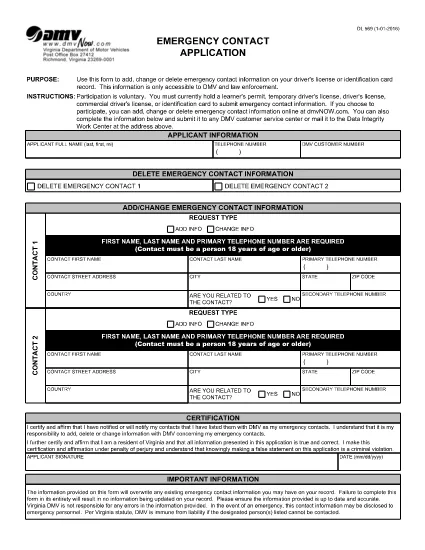
The DL 569 is the Virginia Department of Motor Vehicles (DMV) Emergency Contact Application. It lets you add, change, or delete emergency contact information linked to your driver’s license or state ID. Keeping this information up‑to‑date can help law enforcement and DMV staff reach your designated contacts quickly in an emergency.

What Is the DL 569 Form?

This form is a short, printable PDF that captures:

  • Primary and secondary emergency contacts
  • Relationship to you
  • Phone numbers and mailing address
  • Signature and date

Because it’s a fillable PDF, you can complete it directly in your browser without needing special software.

How to Fill Out the DL 569 Online

Instead of downloading the PDF and opening a separate editor, simply click the “Fill out this form” button on this page. The Formize PDF Filler will load instantly, allowing you to type, select, and sign the form online.

  1. Click Fill out this form below.
  2. The Formize PDF Filler app opens in a new tab.
  3. Enter each field carefully – the form will highlight required sections.
  4. Save your progress at any time with the Save button.
  5. When finished, click Submit to download the completed PDF.

Common Mistakes to Avoid

  • Leaving a required field blank – the filler will block submission.
  • Entering an incorrect phone format (use 10‑digit numbers without dashes).
  • Forgetting to sign and date the form.
  • Using a non‑Virginia address for a Virginia driver’s license.

Where to Submit Your Completed Form

After you download the completed PDF, you can:

  • Mail it to your local Virginia DMV office.
  • Drop it off in person at any DMV service center.
  • Upload it via the Virginia DMV online portal if you have an account.

Make sure to keep a copy for your records.

CÂU HỎI THƯỜNG GẶP
  • Do I need Adobe Acrobat to fill out DL 569?

    No. The Formize PDF Filler works in any modern browser, so you can complete the form without installing additional software.

  • Can I edit the form after I download it?

    Yes, but you’ll need a PDF editor. To avoid extra steps, finish all edits in the online filler before downloading.

  • Is there a fee to submit the DL 569?

    No. The Emergency Contact Application is free to complete and submit.

  • How long does the DMV keep my emergency contact information?

    The DMV retains the information as long as your driver’s license or ID is active. Update the form whenever contacts change.

  • What if I make a mistake on the form?

    Simply reopen the fillable PDF, correct the error, and download a new version before submitting.

  • Can I submit the form electronically?

    Yes, if you have a Virginia DMV online account you can upload the completed PDF directly through the portal.

  • Do I need to provide both a primary and secondary contact?

    Providing a secondary contact is optional but recommended for added safety.

  • Is the DL 569 accepted for non‑Virginia licenses?

    The form is specific to Virginia driver’s licenses and state IDs only.

LÀM THẾ NÀO ĐỂ

Cách điền DL 569 miễn phí, trực tuyến trong 5 bước đơn giản:

  1. 1
    Open the Fillable Form
    Click the "Fill out this form" button below. The Formize PDF Filler loads instantly in a new browser tab.
  2. 2
    Enter Your Information
    Type your emergency contacts, relationship, phone numbers, and address directly into the highlighted fields.
  3. 3
    Save and Review
    Use the Save button to keep a draft. Review each entry for accuracy before finalizing.
  4. 4
    Submit and Download
    When all fields are completed, click Submit to generate a finished PDF. Download and keep a copy for your records.
  5. 5
    Send to the DMV
    Mail, drop off, or upload the completed PDF to your nearest Virginia DMV office.
Định dạng ứng dụng PDF Filler
TRONG KHOẢNG

Mẫu đơn xin giấy phép lái xe

Ở hầu hết các quốc gia, bắt buộc phải có bằng lái xe trước khi bạn có thể lên đường. Nhận giấy phép lái xe là một cột mốc quan trọng đối với bất kỳ ai muốn lái xe ô tô.

DL 569 là một trong các biểu mẫu Đơn xin cấp Giấy phép Lái ​​xe, là tài liệu được sử dụng để thu thập thông tin từ những người muốn đăng ký cấp giấy phép lái xe. Nó thường chứa các trường về tên, ngày sinh, số ID, thông tin liên hệ của người nộp đơn, cũng như lịch sử và kinh nghiệm bằng lái xe của họ.

ĐẶC TRƯNG

Trình điền PDF

Cách dễ nhất để điền vào các mẫu PDF trực tuyến

  • Nhanh chóng điền vào DL 569
    Bạn đang tìm cách điền nhanh DL 569 trực tuyến? Với trình điền biểu mẫu PDF miễn phí trực tuyến của chúng tôi, bạn sẽ biết cách chỉnh sửa và điền vào tài liệu pdf này trong vòng chưa đầy một phút.
  • Trình chỉnh sửa PDF trực tuyến dễ sử dụng
    Chán nản với việc in ra các tệp PDF để bạn có thể chỉnh sửa chúng trước khi quét lại và gửi lại? Chỉnh sửa tài liệu PDF trực tuyến miễn phí. Sử dụng trình chỉnh sửa pdf trực tuyến của chúng tôi để tiết kiệm thời gian và giấy.
  • Công cụ tuyệt vời, tất cả các nền tảng
    Bạn muốn biết cách điền DL 569 trên máy Mac hoặc có thể là cách sử dụng trình điền PDF miễn phí? Các công cụ PDF trực tuyến của chúng tôi hoạt động trên tất cả các nền tảng.
  • Lưu trữ tệp an toàn
    Các tệp "DL 569" đã hoàn thành được lưu trữ trong cơ sở dữ liệu bảo mật do dịch vụ lưu trữ Amazon Cloud quản lý. Bạn có thể xóa các tệp của mình khỏi hệ thống của chúng tôi bất cứ lúc nào. Trong mọi trường hợp, các tệp này sẽ tự động bị xóa sau 24 giờ.
  • Trò chuyện với DL 569
    Trò chuyện với "DL 569" trên Trò chuyện, một trợ lý đọc PDF miễn phí. Đặt câu hỏi và nhận câu trả lời từ "DL 569". Chỉ cần nhấp vào nút Trò chuyện với tài liệu ở trên.

Xóa phiên điền

Xóa phiên điền đã chọn? Trong trường hợp này, tiến độ của bạn trong việc hoàn thành biểu mẫu sẽ bị mất.

Xóa phiên chỉnh sửa

Xóa phiên chỉnh sửa đã chọn? Trong trường hợp này, tiến trình tạo và chỉnh sửa biểu mẫu của bạn sẽ bị mất.