
Chọn ngôn ngữ

2026 IRS W‑4 Employee Tax Withholding Form (Fillable PDF)

  1. Quốc gia Hoa Kỳ
  2. Ngôn ngữ Tiếng Anh
  3. Hoạt động thuế
  4. Phòng IRS
2026 IRS W‑4 Employee Tax Withholding Form (Fillable PDF)

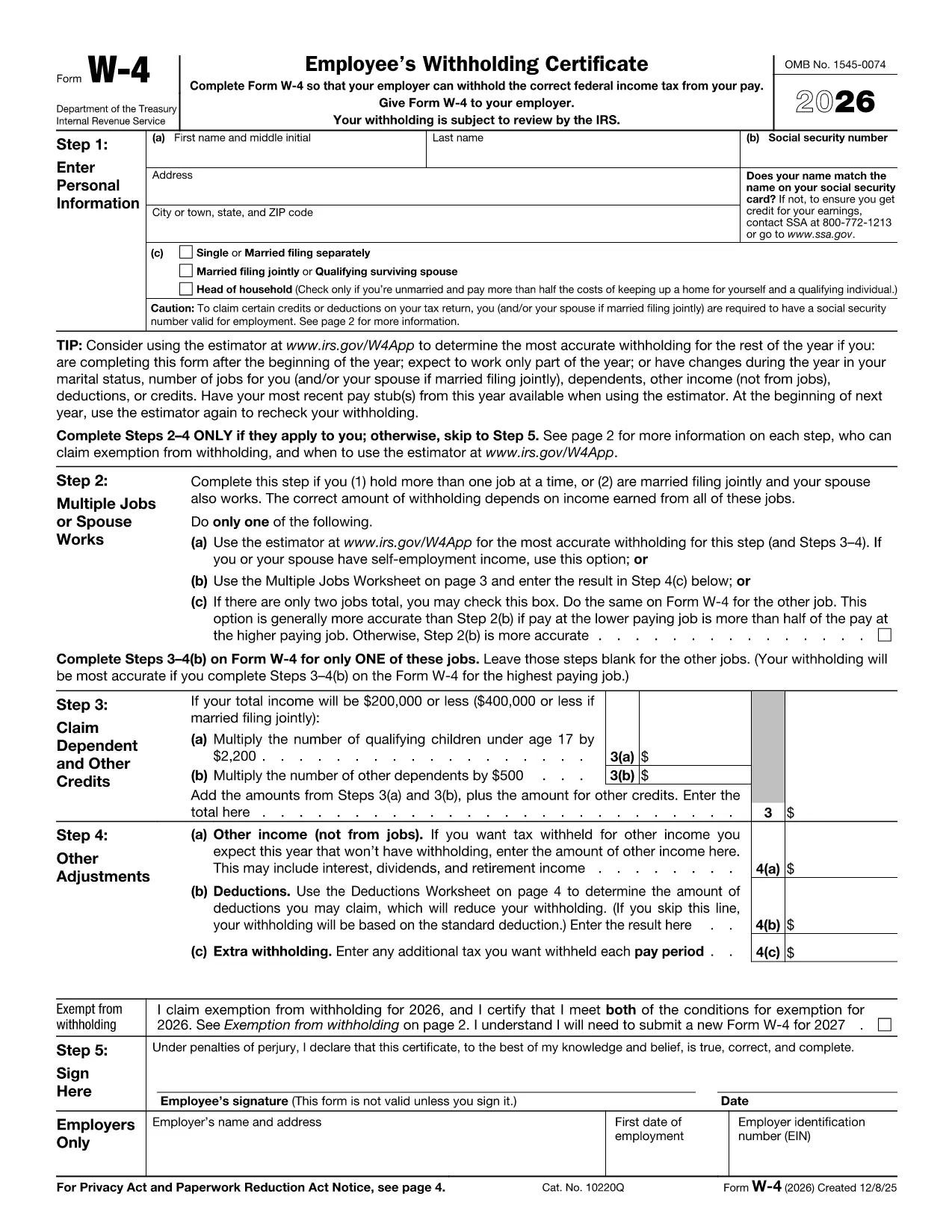
The 2026 IRS W‑4 is the official employee tax‑withholding form you use when starting a new job or when your personal or financial situation changes. Filling it out correctly ensures the right amount of federal income tax is taken from each paycheck.

Why You Need the 2026 W‑4 Form

Employers must have a current W‑4 on file for every employee. An up‑to‑date form helps you avoid over‑withholding (which reduces your take‑home pay) or under‑withholding (which could lead to a tax bill at filing time).

How to Fill Out the 2026 W‑4 Online

Instead of downloading the PDF and editing it with a separate program, simply click the "Fill out this form" button on this page. The Formize PDF Filler app will load directly in your browser, letting you complete the form instantly.

Common Mistakes to Avoid

  • Leaving the “Step 4 (Other Adjustments)” section blank when you have extra income or deductions.
  • Signing and dating the form in the wrong place.
  • Using an old version of the W‑4 (always use the 2026 edition).

Submit and Keep Records

After you finish, click Submit in the Formize app. Your completed PDF can be saved to your device and a copy should be kept for your records. Give the signed form to your employer’s payroll department.

Need more help? Review the FAQs below or consult the IRS Publication 505 for detailed withholding guidance.

CÂU HỎI THƯỜNG GẶP
  • When should I submit a new W‑4?

    Submit a new W‑4 whenever your filing status, number of dependents, or other tax‑affecting circumstances change, such as a marriage, birth, or significant raise.

  • Do I need to file the W‑4 with the IRS?

    No. The W‑4 is given only to your employer. The IRS receives the information indirectly through your employer’s payroll reports.

  • Can I edit a submitted W‑4?

    You cannot edit a submitted form, but you can complete a new W‑4 and give it to your employer to replace the old one.

  • Is the 2026 W‑4 available in paper form?

    Yes, you can request a paper copy from your employer or download the PDF and print it, but the online Formize filler offers a faster, error‑checking experience.

  • What if I make a mistake after submitting?

    Complete a new W‑4 with the correct information and submit it to your employer as soon as possible. This will update future withholdings.

  • Where can I find more detailed guidance?

    Refer to IRS Publication 505, "Tax Withholding and Estimated Tax," for comprehensive instructions on how the W‑4 impacts your tax liability.

LÀM THẾ NÀO ĐỂ

Cách điền 2026 W-4 miễn phí, trực tuyến trong 4 bước đơn giản:

  1. 1
    Open the Fillable Form
    Click the "Fill out this form" button on the page. The Formize PDF Filler loads directly in your browser.
  2. 2
    Complete Each Section
    Enter your personal information, filing status, dependents, and any extra withholding adjustments as prompted.
  3. 3
    Review for Accuracy
    Double‑check all entries, especially Social Security Number and signature fields, to avoid processing delays.
  4. 4
    Save and Submit
    Save the completed PDF to your device, then submit a copy to your employer’s payroll department.
Định dạng ứng dụng PDF Filler
TRONG KHOẢNG

Đơn thuế

2026 W-4 là một trong những Biểu mẫu khai thuế là văn bản dùng để khai báo các thông tin liên quan đến thuế với cơ quan thuế liên quan. Có nhiều loại biểu mẫu thuế khác nhau, bao gồm biểu mẫu thuế liên bang, tiểu bang và địa phương, có thể khác nhau tùy thuộc vào hoàn cảnh và địa điểm của người nộp thuế.

ĐẶC TRƯNG

Trình điền PDF

Cách dễ nhất để điền vào các mẫu PDF trực tuyến

  • Nhanh chóng điền vào 2026 W-4
    Bạn đang tìm cách điền nhanh 2026 W-4 trực tuyến? Với trình điền biểu mẫu PDF miễn phí trực tuyến của chúng tôi, bạn sẽ biết cách chỉnh sửa và điền vào tài liệu pdf này trong vòng chưa đầy một phút.
  • Trình chỉnh sửa PDF trực tuyến dễ sử dụng
    Chán nản với việc in ra các tệp PDF để bạn có thể chỉnh sửa chúng trước khi quét lại và gửi lại? Chỉnh sửa tài liệu PDF trực tuyến miễn phí. Sử dụng trình chỉnh sửa pdf trực tuyến của chúng tôi để tiết kiệm thời gian và giấy.
  • Công cụ tuyệt vời, tất cả các nền tảng
    Bạn muốn biết cách điền 2026 W-4 trên máy Mac hoặc có thể là cách sử dụng trình điền PDF miễn phí? Các công cụ PDF trực tuyến của chúng tôi hoạt động trên tất cả các nền tảng.
  • Lưu trữ tệp an toàn
    Các tệp "2026 W-4" đã hoàn thành được lưu trữ trong cơ sở dữ liệu bảo mật do dịch vụ lưu trữ Amazon Cloud quản lý. Bạn có thể xóa các tệp của mình khỏi hệ thống của chúng tôi bất cứ lúc nào. Trong mọi trường hợp, các tệp này sẽ tự động bị xóa sau 24 giờ.
  • Trò chuyện với 2026 W-4
    Trò chuyện với "2026 W-4" trên Trò chuyện, một trợ lý đọc PDF miễn phí. Đặt câu hỏi và nhận câu trả lời từ "2026 W-4". Chỉ cần nhấp vào nút Trò chuyện với tài liệu ở trên.

Xóa phiên điền

Xóa phiên điền đã chọn? Trong trường hợp này, tiến độ của bạn trong việc hoàn thành biểu mẫu sẽ bị mất.

Xóa phiên chỉnh sửa

Xóa phiên chỉnh sửa đã chọn? Trong trường hợp này, tiến trình tạo và chỉnh sửa biểu mẫu của bạn sẽ bị mất.