
Chọn ngôn ngữ

IRS Form 15110 – Fillable PDF (Additional Child Tax Credit)

  1. Quốc gia Hoa Kỳ
  2. Ngôn ngữ Tiếng Anh
  3. Hoạt động thuế
  4. Phòng IRS
IRS Form 15110 – Fillable PDF (Additional Child Tax Credit)

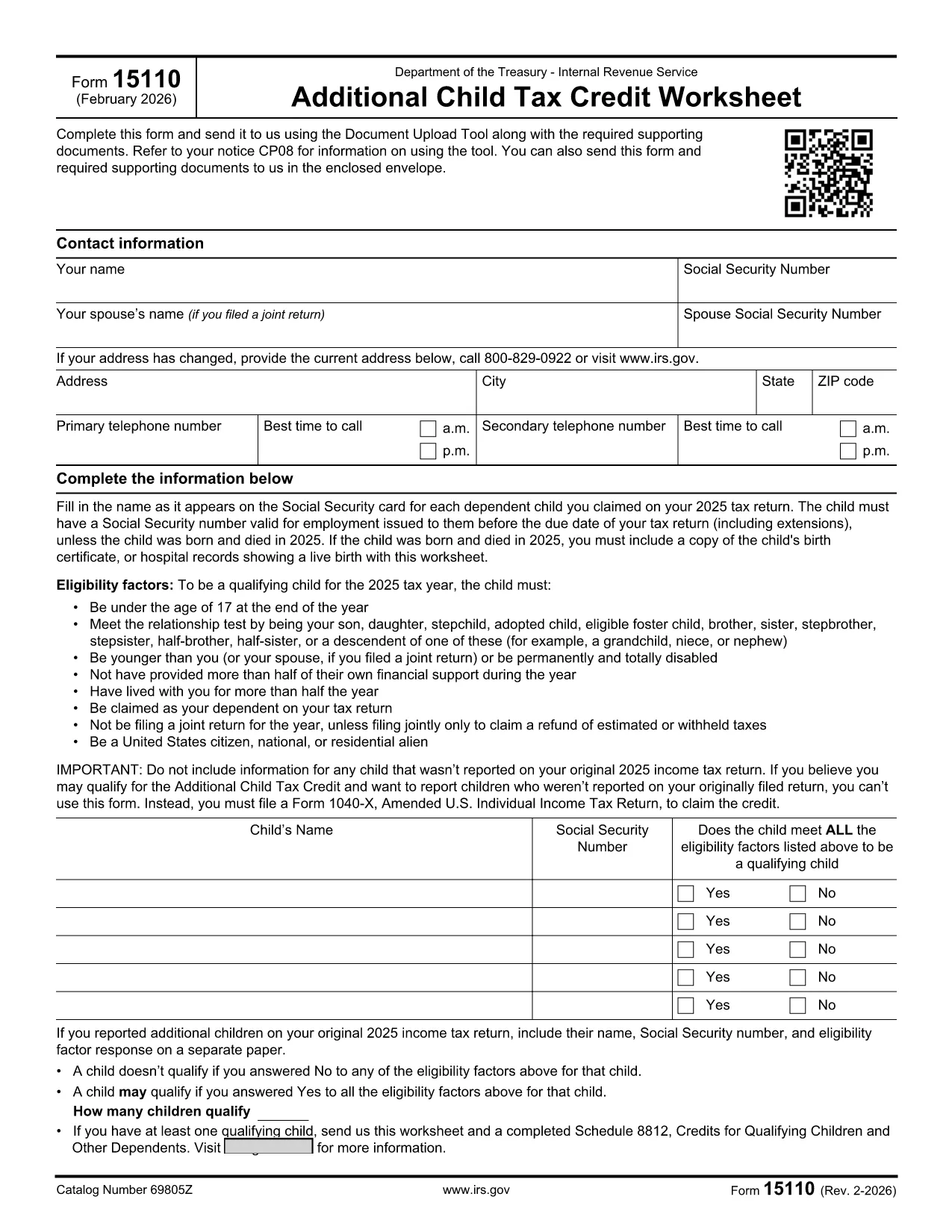
Form 15110 is the Additional Child Tax Credit Worksheet the IRS sends when you receive a CP08 notice. It lets you claim any refundable portion of the child tax credit that wasn’t captured on your original return.

What Is Form 15110 and When Do You Need It?

This one‑page worksheet collects:

  • Taxpayer contact information
  • Social Security numbers for you, your spouse, and each qualifying child
  • Eligibility details for each child (age, relationship, residency, etc.)

If the IRS has told you to complete Form 15110, you must return it with any required supporting documents to claim the additional credit.

How to Complete Form 15110 Online with Formize

Instead of printing, printing, and scanning, use our Formize PDF Filler – a secure, browser‑based editor that works on any device.

  1. Click the "Fill out this form" button on this page.
  2. Wait a few seconds while the Formize PDF Filler app loads the fillable PDF.
  3. Enter your information exactly as it appears on your tax return.
  4. Review each field for accuracy; the filler highlights required fields.
  5. When you’re done, click Save & Download to get a completed PDF you can attach to your CP08 response.

Common Mistakes & Tips for a Smooth Submission

  • Social Security numbers: Double‑check every SSN. A missing or transposed digit will delay processing.
  • Child eligibility: Verify that each child is under 17, lives with you > ½ year, and is a U.S. citizen or resident.
  • Address changes: Use the most recent address on your last filed return; update it in the form if needed.
  • Signature: The fillable PDF allows you to type a digital signature. Make sure it’s legible.
  • Supporting documents: Attach any required proof (e.g., birth certificates) as separate PDFs when you upload your response.

Download the Official Fillable PDF

Need the original PDF for offline use? Click the link below to download the IRS‑provided fillable version.

Download IRS Form 15110 (PDF)

CÂU HỎI THƯỜNG GẶP
  • Do I need a special program to open Form 15110?

    No. With Formize you can fill out the form directly in your web browser. If you prefer, you can also download the PDF and use any standard PDF reader.

  • What is a CP08 notice?

    A CP08 notice is sent by the IRS when they need additional information to process your claim for the Additional Child Tax Credit. The notice includes Form 15110.

  • Can I use an ITIN instead of an SSN for my children?

    No. For the child tax credit and additional child tax credit, each qualifying child must have a Social Security Number before the tax return due date.

  • How many children can I list on Form 15110?

    You can list up to three qualifying children on a single Form 15110 worksheet. If you have more, you must submit additional worksheets.

  • What happens if I make a mistake on the form?

    Errors can delay your refund. Review the form carefully, use the built‑in validation in Formize, and correct any mistakes before submitting.

  • Is there a filing deadline for Form 15110?

    You should return the completed Form 15110 as soon as possible after receiving the CP08 notice. Late submissions may result in a reduced credit.

  • Do I need to attach proof of residency for each child?

    Typically the IRS only requires the worksheet, but if they request additional documentation, you may need to provide school records, medical bills, or a lease showing the child lived with you > ½ year.

LÀM THẾ NÀO ĐỂ

Cách điền IRS Form 15110 miễn phí, trực tuyến trong 4 bước đơn giản:

  1. 1
    Open the Fillable Form
    Click the "Fill out this form" button on the page. The Formize PDF Filler will load the Form 15110 directly in your browser.
  2. 2
    Enter Your Information
    Fill in all required fields—name, SSN, address, and each child's details. Required fields are highlighted in red.
  3. 3
    Review and Save
    Double‑check every entry, then click "Save & Download" to get a completed PDF you can attach to your CP08 response.
  4. 4
    Submit to the IRS
    Upload the completed PDF (and any supporting documents) using the IRS Document Upload Tool or mail it in the envelope provided with the notice.
Định dạng ứng dụng PDF Filler
TRONG KHOẢNG

Biểu mẫu thuế liên bang

IRS Form 15110 là một trong những biểu mẫu thuế Liên bang là tài liệu dùng để báo cáo và nộp thuế thu nhập liên bang với Sở Thuế vụ (IRS) tại Hoa Kỳ. Những biểu mẫu này được các cá nhân, doanh nghiệp và tổ chức sử dụng để báo cáo thu nhập, các khoản khấu trừ và thông tin liên quan khác cần thiết để tính nghĩa vụ thuế liên bang của họ.

Biểu mẫu thuế liên bang được sử dụng phổ biến nhất là Biểu mẫu 1040, được cá nhân nộp thuế sử dụng để báo cáo thuế thu nhập cá nhân của họ. Các biểu mẫu thường được sử dụng khác bao gồm Biểu mẫu 1065 dành cho quan hệ đối tác, Biểu mẫu 1120 dành cho các công ty và Mẫu 990 dành cho các tổ chức được miễn thuế.

Các biểu mẫu thuế liên bang thường yêu cầu người nộp thuế báo cáo nhiều nguồn thu nhập khác nhau, chẳng hạn như tiền lương, tiền lương và tiền boa, cũng như thu nhập từ đầu tư, tài sản cho thuê và các nguồn khác. Các biểu mẫu này cũng cho phép người nộp thuế yêu cầu các khoản khấu trừ và tín dụng cho các chi phí khác nhau, chẳng hạn như đóng góp từ thiện, lãi suất thế chấp và chi phí chăm sóc sức khỏe.

Điều quan trọng là phải nộp các biểu mẫu thuế liên bang một cách chính xác và đúng hạn, vì nếu không làm như vậy có thể bị IRS phạt và tính lãi.

ĐẶC TRƯNG

Trình điền PDF

Cách dễ nhất để điền vào các mẫu PDF trực tuyến

  • Nhanh chóng điền vào IRS Form 15110
    Bạn đang tìm cách điền nhanh IRS Form 15110 trực tuyến? Với trình điền biểu mẫu PDF miễn phí trực tuyến của chúng tôi, bạn sẽ biết cách chỉnh sửa và điền vào tài liệu pdf này trong vòng chưa đầy một phút.
  • Trình chỉnh sửa PDF trực tuyến dễ sử dụng
    Chán nản với việc in ra các tệp PDF để bạn có thể chỉnh sửa chúng trước khi quét lại và gửi lại? Chỉnh sửa tài liệu PDF trực tuyến miễn phí. Sử dụng trình chỉnh sửa pdf trực tuyến của chúng tôi để tiết kiệm thời gian và giấy.
  • Công cụ tuyệt vời, tất cả các nền tảng
    Bạn muốn biết cách điền IRS Form 15110 trên máy Mac hoặc có thể là cách sử dụng trình điền PDF miễn phí? Các công cụ PDF trực tuyến của chúng tôi hoạt động trên tất cả các nền tảng.
  • Lưu trữ tệp an toàn
    Các tệp "IRS Form 15110" đã hoàn thành được lưu trữ trong cơ sở dữ liệu bảo mật do dịch vụ lưu trữ Amazon Cloud quản lý. Bạn có thể xóa các tệp của mình khỏi hệ thống của chúng tôi bất cứ lúc nào. Trong mọi trường hợp, các tệp này sẽ tự động bị xóa sau 24 giờ.
  • Trò chuyện với IRS Form 15110
    Trò chuyện với "IRS Form 15110" trên Trò chuyện, một trợ lý đọc PDF miễn phí. Đặt câu hỏi và nhận câu trả lời từ "IRS Form 15110". Chỉ cần nhấp vào nút Trò chuyện với tài liệu ở trên.

Xóa phiên điền

Xóa phiên điền đã chọn? Trong trường hợp này, tiến độ của bạn trong việc hoàn thành biểu mẫu sẽ bị mất.

Xóa phiên chỉnh sửa

Xóa phiên chỉnh sửa đã chọn? Trong trường hợp này, tiến trình tạo và chỉnh sửa biểu mẫu của bạn sẽ bị mất.