
Chọn ngôn ngữ

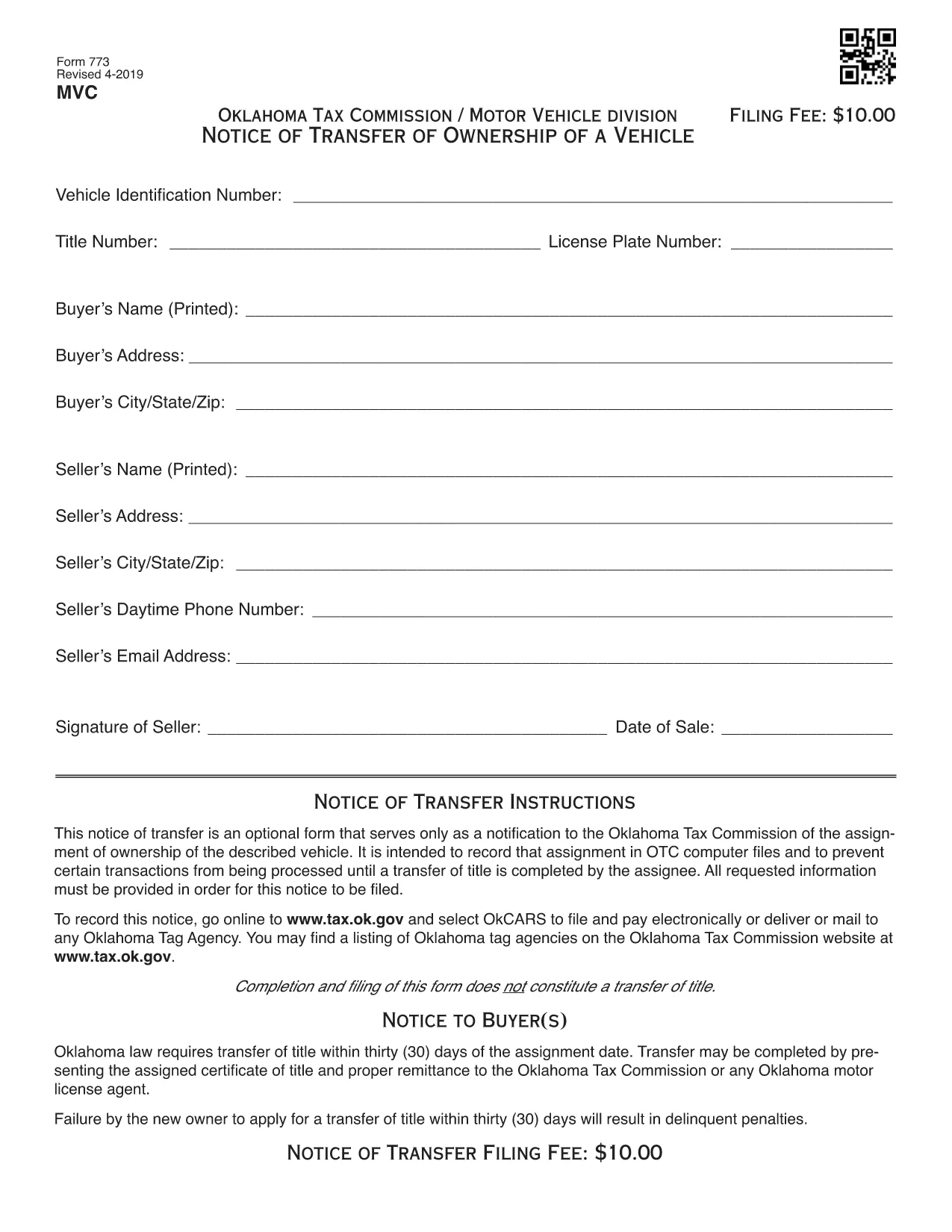
VSD 773 Vehicle Transfer Notice – Fillable PDF

  1. Ngôn ngữ Tiếng Anh
  2. Quốc gia Hoa Kỳ
  3. Hoạt động Đăng ký xe
  4. Phòng Oklahoma Tax Commission
VSD 773 Vehicle Transfer Notice – Fillable PDF

The VSD 773 is Oklahoma’s official Notice of Transfer form. It notifies the Oklahoma Tax Commission of a change in vehicle ownership and helps keep the state’s title records accurate. Whether you’re selling a car, gifting a vehicle, or transferring a title after a divorce, the VSD 773 is required before the new owner can register the vehicle.

Our page provides a Fill out this form button that launches the Formize PDF Filler app. The filler works directly in your browser—no download, no printing, no scanning.

What Is the VSD 773 Form?

The VSD 773 captures essential details such as the seller’s and buyer’s names, vehicle identification number (VIN), license plate, sale price, and odometer reading. Once submitted, the Oklahoma Tax Commission updates its database, preventing future title‑related issues.

How to Complete the VSD 773 Online

Follow these simple steps:

  1. Click the Fill out this form button above.
  2. The Formize PDF Filler loads instantly in a new tab.
  3. Enter the required information in each fillable field.
  4. Review the data for accuracy and click Save & Download to get a completed PDF.
  5. Print the completed form (if required) and submit it to your local Oklahoma Tax Commission office or mail it as instructed.

Common Mistakes to Avoid

  • Incorrect VIN: Double‑check the 17‑character VIN; a single typo can delay the title transfer.
  • Missing Odometer Reading: Oklahoma law requires the current mileage; leaving it blank may cause the form to be rejected.
  • Unsigned Sections: Both buyer and seller must sign the form. The PDF filler lets you add a digital signature, but some offices still require a handwritten one.
  • Wrong Sale Price: Enter the actual sale price; under‑reporting can lead to tax penalties.

Where to Submit the Completed Form

After completing the VSD 773, you can:

  • Visit any Oklahoma Tax Commission office in person.
  • Mail the form to the address on the Oklahoma Tax Commission website.
  • Include it with your vehicle registration renewal packet.

For the latest submission guidelines, always check the Oklahoma Tax Commission website.

CÂU HỎI THƯỜNG GẶP
  • What is the purpose of the VSD 773 form?

    The VSD 773 notifies the Oklahoma Tax Commission of a change in vehicle ownership, ensuring the title records are updated.

  • Can I submit the VSD 773 electronically?

    Most Oklahoma Tax Commission offices require a printed copy, but you can fill it out electronically with Formize and then print the completed PDF.

  • Do I need a notary for the VSD 773?

    A notary is not required for the VSD 773, but both the buyer and seller must sign the form.

  • How long does it take for the title to update after submitting the VSD 773?

    Processing usually takes 5‑7 business days once the form is received and all information is verified.

  • What happens if I enter the wrong VIN?

    An incorrect VIN will cause the title transfer to be rejected, and you’ll need to submit a corrected VSD 773.

  • Is there a fee to file the VSD 773?

    There is no separate fee for the VSD 773 itself, but title transfer fees apply when you register the vehicle in the new owner's name.

  • Can I use the VSD 773 for a gifted vehicle?

    Yes, the form is used for sales, gifts, inheritances, and any transfer of ownership.

  • Where can I find the latest version of the VSD 773?

    The most recent version is available for download on this page and is hosted by the Oklahoma Tax Commission.

LÀM THẾ NÀO ĐỂ

Cách điền VSD 773 miễn phí, trực tuyến trong 5 bước đơn giản:

  1. 1
    Open the Fillable Form
    Click the “Fill out this form” button on the page. The Formize PDF Filler will load in your browser instantly.
  2. 2
    Enter Your Information
    Type in all required fields: seller and buyer details, VIN, license plate, sale price, and odometer reading.
  3. 3
    Review & Sign
    Double‑check each entry for accuracy. Add a digital signature if your local office accepts it.
  4. 4
    Save the Completed PDF
    Click “Save & Download” to store the filled‑out VSD 773 on your device.
  5. 5
    Submit the Form
    Print the PDF (if needed) and deliver it to an Oklahoma Tax Commission office or mail it according to the instructions.
Định dạng ứng dụng PDF Filler
TRONG KHOẢNG

Mẫu đăng ký xe

Nếu bạn sở hữu hoặc thuê một phương tiện cơ giới, xe kéo hoặc thuyền, bạn phải đáp ứng một số nghĩa vụ để giữ cho phương tiện của bạn được đăng ký hợp pháp và an toàn.

VSD 773 là một trong những biểu mẫu Đăng ký phương tiện là tài liệu được sử dụng để đăng ký phương tiện cơ giới với cơ quan nhà nước hoặc cấp tỉnh có liên quan. Những biểu mẫu này thường được yêu cầu khi một người mua một chiếc xe mới hoặc đã qua sử dụng hoặc khi họ chuyển đến một tiểu bang hoặc tỉnh mới với một chiếc xe.

Các yêu cầu và biểu mẫu chính xác cần thiết để đăng ký xe có thể khác nhau tùy theo địa điểm, nhưng nhìn chung, quy trình bao gồm việc cung cấp thông tin về xe, chủ sở hữu và bất kỳ quyền sở hữu nào đối với xe.

Sau khi nộp các mẫu đăng ký và lệ phí, chính quyền tiểu bang hoặc cấp tỉnh sẽ cấp giấy chứng nhận đăng ký hoặc biển số cho chủ sở hữu phương tiện. Việc đăng ký này cho phép phương tiện được vận hành hợp pháp trên đường công cộng và đường cao tốc.

ĐẶC TRƯNG

Trình điền PDF

Cách dễ nhất để điền vào các mẫu PDF trực tuyến

  • Nhanh chóng điền vào VSD 773
    Bạn đang tìm cách điền nhanh VSD 773 trực tuyến? Với trình điền biểu mẫu PDF miễn phí trực tuyến của chúng tôi, bạn sẽ biết cách chỉnh sửa và điền vào tài liệu pdf này trong vòng chưa đầy một phút.
  • Trình chỉnh sửa PDF trực tuyến dễ sử dụng
    Chán nản với việc in ra các tệp PDF để bạn có thể chỉnh sửa chúng trước khi quét lại và gửi lại? Chỉnh sửa tài liệu PDF trực tuyến miễn phí. Sử dụng trình chỉnh sửa pdf trực tuyến của chúng tôi để tiết kiệm thời gian và giấy.
  • Công cụ tuyệt vời, tất cả các nền tảng
    Bạn muốn biết cách điền VSD 773 trên máy Mac hoặc có thể là cách sử dụng trình điền PDF miễn phí? Các công cụ PDF trực tuyến của chúng tôi hoạt động trên tất cả các nền tảng.
  • Lưu trữ tệp an toàn
    Các tệp "VSD 773" đã hoàn thành được lưu trữ trong cơ sở dữ liệu bảo mật do dịch vụ lưu trữ Amazon Cloud quản lý. Bạn có thể xóa các tệp của mình khỏi hệ thống của chúng tôi bất cứ lúc nào. Trong mọi trường hợp, các tệp này sẽ tự động bị xóa sau 24 giờ.
  • Trò chuyện với VSD 773
    Trò chuyện với "VSD 773" trên Trò chuyện, một trợ lý đọc PDF miễn phí. Đặt câu hỏi và nhận câu trả lời từ "VSD 773". Chỉ cần nhấp vào nút Trò chuyện với tài liệu ở trên.

Xóa phiên điền

Xóa phiên điền đã chọn? Trong trường hợp này, tiến độ của bạn trong việc hoàn thành biểu mẫu sẽ bị mất.

Xóa phiên chỉnh sửa

Xóa phiên chỉnh sửa đã chọn? Trong trường hợp này, tiến trình tạo và chỉnh sửa biểu mẫu của bạn sẽ bị mất.