
Chọn ngôn ngữ

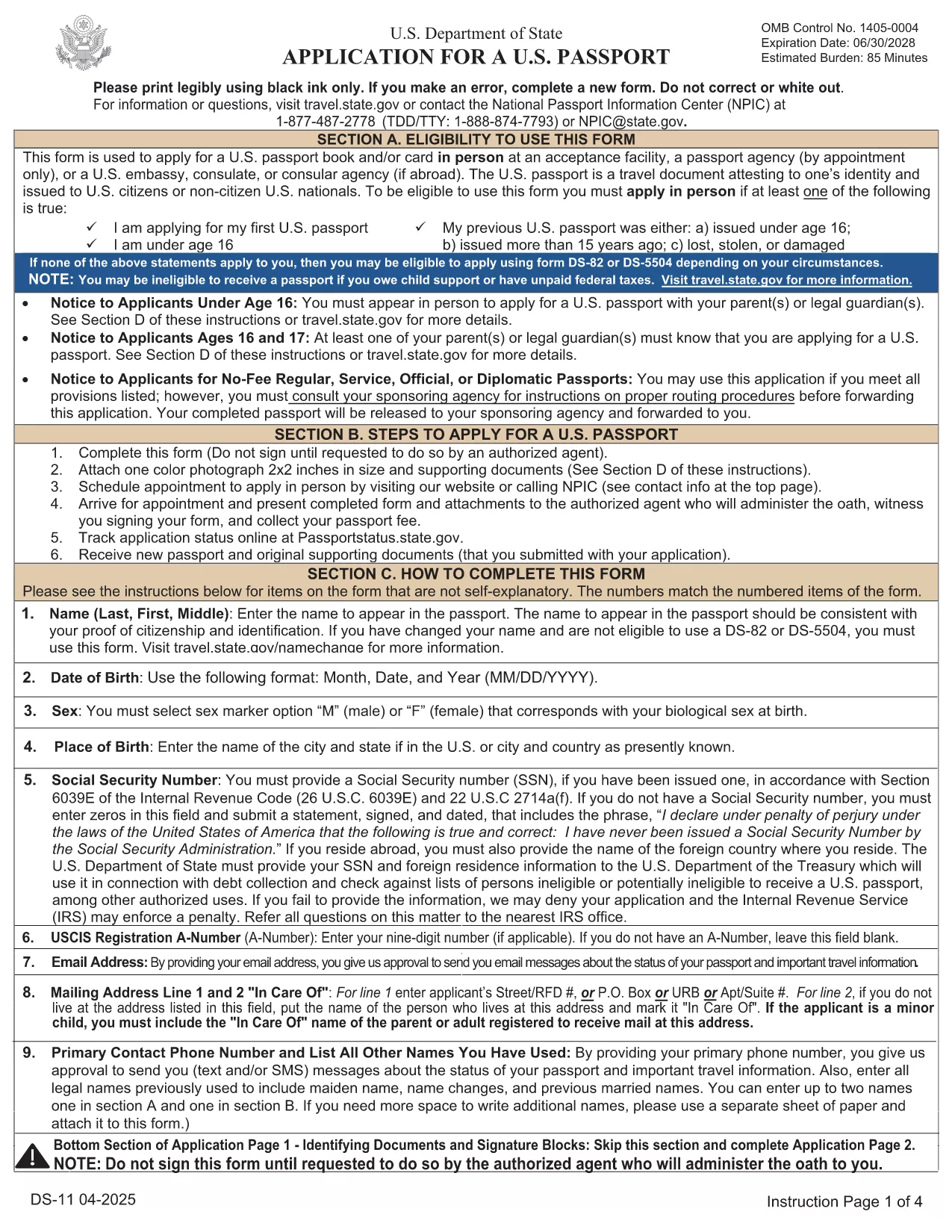
DS-11 U.S. Passport Application – Fillable PDF

  1. Ngôn ngữ Tiếng Anh
  2. Quốc gia Hoa Kỳ
  3. Hoạt động Hộ chiếu
DS-11 U.S. Passport Application – Fillable PDF

The DS-11 is the official application for first‑time U.S. passports, passports for minors, and replacement of lost or damaged passports. Using Formize’s built‑in PDF filler, you can complete the form online, avoid manual errors, and print a clean, one‑sided copy ready for submission.

What Is the DS-11 Form?

DS-11 is issued by the U.S. Department of State. It collects personal information, citizenship proof, and travel details. You must present the unsigned, completed form at a passport acceptance facility along with supporting documents.

How to Complete the DS-11 with Formize

Follow these simple steps to fill the form directly in your browser—no PDF editor required.

  • Click “Fill out this form” on the page.
  • Wait a few seconds while the Formize PDF Filler loads the official DS-11.
  • Enter your information in each field using the on‑screen keyboard.
  • Use the navigation arrows to move between pages.
  • When finished, click Print to produce a one‑sided copy.

Common Mistakes to Avoid

  • Using colored ink – print in black ink only.
  • Leaving any required box empty – the filler will highlight missing fields.
  • Signing the form before you reach the acceptance facility – sign only on the printed copy.
  • Altering a printed form by hand – any corrections require a new form.

Where to Submit Your Completed Form

Take the printed, unsigned DS-11, your proof of citizenship, a government‑issued photo ID, and a passport‑size photo to any passport acceptance facility (post offices, libraries, or designated clerks). If you need expedited service, schedule an appointment at a regional passport agency.

Download the Official Fillable PDF

For offline use, you can download the original PDF from the U.S. Department of State. The online filler provides the same official form, but the download link is included for reference.

Download DS-11 PDF (official)

CÂU HỎI THƯỜNG GẶP
  • Who must use the DS-11 form?

    First‑time applicants, minors under 16, and anyone replacing a lost, stolen, or damaged passport that is more than 5 years old must use DS‑11.

  • Can I submit a signed DS-11 online?

    No. The DS‑11 must be presented unsigned to a passport acceptance agent, who will witness your signature.

  • Do I need a passport photo?

    Yes. Provide one recent, 2×2 inch color photo that meets State Department requirements.

  • How long does processing take?

    Standard processing is 4‑6 weeks after the acceptance facility receives your application. Expedited service reduces this to 2‑3 weeks.

  • Is the Formize filler free?

    Formize offers a free online filler for the DS‑11. No download or software installation is required.

  • What documents accompany the DS‑11?

    You need proof of U.S. citizenship (birth certificate or naturalization certificate), a government‑issued photo ID, a passport‑size photo, and the applicable fee.

  • Can I correct errors after printing?

    If you discover an error, you must fill out a new DS‑11. Hand‑written corrections are not accepted.

LÀM THẾ NÀO ĐỂ

Cách điền DS-11 miễn phí, trực tuyến trong 5 bước đơn giản:

  1. 1
    Open the Formizer Fillable DS-11
    Click the “Fill out this form” button on the page. The Formize PDF Filler will load the official DS-11 automatically.
  2. 2
    Enter Your Information
    Use the on‑screen fields to type your name, date of birth, address, and other required details. The filler validates each entry.
  3. 3
    Review and Print
    After completing all pages, click the Print button. Print a single‑sided copy on white paper using black ink.
  4. 4
    Sign at the Acceptance Facility
    Do NOT sign the printed form until you are in front of a passport acceptance agent.
  5. 5
    Submit Your Package
    Take the printed DS-11, your supporting documents, and payment to the nearest passport acceptance facility.
Định dạng ứng dụng PDF Filler
TRONG KHOẢNG

mẫu hộ chiếu

DS-11 là một trong những mẫu Hộ chiếu là tài liệu dùng để xin cấp hộ chiếu, là giấy thông hành xác nhận danh tính và quốc tịch của người sở hữu và cho phép họ đi du lịch quốc tế. Các mẫu hộ chiếu có thể khác nhau tùy thuộc vào quốc gia cấp hộ chiếu, nhưng chúng thường chứa thông tin cá nhân về người nộp đơn, chẳng hạn như tên, ngày sinh và nơi sinh, cũng như thông tin về cha mẹ của người nộp đơn và bất kỳ hộ chiếu hoặc giấy tờ du lịch nào trước đây .

Tại Hoa Kỳ, hai mẫu hộ chiếu phổ biến nhất là DS-11 và DS-82. Mẫu DS-11 được sử dụng cho những người nộp đơn lần đầu, trẻ vị thành niên hoặc cá nhân không đủ điều kiện sử dụng mẫu DS-82. Mẫu DS-82 được sử dụng để gia hạn hộ chiếu qua đường bưu điện cho những người nộp đơn đủ điều kiện. Cả hai hình thức đều yêu cầu người nộp đơn cung cấp thông tin cá nhân và tài liệu hỗ trợ, chẳng hạn như ảnh hộ chiếu và bằng chứng về quyền công dân.

Các quốc gia khác có thể có các yêu cầu và mẫu hộ chiếu khác nhau, nhưng quy trình cơ bản thường bao gồm hoàn thành đơn xin cấp hộ chiếu, cung cấp tài liệu hỗ trợ và tham dự cuộc phỏng vấn với viên chức hộ chiếu tại cơ quan chính phủ hoặc đại sứ quán. Điều quan trọng cần lưu ý là quy trình đăng ký hộ chiếu có thể mất vài tuần hoặc thậm chí vài tháng, vì vậy bạn nên đăng ký trước bất kỳ chuyến đi nào đã lên kế hoạch.

ĐẶC TRƯNG

Trình điền PDF

Cách dễ nhất để điền vào các mẫu PDF trực tuyến

  • Nhanh chóng điền vào DS-11
    Bạn đang tìm cách điền nhanh DS-11 trực tuyến? Với trình điền biểu mẫu PDF miễn phí trực tuyến của chúng tôi, bạn sẽ biết cách chỉnh sửa và điền vào tài liệu pdf này trong vòng chưa đầy một phút.
  • Trình chỉnh sửa PDF trực tuyến dễ sử dụng
    Chán nản với việc in ra các tệp PDF để bạn có thể chỉnh sửa chúng trước khi quét lại và gửi lại? Chỉnh sửa tài liệu PDF trực tuyến miễn phí. Sử dụng trình chỉnh sửa pdf trực tuyến của chúng tôi để tiết kiệm thời gian và giấy.
  • Công cụ tuyệt vời, tất cả các nền tảng
    Bạn muốn biết cách điền DS-11 trên máy Mac hoặc có thể là cách sử dụng trình điền PDF miễn phí? Các công cụ PDF trực tuyến của chúng tôi hoạt động trên tất cả các nền tảng.
  • Lưu trữ tệp an toàn
    Các tệp "DS-11" đã hoàn thành được lưu trữ trong cơ sở dữ liệu bảo mật do dịch vụ lưu trữ Amazon Cloud quản lý. Bạn có thể xóa các tệp của mình khỏi hệ thống của chúng tôi bất cứ lúc nào. Trong mọi trường hợp, các tệp này sẽ tự động bị xóa sau 24 giờ.
  • Trò chuyện với DS-11
    Trò chuyện với "DS-11" trên Trò chuyện, một trợ lý đọc PDF miễn phí. Đặt câu hỏi và nhận câu trả lời từ "DS-11". Chỉ cần nhấp vào nút Trò chuyện với tài liệu ở trên.

Xóa phiên điền

Xóa phiên điền đã chọn? Trong trường hợp này, tiến độ của bạn trong việc hoàn thành biểu mẫu sẽ bị mất.

Xóa phiên chỉnh sửa

Xóa phiên chỉnh sửa đã chọn? Trong trường hợp này, tiến trình tạo và chỉnh sửa biểu mẫu của bạn sẽ bị mất.