
Chọn ngôn ngữ

DS-64 Statement Regarding a Lost or Stolen U.S. Passport (Fillable PDF)

  1. Ngôn ngữ Tiếng Anh
  2. Quốc gia Hoa Kỳ
  3. Hoạt động Hộ chiếu
DS-64 Statement Regarding a Lost or Stolen U.S. Passport (Fillable PDF)

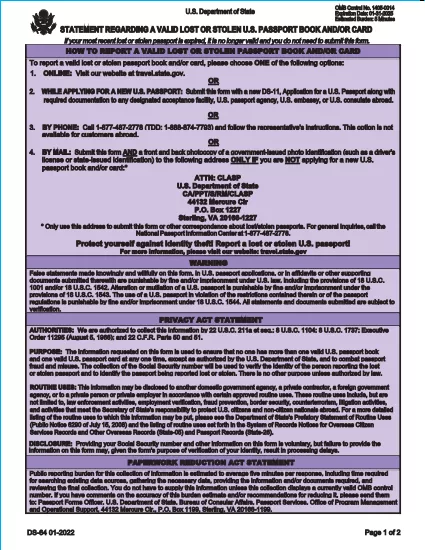
The DS-64 is the official U.S. Department of State form used to report a lost or stolen passport. Once submitted, the passport is immediately invalidated, preventing fraud and protecting your identity.

What Is the DS-64 Form?

DS-64, titled Statement Regarding a Lost or Stolen Passport, collects personal details, passport information, and a description of how the passport was lost or stolen. It is required whether you plan to request a replacement (DS‑11) or simply need the record of loss.

Why Use Formize’s Fillable PDF Filler?

  • Instant online filling: No need to download, print, and hand‑write.
  • Auto‑save: Your progress is saved in the browser, so you never lose data.
  • Error‑checking: Real‑time validation reduces mistakes.
  • Secure: All data stays on your device; Formize never stores personal information.

Step‑by‑Step Guide to Complete DS-64

Follow the simple steps below to fill, sign, and download the form.

Common Mistakes to Avoid

  • Leaving the passport number blank when you know it – the number is essential for cancellation.
  • Using colored ink or handwritten corrections – Formize requires black‑ink digital entry.
  • Forgetting to indicate whether you are submitting a replacement application (DS‑11).

Where to Submit Your Completed Form

After you download the completed DS‑64 PDF, you can:

  • Mail it to the address printed on the form if you are not applying for a new passport.
  • Include it with your DS‑11 application when requesting a replacement.
  • Submit it in person at a regional passport agency.

There is no fee to submit DS‑64 alone; fees apply only when you request a replacement passport.

CÂU HỎI THƯỜNG GẶP
  • Can I submit DS‑64 online?

    No. The DS‑64 must be printed, signed, and submitted by mail or in person. Formize only provides a fillable PDF to simplify completion.

  • Is there a fee to file DS‑64?

    There is no fee to report a lost or stolen passport with DS‑64. Fees apply only when you request a replacement passport.

  • What if I don’t know my passport number?

    Enter ‘Unknown’ in the passport number field and provide as much other identifying information as possible.

  • Do I need a notary for DS‑64?

    No. The form only requires your signature; notarization is not required.

  • How long does it take for the passport to be invalidated?

    Once the State Department receives the DS‑64, the passport is typically canceled within a few business days.

  • Can a parent fill out DS‑64 for a minor?

    Yes. A parent or legal guardian may complete the form on behalf of a minor, signing in the appropriate section.

  • What should I do if my passport was expired when it was lost?

    You do not need to submit DS‑64 for an expired passport, but you may still do so to have a record of the loss.

  • Will I receive confirmation that my passport is canceled?

    The State Department does not send a formal confirmation, but the passport will be marked as invalid in their system.

LÀM THẾ NÀO ĐỂ

Cách điền DS-64 miễn phí, trực tuyến trong 5 bước đơn giản:

  1. 1
    Open the Fillable Form
    Click the **Fill out this form** button on the page. The Formize PDF Filler app will load instantly in your browser.
  2. 2
    Enter Your Information
    Type your personal details, passport number, and loss description directly into the fields. All required fields are highlighted.
  3. 3
    Review & Sign
    Use the built‑in signature tool to sign the form digitally, then review each section for accuracy.
  4. 4
    Download or Print
    When you’re satisfied, click **Download PDF** to save a copy or **Print** to produce a hard copy for mailing.
  5. 5
    Submit the Form
    Mail or bring the completed DS‑64 to the address shown on the form, or attach it to your DS‑11 replacement application.
Định dạng ứng dụng PDF Filler
TRONG KHOẢNG

mẫu hộ chiếu

DS-64 là một trong những mẫu Hộ chiếu là tài liệu dùng để xin cấp hộ chiếu, là giấy thông hành xác nhận danh tính và quốc tịch của người sở hữu và cho phép họ đi du lịch quốc tế. Các mẫu hộ chiếu có thể khác nhau tùy thuộc vào quốc gia cấp hộ chiếu, nhưng chúng thường chứa thông tin cá nhân về người nộp đơn, chẳng hạn như tên, ngày sinh và nơi sinh, cũng như thông tin về cha mẹ của người nộp đơn và bất kỳ hộ chiếu hoặc giấy tờ du lịch nào trước đây .

Tại Hoa Kỳ, hai mẫu hộ chiếu phổ biến nhất là DS-11 và DS-82. Mẫu DS-11 được sử dụng cho những người nộp đơn lần đầu, trẻ vị thành niên hoặc cá nhân không đủ điều kiện sử dụng mẫu DS-82. Mẫu DS-82 được sử dụng để gia hạn hộ chiếu qua đường bưu điện cho những người nộp đơn đủ điều kiện. Cả hai hình thức đều yêu cầu người nộp đơn cung cấp thông tin cá nhân và tài liệu hỗ trợ, chẳng hạn như ảnh hộ chiếu và bằng chứng về quyền công dân.

Các quốc gia khác có thể có các yêu cầu và mẫu hộ chiếu khác nhau, nhưng quy trình cơ bản thường bao gồm hoàn thành đơn xin cấp hộ chiếu, cung cấp tài liệu hỗ trợ và tham dự cuộc phỏng vấn với viên chức hộ chiếu tại cơ quan chính phủ hoặc đại sứ quán. Điều quan trọng cần lưu ý là quy trình đăng ký hộ chiếu có thể mất vài tuần hoặc thậm chí vài tháng, vì vậy bạn nên đăng ký trước bất kỳ chuyến đi nào đã lên kế hoạch.

ĐẶC TRƯNG

Trình điền PDF

Cách dễ nhất để điền vào các mẫu PDF trực tuyến

  • Nhanh chóng điền vào DS-64
    Bạn đang tìm cách điền nhanh DS-64 trực tuyến? Với trình điền biểu mẫu PDF miễn phí trực tuyến của chúng tôi, bạn sẽ biết cách chỉnh sửa và điền vào tài liệu pdf này trong vòng chưa đầy một phút.
  • Trình chỉnh sửa PDF trực tuyến dễ sử dụng
    Chán nản với việc in ra các tệp PDF để bạn có thể chỉnh sửa chúng trước khi quét lại và gửi lại? Chỉnh sửa tài liệu PDF trực tuyến miễn phí. Sử dụng trình chỉnh sửa pdf trực tuyến của chúng tôi để tiết kiệm thời gian và giấy.
  • Công cụ tuyệt vời, tất cả các nền tảng
    Bạn muốn biết cách điền DS-64 trên máy Mac hoặc có thể là cách sử dụng trình điền PDF miễn phí? Các công cụ PDF trực tuyến của chúng tôi hoạt động trên tất cả các nền tảng.
  • Lưu trữ tệp an toàn
    Các tệp "DS-64" đã hoàn thành được lưu trữ trong cơ sở dữ liệu bảo mật do dịch vụ lưu trữ Amazon Cloud quản lý. Bạn có thể xóa các tệp của mình khỏi hệ thống của chúng tôi bất cứ lúc nào. Trong mọi trường hợp, các tệp này sẽ tự động bị xóa sau 24 giờ.
  • Trò chuyện với DS-64
    Trò chuyện với "DS-64" trên Trò chuyện, một trợ lý đọc PDF miễn phí. Đặt câu hỏi và nhận câu trả lời từ "DS-64". Chỉ cần nhấp vào nút Trò chuyện với tài liệu ở trên.

Xóa phiên điền

Xóa phiên điền đã chọn? Trong trường hợp này, tiến độ của bạn trong việc hoàn thành biểu mẫu sẽ bị mất.

Xóa phiên chỉnh sửa

Xóa phiên chỉnh sửa đã chọn? Trong trường hợp này, tiến trình tạo và chỉnh sửa biểu mẫu của bạn sẽ bị mất.