Chọn ngôn ngữ

SSA‑8 Lump‑Sum Death Payment Form (Fillable PDF)

  1. Ngôn ngữ Tiếng Anh
  2. Quốc gia Hoa Kỳ
  3. Hoạt động Benefits
  4. Phòng Social Security Administration
Điền vào mẫu đơn này
SSA‑8 Lump‑Sum Death Payment Form (Fillable PDF)

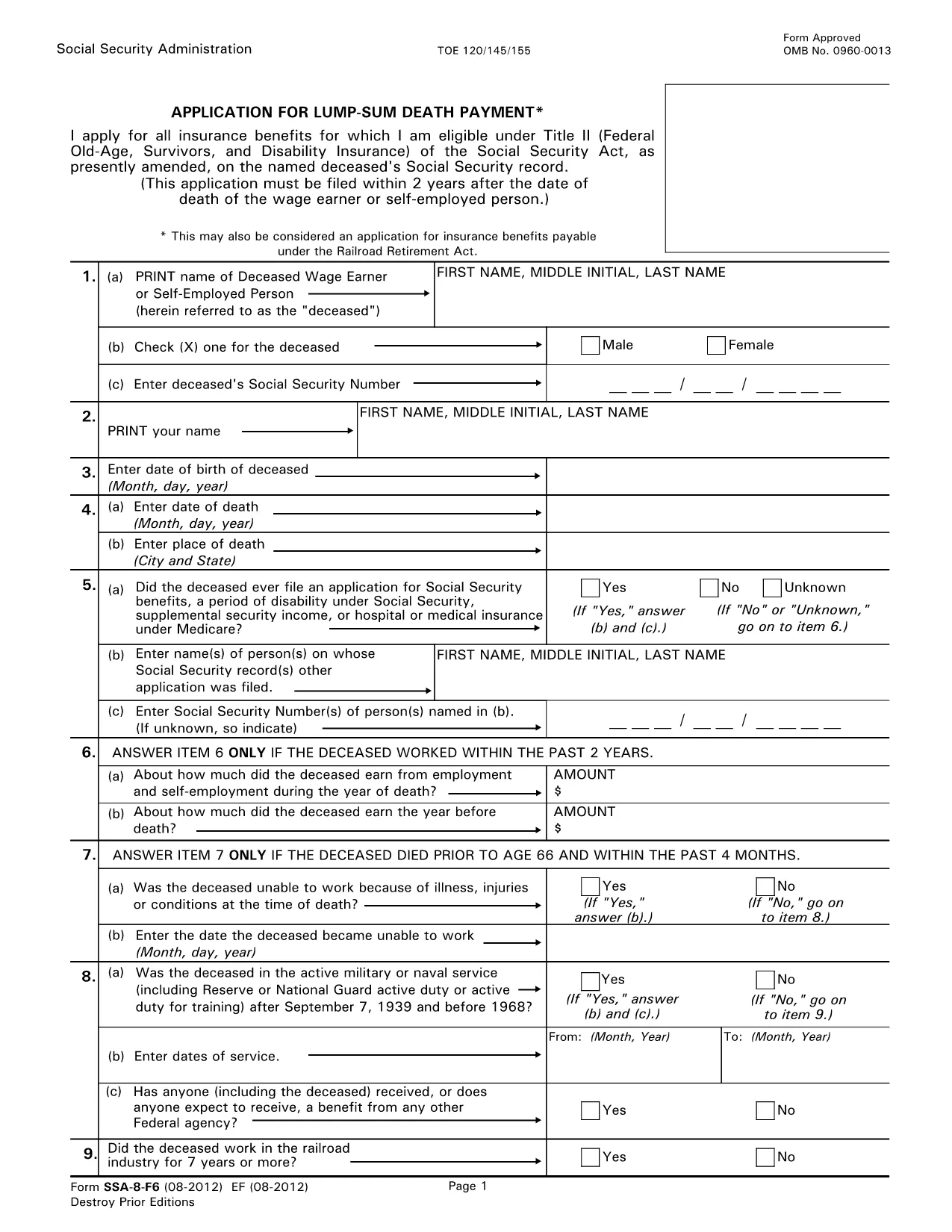
The SSA‑8 is the official Social Security Administration (SSA) application for a lump‑sum death payment to surviving family members. This form is required when a beneficiary wants a one‑time cash payment after the death of a qualified worker.

What Is the SSA‑8 Form?

The SSA‑8 collects personal details about the deceased, the claimant, and the type of payment being requested. It is used by the SSA to verify eligibility and calculate the amount owed.

How to Fill Out the SSA‑8 Online with Formize

Instead of downloading, printing, and scanning, you can complete the form directly on our site. Click the "Fill out this form" button, wait for the Formize PDF Filler to load, and start typing. All fields are interactive, and the app saves your progress automatically.

Key Sections & Required Information

  • Section 1: Deceased’s Social Security number and date of death.
  • Section 2: Claimant’s relationship to the deceased and contact details.
  • Section 3: Payment options – direct deposit or paper check.
  • Section 4: Signature and date.

Common Mistakes to Avoid

  • Leaving the Social Security number blank or entering it with dashes.
  • Providing an outdated address – the SSA will mail any correspondence there.
  • Missing the claimant’s signature; an unsigned form is rejected.
  • Choosing the wrong payment method (e.g., selecting direct deposit without providing bank details).

Where to Submit the Completed Form

After you finish, download the completed PDF and bring it to your local Social Security office or mail it to the address listed on the form. You can locate the nearest office at SSA.gov/locator.

CÂU HỎI THƯỜNG GẶP
  • Who is eligible for a lump‑sum death payment?

    Surviving spouses, children, and certain dependent parents of a deceased worker who earned enough Social Security credits are eligible.

  • Can I submit the SSA‑8 electronically?

    The SSA does not accept fully electronic submissions. You must download the completed PDF and bring or mail it to a Social Security office.

  • How long does it take to receive the payment?

    Processing usually takes 4‑6 weeks after the SSA receives a correctly completed form.

  • Do I need a notarized signature?

    No notarization is required. A handwritten or electronic signature is sufficient as long as it is legible.

  • What if I make a mistake after submitting?

    Contact your local Social Security office immediately. They can provide a corrected form or advise on next steps.

  • Is there a fee to use Formize PDF Filler?

    No, Formize provides the filler for free on this page.

  • Can I save my progress and finish later?

    Yes. The Formize app autosaves locally in your browser, allowing you to return later before downloading the final PDF.

LÀM THẾ NÀO ĐỂ

Cách điền SSA-8 form miễn phí, trực tuyến trong 5 bước đơn giản:

  1. 1
    Click the Fill‑out Button
    On this page, click the "Fill out this form" button to launch the Formize PDF Filler.
  2. 2
    Wait for the Filler to Load
    The online filler loads in a few seconds. All fields become editable directly in your browser.
  3. 3
    Complete Each Section
    Enter the required information exactly as it appears on the SSA‑8. Use the tab key to move between fields.
  4. 4
    Review and Sign
    Double‑check every entry, add your digital signature, and click "Save" to generate the final PDF.
  5. 5
    Download or Print
    Download the completed form or print it for in‑person submission at your local Social Security office.
Định dạng ứng dụng PDF Filler
TRONG KHOẢNG

mẫu SSA-8 form

Với bộ tính năng truyền thống để xem và điền vào tài liệu PDF, kết hợp với các lợi ích của ứng dụng web và bố cục đáp ứng, bạn có thể hoàn thành SSA-8 form trong vài phút.

ĐẶC TRƯNG

Trình điền PDF

Cách dễ nhất để điền vào các mẫu PDF trực tuyến

  • Nhanh chóng điền vào SSA-8 form
    Bạn đang tìm cách điền nhanh SSA-8 form trực tuyến? Với trình điền biểu mẫu PDF miễn phí trực tuyến của chúng tôi, bạn sẽ biết cách chỉnh sửa và điền vào tài liệu pdf này trong vòng chưa đầy một phút.
  • Trình chỉnh sửa PDF trực tuyến dễ sử dụng
    Chán nản với việc in ra các tệp PDF để bạn có thể chỉnh sửa chúng trước khi quét lại và gửi lại? Chỉnh sửa tài liệu PDF trực tuyến miễn phí. Sử dụng trình chỉnh sửa pdf trực tuyến của chúng tôi để tiết kiệm thời gian và giấy.
  • Công cụ tuyệt vời, tất cả các nền tảng
    Bạn muốn biết cách điền SSA-8 form trên máy Mac hoặc có thể là cách sử dụng trình điền PDF miễn phí? Các công cụ PDF trực tuyến của chúng tôi hoạt động trên tất cả các nền tảng.
  • Lưu trữ tệp an toàn
    Các tệp "SSA-8 form" đã hoàn thành được lưu trữ trong cơ sở dữ liệu bảo mật do dịch vụ lưu trữ Amazon Cloud quản lý. Bạn có thể xóa các tệp của mình khỏi hệ thống của chúng tôi bất cứ lúc nào. Trong mọi trường hợp, các tệp này sẽ tự động bị xóa sau 24 giờ.
  • Trò chuyện với SSA-8 form
    Trò chuyện với "SSA-8 form" trên Trò chuyện, một trợ lý đọc PDF miễn phí. Đặt câu hỏi và nhận câu trả lời từ "SSA-8 form". Chỉ cần nhấp vào nút Trò chuyện với tài liệu ở trên.

Xóa phiên điền

Xóa phiên điền đã chọn? Trong trường hợp này, tiến độ của bạn trong việc hoàn thành biểu mẫu sẽ bị mất.

Xóa phiên chỉnh sửa

Xóa phiên chỉnh sửa đã chọn? Trong trường hợp này, tiến trình tạo và chỉnh sửa biểu mẫu của bạn sẽ bị mất.