
Chọn ngôn ngữ

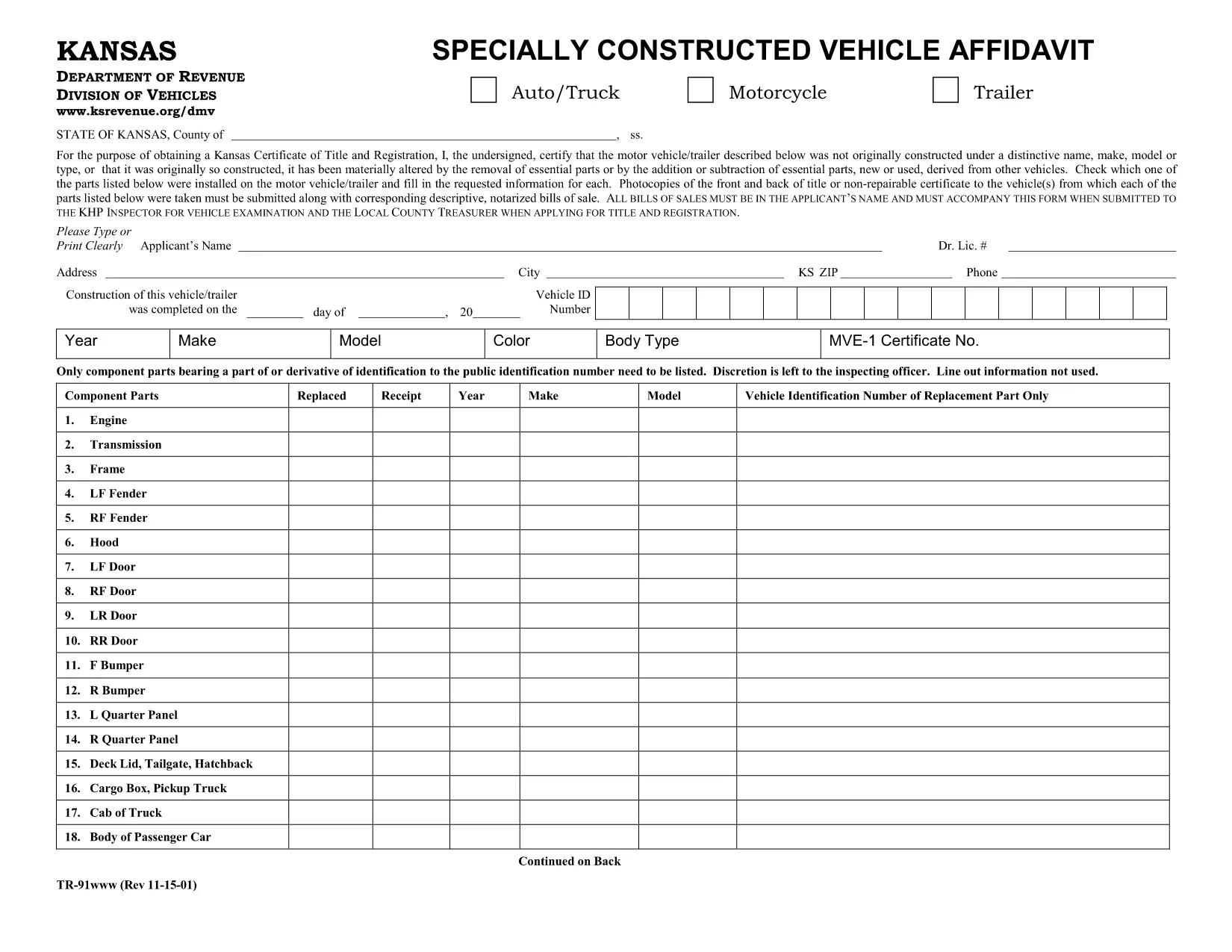
TR‑91 Specially Constructed Vehicle Affidavit (Kansas) – Fillable PDF

  1. Quốc gia Hoa Kỳ
  2. Ngôn ngữ Tiếng Anh
  3. Hoạt động Đăng ký xe
  4. Tiểu bang Kansas
TR‑91 Specially Constructed Vehicle Affidavit (Kansas) – Fillable PDF

The Kansas TR‑91 Specially Constructed Vehicle Affidavit is required when you assemble, rebuild, or otherwise modify a vehicle and need a state inspection. This form verifies that the work complies with Kansas safety standards and that you own all parts used.

What Is the TR‑91 Form?

Form TR‑91, also known as the Specially Constructed Vehicle Affidavit, is issued by the Kansas Division of Vehicles (DOV). It is used for:

  • Custom‑built cars, kit cars, and heavily modified vehicles.
  • Vehicles that have been rebuilt after a total loss.
  • Any vehicle that does not fit standard factory specifications.

How to Complete the TR‑91 Online

Instead of downloading the PDF and editing it manually, simply click the "Fill out this form" button on this page. The Formize PDF Filler app will load in your browser, letting you complete each field instantly.

Common Mistakes to Avoid

  • Missing ownership proof: Attach a bill of sale or title for every major part.
  • Incomplete descriptions: Provide detailed explanations of the work performed.
  • Incorrect dates: Use the exact dates of construction or alteration.
  • Skipping notarization: Certain sections must be notarized before submission.

Where to Submit the Affidavit

After completing the form, print it and bring it to your local Kansas DOV office or mail it to:

Kansas Division of Vehicles
555 S. Kansas Ave.
Topeka, KS 66603

Make sure to include any supporting documents, such as receipts, photos, or invoices.

Frequently Asked Questions

Find quick answers below, or scroll down to the full FAQ section.

CÂU HỎI THƯỜNG GẶP
  • Do I need a notarized signature on the TR‑91?

    Yes. Sections that certify ownership of major parts and the overall affidavit must be notarized before submission.

  • Can I submit the TR‑91 electronically?

    Kansas DOV currently requires a printed, signed, and notarized copy. Electronic submission is not accepted.

  • What supporting documents are required?

    Attach a bill of sale, title, or receipt for each major component, plus photos of the finished vehicle if requested.

  • How long does the DOV take to process the affidavit?

    Processing typically takes 7‑10 business days after the complete package is received.

  • Is there a fee for filing the TR‑91?

    Yes, there is a standard filing fee of $15.00, payable by cash, check, or credit card at the DOV office.

  • Can I use a printed copy of the PDF instead of the fillable version?

    You can, but the fillable version reduces errors and speeds up the review process.

  • What if I make a mistake after submitting?

    Contact the Kansas Division of Vehicles to request a correction. You may need to submit a revised affidavit with a new notarization.

LÀM THẾ NÀO ĐỂ

Cách điền TR-91 miễn phí, trực tuyến trong 5 bước đơn giản:

  1. 1
    Click the Fill‑out Button
    Press the “Fill out this form” button on the page. The Formize PDF Filler will open in a new browser tab.
  2. 2
    Wait for the Filler to Load
    Give the app a few seconds to initialize. All fields become editable directly in your browser.
  3. 3
    Enter Your Information
    Complete each section—vehicle details, part ownership, and description of work—exactly as requested.
  4. 4
    Review and Sign
    Check every entry for accuracy, then add your electronic signature where required. Print and notarize if the form calls for it.
  5. 5
    Download or Submit
    Save the finished PDF to your device, print a hard copy, and bring it to the Kansas DOV office or mail it with supporting documents.
Định dạng ứng dụng PDF Filler
TRONG KHOẢNG

Mẫu đăng ký xe

Nếu bạn sở hữu hoặc thuê một phương tiện cơ giới, xe kéo hoặc thuyền, bạn phải đáp ứng một số nghĩa vụ để giữ cho phương tiện của bạn được đăng ký hợp pháp và an toàn.

TR-91 là một trong những biểu mẫu Đăng ký phương tiện là tài liệu được sử dụng để đăng ký phương tiện cơ giới với cơ quan nhà nước hoặc cấp tỉnh có liên quan. Những biểu mẫu này thường được yêu cầu khi một người mua một chiếc xe mới hoặc đã qua sử dụng hoặc khi họ chuyển đến một tiểu bang hoặc tỉnh mới với một chiếc xe.

Các yêu cầu và biểu mẫu chính xác cần thiết để đăng ký xe có thể khác nhau tùy theo địa điểm, nhưng nhìn chung, quy trình bao gồm việc cung cấp thông tin về xe, chủ sở hữu và bất kỳ quyền sở hữu nào đối với xe.

Sau khi nộp các mẫu đăng ký và lệ phí, chính quyền tiểu bang hoặc cấp tỉnh sẽ cấp giấy chứng nhận đăng ký hoặc biển số cho chủ sở hữu phương tiện. Việc đăng ký này cho phép phương tiện được vận hành hợp pháp trên đường công cộng và đường cao tốc.

ĐẶC TRƯNG

Trình điền PDF

Cách dễ nhất để điền vào các mẫu PDF trực tuyến

  • Nhanh chóng điền vào TR-91
    Bạn đang tìm cách điền nhanh TR-91 trực tuyến? Với trình điền biểu mẫu PDF miễn phí trực tuyến của chúng tôi, bạn sẽ biết cách chỉnh sửa và điền vào tài liệu pdf này trong vòng chưa đầy một phút.
  • Trình chỉnh sửa PDF trực tuyến dễ sử dụng
    Chán nản với việc in ra các tệp PDF để bạn có thể chỉnh sửa chúng trước khi quét lại và gửi lại? Chỉnh sửa tài liệu PDF trực tuyến miễn phí. Sử dụng trình chỉnh sửa pdf trực tuyến của chúng tôi để tiết kiệm thời gian và giấy.
  • Công cụ tuyệt vời, tất cả các nền tảng
    Bạn muốn biết cách điền TR-91 trên máy Mac hoặc có thể là cách sử dụng trình điền PDF miễn phí? Các công cụ PDF trực tuyến của chúng tôi hoạt động trên tất cả các nền tảng.
  • Lưu trữ tệp an toàn
    Các tệp "TR-91" đã hoàn thành được lưu trữ trong cơ sở dữ liệu bảo mật do dịch vụ lưu trữ Amazon Cloud quản lý. Bạn có thể xóa các tệp của mình khỏi hệ thống của chúng tôi bất cứ lúc nào. Trong mọi trường hợp, các tệp này sẽ tự động bị xóa sau 24 giờ.
  • Trò chuyện với TR-91
    Trò chuyện với "TR-91" trên Trò chuyện, một trợ lý đọc PDF miễn phí. Đặt câu hỏi và nhận câu trả lời từ "TR-91". Chỉ cần nhấp vào nút Trò chuyện với tài liệu ở trên.

Xóa phiên điền

Xóa phiên điền đã chọn? Trong trường hợp này, tiến độ của bạn trong việc hoàn thành biểu mẫu sẽ bị mất.

Xóa phiên chỉnh sửa

Xóa phiên chỉnh sửa đã chọn? Trong trường hợp này, tiến trình tạo và chỉnh sửa biểu mẫu của bạn sẽ bị mất.