
Chọn ngôn ngữ

Missouri Form 4601 – Fillable PDF for Military Personalized License Plates

  1. Ngôn ngữ Tiếng Anh
  2. Quốc gia Hoa Kỳ
  3. Hoạt động Đăng ký xe
  4. Tiểu bang Missouri
Missouri Form 4601 – Fillable PDF for Military Personalized License Plates

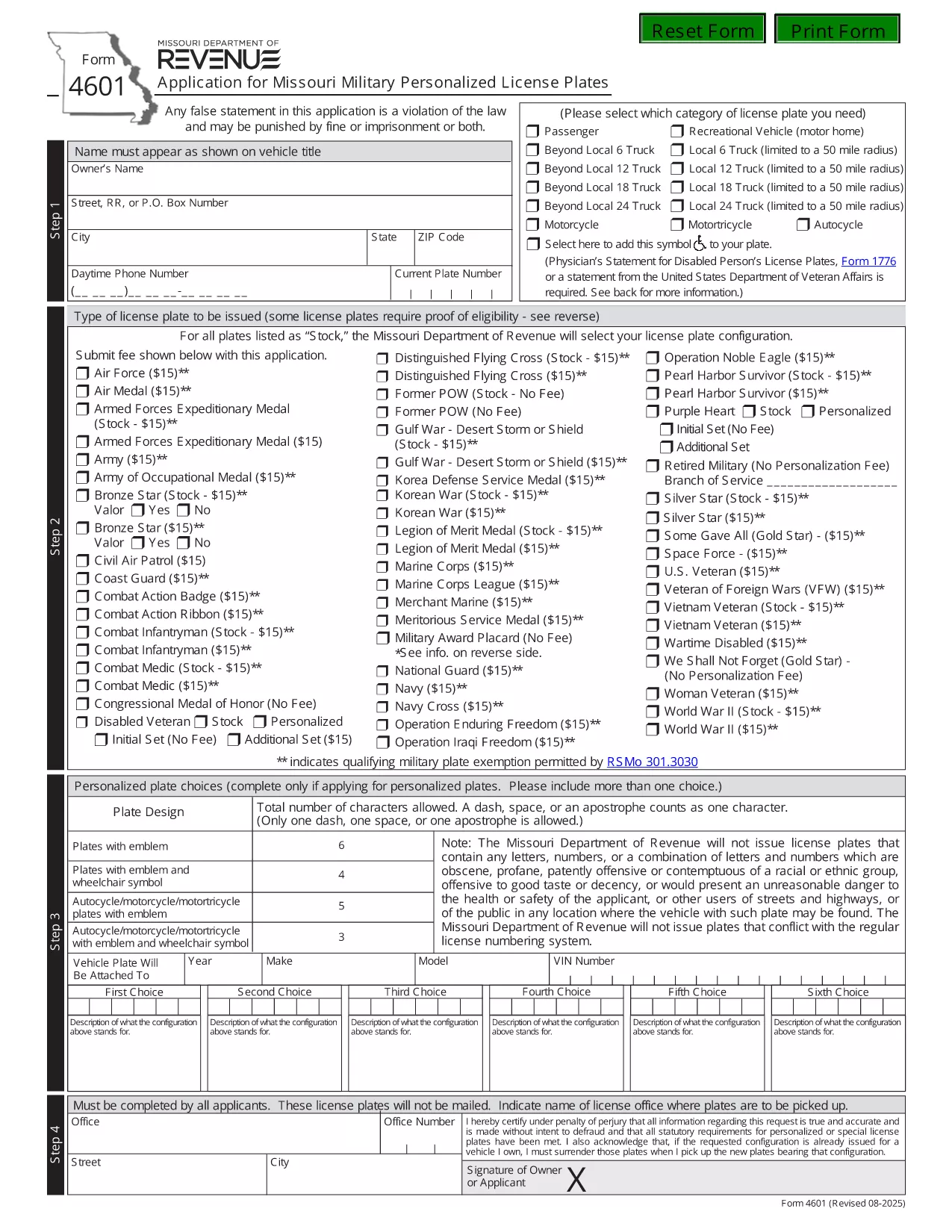
Form 4601 is the official Application for Missouri Military Personalized License Plates issued by the Missouri Department of Revenue. This fillable PDF lets eligible veterans, active‑duty service members, and qualified family members request a custom military‑themed plate for their vehicle.

What Is Form 4601?

Form 4601 collects personal information, vehicle details, and proof of military service. The form is required for any of the following plate designs:

  • U.S. Army, Navy, Air Force, Marine Corps, Coast Guard
  • Veterans of specific campaigns or decorations
  • Active‑duty personnel requesting a temporary plate

How to Complete the Fillable Form 4601 Online

With Formize’s PDF Filler you can fill out the form directly in your browser—no download, print, or third‑party editor needed.

  1. Click the "Fill out this form" button on this page.
  2. Wait a few seconds while the Formize PDF Filler loads the fillable version of Form 4601.
  3. Enter your information in each highlighted field. The filler automatically validates dates, ZIP codes, and required fields.
  4. Upload a scanned copy of your discharge papers or award certificate when prompted.
  5. Review the completed form, then click Submit to download the filled PDF or to email it directly to the Missouri Department of Revenue.

Common Mistakes to Avoid

  • Leaving the "Signature" field blank—use the electronic signature tool provided.
  • Entering an incorrect VIN; double‑check the 17‑character vehicle identification number.
  • Submitting an outdated or non‑honorable discharge document.
  • Choosing a plate configuration longer than six characters (or five with an emblem).

Where to Submit Your Application

After completing the fillable PDF, mail it with the $15 application fee to:

Motor Vehicle Bureau
301 West High Street – Room 370
PO Box 569
Jefferson City, MO 65105‑0569

Or bring the printed form to any Missouri license office. The Department will process the request within 6‑8 weeks.

Download the Official PDF

If you prefer the original, non‑fillable version, you can download it directly from the Missouri Department of Revenue:

Download Form 4601 (PDF)

Using Formize’s fillable version saves time, reduces errors, and keeps a digital copy for your records.

CÂU HỎI THƯỜNG GẶP
  • Who is eligible to use Form 4601?

    Veterans with an honorable discharge, active‑duty service members, and surviving spouses of eligible veterans may apply for a military personalized plate.

  • Is there a fee to submit Form 4601?

    Yes, a $15 application fee is required for each military plate request. The fee is paid to the Missouri Department of Revenue when you mail the form.

  • Can I submit Form 4601 electronically?

    The Missouri Department of Revenue currently requires a printed, signed PDF with the fee. However, you can fill it out online using Formize, then print and mail it.

  • How long does it take to receive the plates?

    Processing typically takes 6‑8 weeks after the Department receives your completed form and payment.

  • What proof of service do I need to attach?

    Attach a copy of your DD‑214, discharge certificate, or the official award documentation that qualifies you for the specific military plate.

  • What if my desired plate configuration is unavailable?

    You may submit up to three alternative configurations on the same form. If none are available, you can request a refund of the $15 fee.

  • Do I need to renew the military plate each year?

    Yes. Renewal requires the same $15 fee and a current proof of service if your status has changed.

LÀM THẾ NÀO ĐỂ

Cách điền Form 4601 miễn phí, trực tuyến trong 3 bước đơn giản:

  1. 1
    Open the Fillable Form
    Click the "Fill out this form" button on the page. The Formize PDF Filler will open the fillable version of Form 4601 in your browser.
  2. 2
    Enter Your Information
    Complete each highlighted field—personal details, vehicle info, and military service proof. Use the upload button for your discharge documents.
  3. 3
    Validate and Submit
    Review the completed form for any errors. Click the Submit button to download the finished PDF or to email it directly to the Missouri Department of Revenue.
Định dạng ứng dụng PDF Filler
TRONG KHOẢNG

Mẫu đăng ký xe

Nếu bạn sở hữu hoặc thuê một phương tiện cơ giới, xe kéo hoặc thuyền, bạn phải đáp ứng một số nghĩa vụ để giữ cho phương tiện của bạn được đăng ký hợp pháp và an toàn.

Form 4601 là một trong những biểu mẫu Đăng ký phương tiện là tài liệu được sử dụng để đăng ký phương tiện cơ giới với cơ quan nhà nước hoặc cấp tỉnh có liên quan. Những biểu mẫu này thường được yêu cầu khi một người mua một chiếc xe mới hoặc đã qua sử dụng hoặc khi họ chuyển đến một tiểu bang hoặc tỉnh mới với một chiếc xe.

Các yêu cầu và biểu mẫu chính xác cần thiết để đăng ký xe có thể khác nhau tùy theo địa điểm, nhưng nhìn chung, quy trình bao gồm việc cung cấp thông tin về xe, chủ sở hữu và bất kỳ quyền sở hữu nào đối với xe.

Sau khi nộp các mẫu đăng ký và lệ phí, chính quyền tiểu bang hoặc cấp tỉnh sẽ cấp giấy chứng nhận đăng ký hoặc biển số cho chủ sở hữu phương tiện. Việc đăng ký này cho phép phương tiện được vận hành hợp pháp trên đường công cộng và đường cao tốc.

ĐẶC TRƯNG

Trình điền PDF

Cách dễ nhất để điền vào các mẫu PDF trực tuyến

  • Nhanh chóng điền vào Form 4601
    Bạn đang tìm cách điền nhanh Form 4601 trực tuyến? Với trình điền biểu mẫu PDF miễn phí trực tuyến của chúng tôi, bạn sẽ biết cách chỉnh sửa và điền vào tài liệu pdf này trong vòng chưa đầy một phút.
  • Trình chỉnh sửa PDF trực tuyến dễ sử dụng
    Chán nản với việc in ra các tệp PDF để bạn có thể chỉnh sửa chúng trước khi quét lại và gửi lại? Chỉnh sửa tài liệu PDF trực tuyến miễn phí. Sử dụng trình chỉnh sửa pdf trực tuyến của chúng tôi để tiết kiệm thời gian và giấy.
  • Công cụ tuyệt vời, tất cả các nền tảng
    Bạn muốn biết cách điền Form 4601 trên máy Mac hoặc có thể là cách sử dụng trình điền PDF miễn phí? Các công cụ PDF trực tuyến của chúng tôi hoạt động trên tất cả các nền tảng.
  • Lưu trữ tệp an toàn
    Các tệp "Form 4601" đã hoàn thành được lưu trữ trong cơ sở dữ liệu bảo mật do dịch vụ lưu trữ Amazon Cloud quản lý. Bạn có thể xóa các tệp của mình khỏi hệ thống của chúng tôi bất cứ lúc nào. Trong mọi trường hợp, các tệp này sẽ tự động bị xóa sau 24 giờ.
  • Trò chuyện với Form 4601
    Trò chuyện với "Form 4601" trên Trò chuyện, một trợ lý đọc PDF miễn phí. Đặt câu hỏi và nhận câu trả lời từ "Form 4601". Chỉ cần nhấp vào nút Trò chuyện với tài liệu ở trên.

Xóa phiên điền

Xóa phiên điền đã chọn? Trong trường hợp này, tiến độ của bạn trong việc hoàn thành biểu mẫu sẽ bị mất.

Xóa phiên chỉnh sửa

Xóa phiên chỉnh sửa đã chọn? Trong trường hợp này, tiến trình tạo và chỉnh sửa biểu mẫu của bạn sẽ bị mất.