
Chọn ngôn ngữ

VP‑238 Moped‑Motorcycle Declaration – Fillable PDF

  1. Ngôn ngữ Tiếng Anh
  2. Quốc gia Hoa Kỳ
  3. Hoạt động Đăng ký xe
  4. Tiểu bang Nevada
VP‑238 Moped‑Motorcycle Declaration – Fillable PDF

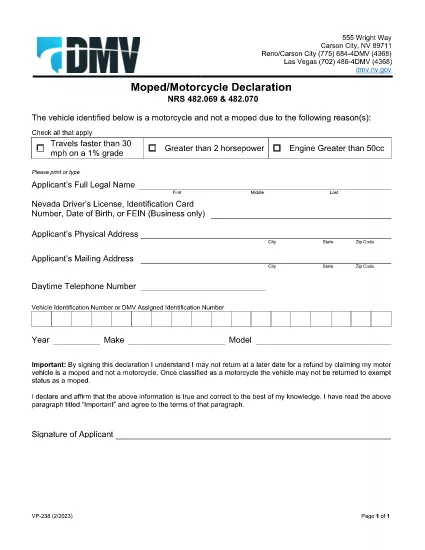
The Nevada Department of Motor Vehicles (DMV) requires the VP‑238 Moped‑Motorcycle Declaration when you convert a moped to a motorcycle or when you need to certify the vehicle’s classification. This form confirms that the vehicle meets Nevada’s definition of a motorcycle and that you understand the legal responsibilities.

What Is the VP‑238 Form?

VP‑238 is a one‑page declaration used for:

  • Changing a moped’s status to a motorcycle.
  • Providing a sworn statement that the vehicle complies with Nevada traffic laws.
  • Recording the applicant’s signature and the date of the declaration.

How to Complete the VP‑238 Online

Instead of printing, printing, and scanning, you can fill out the form directly in your browser with Formize’s PDF Filler. Follow these simple steps:

  1. Click the “Fill out this form” button on this page.
  2. Wait for the Formize PDF Filler app to load (a few seconds).
  3. Enter your personal information, vehicle details, and sign electronically.
  4. Review the entered data for accuracy.
  5. Click “Save & Download” to get a completed PDF you can print or submit electronically.

Common Mistakes to Avoid

  • Incorrect vehicle classification: Verify that the vehicle truly meets Nevada’s motorcycle criteria before selecting “Motorcycle.”
  • Missing signature: The form is not valid without a signed declaration.
  • Out‑of‑date information: Use the most recent vehicle identification number (VIN) and registration data.
  • Wrong form version: Always use the official VP‑238 PDF from the Nevada DMV (linked below).

Where to Submit the Completed Form

After filling out and printing the form, submit it to any Nevada DMV office or mail it to:

Nevada Department of Motor Vehicles
555 E. Washington St.
Carson City, NV 89701

Bring additional supporting documents such as the vehicle title, proof of insurance, and a valid ID.

Download the Official PDF

Click the button below to download the original, fillable VP‑238 PDF directly from the Nevada DMV.

Download VP‑238 PDF

CÂU HỎI THƯỜNG GẶP
  • Do I need to print the VP‑238 after filling it online?

    Yes. The DMV requires a hard‑copy signature on the printed form, but you can fill out all fields electronically first.

  • Can I submit the VP‑238 electronically?

    Nevada DMV currently accepts only a printed, signed form. However, you can email a scanned copy for preliminary review before mailing the original.

  • What happens if I declare a moped as a motorcycle incorrectly?

    An incorrect classification can lead to fines, insurance issues, and the need to re‑file the form. Verify the vehicle meets Nevada’s motorcycle specifications before submitting.

  • Is there a fee for filing VP‑238?

    The VP‑238 itself has no filing fee, but changing the vehicle classification may trigger title or registration fees.

  • How long is the VP‑238 valid?

    The declaration is valid as long as the vehicle remains classified as a motorcycle. Any future status changes require a new VP‑238 submission.

  • What supporting documents should I bring?

    Bring the vehicle title, proof of insurance, a valid driver’s license, and any emission inspection certificates if applicable.

LÀM THẾ NÀO ĐỂ

Cách điền VP-238 miễn phí, trực tuyến trong 5 bước đơn giản:

  1. 1
    Open the Form
    Click the “Fill out this form” button on the page to launch Formize’s PDF Filler.
  2. 2
    Load the PDF
    The VP‑238 PDF loads automatically; wait a few seconds for the editor to appear.
  3. 3
    Enter Your Information
    Fill in all required fields: owner name, address, VIN, and vehicle classification.
  4. 4
    Add Your Signature
    Use the built‑in signature tool to sign electronically; this satisfies the DMV’s signature requirement.
  5. 5
    Save and Download
    Click “Save & Download” to get a completed PDF you can print or submit online.
Định dạng ứng dụng PDF Filler
TRONG KHOẢNG

Mẫu đăng ký xe

Nếu bạn sở hữu hoặc thuê một phương tiện cơ giới, xe kéo hoặc thuyền, bạn phải đáp ứng một số nghĩa vụ để giữ cho phương tiện của bạn được đăng ký hợp pháp và an toàn.

VP-238 là một trong những biểu mẫu Đăng ký phương tiện là tài liệu được sử dụng để đăng ký phương tiện cơ giới với cơ quan nhà nước hoặc cấp tỉnh có liên quan. Những biểu mẫu này thường được yêu cầu khi một người mua một chiếc xe mới hoặc đã qua sử dụng hoặc khi họ chuyển đến một tiểu bang hoặc tỉnh mới với một chiếc xe.

Các yêu cầu và biểu mẫu chính xác cần thiết để đăng ký xe có thể khác nhau tùy theo địa điểm, nhưng nhìn chung, quy trình bao gồm việc cung cấp thông tin về xe, chủ sở hữu và bất kỳ quyền sở hữu nào đối với xe.

Sau khi nộp các mẫu đăng ký và lệ phí, chính quyền tiểu bang hoặc cấp tỉnh sẽ cấp giấy chứng nhận đăng ký hoặc biển số cho chủ sở hữu phương tiện. Việc đăng ký này cho phép phương tiện được vận hành hợp pháp trên đường công cộng và đường cao tốc.

ĐẶC TRƯNG

Trình điền PDF

Cách dễ nhất để điền vào các mẫu PDF trực tuyến

  • Nhanh chóng điền vào VP-238
    Bạn đang tìm cách điền nhanh VP-238 trực tuyến? Với trình điền biểu mẫu PDF miễn phí trực tuyến của chúng tôi, bạn sẽ biết cách chỉnh sửa và điền vào tài liệu pdf này trong vòng chưa đầy một phút.
  • Trình chỉnh sửa PDF trực tuyến dễ sử dụng
    Chán nản với việc in ra các tệp PDF để bạn có thể chỉnh sửa chúng trước khi quét lại và gửi lại? Chỉnh sửa tài liệu PDF trực tuyến miễn phí. Sử dụng trình chỉnh sửa pdf trực tuyến của chúng tôi để tiết kiệm thời gian và giấy.
  • Công cụ tuyệt vời, tất cả các nền tảng
    Bạn muốn biết cách điền VP-238 trên máy Mac hoặc có thể là cách sử dụng trình điền PDF miễn phí? Các công cụ PDF trực tuyến của chúng tôi hoạt động trên tất cả các nền tảng.
  • Lưu trữ tệp an toàn
    Các tệp "VP-238" đã hoàn thành được lưu trữ trong cơ sở dữ liệu bảo mật do dịch vụ lưu trữ Amazon Cloud quản lý. Bạn có thể xóa các tệp của mình khỏi hệ thống của chúng tôi bất cứ lúc nào. Trong mọi trường hợp, các tệp này sẽ tự động bị xóa sau 24 giờ.
  • Trò chuyện với VP-238
    Trò chuyện với "VP-238" trên Trò chuyện, một trợ lý đọc PDF miễn phí. Đặt câu hỏi và nhận câu trả lời từ "VP-238". Chỉ cần nhấp vào nút Trò chuyện với tài liệu ở trên.

Xóa phiên điền

Xóa phiên điền đã chọn? Trong trường hợp này, tiến độ của bạn trong việc hoàn thành biểu mẫu sẽ bị mất.

Xóa phiên chỉnh sửa

Xóa phiên chỉnh sửa đã chọn? Trong trường hợp này, tiến trình tạo và chỉnh sửa biểu mẫu của bạn sẽ bị mất.