
Chọn ngôn ngữ

RSC-6 Vehicle Registration/Plate Status Form (Fillable PDF)

  1. Ngôn ngữ Tiếng Anh
  2. Quốc gia Hoa Kỳ
  3. Hoạt động Đăng ký xe
  4. Tiểu bang Áo mới
RSC-6 Vehicle Registration/Plate Status Form (Fillable PDF)

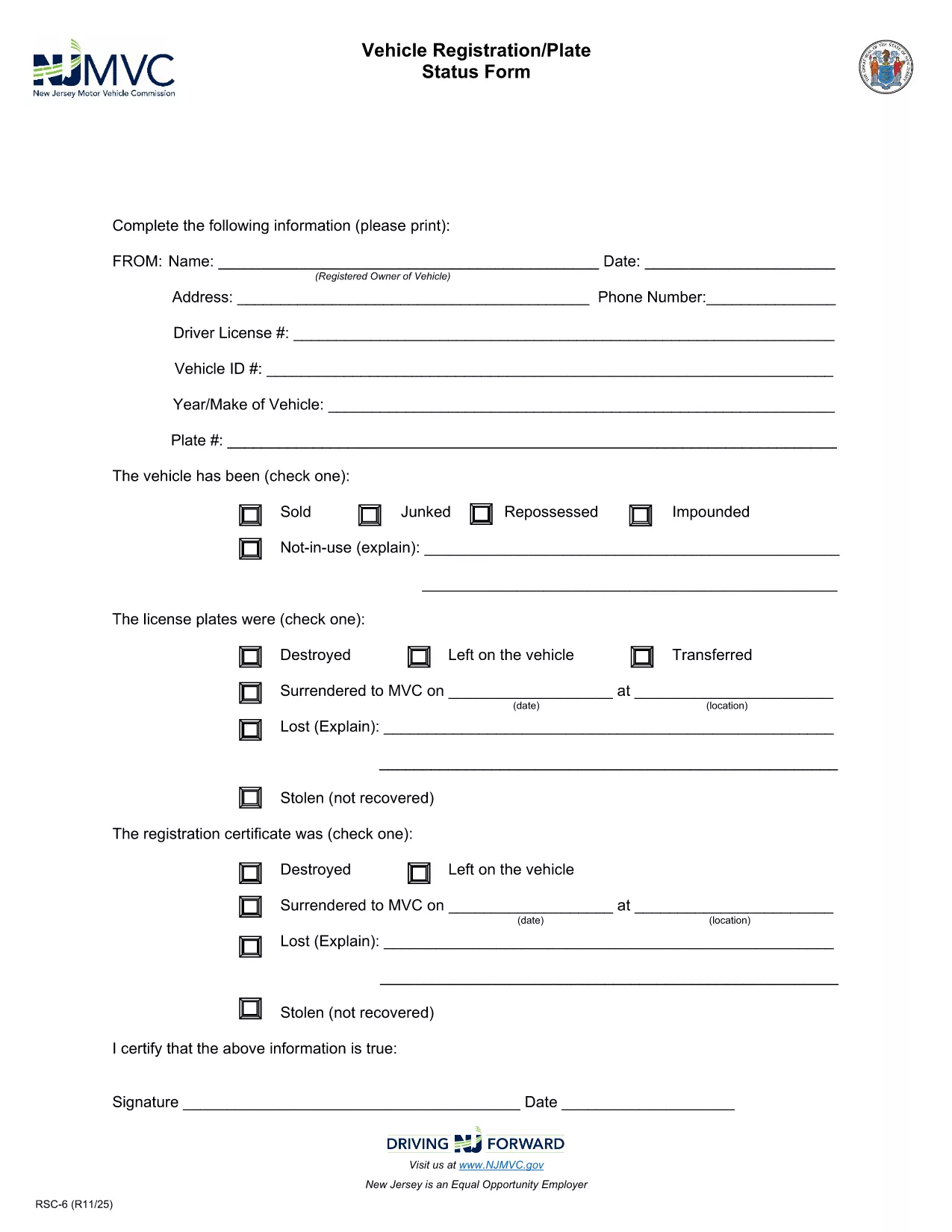
The RSC-6 is the official New Jersey Motor Vehicle Commission (NJ MVC) form used to request the current registration or plate status of a vehicle. Whether you are a dealer, a private buyer, or need verification for legal purposes, this fillable PDF lets you obtain the information quickly and accurately.

Our page provides a direct, secure link to the latest RSC-6 form and an integrated Formize PDF Filler that works in any browser—no Adobe Acrobat required. Simply click “Fill out this form,” let the app load, and start typing.

What Is the RSC-6 Form?

The RSC-6, sometimes called the “Vehicle Registration/Plate Status Form,” is a request for the NJ MVC to confirm a vehicle’s registration standing, plate condition, and any liens or holds. The form is commonly used by:

  • Dealerships during vehicle transfers
  • Law enforcement or courts for verification
  • Owners who need proof of registration for insurance or resale

When and Why You Need RSC-6

You’ll need the RSC-6 whenever you must prove that a vehicle’s registration is active, check for outstanding tolls, or verify that the plates are correctly assigned. Submitting an accurate form helps avoid delays in title transfers or legal disputes.

How to Complete the RSC-6 Online

Follow these simple steps:

  1. Click the “Fill out this form” button on this page.
  2. The Formize PDF Filler loads the fillable RSC-6 PDF directly in your browser.
  3. Enter the required details: vehicle VIN, license plate number, owner information, and purpose of request.
  4. Review the completed form for any errors.
  5. Submit electronically or download and print for hand‑delivery to the NJ MVC.

Common Mistakes to Avoid

Even small errors can cause the NJ MVC to reject your request. Double‑check the following:

  • VIN and plate numbers are entered exactly as they appear on the vehicle.
  • All required fields are filled; the form will not accept blank mandatory sections.
  • Signature fields are completed with a legible electronic signature or printed signature after download.

Where to Submit the Completed Form

After filling out the RSC-6, you can:

  • Mail it to the address listed on the form.
  • Deliver it in person to any NJ MVC office.
  • Upload a scanned copy through the NJ MVC online portal if you have an account.

Need more help? The NJ MVC website provides additional guidance, but the fillable PDF and our step‑by‑step instructions cover most user needs.

CÂU HỎI THƯỜNG GẶP
  • What is the purpose of the RSC-6 form?

    The RSC-6 requests the New Jersey Motor Vehicle Commission to confirm a vehicle’s registration and plate status, often needed for sales, legal matters, or insurance.

  • Can I fill out the RSC-6 on a mobile device?

    Yes. The Formize PDF Filler works on all modern browsers, including mobile Safari and Chrome, allowing you to complete the form on phones or tablets.

  • Do I need Adobe Acrobat to use the fillable PDF?

    No. The form is fully fillable within the Formize web app—no additional software is required.

  • How long does it take for the NJ MVC to process my request?

    Processing times vary, but most requests are handled within 5‑7 business days after the NJ MVC receives the completed RSC-6.

  • What should I do if I make a mistake after submitting?

    Contact the NJ MVC directly to request a correction or submit a new RSC-6 with the correct information.

  • Is there a fee to submit the RSC-6 form?

    The RSC-6 itself does not have a filing fee, but the NJ MVC may charge fees for related services such as title transfers or duplicate plates.

  • Can I save a partially completed RSC-6 to finish later?

    Yes. The Formize app lets you save your progress locally in the browser and return later to complete the form.

LÀM THẾ NÀO ĐỂ

Cách điền RSC-6 form miễn phí, trực tuyến trong 3 bước đơn giản:

  1. 1
    Open the Fillable Form
    Click the “Fill out this form” button on this page. The Formize PDF Filler app will open the RSC-6 PDF directly in your browser.
  2. 2
    Enter Your Information
    Type the required data into each field—VIN, license plate, owner details, and reason for the request. The form saves your entries automatically.
  3. 3
    Submit or Download
    When you’re done, choose to submit the completed form electronically (if supported) or download it, print, and mail it to the NJ MVC.
Định dạng ứng dụng PDF Filler
TRONG KHOẢNG

Mẫu đăng ký xe

Nếu bạn sở hữu hoặc thuê một phương tiện cơ giới, xe kéo hoặc thuyền, bạn phải đáp ứng một số nghĩa vụ để giữ cho phương tiện của bạn được đăng ký hợp pháp và an toàn.

RSC-6 form là một trong những biểu mẫu Đăng ký phương tiện là tài liệu được sử dụng để đăng ký phương tiện cơ giới với cơ quan nhà nước hoặc cấp tỉnh có liên quan. Những biểu mẫu này thường được yêu cầu khi một người mua một chiếc xe mới hoặc đã qua sử dụng hoặc khi họ chuyển đến một tiểu bang hoặc tỉnh mới với một chiếc xe.

Các yêu cầu và biểu mẫu chính xác cần thiết để đăng ký xe có thể khác nhau tùy theo địa điểm, nhưng nhìn chung, quy trình bao gồm việc cung cấp thông tin về xe, chủ sở hữu và bất kỳ quyền sở hữu nào đối với xe.

Sau khi nộp các mẫu đăng ký và lệ phí, chính quyền tiểu bang hoặc cấp tỉnh sẽ cấp giấy chứng nhận đăng ký hoặc biển số cho chủ sở hữu phương tiện. Việc đăng ký này cho phép phương tiện được vận hành hợp pháp trên đường công cộng và đường cao tốc.

ĐẶC TRƯNG

Trình điền PDF

Cách dễ nhất để điền vào các mẫu PDF trực tuyến

  • Nhanh chóng điền vào RSC-6 form
    Bạn đang tìm cách điền nhanh RSC-6 form trực tuyến? Với trình điền biểu mẫu PDF miễn phí trực tuyến của chúng tôi, bạn sẽ biết cách chỉnh sửa và điền vào tài liệu pdf này trong vòng chưa đầy một phút.
  • Trình chỉnh sửa PDF trực tuyến dễ sử dụng
    Chán nản với việc in ra các tệp PDF để bạn có thể chỉnh sửa chúng trước khi quét lại và gửi lại? Chỉnh sửa tài liệu PDF trực tuyến miễn phí. Sử dụng trình chỉnh sửa pdf trực tuyến của chúng tôi để tiết kiệm thời gian và giấy.
  • Công cụ tuyệt vời, tất cả các nền tảng
    Bạn muốn biết cách điền RSC-6 form trên máy Mac hoặc có thể là cách sử dụng trình điền PDF miễn phí? Các công cụ PDF trực tuyến của chúng tôi hoạt động trên tất cả các nền tảng.
  • Lưu trữ tệp an toàn
    Các tệp "RSC-6 form" đã hoàn thành được lưu trữ trong cơ sở dữ liệu bảo mật do dịch vụ lưu trữ Amazon Cloud quản lý. Bạn có thể xóa các tệp của mình khỏi hệ thống của chúng tôi bất cứ lúc nào. Trong mọi trường hợp, các tệp này sẽ tự động bị xóa sau 24 giờ.
  • Trò chuyện với RSC-6 form
    Trò chuyện với "RSC-6 form" trên Trò chuyện, một trợ lý đọc PDF miễn phí. Đặt câu hỏi và nhận câu trả lời từ "RSC-6 form". Chỉ cần nhấp vào nút Trò chuyện với tài liệu ở trên.

Xóa phiên điền

Xóa phiên điền đã chọn? Trong trường hợp này, tiến độ của bạn trong việc hoàn thành biểu mẫu sẽ bị mất.

Xóa phiên chỉnh sửa

Xóa phiên chỉnh sửa đã chọn? Trong trường hợp này, tiến trình tạo và chỉnh sửa biểu mẫu của bạn sẽ bị mất.