
Chọn ngôn ngữ

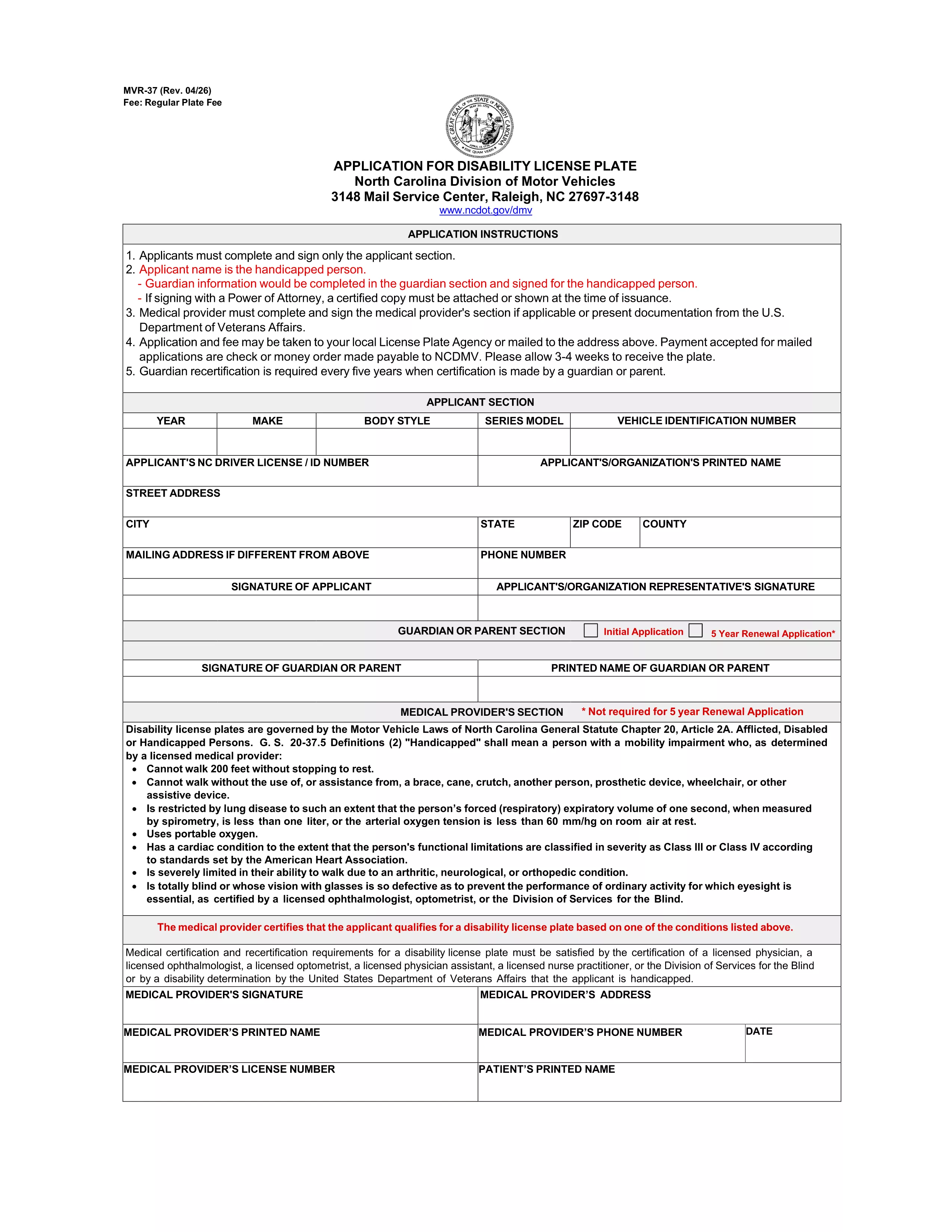
MVR-37 Application for Handicap Driver Registration Plate (North Carolina)

  1. Ngôn ngữ Tiếng Anh
  2. Quốc gia Hoa Kỳ
  3. Hoạt động Đăng ký xe
  4. Tiểu bang bắc Carolina
MVR-37 Application for Handicap Driver Registration Plate (North Carolina)

The MVR-37 is the official North Carolina Department of Transportation (NCDOT) application for a handicap driver registration plate. This plate allows qualified drivers to park in designated disabled parking spaces and enjoy other accessibility benefits.

Formize.com hosts a fillable PDF version of the MVR-37, so you can complete the entire application online without printing, scanning, or using a separate PDF editor.

What Is the MVR-37 Form?

The MVR-37 is used to request a permanent or temporary disability license plate. It must be signed by the applicant (or guardian) and a licensed medical professional who verifies the qualifying disability.

How to Complete the MVR-37 Online

Follow these simple steps to fill out the form directly on our site:

  • Click the "Fill out this form" button below.
  • Wait for the Formize PDF Filler app to load (usually a few seconds).
  • Enter the required information in each field, upload the medical certification, and add your electronic signature.
  • Review the completed form, then download or email it to the North Carolina DMV.

Eligibility & Required Documents

To qualify for a handicap driver registration plate, you must meet one of the following criteria:

  • Possess a disability that limits your ability to walk or stand for extended periods.
  • Have a visual impairment certified by an optometrist, ophthalmologist, or a Division of Services for the Blind representative.

Required documents include:

  • Completed MVR-37 form.
  • Medical certification signed by a qualified provider.
  • Proof of identity (driver’s license, state ID, or passport).
  • Payment of the $36 plate fee (or $5 per placard if you’re applying for a placard instead).

Common Mistakes to Avoid

  • Leaving any required field blank – the PDF filler will highlight missing information.
  • Submitting an unsigned medical certification – the physician’s signature is mandatory.
  • Using an outdated version of the form – always use the latest PDF provided by the NCDOT.
  • Forgetting to attach the fee payment receipt when mailing the application.

Where to Submit Your Application

You can submit the completed MVR-37 by mail or in person at any North Carolina DMV license‑plate office. The mailing address is printed on the last page of the form.

Need help? Review the North Carolina DMV handicap services page for additional guidance.

CÂU HỎI THƯỜNG GẶP
  • What is the purpose of the MVR-37 form?

    The MVR-37 is used to apply for a handicap driver registration plate in North Carolina, granting access to disabled parking spaces.

  • Can I fill out the MVR-37 on a mobile device?

    Yes. The Formize fillable PDF works on smartphones and tablets as long as you have a modern browser.

  • Do I need a doctor’s signature on the form?

    A licensed physician, optometrist, ophthalmologist, or a Division of Services for the Blind representative must sign the medical certification section.

  • How much does a handicap license plate cost?

    The fee for a permanent handicap driver registration plate is $36. Temporary plates and placards have separate fees.

  • Where do I mail the completed MVR-37?

    Mail the completed form, medical certification, proof of identity, and payment to the address printed on the last page of the PDF.

  • Can I submit the form online directly to the DMV?

    North Carolina currently requires a mailed or in‑person submission, but you can email the completed PDF to the DMV if they approve it.

LÀM THẾ NÀO ĐỂ

Cách điền MVR-37 miễn phí, trực tuyến trong 4 bước đơn giản:

  1. 1
    Click the Fill Out Button
    On this page, click the "Fill out this form" button to launch the Formize PDF Filler.
  2. 2
    Wait for the Filler to Load
    The Formize PDF Filler app will open in a new window. Allow a few seconds for all fields to become interactive.
  3. 3
    Enter Your Information
    Complete each required field, upload your physician’s certification, and add your electronic signature.
  4. 4
    Review, Download, and Submit
    Double‑check the form for errors, then download the completed PDF or email it directly to the North Carolina DMV.
Định dạng ứng dụng PDF Filler
TRONG KHOẢNG

Mẫu đăng ký xe

Nếu bạn sở hữu hoặc thuê một phương tiện cơ giới, xe kéo hoặc thuyền, bạn phải đáp ứng một số nghĩa vụ để giữ cho phương tiện của bạn được đăng ký hợp pháp và an toàn.

MVR-37 là một trong những biểu mẫu Đăng ký phương tiện là tài liệu được sử dụng để đăng ký phương tiện cơ giới với cơ quan nhà nước hoặc cấp tỉnh có liên quan. Những biểu mẫu này thường được yêu cầu khi một người mua một chiếc xe mới hoặc đã qua sử dụng hoặc khi họ chuyển đến một tiểu bang hoặc tỉnh mới với một chiếc xe.

Các yêu cầu và biểu mẫu chính xác cần thiết để đăng ký xe có thể khác nhau tùy theo địa điểm, nhưng nhìn chung, quy trình bao gồm việc cung cấp thông tin về xe, chủ sở hữu và bất kỳ quyền sở hữu nào đối với xe.

Sau khi nộp các mẫu đăng ký và lệ phí, chính quyền tiểu bang hoặc cấp tỉnh sẽ cấp giấy chứng nhận đăng ký hoặc biển số cho chủ sở hữu phương tiện. Việc đăng ký này cho phép phương tiện được vận hành hợp pháp trên đường công cộng và đường cao tốc.

ĐẶC TRƯNG

Trình điền PDF

Cách dễ nhất để điền vào các mẫu PDF trực tuyến

  • Nhanh chóng điền vào MVR-37
    Bạn đang tìm cách điền nhanh MVR-37 trực tuyến? Với trình điền biểu mẫu PDF miễn phí trực tuyến của chúng tôi, bạn sẽ biết cách chỉnh sửa và điền vào tài liệu pdf này trong vòng chưa đầy một phút.
  • Trình chỉnh sửa PDF trực tuyến dễ sử dụng
    Chán nản với việc in ra các tệp PDF để bạn có thể chỉnh sửa chúng trước khi quét lại và gửi lại? Chỉnh sửa tài liệu PDF trực tuyến miễn phí. Sử dụng trình chỉnh sửa pdf trực tuyến của chúng tôi để tiết kiệm thời gian và giấy.
  • Công cụ tuyệt vời, tất cả các nền tảng
    Bạn muốn biết cách điền MVR-37 trên máy Mac hoặc có thể là cách sử dụng trình điền PDF miễn phí? Các công cụ PDF trực tuyến của chúng tôi hoạt động trên tất cả các nền tảng.
  • Lưu trữ tệp an toàn
    Các tệp "MVR-37" đã hoàn thành được lưu trữ trong cơ sở dữ liệu bảo mật do dịch vụ lưu trữ Amazon Cloud quản lý. Bạn có thể xóa các tệp của mình khỏi hệ thống của chúng tôi bất cứ lúc nào. Trong mọi trường hợp, các tệp này sẽ tự động bị xóa sau 24 giờ.
  • Trò chuyện với MVR-37
    Trò chuyện với "MVR-37" trên Trò chuyện, một trợ lý đọc PDF miễn phí. Đặt câu hỏi và nhận câu trả lời từ "MVR-37". Chỉ cần nhấp vào nút Trò chuyện với tài liệu ở trên.

Xóa phiên điền

Xóa phiên điền đã chọn? Trong trường hợp này, tiến độ của bạn trong việc hoàn thành biểu mẫu sẽ bị mất.

Xóa phiên chỉnh sửa

Xóa phiên chỉnh sửa đã chọn? Trong trường hợp này, tiến trình tạo và chỉnh sửa biểu mẫu của bạn sẽ bị mất.