
Chọn ngôn ngữ

MVR-9 Farmer Affidavit – Fillable PDF Form

  1. Ngôn ngữ Tiếng Anh
  2. Quốc gia Hoa Kỳ
  3. Hoạt động Đăng ký xe
  4. Tiểu bang bắc Carolina
MVR-9 Farmer Affidavit – Fillable PDF Form

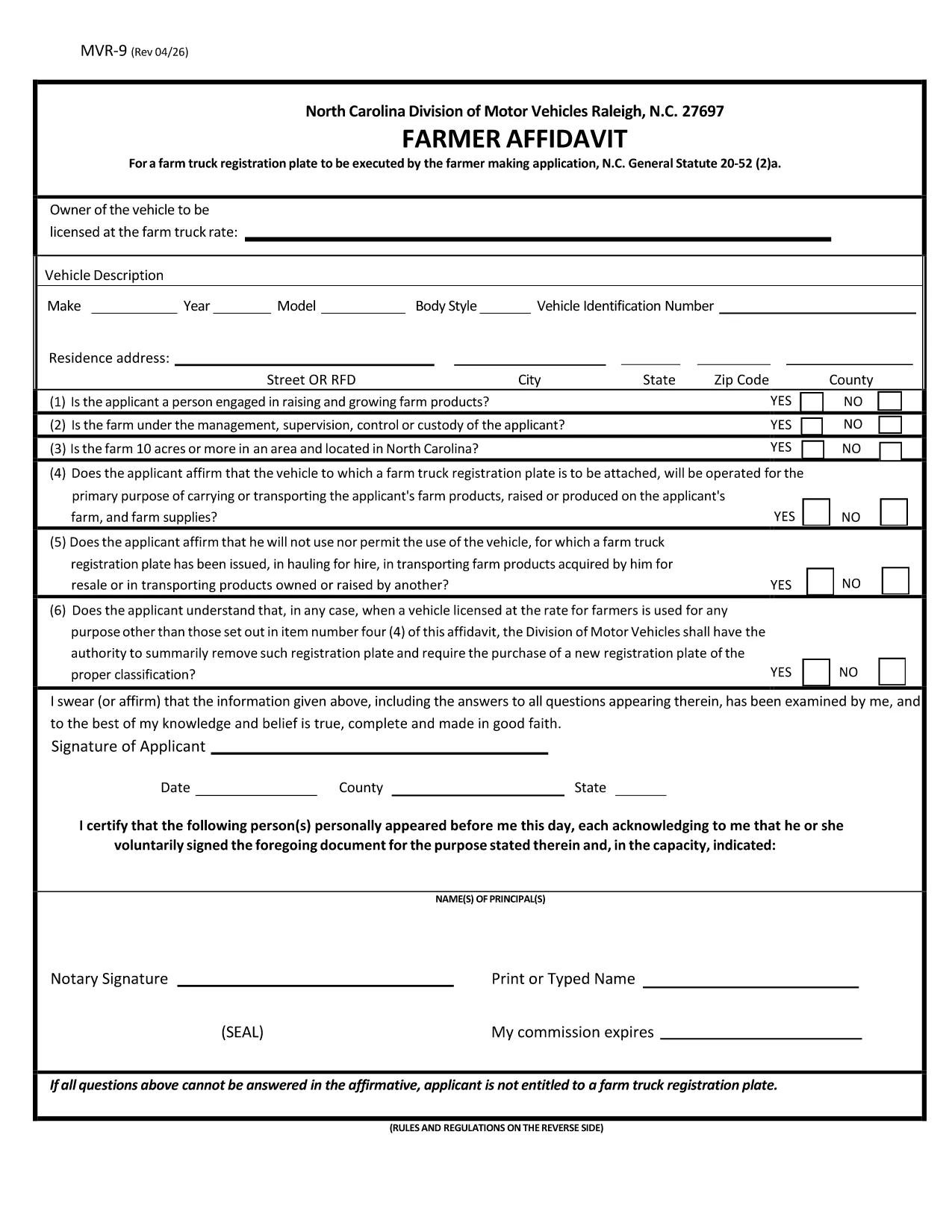
The MVR-9 Farmer Affidavit is a North Carolina Department of Transportation (NCDOT) form required for obtaining a special farm‑truck registration plate. It verifies that the vehicle is used primarily for agricultural purposes, as defined by N.C. General Statute 20‑52(2)(a).

Traditionally, applicants had to print the PDF, fill it by hand, and mail or deliver it to a local DMV office. With Formize’s online PDF filler, you can complete the form directly in your browser, save a digital copy, and print only the final version you need.

What Is the MVR-9 Farmer Affidavit?

The MVR-9 collects essential information about the vehicle, the farmer, and the farm operation. Key sections include:

  • Owner and farmer details
  • Vehicle identification (VIN, make, model)
  • Proof of farm ownership or lease
  • Signature of the farmer and, if applicable, a notary

How to Complete the MVR-9 Online with Formize

Instead of downloading the PDF and opening it in a separate editor, simply click the "Fill out this form" button on this page. The Formize PDF Filler will load automatically. Follow the on‑screen prompts to enter your information, save progress, and download the completed document.

Common Mistakes to Avoid on the MVR-9

  • Leaving fields blank: Every required field must be completed; otherwise the DMV will reject the application.
  • Incorrect VIN: Double‑check the Vehicle Identification Number; a single digit error can delay processing.
  • Missing notarization: If a notary is required, ensure the signature and seal are present before submitting.
  • Outdated farm ownership documents: Provide current proof of ownership or lease.

Where to Submit Your Completed MVR-9

After filling out and printing the form, submit it to any North Carolina DMV office or mail it to the address listed on the form. Keep a copy for your records.

CÂU HỎI THƯỜNG GẶP
  • What is the purpose of the MVR-9 form?

    The MVR-9 Farmer Affidavit verifies that a vehicle is used primarily for agricultural purposes, allowing owners to obtain a special farm‑truck registration plate in North Carolina.

  • Can I file the MVR-9 completely online?

    You can fill out the form online using Formize, but the final submission still requires a printed, signed (and possibly notarized) copy to be handed to the DMV.

  • Do I need a notary for the MVR-9?

    A notary is required only if the affidavit states that the farmer is not the vehicle owner. Check the specific box on the form to see if notarization is needed.

  • How long does it take for the DMV to process the MVR-9?

    Processing times vary by office, but most locations complete the farm‑truck plate issuance within 7‑10 business days after receiving a complete, correctly signed form.

  • What documents should I attach with the MVR-9?

    Attach a copy of the vehicle title, proof of farm ownership or lease (such as a deed or lease agreement), and any required notarization.

  • Is there a fee to file the MVR-9?

    Yes, there is a standard fee for a farm‑truck registration plate, which varies by vehicle weight and type. Check the latest fee schedule on the NCDOT website.

  • Can I edit the MVR-9 after I download it?

    Once you download the completed PDF, you can re‑open it in Formize to make edits before final submission, as long as the form has not been signed and notarized.

LÀM THẾ NÀO ĐỂ

Cách điền MVR-9 miễn phí, trực tuyến trong 4 bước đơn giản:

  1. 1
    Open the Fillable Form
    Click the "Fill out this form" button on the page. The Formize PDF Filler app will open in a new tab.
  2. 2
    Enter Your Information
    Use the on‑screen fields to type in your farmer details, vehicle information, and farm ownership proof. All fields are searchable and auto‑save.
  3. 3
    Review & Sign
    Check each section for accuracy, then use the digital signature tool to sign. If a notary is required, print the completed form for notarization.
  4. 4
    Download & Submit
    Once satisfied, click "Download PDF" to save a copy. Print the final document and submit it to your local NCDOT DMV office or mail it as instructed.
Định dạng ứng dụng PDF Filler
TRONG KHOẢNG

Mẫu đăng ký xe

Nếu bạn sở hữu hoặc thuê một phương tiện cơ giới, xe kéo hoặc thuyền, bạn phải đáp ứng một số nghĩa vụ để giữ cho phương tiện của bạn được đăng ký hợp pháp và an toàn.

MVR-9 là một trong những biểu mẫu Đăng ký phương tiện là tài liệu được sử dụng để đăng ký phương tiện cơ giới với cơ quan nhà nước hoặc cấp tỉnh có liên quan. Những biểu mẫu này thường được yêu cầu khi một người mua một chiếc xe mới hoặc đã qua sử dụng hoặc khi họ chuyển đến một tiểu bang hoặc tỉnh mới với một chiếc xe.

Các yêu cầu và biểu mẫu chính xác cần thiết để đăng ký xe có thể khác nhau tùy theo địa điểm, nhưng nhìn chung, quy trình bao gồm việc cung cấp thông tin về xe, chủ sở hữu và bất kỳ quyền sở hữu nào đối với xe.

Sau khi nộp các mẫu đăng ký và lệ phí, chính quyền tiểu bang hoặc cấp tỉnh sẽ cấp giấy chứng nhận đăng ký hoặc biển số cho chủ sở hữu phương tiện. Việc đăng ký này cho phép phương tiện được vận hành hợp pháp trên đường công cộng và đường cao tốc.

ĐẶC TRƯNG

Trình điền PDF

Cách dễ nhất để điền vào các mẫu PDF trực tuyến

  • Nhanh chóng điền vào MVR-9
    Bạn đang tìm cách điền nhanh MVR-9 trực tuyến? Với trình điền biểu mẫu PDF miễn phí trực tuyến của chúng tôi, bạn sẽ biết cách chỉnh sửa và điền vào tài liệu pdf này trong vòng chưa đầy một phút.
  • Trình chỉnh sửa PDF trực tuyến dễ sử dụng
    Chán nản với việc in ra các tệp PDF để bạn có thể chỉnh sửa chúng trước khi quét lại và gửi lại? Chỉnh sửa tài liệu PDF trực tuyến miễn phí. Sử dụng trình chỉnh sửa pdf trực tuyến của chúng tôi để tiết kiệm thời gian và giấy.
  • Công cụ tuyệt vời, tất cả các nền tảng
    Bạn muốn biết cách điền MVR-9 trên máy Mac hoặc có thể là cách sử dụng trình điền PDF miễn phí? Các công cụ PDF trực tuyến của chúng tôi hoạt động trên tất cả các nền tảng.
  • Lưu trữ tệp an toàn
    Các tệp "MVR-9" đã hoàn thành được lưu trữ trong cơ sở dữ liệu bảo mật do dịch vụ lưu trữ Amazon Cloud quản lý. Bạn có thể xóa các tệp của mình khỏi hệ thống của chúng tôi bất cứ lúc nào. Trong mọi trường hợp, các tệp này sẽ tự động bị xóa sau 24 giờ.
  • Trò chuyện với MVR-9
    Trò chuyện với "MVR-9" trên Trò chuyện, một trợ lý đọc PDF miễn phí. Đặt câu hỏi và nhận câu trả lời từ "MVR-9". Chỉ cần nhấp vào nút Trò chuyện với tài liệu ở trên.

Xóa phiên điền

Xóa phiên điền đã chọn? Trong trường hợp này, tiến độ của bạn trong việc hoàn thành biểu mẫu sẽ bị mất.

Xóa phiên chỉnh sửa

Xóa phiên chỉnh sửa đã chọn? Trong trường hợp này, tiến trình tạo và chỉnh sửa biểu mẫu của bạn sẽ bị mất.