
选择语言

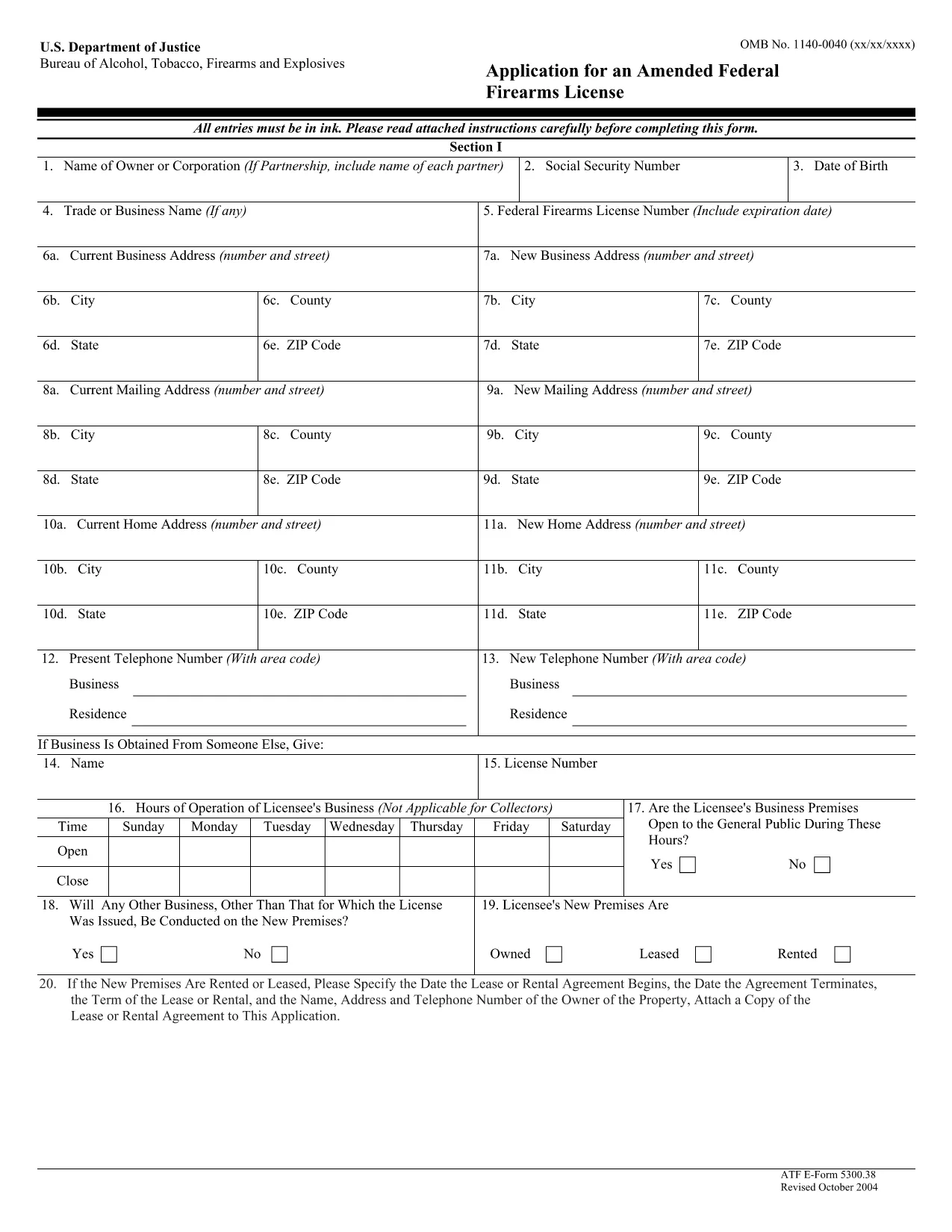
ATF Form 5300.38 – Amended Federal Firearms License Application

  1. 语言 英语
  2. 国家 美国
  3. 部门 酒精、烟草、火器和爆炸物管理局
  4. 部门 枪支
ATF Form 5300.38 – Amended Federal Firearms License Application

The ATF Form 5300.38 is the official application used to request an amendment to an existing Federal Firearms License (FFL). Whether you need to add a new class of firearms, change your business address, or update other license details, this form is required by the Bureau of Alcohol, Tobacco, Firearms and Explosives (ATF).

Formize.com offers a 100% fillable, searchable PDF version of the ATF Form 5300.38. You can either download the PDF to complete it offline or use our integrated online PDF filler to fill it out instantly in your browser—no extra software needed.

What is ATF Form 5300.38?

This form is titled “Application for an Amended Federal Firearms License” and is governed by 18 U.S.C. Chapter 44. It is used by existing FFL holders to request any change to their license that does not require a completely new application.

How to Fill Out the Form Online

Follow the simple steps below to complete the form securely with Formize’s PDF Filler:

  • Click the “Fill out this form” button on this page.
  • Wait a few seconds while the Formize PDF Filler loads the fillable ATF Form 5300.38.
  • Enter your information directly into each field. The filler validates dates, phone numbers, and required fields in real time.
  • Review the completed form, sign electronically if required, and click “Download” or “Print”.
  • Mail the signed form to the ATF Federal Firearms Licensing Center as instructed.

Common Mistakes to Avoid

Even a small error can delay processing. Keep these tips in mind:

  • Incorrect ATF Number: Double‑check your current FFL number.
  • Missing Signatures: All required signatures must be original or an accepted electronic signature.
  • Out‑of‑Date Addresses: Use the exact mailing address listed on your current license.
  • Incomplete Attachments: If you’re adding a new class, include the appropriate supplemental pages.

Where to Submit Your Application

After completing the form, mail it to:

Chief, Federal Firearms Licensing Center
2600 Century Parkway NE
Atlanta, GA 30345
United States

Use certified mail or a reputable courier to ensure delivery tracking.

Download the Official PDF

If you prefer to fill out the form offline, click the download button below to get the official ATF Form 5300.38 PDF directly from the government source.

Download ATF Form 5300.38 PDF

常问问题
  • Is the ATF Form 5300.38 available as a fillable PDF?

    Yes. Formize provides a fully fillable PDF version that you can complete online or download for offline use.

  • Do I need a digital signature for this form?

    The ATF accepts electronic signatures for most sections, but the final signature line often requires a wet ink signature. Check the instructions on the form.

  • How long does it take for the ATF to process an amendment?

    Processing times vary, but most amended license requests are reviewed within 4‑6 weeks after receipt.

  • Can I submit the form electronically?

    The ATF still requires a hard‑copy submission by mail. You can, however, fill out the form electronically and print it for mailing.

  • What should I do if I make a mistake after printing?

    Cross out the error with a single line, initial the change, and complete the rest of the form. For major errors, it’s best to start a new copy.

  • Is there a fee for filing an amendment?

    Generally, there is no additional fee for amending an existing FFL unless the amendment adds a new class of firearms, which may incur a fee.

  • Where can I find the official ATF instructions for Form 5300.38?

    The official instruction sheet is included as the first page of the PDF linked above or can be accessed on the ATF website.

  • Do I need to attach any supporting documents?

    Depending on the amendment, you may need to attach a copy of your current license, a new business location map, or other relevant documentation.

如何

如何通过 5 个简单步骤在线免费填写 ATF Form 5300.38:

  1. 1
    Click the Fill‑out Button
    Press the “Fill out this form” button on this page to launch the Formize PDF Filler.
  2. 2
    Wait for the Filler to Load
    The fillable ATF Form 5300.38 will appear in your browser within a few seconds.
  3. 3
    Enter Your Information
    Complete each field. The tool validates entries and highlights required sections.
  4. 4
    Review and Sign
    Check the completed form for accuracy, add an electronic signature if allowed, and save.
  5. 5
    Download or Print
    Download the finished PDF or print it to mail to the ATF Federal Firearms Licensing Center.
Formize PDF Filler 应用程序
关于

酒精、烟草、枪支和爆炸物局 (ATF) 表格

ATF Form 5300.38 是美国司法部联邦执法机构 ATF 使用的官方表格之一。 ATF 负责执行与酒精、烟草、枪支和爆炸物相关的联邦法律和法规。这些表格用于各种目的,包括对这些行业涉及的企业和个人进行注册、许可和监管。以下是 ATF 表格的一些示例:

ATF 表格 4473:此表格用于当个人从联邦许可的枪支经销商处购买枪支时进行背景调查。它收集有关购买者的身份、背景和拥有枪支资格的信息。

ATF 表 1:此表用于申请枪支的制造和注册。它通常用于想要制造供个人使用的枪支或将现有枪支转换为不同配置的个人。

ATF 表 4:此表用于将枪支从一个个人或实体转让给另一个人或实体并进行登记。它通常用于从私人团体购买枪支或将枪支转让给信托或公司的过程中。

ATF 表 6:此表用于进口枪支、弹药和 ATF 监管的某些其他物品。对于想要将此类物品进口到美国的个人或企业来说,这是必需的。

ATF 表 7:此表用于申请和续签联邦枪支许可证 (FFL)。从事制造、交易或进口枪支业务的个人或企业需要这样做。

ATF表格5320.20:此表格用于枪支运输的通知和批准或跨州界的破坏性装置。

ATF 表格 5400.13:此表格用于注册和报告爆炸材料和装置。

这些只是 ATF 表格的几个例子,其用于与管理酒精、烟草、枪支和爆炸物的联邦法律的监管和执行相关的各种目的。所需的具体表格取决于正在进行的特定活动或交易以及适用的法规。请务必查阅酒精、烟草、枪械和爆炸物管理局的官方网站 (www.atf.gov) 或寻求专业指导以获取准确和最新的信息关于与您的情况相关的具体 ATF 表格。

特征

PDF 填充器

在线填写 PDF 表单的最简单方法

  • 快速填写ATF Form 5300.38
    正在寻找一种在线快速填写 ATF Form 5300.38 的方法?使用我们的在线免费 PDF 填表工具,您将在不到一分钟的时间内了解如何编辑和填写此 pdf 文档。
  • 易于使用的在线 PDF 编辑器
    是否厌倦了打印 PDF 文件以便在重新扫描并发回之前对其进行编辑?免费在线编辑 PDF 文档。使用我们的在线 pdf 编辑器可以节省时间和纸张。
  • 伟大的工具,所有平台
    想知道如何在 Mac 上填写 ATF Form 5300.38,或者如何免费使用 PDF 填充程序?我们的在线 PDF 工具适用于所有平台。
  • 安全文件存储
    完成的“ATF Form 5300.38”文件存储在由亚马逊云托管管理的安全数据库中。您可以随时从我们的系统中删除您的文件。在任何情况下,这些文件都会在 24 小时后自动删除。
  • 与 ATF Form 5300.38 聊天
    Chatize 上与“ATF Form 5300.38”聊天,这是一个免费的 PDF 阅读器助手。提出问题并从“ATF Form 5300.38”获得答案。只需点击上面的与文档聊天按钮即可。

删除填充会话

删除选定的填充会话?在这种情况下,您填写表格的进度将丢失。

删除编辑会话

删除选定的编辑会话?在这种情况下,您创建和编辑表单的进度将会丢失。