
选择语言

ATF Form 5310.12 & 5310.16 Fillable PDF – Download & Complete Online

  1. 语言 英语
  2. 国家 美国
  3. 部门 酒精、烟草、火器和爆炸物管理局
  4. 部门 枪支
ATF Form 5310.12 & 5310.16 Fillable PDF – Download & Complete Online

Whether you are applying for a new Federal Firearms License (FFL) or need to add a responsible person to an existing license, the ATF’s Form 5310.12 and Form 5310.16 are essential. Formize provides a secure, fillable PDF that lets you complete both forms directly in your browser – no extra software required.

What Is ATF Form 5310.12?

Form 5310.12 is the official application used to request any type of FFL (Dealer, Manufacturer, Importer, etc.). It collects business information, background details, and the specific license class you are seeking.

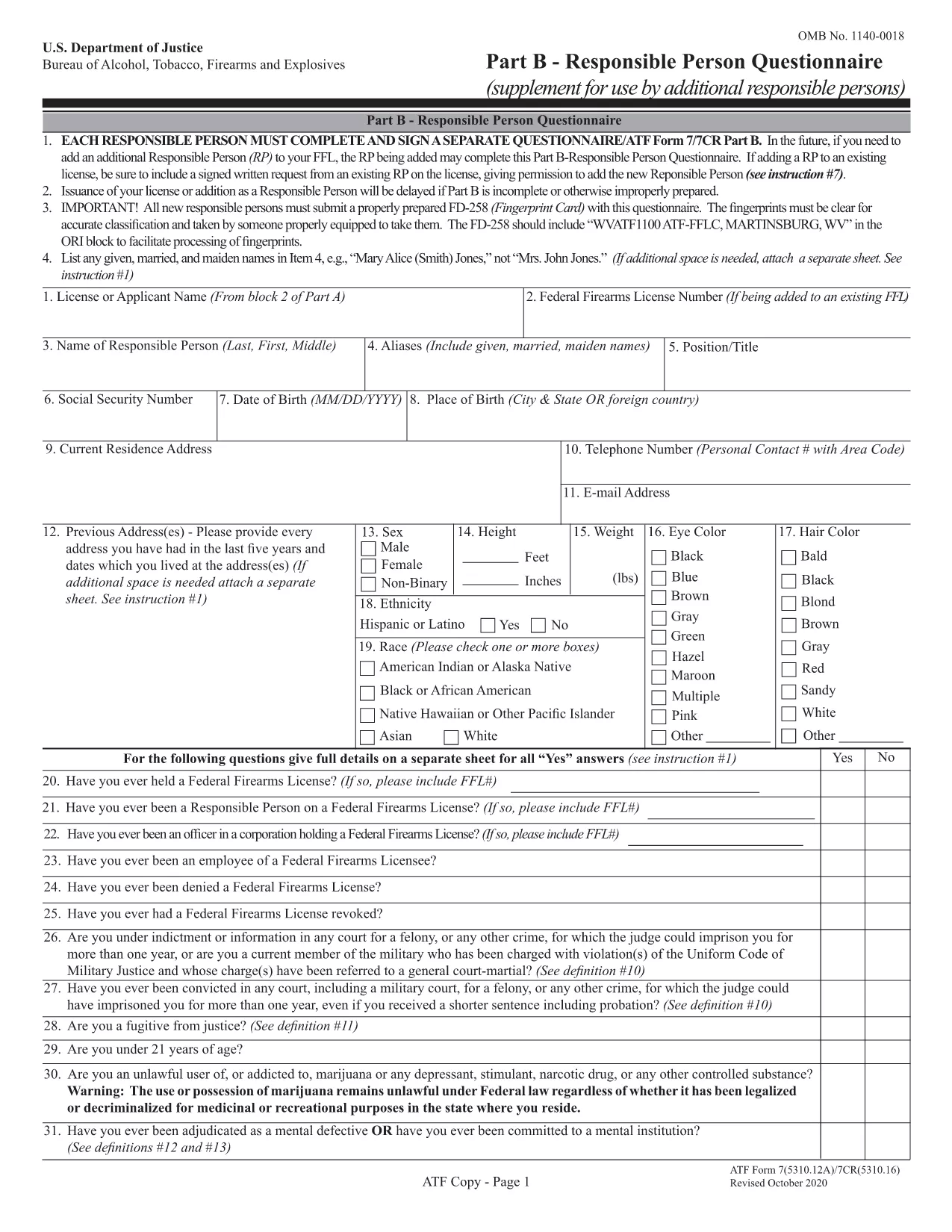
Understanding Form 5310.16 – Responsible Person Questionnaire

Form 5310.16 (also known as Part B) is a questionnaire that must be completed by every responsible person added to an FFL. It includes personal background questions, fingerprint instructions, and a photo requirement.

How to Fill Out the Forms Online with Formize

Follow the simple steps below to fill the PDF without leaving the page.

  • Click the "Fill out this form" button on the page.
  • Wait a few seconds while the Formize PDF Filler app loads.
  • Enter your information directly into the fillable fields.
  • Use the Save button to download a completed copy or Print it for mailing.
  • Mail the printed form to the ATF address shown on the form instructions.

Common Mistakes to Avoid

  • Leaving required fields blank – the filler highlights empty mandatory sections.
  • Using an outdated form version – our PDF is the latest revision (effective 2022).
  • Submitting the wrong mailing address – double‑check the address on the form’s last page.
  • Forgetting the fingerprint card for Form 5310.16 – attach it before mailing.

Where to Submit Your Completed Forms

After completing the forms, mail them to the ATF’s Federal Firearms Licensing Center (FFLC) at the address printed on the last page of each form. For expedited processing, consider using certified mail with tracking.

Need more help? Review the ATF’s official instructions linked on each form or consult a qualified firearms attorney.

常问问题
  • Do I need to fill out both Form 5310.12 and 5310.16?

    Form 5310.12 is required for a new FFL. Form 5310.16 is only needed when adding or updating a responsible person on an existing FFL.

  • Can I submit the forms electronically?

    The ATF currently requires a hard‑copy submission for these forms. Use the online filler to complete them, then print and mail.

  • Is the PDF fillable on mobile devices?

    Yes. The Formize filler works on most modern smartphones and tablets, though a larger screen makes data entry easier.

  • What address should I use for mailing?

    The correct mailing address is printed on the last page of each form. For Form 5310.12, use the Federal Firearms Licensing Center address; for Form 5310.16, use the ATF address shown in the questionnaire instructions.

  • How long does it take the ATF to process my application?

    Processing times vary, but most FFL applications are reviewed within 60‑90 days after receipt.

  • Do I need a fingerprint card for Form 5310.16?

    Yes. Every responsible person must submit a fingerprint card (FD‑258) along with the completed questionnaire.

  • What if I make a mistake after mailing?

    Contact the ATF’s Federal Firearms Licensing Center immediately. They may allow a corrected form to be resubmitted before final approval.

如何

如何通过 5 个简单步骤在线免费填写 ATF Form 5310.12:

  1. 1
    Click the Fill Out Button
    Press the "Fill out this form" button on the page to launch the Formize PDF Filler.
  2. 2
    Wait for the Filler to Load
    A short loading screen appears while the secure fillable PDF is prepared.
  3. 3
    Enter Your Information
    Type directly into each highlighted field. Use the navigation tabs to jump between sections.
  4. 4
    Save or Print Your Completed Form
    When finished, click "Save" to download a copy or "Print" to produce a hard‑copy for mailing.
  5. 5
    Mail to the ATF
    Attach any required fingerprint cards or photos and mail the form to the address shown on the last page.
Formize PDF Filler 应用程序
关于

酒精、烟草、枪支和爆炸物局 (ATF) 表格

ATF Form 5310.12 是美国司法部联邦执法机构 ATF 使用的官方表格之一。 ATF 负责执行与酒精、烟草、枪支和爆炸物相关的联邦法律和法规。这些表格用于各种目的,包括对这些行业涉及的企业和个人进行注册、许可和监管。以下是 ATF 表格的一些示例:

ATF 表格 4473:此表格用于当个人从联邦许可的枪支经销商处购买枪支时进行背景调查。它收集有关购买者的身份、背景和拥有枪支资格的信息。

ATF 表 1:此表用于申请枪支的制造和注册。它通常用于想要制造供个人使用的枪支或将现有枪支转换为不同配置的个人。

ATF 表 4:此表用于将枪支从一个个人或实体转让给另一个人或实体并进行登记。它通常用于从私人团体购买枪支或将枪支转让给信托或公司的过程中。

ATF 表 6:此表用于进口枪支、弹药和 ATF 监管的某些其他物品。对于想要将此类物品进口到美国的个人或企业来说,这是必需的。

ATF 表 7:此表用于申请和续签联邦枪支许可证 (FFL)。从事制造、交易或进口枪支业务的个人或企业需要这样做。

ATF表格5320.20:此表格用于枪支运输的通知和批准或跨州界的破坏性装置。

ATF 表格 5400.13:此表格用于注册和报告爆炸材料和装置。

这些只是 ATF 表格的几个例子,其用于与管理酒精、烟草、枪支和爆炸物的联邦法律的监管和执行相关的各种目的。所需的具体表格取决于正在进行的特定活动或交易以及适用的法规。请务必查阅酒精、烟草、枪械和爆炸物管理局的官方网站 (www.atf.gov) 或寻求专业指导以获取准确和最新的信息关于与您的情况相关的具体 ATF 表格。

特征

PDF 填充器

在线填写 PDF 表单的最简单方法

  • 快速填写ATF Form 5310.12
    正在寻找一种在线快速填写 ATF Form 5310.12 的方法?使用我们的在线免费 PDF 填表工具,您将在不到一分钟的时间内了解如何编辑和填写此 pdf 文档。
  • 易于使用的在线 PDF 编辑器
    是否厌倦了打印 PDF 文件以便在重新扫描并发回之前对其进行编辑?免费在线编辑 PDF 文档。使用我们的在线 pdf 编辑器可以节省时间和纸张。
  • 伟大的工具,所有平台
    想知道如何在 Mac 上填写 ATF Form 5310.12,或者如何免费使用 PDF 填充程序?我们的在线 PDF 工具适用于所有平台。
  • 安全文件存储
    完成的“ATF Form 5310.12”文件存储在由亚马逊云托管管理的安全数据库中。您可以随时从我们的系统中删除您的文件。在任何情况下,这些文件都会在 24 小时后自动删除。
  • 与 ATF Form 5310.12 聊天
    Chatize 上与“ATF Form 5310.12”聊天,这是一个免费的 PDF 阅读器助手。提出问题并从“ATF Form 5310.12”获得答案。只需点击上面的与文档聊天按钮即可。

删除填充会话

删除选定的填充会话?在这种情况下,您填写表格的进度将丢失。

删除编辑会话

删除选定的编辑会话?在这种情况下,您创建和编辑表单的进度将会丢失。