
选择语言

ATF Form 5400.13/5400.16 – Responsible Person Questionnaire

  1. 语言 英语
  2. 国家 美国
  3. 部门 酒精、烟草、火器和爆炸物管理局
  4. 部门 炸药
ATF Form 5400.13/5400.16 – Responsible Person Questionnaire

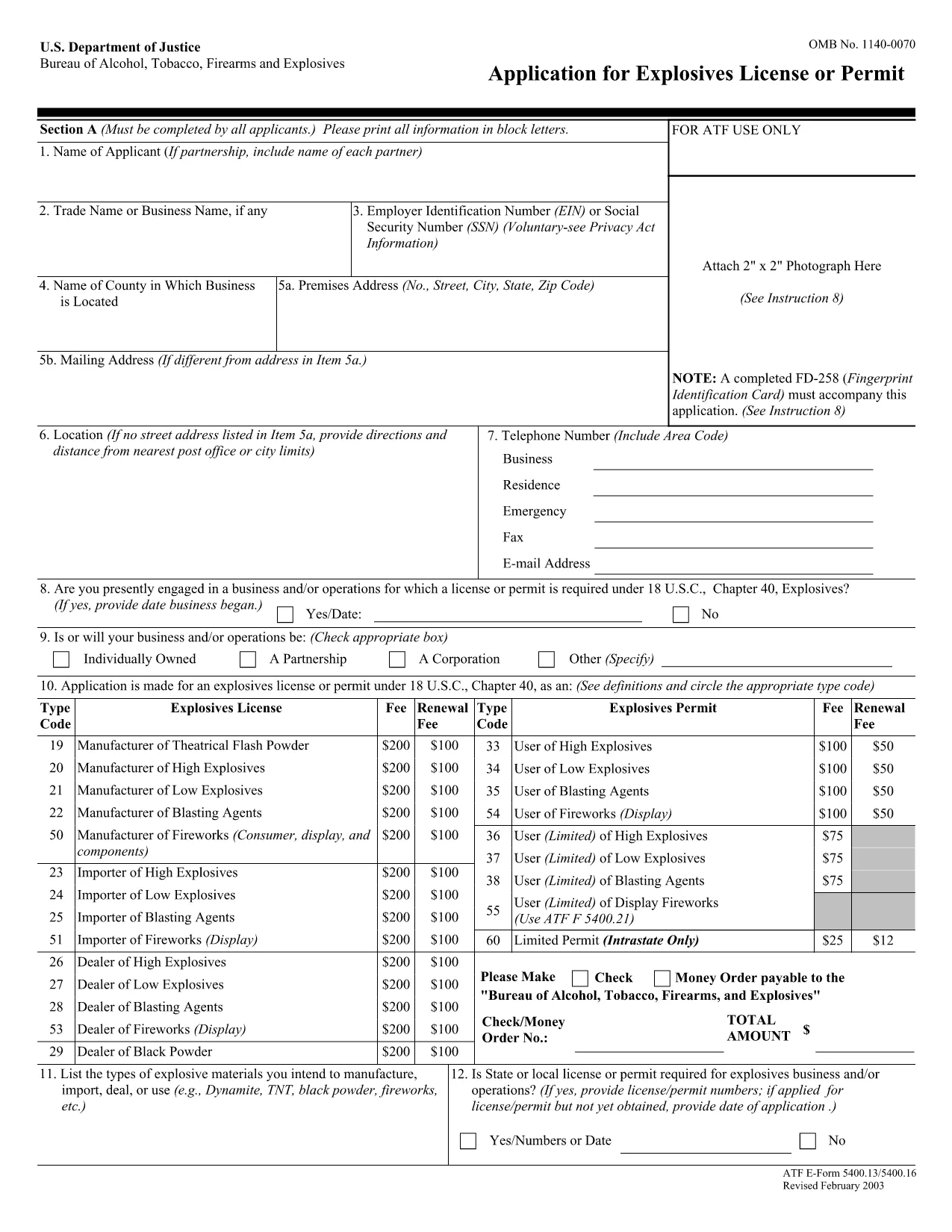
The ATF Form 5400.13 (Responsible Person Questionnaire) and its companion Form 5400.16 are required for anyone applying for an explosives license or permit. These forms collect detailed information about each responsible person associated with the business, ensuring compliance with the Bureau of Alcohol, Tobacco, Firearms and Explosives (ATF) regulations.

What Is ATF Form 5400.13/5400.16?

Form 5400.13 gathers personal, business, and background data for each responsible person, while Form 5400.16 provides additional certification and signature fields. Together, they form the core of the ATF’s Responsible Person Questionnaire, a mandatory part of every explosives license or permit application.

How to Complete the Form Online with Formize

  • Step 1: Click the "Fill out this form" button on this page.
  • Step 2: Wait a few seconds while the Formize PDF Filler app loads the fillable PDF.
  • Step 3: Enter the requested information in each field. The interface saves your progress automatically.
  • Step 4: When all sections are complete, download the finished PDF or submit it directly to the ATF portal.

Common Mistakes & Tips for a Successful Submission

Don’t leave any required fields blank. The ATF will reject applications with missing data. Use the "Add another responsible person" button if you have more than one individual to report.

Use legal names only. Include maiden names, previous married names, and any aliases exactly as they appear on official documents.

Double‑check dates. Ensure birth dates, licensing dates, and expiration dates follow the MM/DD/YYYY format.

Where to Send the Completed Form

After you download the completed PDF, mail or fax it to the ATF National Services Center, Federal Explosives Licensing Center, P.O. Box 6200‑18, Portland, OR 97228‑6200. Refer to the ATF instructions for any additional submission requirements.

Need a printable version? Use the download link below to get the original PDF.

常问问题
  • Who must complete ATF Form 5400.13/5400.16?

    Every individual who will act as a responsible person for an explosives business – owners, partners, officers, and key employees – must complete the questionnaire.

  • Can I submit a paper copy instead of the fillable PDF?

    Yes, a printed version is accepted, but using the fillable PDF reduces errors and speeds up processing.

  • What if I have more than three responsible persons?

    Use the "Add another responsible person" button in the online filler, or attach additional sheets if you print the form.

  • How long is the form valid after I submit it?

    The information is valid for the duration of the license or permit. Any changes (e.g., new responsible person) must be reported to the ATF promptly.

  • Do I need a digital signature?

    A typed name in the signature field is acceptable for the online version. For paper submissions, sign with a pen.

  • Is there a filing fee associated with this questionnaire?

    The questionnaire itself has no fee, but it is part of the overall explosives license application, which may have associated fees.

  • What should I do if I make a mistake after saving?

    Open the saved PDF in the Formize filler again, correct the error, and re‑download the updated file.

  • Where can I find the official ATF instructions?

    The ATF publishes detailed guidance on its website under the Explosives Licensing section; a link is included on the form’s cover page.

如何

如何通过 4 个简单步骤在线免费填写 ATF Form 5400.13:

  1. 1
    Click the Fill‑out Button
    Press the "Fill out this form" button on the page to launch the Formize PDF Filler.
  2. 2
    Wait for the Filler to Load
    A few seconds later the fillable PDF appears in the browser. No download or extra software is needed.
  3. 3
    Enter All Required Information
    Complete each field for every responsible person. The app auto‑saves as you type.
  4. 4
    Download or Submit
    When finished, click "Download PDF" to save a copy or follow ATF instructions to submit the form.
Formize PDF Filler 应用程序
关于

酒精、烟草、枪支和爆炸物局 (ATF) 表格

ATF Form 5400.13 是美国司法部联邦执法机构 ATF 使用的官方表格之一。 ATF 负责执行与酒精、烟草、枪支和爆炸物相关的联邦法律和法规。这些表格用于各种目的,包括对这些行业涉及的企业和个人进行注册、许可和监管。以下是 ATF 表格的一些示例:

ATF 表格 4473:此表格用于当个人从联邦许可的枪支经销商处购买枪支时进行背景调查。它收集有关购买者的身份、背景和拥有枪支资格的信息。

ATF 表 1:此表用于申请枪支的制造和注册。它通常用于想要制造供个人使用的枪支或将现有枪支转换为不同配置的个人。

ATF 表 4:此表用于将枪支从一个个人或实体转让给另一个人或实体并进行登记。它通常用于从私人团体购买枪支或将枪支转让给信托或公司的过程中。

ATF 表 6:此表用于进口枪支、弹药和 ATF 监管的某些其他物品。对于想要将此类物品进口到美国的个人或企业来说,这是必需的。

ATF 表 7:此表用于申请和续签联邦枪支许可证 (FFL)。从事制造、交易或进口枪支业务的个人或企业需要这样做。

ATF表格5320.20:此表格用于枪支运输的通知和批准或跨州界的破坏性装置。

ATF 表格 5400.13:此表格用于注册和报告爆炸材料和装置。

这些只是 ATF 表格的几个例子,其用于与管理酒精、烟草、枪支和爆炸物的联邦法律的监管和执行相关的各种目的。所需的具体表格取决于正在进行的特定活动或交易以及适用的法规。请务必查阅酒精、烟草、枪械和爆炸物管理局的官方网站 (www.atf.gov) 或寻求专业指导以获取准确和最新的信息关于与您的情况相关的具体 ATF 表格。

特征

PDF 填充器

在线填写 PDF 表单的最简单方法

  • 快速填写ATF Form 5400.13
    正在寻找一种在线快速填写 ATF Form 5400.13 的方法?使用我们的在线免费 PDF 填表工具,您将在不到一分钟的时间内了解如何编辑和填写此 pdf 文档。
  • 易于使用的在线 PDF 编辑器
    是否厌倦了打印 PDF 文件以便在重新扫描并发回之前对其进行编辑?免费在线编辑 PDF 文档。使用我们的在线 pdf 编辑器可以节省时间和纸张。
  • 伟大的工具,所有平台
    想知道如何在 Mac 上填写 ATF Form 5400.13,或者如何免费使用 PDF 填充程序?我们的在线 PDF 工具适用于所有平台。
  • 安全文件存储
    完成的“ATF Form 5400.13”文件存储在由亚马逊云托管管理的安全数据库中。您可以随时从我们的系统中删除您的文件。在任何情况下,这些文件都会在 24 小时后自动删除。
  • 与 ATF Form 5400.13 聊天
    Chatize 上与“ATF Form 5400.13”聊天,这是一个免费的 PDF 阅读器助手。提出问题并从“ATF Form 5400.13”获得答案。只需点击上面的与文档聊天按钮即可。

删除填充会话

删除选定的填充会话?在这种情况下,您填写表格的进度将丢失。

删除编辑会话

删除选定的编辑会话?在这种情况下,您创建和编辑表单的进度将会丢失。