
选择语言

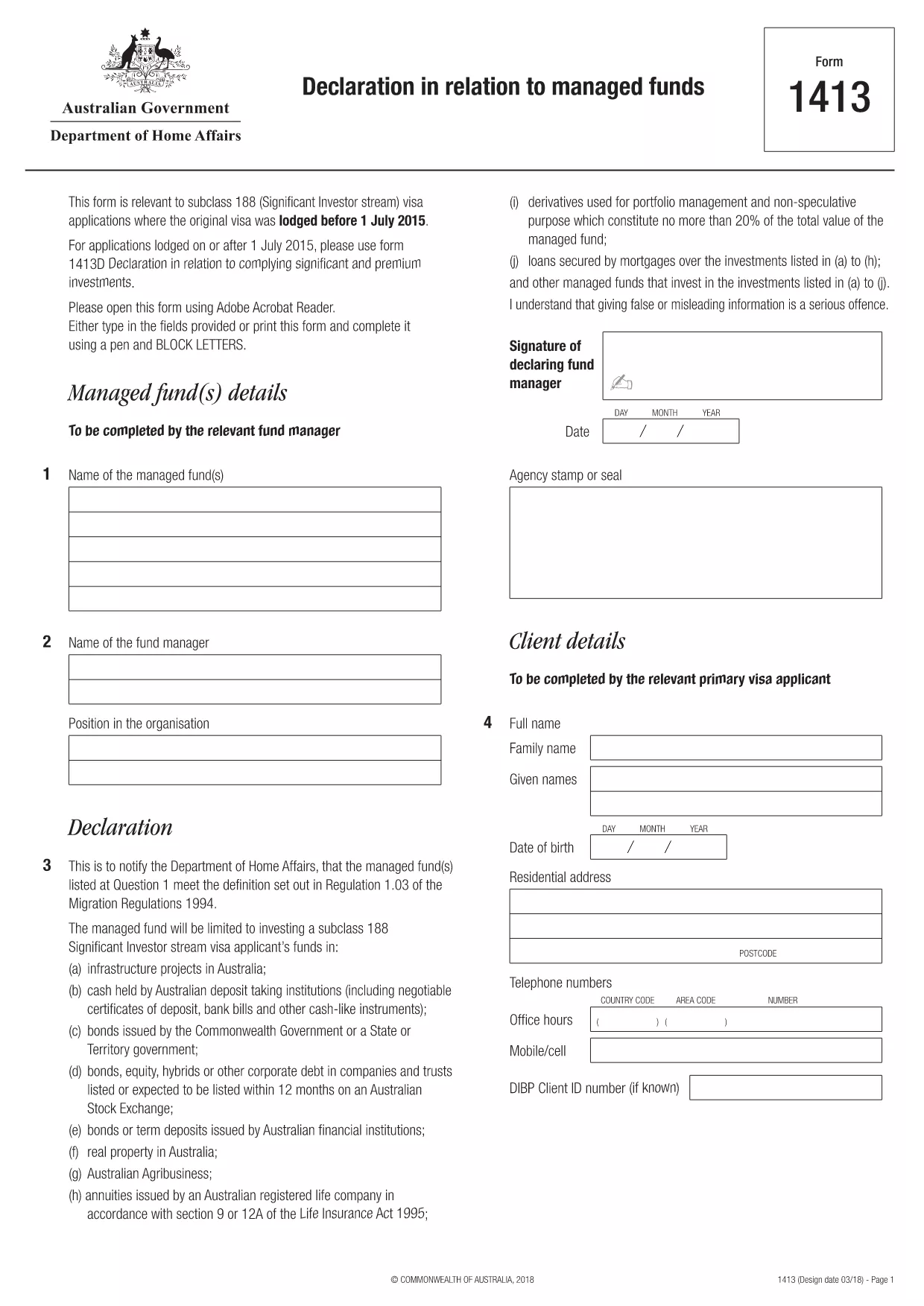
Form 1413 – Fillable Declaration in Relation to Managed Funds

  1. 语言 英语
  2. 国家 澳大利亚
  3. 活动 商业与投资
Form 1413 – Fillable Declaration in Relation to Managed Funds

Form 1413 is the official Declaration in relation to managed funds required by the Australian Department of Home Affairs for certain visa subclasses, such as the Subclass 188 Significant Investor stream. The form must be completed accurately and submitted with your visa application.

With Formize you can open the original PDF as a fully fillable, interactive form directly in your browser – no extra software needed. Simply click the “Fill out this form” button, enter your details, and download the completed PDF ready for submission.

What Is Form 1413?

This declaration confirms the applicant’s investments in Australian managed funds and verifies that the funds meet the government‑specified criteria. It is used to satisfy the financial requirements of the Significant Investor visa and related immigration pathways.

How to Complete Form 1413 Online with Formize

Follow the quick steps below to fill out the form without printing or scanning:

  • Click the Fill out this form button on this page.
  • Wait a few seconds while the Formize PDF Filler app loads the document.
  • Enter your information into each highlighted field – the app automatically saves your progress.
  • Use the built‑in validation to catch formatting errors before you finish.
  • When you’re done, click Download Completed PDF and save it to your device.
  • Attach the saved PDF to your visa application or email it to the Department of Home Affairs as instructed.

Common Mistakes to Avoid

  • Leaving mandatory fields blank – the form will not be accepted.
  • Entering dates in the wrong format (DD/MM/YYYY).
  • Using unofficial fund names – the exact legal name must match the fund’s registration.
  • Forgetting to sign and date the declaration.

Why Choose Formize’s Fillable PDF

  • Secure cloud processing – your data never leaves your browser.
  • Auto‑save prevents loss of information if the page reloads.
  • Built‑in field validation reduces errors.
  • Completely free for this government form.

Where to Submit the Completed Form

After downloading the filled PDF, attach it to your visa application through ImmiAccount or email it to the address specified in your visa instructions. Keep a copy for your records.

常问问题
  • Is Form 1413 required for all visa subclasses?

    No. Form 1413 is specifically required for visa subclasses that involve a managed‑fund investment, such as Subclass 188 (Significant Investor) applications lodged before 1 July 2015.

  • Can I print the form and fill it by hand?

    You can, but a hand‑filled form is more prone to errors and may be rejected. Using the fillable PDF ensures legibility and automatic validation.

  • Do I need Adobe Acrobat to fill Form 1413?

    No. Formize’s online PDF filler works in any modern browser – no extra software is required.

  • How can I be sure my data is secure?

    Formize processes the PDF entirely in your browser; no data is stored on external servers, keeping your personal information private.

  • What should I do if I make a mistake after downloading?

    Open the downloaded PDF again in Formize, make the correction, and re‑download the updated version before submission.

  • Is there a fee to use the fillable version of Form 1413?

    No. Formize provides this government form free of charge.

  • Where can I find guidance on the financial thresholds for managed funds?

    The Department of Home Affairs website provides detailed investment criteria; the form itself includes reference notes for each required amount.

  • Can I save my progress and finish the form later?

    Yes. The Formize filler auto‑saves your entries locally; you can close the browser and return later to continue.

如何

如何通过 5 个简单步骤在线免费填写 form 1413:

  1. 1
    Click the Fill‑out Button
    Press the “Fill out this form” button on the page to launch the Formize PDF Filler.
  2. 2
    Wait for the App to Load
    A few seconds later the fillable version of Form 1413 appears in your browser.
  3. 3
    Enter Your Details
    Complete each highlighted field. The app validates entries in real time.
  4. 4
    Download the Completed PDF
    When all sections are filled, click “Download Completed PDF” and save the file.
  5. 5
    Submit with Your Visa Application
    Attach the saved PDF to your ImmiAccount submission or email it as instructed.
Formize PDF Filler 应用程序
关于

商业和投资形式

form 1413 是在创办、管理或投资企业时使用的形式之一。政府机构、金融机构或监管机构通常需要这些表格来收集信息、建立法人实体或遵守与业务运营和投资相关的特定规则和法规。具体形式可能因业务或投资活动的性质而异。以下是“商业和投资”表格的一些示例:

商业登记表:这些表格用于向适当的政府机构注册商业实体。他们收集有关企业名称、法律结构(例如独资企业、合伙企业、公司)、企业地址、所有权详细信息以及法律认可所需的其他必要信息的信息。

公司成立文件:如果成立法人或公司,需要提交各种文件来创建法人实体。这些文件通常包括公司章程、章程、股东协议和其他相关表格。

营业执照申请:根据行业和地点,某些企业需要特定的执照或许可证才能合法经营。营业执照申请收集有关业务性质、地点、所有权详细信息以及相关法规遵守情况的信息。

投资账户开户表格:希望在金融机构或经纪公司开立投资账户的投资者可能需要填写开户表格。这些表格收集个人信息、投资目标、风险承受能力和其他相关详细信息以建立投资者账户。

合作伙伴协议:建立合作伙伴关系时,合作伙伴通常会制定一份合作伙伴协议,概述其业务关系的条款和条件。该协议可能包括与利润分享、决策、贡献和合伙企业其他方面相关的条款。

保密协议 (NDA):NDA 通常在商业交易中用于保护敏感信息或商业秘密。这些协议确保参与商业或投资交易的各方对交易过程中共享的特定信息保密。

贷款或融资申请表:向金融机构寻求融资或贷款的企业可能需要填写贷款申请表。这些表格收集有关企业财务状况、信用记录、抵押品以及贷款审批流程所需的其他详细信息的信息。

证券备案:对于涉及发行股票或债券等证券的业务,可能需要进行各种证券备案,以遵守证券法律和法规。这些表格包括招股说明书、注册声明、年度报告和其他披露信息。

具体形式和要求可能因国家、行业以及特定商业或投资活动而异。请务必咨询相关政府机构、法律专业人士或金融机构,以获得有关特定业务或投资相关活动所需表格的准确和最新信息。

特征

PDF 填充器

在线填写 PDF 表单的最简单方法

  • 快速填写form 1413
    正在寻找一种在线快速填写 form 1413 的方法?使用我们的在线免费 PDF 填表工具,您将在不到一分钟的时间内了解如何编辑和填写此 pdf 文档。
  • 易于使用的在线 PDF 编辑器
    是否厌倦了打印 PDF 文件以便在重新扫描并发回之前对其进行编辑?免费在线编辑 PDF 文档。使用我们的在线 pdf 编辑器可以节省时间和纸张。
  • 伟大的工具,所有平台
    想知道如何在 Mac 上填写 form 1413,或者如何免费使用 PDF 填充程序?我们的在线 PDF 工具适用于所有平台。
  • 安全文件存储
    完成的“form 1413”文件存储在由亚马逊云托管管理的安全数据库中。您可以随时从我们的系统中删除您的文件。在任何情况下,这些文件都会在 24 小时后自动删除。
  • 与 form 1413 聊天
    Chatize 上与“form 1413”聊天,这是一个免费的 PDF 阅读器助手。提出问题并从“form 1413”获得答案。只需点击上面的与文档聊天按钮即可。

删除填充会话

删除选定的填充会话?在这种情况下,您填写表格的进度将丢失。

删除编辑会话

删除选定的编辑会话?在这种情况下,您创建和编辑表单的进度将会丢失。