
选择语言

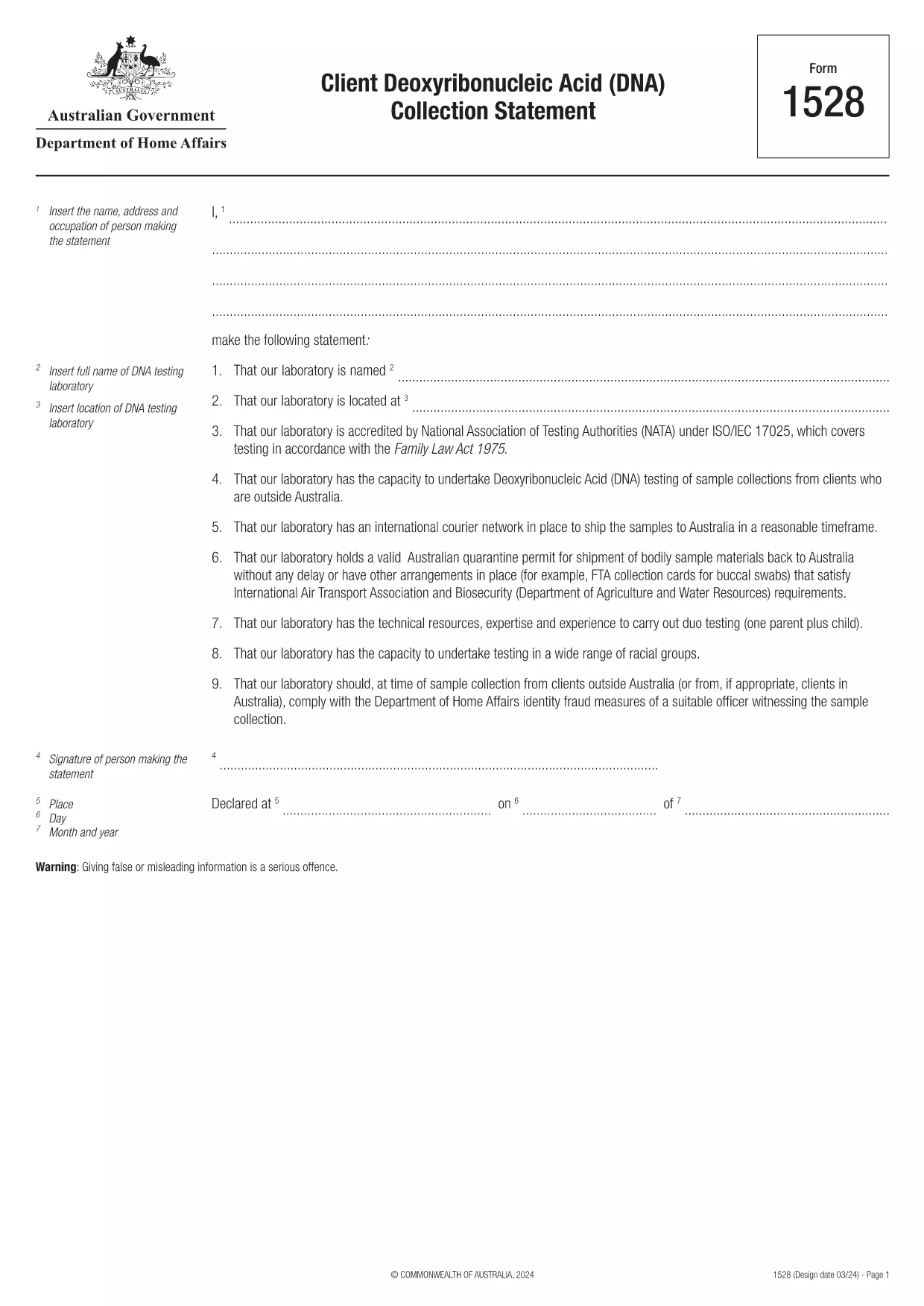
Form 1528 – Client DNA Collection Statement (Fillable PDF)

  1. 国家 澳大利亚
  2. 语言 英语
  3. 活动 性格或身份
Form 1528 – Client DNA Collection Statement (Fillable PDF)

Form 1528 is the official Client Deoxyribonucleic Acid (DNA) Collection Statement required by the Australian Department of Home Affairs. The form captures the name, address and occupation of the person making the statement, as well as details of the DNA testing laboratory.

What Is Form 1528?

This form is used when an individual must provide a DNA sample for immigration, visa, or forensic purposes. It must be completed by the person providing the sample and signed by an authorised DNA testing laboratory.

How to Fill Out Form 1528 with Formize

Instead of printing, scanning, or editing the PDF manually, simply click the “Fill out this form” button on this page. The Formize PDF Filler app will load the fillable version, letting you enter data, add signatures, and save the completed document in seconds.

Common Mistakes & Tips

  • Leave no blank fields – the Department rejects forms with empty required sections.
  • Use the exact laboratory name and address as it appears on the lab’s official letterhead.
  • Check date formats – use DD/MM/YYYY throughout.
  • Sign electronically only after all information is verified; a digital signature is accepted.

Where to Submit the Completed Form

After you download the completed PDF, you can upload it through your online visa portal, email it to the requesting officer, or deliver a printed copy to the nearest Australian Visa Application Centre.

Need More Help?

For detailed guidance, review the instructions on the Department of Home Affairs website or contact your DNA testing laboratory for clarification on laboratory‑specific fields.

常问问题
  • Is an electronic signature accepted on Form 1528?

    Yes. The Department of Home Affairs accepts a clear electronic signature created with the Formize PDF Filler.

  • Can I print the form after filling it online?

    Absolutely. After completing the form, you can download the PDF and print a hard copy if you prefer a physical submission.

  • What if I make a mistake after saving the form?

    Open the saved PDF again in Formize, edit the incorrect fields, and re‑save. The fillable PDF allows unlimited edits before final submission.

  • Do I need to attach any supporting documents?

    Typically, the DNA laboratory will provide a separate certification letter. Attach that letter alongside the completed Form 1528 when you submit your application.

  • How long does it take to process Form 1528?

    Processing time varies by case, but the Department generally reviews the statement within 5‑10 business days after receipt.

  • Is there a fee for using Formize’s PDF filler?

    Formize offers a free basic fillable version for Form 1528. Advanced features such as bulk signing require a paid plan, but are not needed for a single submission.

  • Can I fill out Form 1528 on a mobile device?

    Yes. The Formize PDF Filler works on smartphones and tablets, allowing you to complete the form anywhere.

  • What format should I use when uploading the completed form?

    Upload the final document as a PDF file. Ensure the file size does not exceed the portal’s limit (usually 5 MB).

如何

如何通过 5 个简单步骤在线免费填写 Form 1528:

  1. 1
    Open the Fillable Form
    Click the “Fill out this form” button on the page. The Formize PDF Filler app will launch in a new tab with the fillable version of Form 1528.
  2. 2
    Enter Your Information
    Type the required details – personal data, laboratory name, and address – directly into the highlighted fields.
  3. 3
    Add Electronic Signatures
    Use the signature tool to sign the statement and, if required, the laboratory representative’s signature.
  4. 4
    Review & Validate
    Double‑check every field for accuracy, especially dates and laboratory information.
  5. 5
    Download or Submit
    When you’re satisfied, click “Save & Download” to get the completed PDF, or use the built‑in “Submit” button to send it directly to the Home Affairs portal.
Formize PDF Filler 应用程序
关于

性格或身份形式

Form 1528 是与建立或验证个人身份相关的文件或表格之一。这些表格通常需要个人信息和文件来确认个人身份。以下是一些通常与身份验证相关的表单示例:

身份验证表格:雇主、政府机构或金融机构等组织使用这些表格来验证个人身份。他们通常会要求提供个人信息,例如姓名、地址、出生日期和社会安全号码,并且可能需要政府签发的身份证件、护照或出生证明等支持文件。

地址证明表格:这些表格用于验证个人的居住地址。他们可能要求该人提供水电费账单、银行对账单、租赁协议或其他证明其当前地址的文件。

背景调查授权表格:当组织对个人进行背景调查时,他们通常要求该人填写一份授权检查的表格。这些表格可能会要求提供个人信息,包括姓名、出生日期和社会安全号码,这有助于确定该人的身份。

身份盗窃宣誓书表格:在身份盗窃的情况下,受害者可能需要填写身份盗窃宣誓书表格。该表格可帮助个人举报冒用其身份的行为,并提供该事件的法律记录。

值得注意的是,建立或验证身份的具体形式和要求可能会根据具体情况而有所不同,例如涉及的目的、管辖范围或组织。请务必参阅要求身份验证的组织或机构提供的具体表格,以获取最准确和最新的信息。

特征

PDF 填充器

在线填写 PDF 表单的最简单方法

  • 快速填写Form 1528
    正在寻找一种在线快速填写 Form 1528 的方法?使用我们的在线免费 PDF 填表工具,您将在不到一分钟的时间内了解如何编辑和填写此 pdf 文档。
  • 易于使用的在线 PDF 编辑器
    是否厌倦了打印 PDF 文件以便在重新扫描并发回之前对其进行编辑?免费在线编辑 PDF 文档。使用我们的在线 pdf 编辑器可以节省时间和纸张。
  • 伟大的工具,所有平台
    想知道如何在 Mac 上填写 Form 1528,或者如何免费使用 PDF 填充程序?我们的在线 PDF 工具适用于所有平台。
  • 安全文件存储
    完成的“Form 1528”文件存储在由亚马逊云托管管理的安全数据库中。您可以随时从我们的系统中删除您的文件。在任何情况下,这些文件都会在 24 小时后自动删除。
  • 与 Form 1528 聊天
    Chatize 上与“Form 1528”聊天,这是一个免费的 PDF 阅读器助手。提出问题并从“Form 1528”获得答案。只需点击上面的与文档聊天按钮即可。

删除填充会话

删除选定的填充会话?在这种情况下,您填写表格的进度将丢失。

删除编辑会话

删除选定的编辑会话?在这种情况下,您创建和编辑表单的进度将会丢失。