
选择语言

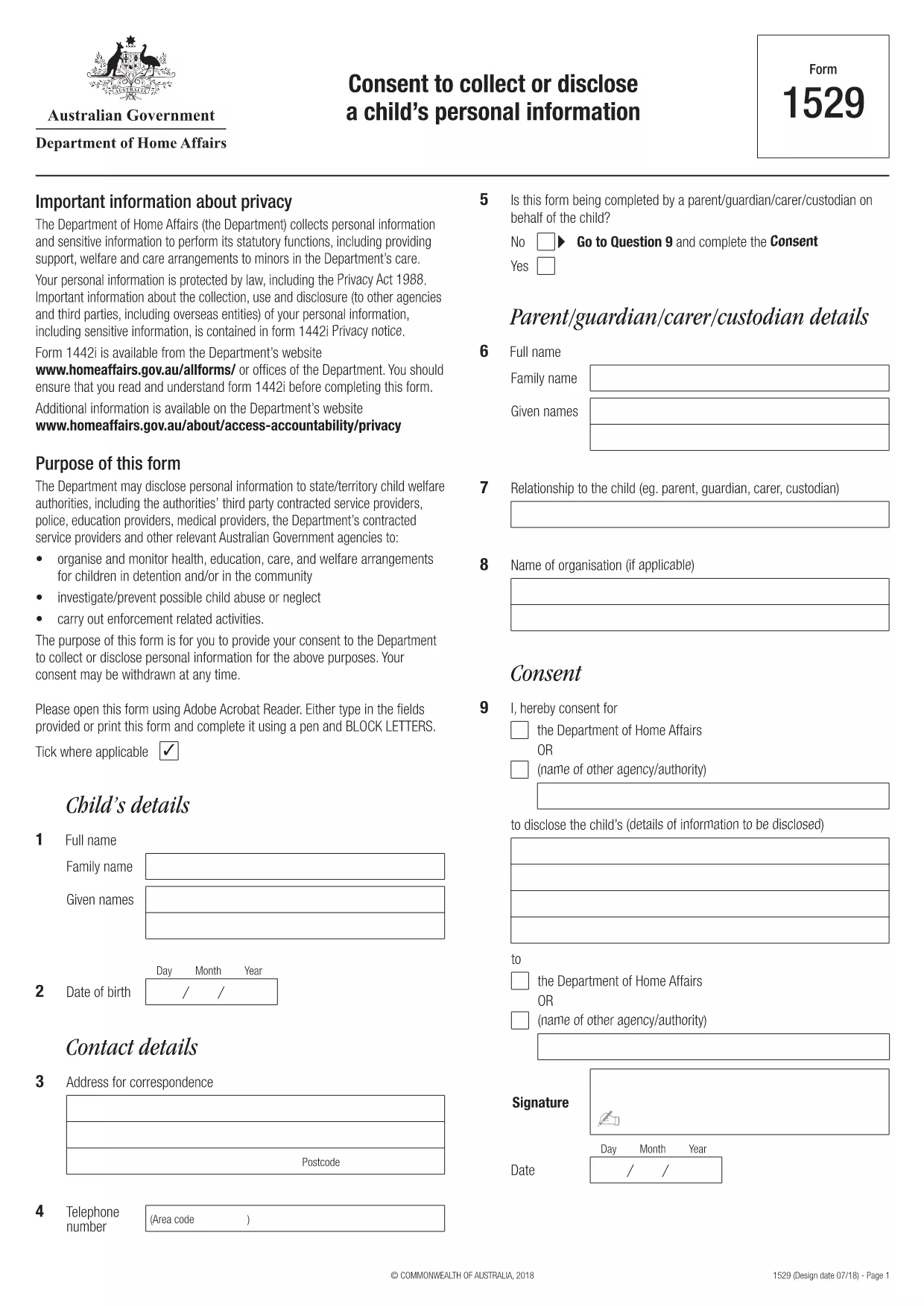
Form 1529 – Consent to Collect or Disclose a Child’s Personal Information

  1. 国家 澳大利亚
  2. 语言 英语
  3. 活动 性格或身份
Form 1529 – Consent to Collect or Disclose a Child’s Personal Information

What is Form 1529?

Form 1529 is the official consent to collect or disclose a child’s personal information required by the Australian Department of Home Affairs. It allows parents or guardians to give permission for government agencies to access or share a minor’s data for immigration, welfare, or protection purposes.

Who Needs to Complete Form 1529?

The form is mandatory for:

  • Parents or legal guardians of children under 18 who are involved in a Home Affairs case.
  • Applicants for visas, citizenship, or refugee status who have dependent children.
  • Legal representatives acting on behalf of a child.

How to Fill Out Form 1529 Online

Instead of downloading the PDF and using a separate editor, you can fill the form directly on Formize:

  1. Click the **"Fill out this form"** button below.
  2. Wait a few seconds while the Formize PDF Filler app loads the fillable version of Form 1529.
  3. Enter the required information in each field – the interface highlights mandatory sections.
  4. Review your answers, then click **"Submit"** to generate a completed PDF.
  5. Download, print, or email the finished form directly from the page.

Common Mistakes to Avoid

  • Leaving mandatory fields blank – the filler will flag these before you can submit.
  • Using an outdated version of the form – always use the PDF linked on this page (2024‑latest).
  • Providing incorrect dates or identification numbers – double‑check passports, birth certificates, and visa numbers.
  • Signing digitally when a handwritten signature is required – follow the instructions on the final page of the PDF.

Where to Submit the Completed Form

After you have downloaded the signed PDF, you can submit it through one of the following channels:

  • Upload via the Home Affairs online portal (ImmiAccount).
  • Attach to your visa or citizenship application.
  • Mail to the address listed on the form’s last page.

Keeping a copy for your records is recommended.

常问问题
  • What is the purpose of Form 1529?

    Form 1529 gives parents or guardians consent for the Department of Home Affairs to collect, use, or share a child’s personal information for immigration and welfare decisions.

  • Can I fill Form 1529 on a mobile device?

    Yes. The Formize PDF Filler works on all modern browsers, including smartphones and tablets.

  • Do I need a lawyer to complete this form?

    No. The form is designed for parents or legal guardians. If you have complex legal questions, consult a migration agent.

  • Is an electronic signature accepted?

    The Department accepts electronic signatures for most cases, but check the specific instructions on the last page of the PDF.

  • How long is Form 1529 valid?

    The consent is valid for the duration of the specific visa or immigration process it relates to. A new form may be required for new applications.

  • What should I do if I make a mistake after submitting?

    Contact the Home Affairs help desk immediately and request a revised form. Do not alter a submitted PDF on your own.

  • Is there a fee to download or fill Form 1529?

    Downloading and filling the form via Formize is free. Any government processing fees are separate.

如何

如何通过 5 个简单步骤在线免费填写 form 1529:

  1. 1
    Open the Fillable Form
    Click the **"Fill out this form"** button on the page. The Formize PDF Filler app will open in a new window.
  2. 2
    Load the Form
    Wait a few seconds while the system loads the fillable version of Form 1529.
  3. 3
    Enter Your Information
    Complete each highlighted field. Required fields are marked with an asterisk.
  4. 4
    Review and Submit
    Check all entries for accuracy, then click **"Submit"** to generate the completed PDF.
  5. 5
    Download or Print
    Save the finished form to your device, print it if a physical signature is needed, and submit as instructed.
Formize PDF Filler 应用程序
关于

性格或身份形式

form 1529 是用于收集有关个人性格或个人品质信息的文档之一。这些表格可用于各种情况,例如就业、住房或法律诉讼,以评估个人的适合性或可信度。以下是在不同上下文中可能被视为“字符形式”的一些形式示例:

性格参考表:这些表格用于收集可以证明个人性格、技能和资格的个人信息。它们经常被要求作为工作申请、租赁申请或法律诉讼的一部分。这些表格通常会询问有关与申请人的关系、他们对申请人性格的看法以及任何相关经历或观察的详细信息。

个人陈述表格:在某些情况下,可能会要求个人提供个人陈述或文章来表达他们的性格、价值观和动机。这可能是大学录取、奖学金申请或专业许可流程所必需的。

品格证人证词表:在法律诉讼中,品格证人可能会被传唤提供有关个人品格、声誉或行为的证词。尽管通常不采用预定义文件的形式,但可能会提供表格或模板来指导证人构建其证词。

背景调查披露和授权表格:在某些情况下,例如就业申请,可能会要求个人填写授权背景调查的表格。这些表格可能包括有关性格参考、以前的犯罪记录或其他相关个人信息的问题。

值得注意的是,用于评估个人性格的具体形式可能会根据相关组织或机构的背景和要求而有所不同。因此,建议您参考相关方提供的具体表格,了解所寻求的信息以及如何准确填写表格。

特征

PDF 填充器

在线填写 PDF 表单的最简单方法

  • 快速填写form 1529
    正在寻找一种在线快速填写 form 1529 的方法?使用我们的在线免费 PDF 填表工具,您将在不到一分钟的时间内了解如何编辑和填写此 pdf 文档。
  • 易于使用的在线 PDF 编辑器
    是否厌倦了打印 PDF 文件以便在重新扫描并发回之前对其进行编辑?免费在线编辑 PDF 文档。使用我们的在线 pdf 编辑器可以节省时间和纸张。
  • 伟大的工具,所有平台
    想知道如何在 Mac 上填写 form 1529,或者如何免费使用 PDF 填充程序?我们的在线 PDF 工具适用于所有平台。
  • 安全文件存储
    完成的“form 1529”文件存储在由亚马逊云托管管理的安全数据库中。您可以随时从我们的系统中删除您的文件。在任何情况下,这些文件都会在 24 小时后自动删除。
  • 与 form 1529 聊天
    Chatize 上与“form 1529”聊天,这是一个免费的 PDF 阅读器助手。提出问题并从“form 1529”获得答案。只需点击上面的与文档聊天按钮即可。

删除填充会话

删除选定的填充会话?在这种情况下,您填写表格的进度将丢失。

删除编辑会话

删除选定的编辑会话?在这种情况下,您创建和编辑表单的进度将会丢失。