
选择语言

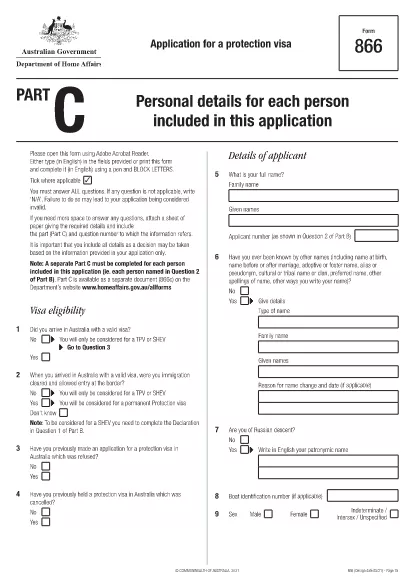
Form 866C – Application for a Protection Visa (Fillable PDF)

  1. 语言 英语
  2. 国家 澳大利亚
  3. 活动 难民和人道主义
Form 866C – Application for a Protection Visa (Fillable PDF)

Form 866C is the Australian Application for a Protection Visa. It is required when you are seeking protection under the Australian Migration Act. The form must be completed in English, using block letters, and signed where indicated.

At Formize.com you can open the official Form 866C PDF directly in our secure PDF Filler – no extra software needed. The fillable version lets you type, upload a passport‑size photograph, and sign digitally.

What is Form 866C?

Form 866C gathers personal details, travel history, family connections, education, employment, and any criminal matters relevant to your protection claim. It is part of the broader protection visa (subclass 866) application package.

How to Complete Form 866C Online

Simply click the “Fill out this form” button on this page. The Formize PDF Filler app loads, presenting each field in a clear, editable format. Follow the on‑screen prompts, upload your photograph, and sign with your mouse or finger.

Common Mistakes to Avoid

  • Leaving any mandatory field blank.
  • Using cursive or non‑block letters.
  • Submitting an outdated or blurred photograph.
  • Providing inconsistent dates or travel details.
  • Forgetting to sign the declaration at the end.

Where to Submit Your Completed Form

After saving the filled PDF, print a hard copy and attach it to your complete protection‑visa application package. Submit the package to the Department of Home Affairs – either by post to the address on the Department’s website or via an authorised migration agent.

Download the Official PDF

The official, up‑to‑date Form 866C can be downloaded directly from the Australian Department of Home Affairs:

https://immi.homeaffairs.gov.au/form-listing/forms/866c.pdf

Use Formize’s online filler to avoid the hassle of printing, scanning, or re‑typing. Your completed form is ready for submission in minutes.

常问问题
  • Is Form 866C available as a fillable PDF?

    Yes. The official form is a PDF that can be opened in Formize’s online filler, allowing you to type, upload a photo, and sign digitally.

  • Can I submit the PDF electronically?

    The Department of Home Affairs requires a printed, signed copy as part of the protection visa package. Use the online filler to create a clean, printable version.

  • What language must I use on Form 866C?

    All entries must be in English, written in block (capital) letters.

  • Do I need a passport‑size photograph?

    Yes. Attach a recent passport‑size photo in the designated area and certify it according to the form’s instructions.

  • How long does it take to fill out Form 866C?

    Using the fillable PDF typically takes 20‑30 minutes, depending on how much information you have prepared.

  • Where should I send the completed form?

    Include the printed Form 866C with the rest of your protection visa application and send it to the Department of Home Affairs address listed on their website.

  • Can I correct mistakes after saving?

    Yes. Open the saved PDF again in Formize, edit the necessary fields, and re‑save before printing.

  • Is there a fee to download Form 866C?

    No. The form is provided free of charge by the Australian Department of Home Affairs.

如何

如何通过 5 个简单步骤在线免费填写 Form 866C:

  1. 1
    Click the Fill button
    Press the “Fill out this form” button on the page. The Formize PDF Filler loads the official Form 866C.
  2. 2
    Enter your information
    Type your personal details, travel history, and other required data directly into the fillable fields. Use block letters.
  3. 3
    Upload your photograph
    Click the photo placeholder and upload a recent passport‑size image that meets the Department’s specifications.
  4. 4
    Sign digitally
    Use your mouse, trackpad, or finger to add a digital signature in the designated area.
  5. 5
    Save and download
    When all fields are completed, click “Save”. Download the filled PDF, print a hard copy, and include it with your visa application.
Formize PDF Filler 应用程序
关于

难民和人道主义表格

Form 866C 是在寻求难民地位或人道主义保护过程中使用的申请表之一。这些表格供逃离迫害、冲突或其他危及生命的情况并寻求国际保护和援助的个人使用。具体形式和程序可能因国家及其移民政策以及管理难民和人道主义保护的国际公约和协议而异。以下是“难民和人道主义”表格的一些示例:

难民申请表:这是寻求难民身份的个人使用的主要表格。它收集个人信息、有关个人情况的详细信息和寻求保护的原因,以及任何支持文件或证据。

庇护申请表:在使用“庇护”一词指为逃离迫害的个人提供法律保护的国家,需要填写庇护申请表。它包括有关申请人的身份、背景和寻求庇护原因的信息,以及任何相关的证明文件。

重新安置申请表:有些人,特别是那些生活在难民营或处境不稳定的人,可以申请重新安置到第三国。重新安置申请表收集有关申请人的个人和家庭详细信息、背景以及寻求重新安置的原因的信息。

家庭团聚表格:对于在特定国家/地区获得难民或人道主义身份的个人,可能需要填写表格和流程来申请家庭成员加入他们。这些表格通常需要有关担保人(已获得保护的人)和被担保的家庭成员的信息,以及建立家庭关系的支持文件。

旅行证件申请表:需要出国旅行的难民或受到人道主义保护的个人可能需要申请旅行证件。申请表收集个人信息和有关旅行计划的详细信息。

临时保护申请表:在某些情况下,国家可能会向不符合难民身份标准但因冲突或其他特殊情况而无法返回祖国的个人提供临时保护。临时保护申请表收集有关申请人的情况和寻求临时保护的原因的信息。

值得注意的是,难民和人道主义保护的具体形式和程序可能因国家及其移民政策以及国际协议和公约的不同而有很大差异。建议咨询相关政府机构、难民支持组织或法律专业人士,以获取有关在特定国家寻求难民或人道主义保护的必要表格和程序的准确和最新信息。

特征

PDF 填充器

在线填写 PDF 表单的最简单方法

  • 快速填写Form 866C
    正在寻找一种在线快速填写 Form 866C 的方法?使用我们的在线免费 PDF 填表工具,您将在不到一分钟的时间内了解如何编辑和填写此 pdf 文档。
  • 易于使用的在线 PDF 编辑器
    是否厌倦了打印 PDF 文件以便在重新扫描并发回之前对其进行编辑?免费在线编辑 PDF 文档。使用我们的在线 pdf 编辑器可以节省时间和纸张。
  • 伟大的工具,所有平台
    想知道如何在 Mac 上填写 Form 866C,或者如何免费使用 PDF 填充程序?我们的在线 PDF 工具适用于所有平台。
  • 安全文件存储
    完成的“Form 866C”文件存储在由亚马逊云托管管理的安全数据库中。您可以随时从我们的系统中删除您的文件。在任何情况下,这些文件都会在 24 小时后自动删除。
  • 与 Form 866C 聊天
    Chatize 上与“Form 866C”聊天,这是一个免费的 PDF 阅读器助手。提出问题并从“Form 866C”获得答案。只需点击上面的与文档聊天按钮即可。

删除填充会话

删除选定的填充会话?在这种情况下,您填写表格的进度将丢失。

删除编辑会话

删除选定的编辑会话?在这种情况下,您创建和编辑表单的进度将会丢失。