
选择语言

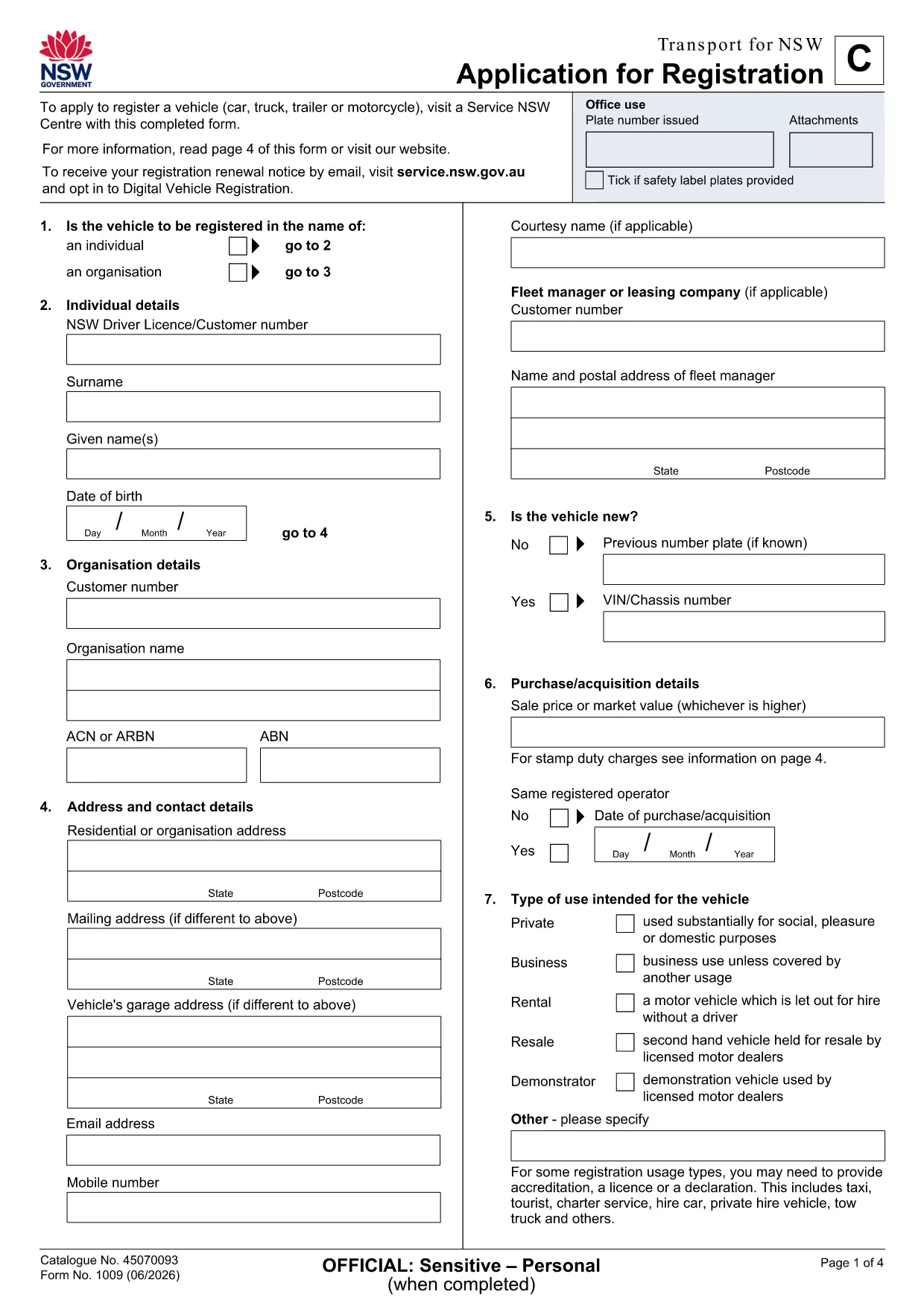
Application Form of Registration – Fillable PDF

  1. 语言 英语
  2. 国家 澳大利亚
  3. 部门 Transport for NSW
  4. 活动 车辆登记
Application Form of Registration – Fillable PDF

Looking for a quick, hassle‑free way to submit your application form of registration in New South Wales? The fillable PDF provided by Transport for NSW lets you enter data directly on your screen, save a draft, and print a clean copy for submission.

Our Formize PDF Filler loads the form instantly in your browser—no extra software needed. Just click the button, fill the fields, and download the completed document.

How to Fill the Application Form of Registration Online

  1. Click the Fill out this form button on the page.
  2. Wait a few seconds while the Formize PDF Filler app loads the registration PDF.
  3. Enter your personal details, vehicle information, and any supporting data in the highlighted fields.
  4. Use the built‑in validation to catch missing or incorrectly formatted entries.
  5. When you’re done, click Save & Download to get a completed PDF ready for printing or email.

Key Sections & Required Information

  • Applicant Details – full name, address, contact number, and driver licence number.
  • Vehicle Information – make, model, VIN, and registration number.
  • Supporting Documents – proof of identity, insurance, and any exemption letters.
  • Declaration & Signature – electronic signature box that complies with NSW regulations.

Common Mistakes to Avoid When Completing the Form

  • Leaving mandatory fields blank – the filler will highlight them in red.
  • Using non‑standard fonts or special characters in names – stick to alphanumeric characters.
  • Uploading outdated supporting documents – ensure PDFs are current and legible.
  • Forgetting to sign the electronic declaration – an unsigned form will be rejected.

Download & Print the PDF in One Click

After saving, you can instantly download the filled PDF, print it on plain A4 paper, and attach any required attachments before delivering it to your local Transport for NSW office.

Need a hard copy? The Formize app also offers a Print button that sends the document directly to your printer with the correct margins.

常问问题
  • Do I need Adobe Acrobat to fill this form?

    No. The Formize PDF Filler works in any modern browser, so you can complete the form without installing additional software.

  • Can I save a draft and finish later?

    Yes. Use the **Save Draft** button in the filler to download a partially completed PDF, then reopen it later to finish.

  • Is the electronic signature legally accepted?

    Transport for NSW accepts the electronic signature generated by Formize, as it complies with NSW electronic signing standards.

  • What file format will I receive after completion?

    You will receive a standard PDF file that can be printed, emailed, or stored on your device.

  • What should I do if I encounter an error while filling the form?

    Refresh the page and reopen the form. If the problem persists, check your internet connection or try a different browser.

  • Are there any fees for using the fillable PDF?

    The PDF download and online filling are free. Any processing fees are determined by Transport for NSW, not by Formize.

如何

如何通过 4 个简单步骤在线免费填写 application form of registration:

  1. 1
    Open the Fillable Form
    Click the **Fill out this form** button on the page. The Formize PDF Filler app will open the registration PDF directly in your browser.
  2. 2
    Enter Your Information
    Type your details into each highlighted field. The app validates entries in real time, so you’ll know immediately if something is missing.
  3. 3
    Save and Download
    When all required sections are complete, press **Save & Download**. The completed PDF is saved to your device, ready to print or email.
  4. 4
    Print or Submit Electronically
    Print the saved PDF on A4 paper and attach any supporting documents, or email the file to the address indicated on the form.
Formize PDF Filler 应用程序
关于

车辆登记表

application form of registration 是 DMV 表格之一,也称为机动车辆部表格,是与机动车辆相关的各种交易和流程中使用的文件。 DMV 是负责驾驶执照、车辆登记和执行机动车辆法的政府机构。可用的具体 DMV 表格可能因司法管辖区而异,但以下是一些常见示例:

驾驶执照表格:这些表格用于申请驾驶执照或请求更改或续签。它们通常需要个人信息、身份证明,并且可能包括医疗信息或驾驶历史部分。

车辆登记表:这些表格用于向 DMV 登记机动车辆。他们需要车辆信息、所有权详细信息和保险证明。

所有权转让表格:购买或出售车辆时,这些表格用于将所有权从一方转让给另一方。他们需要有关买方、卖方、车辆详细信息的信息,并且可能包括销售单。

车辆责任免除表:在出售或转让车辆所有权时,这些表格通知 DMV 卖方不再对车辆负责。它有助于保护卖方免受涉及售后车辆的事故或事件的责任。

车牌和登记更新表格:这些表格用于更新车辆登记或申请新的车牌。他们通常需要有关注册所有者、当前注册详细信息以及适用费用支付的信息。

驾驶记录申请表:这些表格允许个人向 DMV 索取驾驶记录,其中提供有关驾驶违规、驾照状态和其他相关详细信息的信息。

专业或个性化车牌表格:这些表格用于申请个性化或专业车牌,允许个人使用特定字符或设计定制他们的车牌。

这些只是 DMV 提供的多种表格中的几个示例。具体表格和要求可能因司法管辖区而异,因此请务必咨询当地 DMV 网站或访问 DMV 办公室,以获得适合您特定需求的正确表格。

特征

PDF 填充器

在线填写 PDF 表单的最简单方法

  • 快速填写application form of registration
    正在寻找一种在线快速填写 application form of registration 的方法?使用我们的在线免费 PDF 填表工具,您将在不到一分钟的时间内了解如何编辑和填写此 pdf 文档。
  • 易于使用的在线 PDF 编辑器
    是否厌倦了打印 PDF 文件以便在重新扫描并发回之前对其进行编辑?免费在线编辑 PDF 文档。使用我们的在线 pdf 编辑器可以节省时间和纸张。
  • 伟大的工具,所有平台
    想知道如何在 Mac 上填写 application form of registration,或者如何免费使用 PDF 填充程序?我们的在线 PDF 工具适用于所有平台。
  • 安全文件存储
    完成的“application form of registration”文件存储在由亚马逊云托管管理的安全数据库中。您可以随时从我们的系统中删除您的文件。在任何情况下,这些文件都会在 24 小时后自动删除。
  • 与 application form of registration 聊天
    Chatize 上与“application form of registration”聊天,这是一个免费的 PDF 阅读器助手。提出问题并从“application form of registration”获得答案。只需点击上面的与文档聊天按钮即可。

删除填充会话

删除选定的填充会话?在这种情况下,您填写表格的进度将丢失。

删除编辑会话

删除选定的编辑会话?在这种情况下,您创建和编辑表单的进度将会丢失。