
选择语言

Application Form Receipt – Fillable PDF

  1. 语言 英语
  2. 国家 澳大利亚
  3. 部门 Transport
  4. 活动 车辆登记
Application Form Receipt – Fillable PDF

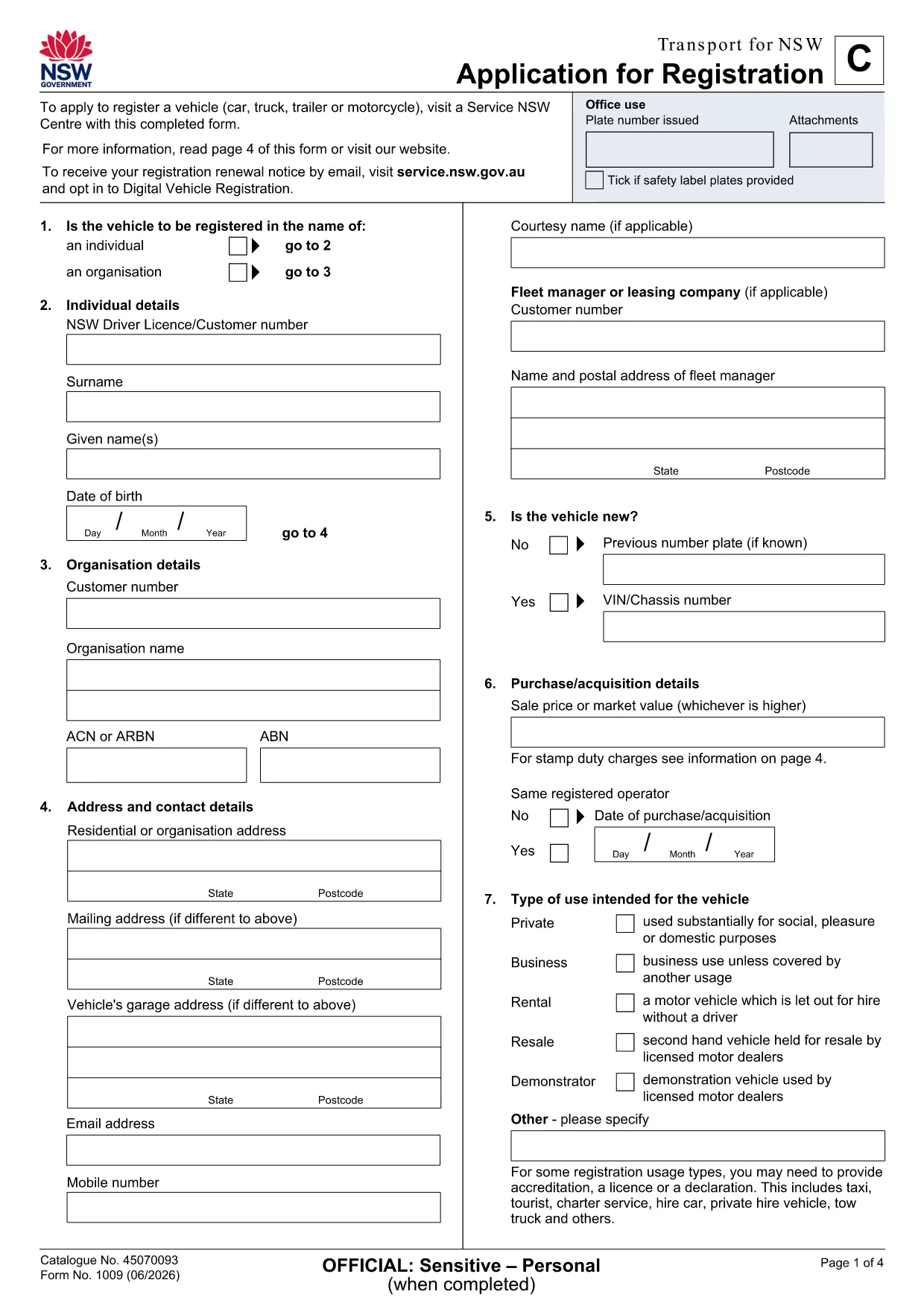
Need a quick, reliable way to capture proof that an application has been submitted and paid for? Our Application Form Receipt is a fillable PDF that lets you record all essential details—date, applicant name, reference numbers, payment amount, and signatures—without printing or scanning.

Why Use a Fillable Application Form Receipt?

  • Instant editing: Open the PDF in the Formize PDF Filler app and type directly into the fields.
  • Accurate records: Built‑in validation reduces data‑entry errors.
  • Secure sharing: Save as a locked PDF or email the completed receipt directly from the app.
  • Free download: No hidden fees, no registration required.

How to Complete the Receipt Form Online

Simply click the “Fill out this form” button on this page. The Formize PDF Filler will load the document, and you can start entering information right away.

Common Mistakes to Avoid

  • Leaving required fields blank – the filler will highlight missing data.
  • Using the wrong date format – the form expects DD/MM/YYYY.
  • Uploading a non‑fillable version – always use the provided fillable PDF.

Where to Submit Your Completed Form

After saving the finished receipt, you can:

  • Upload it to the relevant government portal (e.g., Transport NSW).
  • Email it to the department that requested the receipt.
  • Print a hard copy for your records.

Need more guidance? The step‑by‑step guide below walks you through the entire process.

常问问题
  • What is an Application Form Receipt?

    It is a documented proof that you have submitted an application and, if applicable, paid any associated fees. The receipt records key details for both the applicant and the receiving agency.

  • Do I need special software to fill out the PDF?

    No. The Formize PDF Filler works in any modern browser, so you can complete the form without installing additional programs.

  • Can I edit the receipt after I have saved it?

    Yes. Open the saved PDF again with Formize, make the necessary changes, and re‑save. Just ensure the final version is the one you submit.

  • Is the download free?

    Absolutely. The fillable Application Form Receipt PDF is provided at no cost.

  • What should I do if a field is highlighted in red?

    A red highlight means the field is required or contains an invalid entry. Fill in the correct information and the highlight will disappear.

  • Can I use this receipt for other types of applications?

    The form is designed for transport‑related applications, but the structure works for any situation where a receipt of submission is needed.

如何

如何通过 4 个简单步骤在线免费填写 application form receipt:

  1. 1
    Open the Fillable Form
    Click the “Fill out this form” button on the page. The Formize PDF Filler app will open the receipt PDF in your browser.
  2. 2
    Enter Your Information
    Type directly into each highlighted field – applicant name, date, reference number, amount paid, and signatures.
  3. 3
    Validate & Save
    The app checks for missing or incorrectly formatted data. Once all fields are valid, click “Save” to download the completed PDF.
  4. 4
    Submit the Receipt
    Upload the saved PDF to the required portal, email it to the requesting agency, or print a hard copy for your records.
Formize PDF Filler 应用程序
关于

车辆登记表

如果您拥有或租用机动车辆、拖车或船只,您必须履行某些义务以确保您的车辆合法登记并确保其安全。

application form receipt 是一种车辆登记表,是用于在相关州或省当局登记机动车的文件。当一个人购买新车或二手车,或者当他们带着车辆搬到一个新的州或省时,通常需要这些表格。

车辆登记所需的确切要求和表格可能因地点而异,但一般来说,该过程涉及提供有关车辆、车主和车辆任何留置权的信息。

提交登记表和费用后,州或省当局将向车主颁发登记证或车牌。该注册允许车辆在公共道路和高速公路上合法运行。

特征

PDF 填充器

在线填写 PDF 表单的最简单方法

  • 快速填写application form receipt
    正在寻找一种在线快速填写 application form receipt 的方法?使用我们的在线免费 PDF 填表工具,您将在不到一分钟的时间内了解如何编辑和填写此 pdf 文档。
  • 易于使用的在线 PDF 编辑器
    是否厌倦了打印 PDF 文件以便在重新扫描并发回之前对其进行编辑?免费在线编辑 PDF 文档。使用我们的在线 pdf 编辑器可以节省时间和纸张。
  • 伟大的工具,所有平台
    想知道如何在 Mac 上填写 application form receipt,或者如何免费使用 PDF 填充程序?我们的在线 PDF 工具适用于所有平台。
  • 安全文件存储
    完成的“application form receipt”文件存储在由亚马逊云托管管理的安全数据库中。您可以随时从我们的系统中删除您的文件。在任何情况下,这些文件都会在 24 小时后自动删除。
  • 与 application form receipt 聊天
    Chatize 上与“application form receipt”聊天,这是一个免费的 PDF 阅读器助手。提出问题并从“application form receipt”获得答案。只需点击上面的与文档聊天按钮即可。

删除填充会话

删除选定的填充会话?在这种情况下,您填写表格的进度将丢失。

删除编辑会话

删除选定的编辑会话?在这种情况下,您创建和编辑表单的进度将会丢失。