
选择语言

RTB‑12L‑DR Landlord Application for Dispute Resolution (Fillable PDF)

  1. 语言 英语
  2. 国家 加拿大
  3. 活动 租赁
  4. 状态 不列颠哥伦比亚省
RTB‑12L‑DR Landlord Application for Dispute Resolution (Fillable PDF)

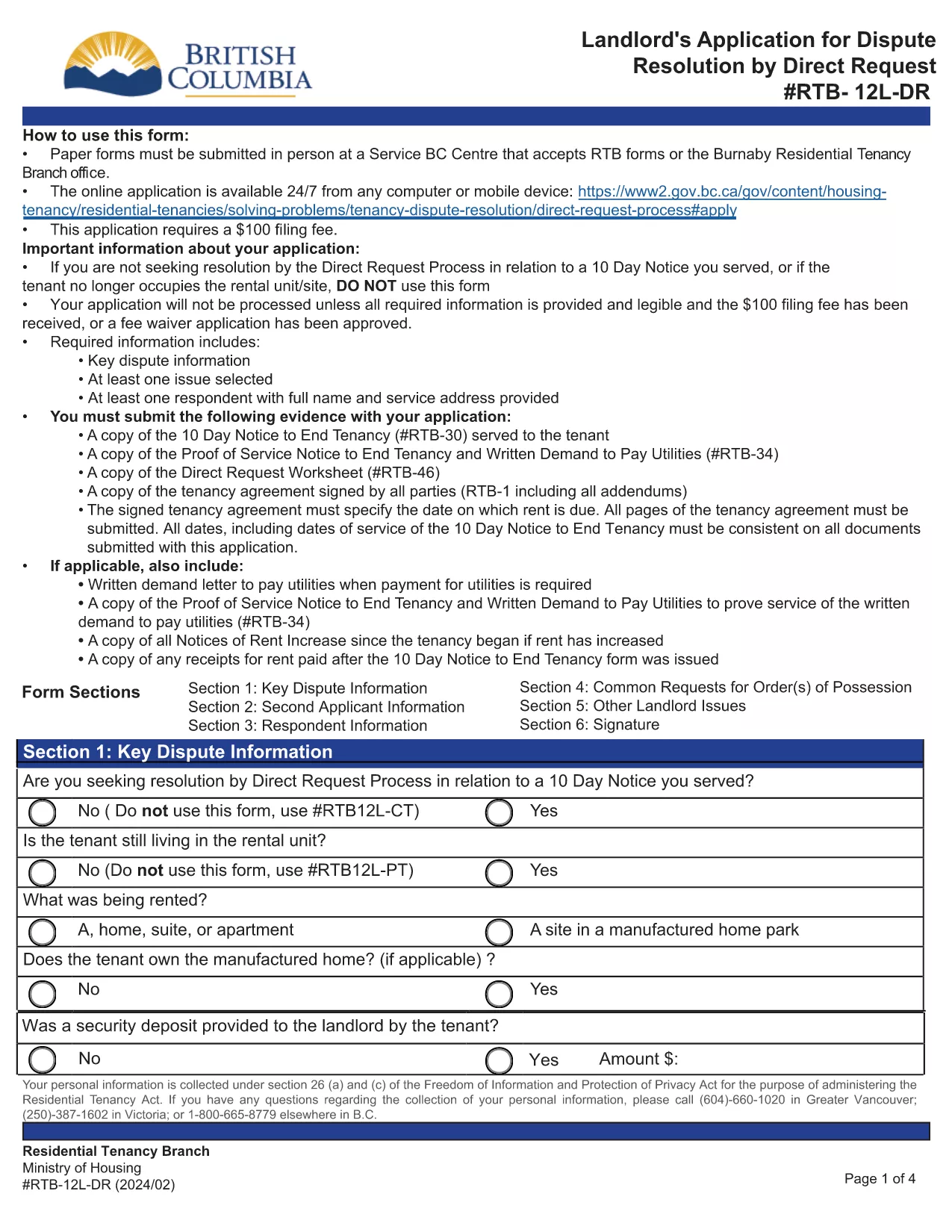
The RTB‑12L‑DR is the official British Columbia Residential Tenancy Branch (RTB) form used by landlords to request a dispute resolution hearing by Direct Request. This form starts the process for resolving issues such as unpaid rent, damage to the rental unit, or breaches of the tenancy agreement.

What Is the RTB‑12L‑DR Form?

Designed for landlords, the RTB‑12L‑DR captures essential information about the tenancy, the nature of the dispute, and the remedy sought. It is required for all direct‑request applications and must be submitted in person or by mail to a Service BC centre that accepts RTB forms.

How to Complete the RTB‑12L‑DR Online

Instead of printing and filling out a paper copy, you can use Formize’s free fillable PDF feature. Follow these simple steps:

  • Click the “Fill out this form” button on this page.
  • Wait for the Formize PDF Filler app to load (usually a few seconds).
  • Enter your information in each field – the form automatically saves your progress.
  • Review the completed form, add your electronic signature, and click “Submit”.
  • Download the finished PDF or print it for submission.

Common Mistakes to Avoid

  • Leaving sections blank: Every field marked with an asterisk (*) is mandatory.
  • Incorrect dates: Use the exact dates from the tenancy agreement and any relevant notices.
  • Mismatched signatures: The landlord or authorized agent must sign; a missing signature will delay processing.
  • Submitting the wrong form: Ensure you are using RTB‑12L‑DR (Direct Request) and not the current‑tenancy or expedited‑hearing versions.

Where to Submit Your Application

After completing the form, you have two options:

  • In‑person: Bring the printed PDF to any Service BC centre that accepts RTB forms or to the Burnaby Residential Tenancy Branch office.
  • Mail: Send the signed PDF to the Residential Tenancy Branch at the address listed on the form.

Download the Official PDF

If you prefer a paper copy, you can download the official RTB‑12L‑DR PDF directly from the Government of British Columbia:

Download RTB‑12L‑DR (Landlord Application for Dispute Resolution – Direct Request)

Using Formize’s fillable version saves time, reduces errors, and ensures your application is ready for submission.

常问问题
  • What does RTB‑12L‑DR stand for?

    RTB‑12L‑DR is the “Landlord Application for Dispute Resolution – Direct Request” used by BC landlords to start a tenancy dispute hearing.

  • Can I submit the form electronically?

    The form itself must be printed, signed, and submitted in person or by mail. However, you can fill it out online with Formize and then print the completed PDF.

  • Do I need a lawyer to complete RTB‑12L‑DR?

    No. The form is designed for landlords to complete on their own. If you have complex legal questions, consider consulting a tenancy‑law specialist.

  • How long does it take to process the application?

    Processing time varies, but the Residential Tenancy Branch typically acknowledges receipt within 7‑10 business days.

  • What fees are associated with filing RTB‑12L‑DR?

    There is a filing fee for the dispute resolution hearing. Check the latest fee schedule on the BC Residential Tenancy Branch website.

  • Can I add additional issues not listed on the form?

    Yes. Use the “Additional Issues” section on the form to describe any other disputes you wish the tribunal to consider.

  • Is the fillable PDF version legally accepted?

    Yes, as long as you print, sign, and submit the completed form, the fillable version is considered identical to the paper version.

  • What if I make a mistake after submitting?

    Contact the Residential Tenancy Branch as soon as possible. Minor errors can often be corrected with a written amendment.

如何

如何通过 5 个简单步骤在线免费填写 RTB-12L-DR:

  1. 1
    Click the Fill‑out Button
    Press the “Fill out this form” button on the page to launch the Formize PDF Filler.
  2. 2
    Wait for the Filler to Load
    The fillable PDF loads in a few seconds. No download or extra software is required.
  3. 3
    Enter Your Information
    Complete each field, following the on‑screen prompts. The form saves your entries automatically.
  4. 4
    Add Your Signature
    Use the built‑in signature field to sign electronically. This satisfies the requirement for a landlord’s signature.
  5. 5
    Download or Print
    When finished, download the completed PDF or print it to submit in person or by mail.
Formize PDF Filler 应用程序
关于

供房东和/或租户提出与租赁协议有关的行动的表格。

RTB-12L-DR 是大多数私人房东和住房协会使用的住宅租赁协议类型。

房东或租户必须遵守法规中规定的某些规则的许多事项。在某些情况下,他们可能需要填写一份称为“规定表格”的表格,该表格提出可能影响租赁协议另一方的行动。

这些表格之所以称为规定表格,是因为其中的措辞经过精心起草,以确保填写表格的人和接受表格的人可以理解所提议的内容以及他们可能会做出的回应。未能提供正确的表格可能会使所提议的行动无效。

您不得更改这些表格中的措辞,除非表格说明您可以这样做。如果您更改措辞,表格可能会失效。您还必须遵守表格中规定的任何通知期限。

特征

PDF 填充器

在线填写 PDF 表单的最简单方法

  • 快速填写RTB-12L-DR
    正在寻找一种在线快速填写 RTB-12L-DR 的方法?使用我们的在线免费 PDF 填表工具,您将在不到一分钟的时间内了解如何编辑和填写此 pdf 文档。
  • 易于使用的在线 PDF 编辑器
    是否厌倦了打印 PDF 文件以便在重新扫描并发回之前对其进行编辑?免费在线编辑 PDF 文档。使用我们的在线 pdf 编辑器可以节省时间和纸张。
  • 伟大的工具,所有平台
    想知道如何在 Mac 上填写 RTB-12L-DR,或者如何免费使用 PDF 填充程序?我们的在线 PDF 工具适用于所有平台。
  • 安全文件存储
    完成的“RTB-12L-DR”文件存储在由亚马逊云托管管理的安全数据库中。您可以随时从我们的系统中删除您的文件。在任何情况下,这些文件都会在 24 小时后自动删除。
  • 与 RTB-12L-DR 聊天
    Chatize 上与“RTB-12L-DR”聊天,这是一个免费的 PDF 阅读器助手。提出问题并从“RTB-12L-DR”获得答案。只需点击上面的与文档聊天按钮即可。

删除填充会话

删除选定的填充会话?在这种情况下,您填写表格的进度将丢失。

删除编辑会话

删除选定的编辑会话?在这种情况下,您创建和编辑表单的进度将会丢失。