
选择语言

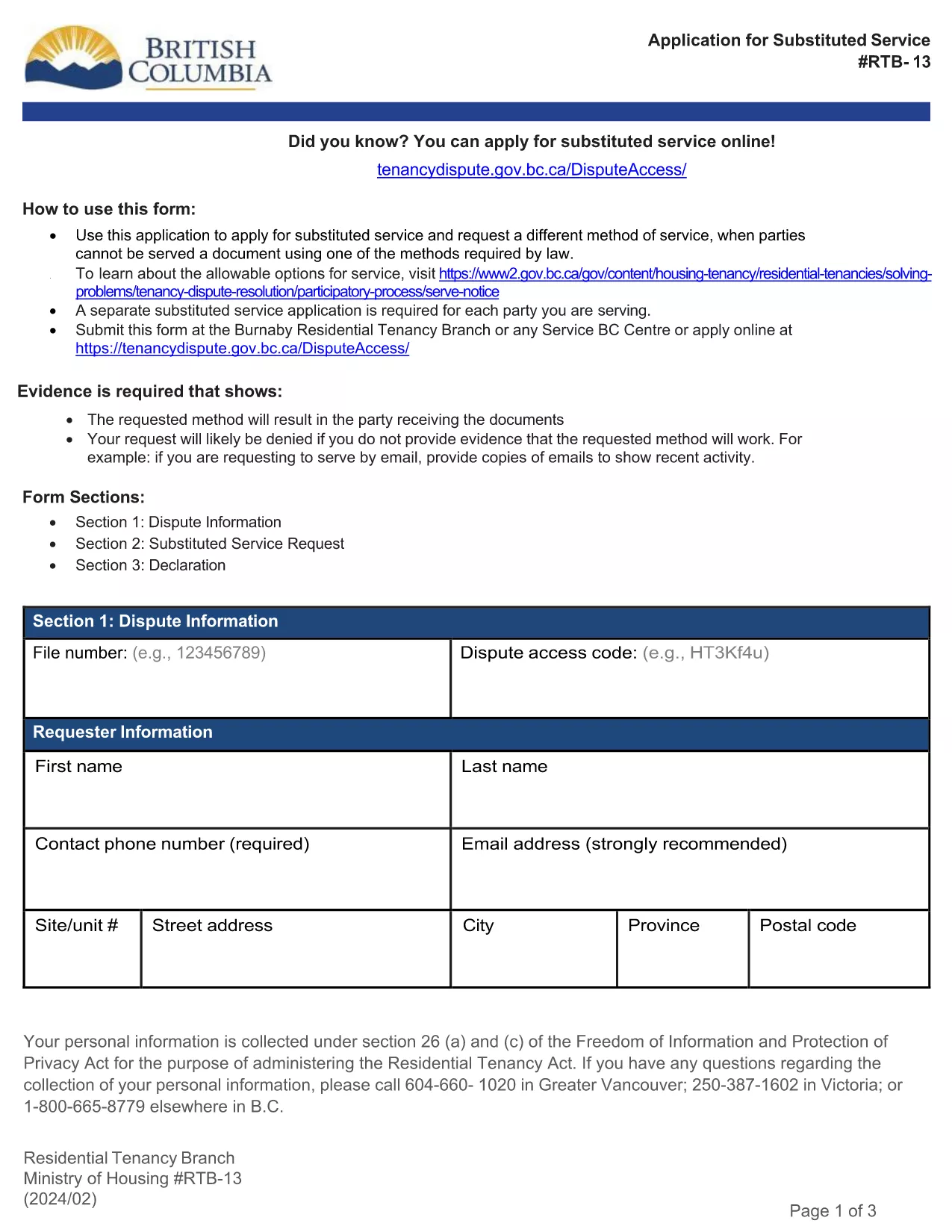
RTB‑13 Application for Substituted Service (Fillable PDF)

  1. 语言 英语
  2. 国家 加拿大
  3. 活动 租赁
  4. 状态 不列颠哥伦比亚省
RTB‑13 Application for Substituted Service (Fillable PDF)

The RTB‑13 Application for Substituted Service is the official form used by the British Columbia Residential Tenancy Branch when a party needs the arbitrator to order an alternative method of serving documents. This form is required when the usual service methods under the Residential Tenancy Act cannot be used.

What Is the RTB‑13 Form?

RTB‑13 is a government‑issued, fillable PDF that captures details such as:

  • Parties involved (landlord, tenant, arbitrator)
  • Reason for requesting substituted service
  • Proposed method of service (email, courier, posting, etc.)
  • Supporting evidence or affidavits

When Should You Use RTB‑13?

Use this form if you have tried the standard service methods (personal delivery, registered mail, etc.) and they have failed, or if the other party’s location makes normal service impractical. Common scenarios include:

  • Tenant has moved without leaving a forwarding address.
  • Landlord cannot locate the tenant after multiple attempts.
  • Documents need to be served to a corporate entity that only accepts electronic delivery.

How to Complete the RTB‑13 Online

Instead of downloading the PDF to a desktop editor, simply click the "Fill out this form" button below. The Formize PDF Filler app will load in your browser, allowing you to:

  1. Navigate field‑by‑field using the Tab key.
  2. Enter required information directly into each box.
  3. Attach supporting documents or affidavits.
  4. Save a copy for your records.
  5. Submit the completed form to the Residential Tenancy Branch via email or upload.

Common Mistakes & Tips

  • Missing signatures: The form is invalid without the landlord’s and tenant’s signatures.
  • Incorrect dates: Use the exact date you attempted the standard service.
  • Insufficient detail: Clearly describe why normal service failed and propose a realistic alternative.
  • File size limits: Keep attached PDFs under 5 MB to avoid upload errors.

Download the Fillable PDF

If you prefer to work offline, you can still download the official RTB‑13 PDF using the link below. Open it with the latest version of Adobe Acrobat Reader for full fillable functionality.

常问问题
  • What is the purpose of RTB‑13?

    RTB‑13 requests that an arbitrator order a different method of serving documents when standard service methods are impossible or have failed.

  • Can I submit RTB‑13 electronically?

    Yes. After completing the fillable PDF with Formize, you can email the PDF or upload it through the Residential Tenancy Branch’s online portal.

  • Do I need a lawyer to fill out RTB‑13?

    No. The form is designed for landlords and tenants to complete themselves, though you may seek legal advice if the situation is complex.

  • How long does the arbitrator take to decide on a substituted service request?

    Processing times vary, but most decisions are issued within 10‑14 business days after the completed form is received.

  • What supporting documents should I include?

    Attach proof of attempted service (e.g., delivery receipts, correspondence), affidavits, and any relevant court orders or notices.

  • Is there a fee for filing RTB‑13?

    There is no filing fee for the RTB‑13 application itself, though other tenancy dispute fees may apply.

  • Can I save my progress and return later?

    Yes. The Formize PDF Filler lets you save a draft on your computer and continue editing at any time.

  • What if I make a mistake after submitting?

    Contact the Residential Tenancy Branch immediately. You may be asked to submit a corrected RTB‑13 with a brief explanation of the changes.

如何

如何通过 5 个简单步骤在线免费填写 RTB-13:

  1. 1
    Click the Fill‑out Button
    Press the "Fill out this form" button on the page. The Formize PDF Filler loads instantly in your browser.
  2. 2
    Enter Your Information
    Tab through each fillable field, entering the required details such as party names, reasons for substituted service, and proposed method.
  3. 3
    Attach Supporting Documents
    Use the attachment field to upload affidavits, proof of attempted service, or any other evidence the arbitrator may need.
  4. 4
    Save and Review
    Click "Save" to store a copy on your device, then review all entries for accuracy before submitting.
  5. 5
    Submit to the Residential Tenancy Branch
    Follow the on‑screen instructions to email or upload the completed RTB‑13 form directly to the BC Residential Tenancy Branch.
Formize PDF Filler 应用程序
关于

供房东和/或租户提出与租赁协议有关的行动的表格。

RTB-13 是在出租或租赁房产过程中使用的文件之一。这些表格确立了业主(房东)和租户之间的法律协议,概述了租赁安排的条款和条件。以下是一些常见的租赁形式:

租赁申请:此表格通常由有兴趣租赁房产的潜在租户填写。它收集有关申请人的个人信息,例如姓名、联系信息、就业详细信息、租赁历史和推荐信。租赁应用程序可帮助房东评估租户的适合性并做出明智的决定。

租赁协议:租赁协议是一份具有法律约束力的合同,概述了房东和租户双方的权利和责任。它涵盖了重要的细节,例如租赁期限、租金金额、保证金、滞纳金、宠物政策、维护责任以及特定于租赁房产的任何其他条款。租赁协议的长度和复杂程度可能有所不同,具体取决于租赁市场和当地法律。

租赁协议:与租赁协议类似,租赁协议是管理财产租赁的合同。然而,租赁协议通常用于短期租赁,例如按月安排。与长期租赁相比,租赁协议通常具有更大的灵活性,可以在更短的通知期内终止或修改。

搬入/搬出检查表:这些表格用于记录租赁开始和结束时租赁物业的状况。它们详细说明了每个房间的状况以及任何现有的损坏情况,确保双方都有财产状况的记录,以解决有关押金或损坏索赔的争议。

搬出通知:房东或租户使用此表格来提供终止租赁的意向通知。所需的通知期可能会有所不同,具体取决于当地法律以及租赁协议或租赁协议的条款。

需要注意的是,租赁或租赁形式可能会根据司法管辖区以及房东或物业管理公司的具体要求而有所不同。建议咨询当地法律并寻求专业建议,以确保遵守适用的法规,并针对具体的租赁或租赁交易使用适当的表格。

特征

PDF 填充器

在线填写 PDF 表单的最简单方法

  • 快速填写RTB-13
    正在寻找一种在线快速填写 RTB-13 的方法?使用我们的在线免费 PDF 填表工具,您将在不到一分钟的时间内了解如何编辑和填写此 pdf 文档。
  • 易于使用的在线 PDF 编辑器
    是否厌倦了打印 PDF 文件以便在重新扫描并发回之前对其进行编辑?免费在线编辑 PDF 文档。使用我们的在线 pdf 编辑器可以节省时间和纸张。
  • 伟大的工具,所有平台
    想知道如何在 Mac 上填写 RTB-13,或者如何免费使用 PDF 填充程序?我们的在线 PDF 工具适用于所有平台。
  • 安全文件存储
    完成的“RTB-13”文件存储在由亚马逊云托管管理的安全数据库中。您可以随时从我们的系统中删除您的文件。在任何情况下,这些文件都会在 24 小时后自动删除。
  • 与 RTB-13 聊天
    Chatize 上与“RTB-13”聊天,这是一个免费的 PDF 阅读器助手。提出问题并从“RTB-13”获得答案。只需点击上面的与文档聊天按钮即可。

删除填充会话

删除选定的填充会话?在这种情况下,您填写表格的进度将丢失。

删除编辑会话

删除选定的编辑会话?在这种情况下,您创建和编辑表单的进度将会丢失。