
选择语言

RTB-40 Tenant Direct Request Worksheet (Fillable PDF)

  1. 语言 英语
  2. 国家 加拿大
  3. 活动 租赁
  4. 状态 不列颠哥伦比亚省
RTB-40 Tenant Direct Request Worksheet (Fillable PDF)

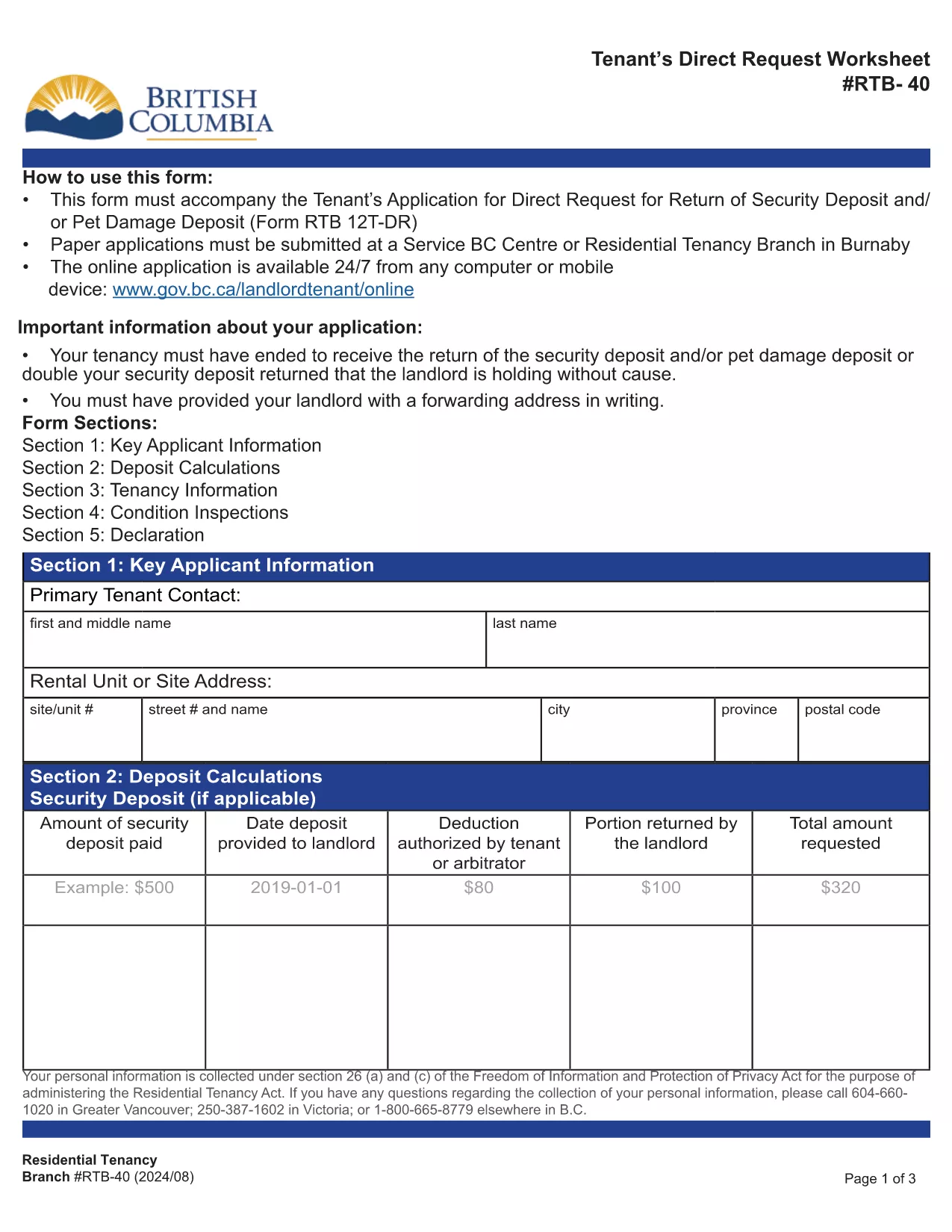
The RTB-40, also known as the Tenant Direct Request Worksheet, is the official British Columbia Residential Tenancy Branch form used when a tenant requests the return of a security or pet‑damage deposit. It allows you to present evidence, list amounts owed, and provide your forwarding address.

Formize hosts a fully‑fillable, web‑based version of this PDF so you can complete the worksheet from any device without installing Adobe Reader. Your data is saved securely and the final PDF can be downloaded or emailed directly to the Residential Tenancy Branch.

Using the online filler saves time, eliminates printing errors, and ensures the form meets the latest BC tenancy regulations.

常问问题
  • Do I need Adobe Reader to fill the RTB‑40?

    No. Formize’s online filler works in any modern browser, so you can complete the form without installing additional software.

  • Can I save my progress and finish later?

    Yes. The filler allows you to download a partially completed PDF, which you can reopen in Formize to continue editing.

  • Is the online version accepted by the Residential Tenancy Branch?

    Absolutely. The PDF generated by Formize is identical to the official government version, so it meets all submission requirements.

  • What supporting documents should I attach?

    Include copies of the original lease, receipts for any deductions, and proof of the deposit amount. List each item in the worksheet’s evidence section.

  • How do I correct a mistake after I’ve saved the PDF?

    Open the saved PDF again in Formize, make the necessary edits, and re‑save. The file remains fully editable until it is signed.

  • Is there a fee to use Formize’s PDF filler?

    No. The filler is free for all government forms, including the RTB‑40.

如何

如何通过 4 个简单步骤在线免费填写 RTB-40:

  1. 1
    Open the Fillable Form
    Click the blue “Fill out this form” button on this page. The Formize PDF Filler will open in a new tab.
  2. 2
    Enter Your Information
    Type directly into each field – the worksheet includes sections for tenant details, deposit amounts, and supporting evidence.
  3. 3
    Review and Save
    Check all entries for accuracy, then click “Save PDF”. The completed RTB‑40 will be downloaded to your computer.
  4. 4
    Submit to the Residential Tenancy Branch
    Print the saved PDF or attach it to an email as instructed in your tenancy dispute package.
Formize PDF Filler 应用程序
关于

供房东和/或租户提出与租赁协议有关的行动的表格。

RTB-40 是大多数私人房东和住房协会使用的住宅租赁协议类型。

房东或租户必须遵守法规中规定的某些规则的许多事项。在某些情况下,他们可能需要填写一份称为“规定表格”的表格,该表格提出可能影响租赁协议另一方的行动。

这些表格之所以称为规定表格,是因为其中的措辞经过精心起草,以确保填写表格的人和接受表格的人可以理解所提议的内容以及他们可能会做出的回应。未能提供正确的表格可能会使所提议的行动无效。

您不得更改这些表格中的措辞,除非表格说明您可以这样做。如果您更改措辞,表格可能会失效。您还必须遵守表格中规定的任何通知期限。

特征

PDF 填充器

在线填写 PDF 表单的最简单方法

  • 快速填写RTB-40
    正在寻找一种在线快速填写 RTB-40 的方法?使用我们的在线免费 PDF 填表工具,您将在不到一分钟的时间内了解如何编辑和填写此 pdf 文档。
  • 易于使用的在线 PDF 编辑器
    是否厌倦了打印 PDF 文件以便在重新扫描并发回之前对其进行编辑?免费在线编辑 PDF 文档。使用我们的在线 pdf 编辑器可以节省时间和纸张。
  • 伟大的工具,所有平台
    想知道如何在 Mac 上填写 RTB-40,或者如何免费使用 PDF 填充程序?我们的在线 PDF 工具适用于所有平台。
  • 安全文件存储
    完成的“RTB-40”文件存储在由亚马逊云托管管理的安全数据库中。您可以随时从我们的系统中删除您的文件。在任何情况下,这些文件都会在 24 小时后自动删除。
  • 与 RTB-40 聊天
    Chatize 上与“RTB-40”聊天,这是一个免费的 PDF 阅读器助手。提出问题并从“RTB-40”获得答案。只需点击上面的与文档聊天按钮即可。

删除填充会话

删除选定的填充会话?在这种情况下,您填写表格的进度将丢失。

删除编辑会话

删除选定的编辑会话?在这种情况下,您创建和编辑表单的进度将会丢失。