
选择语言

Punjab Surrender of COVs – Fillable Driver’s License Form (DL‑100)

  1. 语言 英语 印地语
  2. 国家 印度
  3. 状态 旁遮普省
  4. 部门 交通运输部
Punjab Surrender of COVs – Fillable Driver’s License Form (DL‑100)

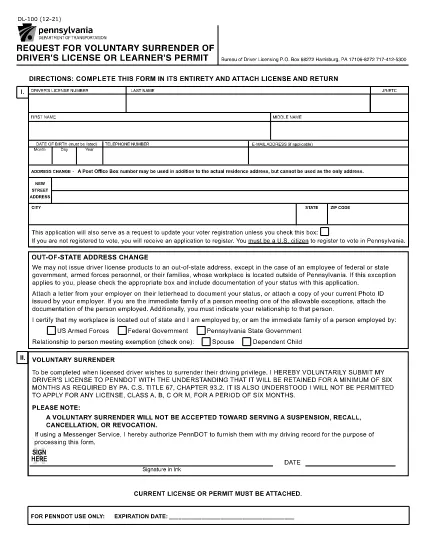
If you need to voluntarily surrender your driver’s license or learner’s permit in Punjab, the DL‑100 – Request for Voluntary Surrender of Driver's License or Learner's Permit is the official form you’ll use. This fillable PDF is now available directly on Formize, so you can complete it without downloading any software.

What Is the Punjab COVs Surrender Form?

The DL‑100 form is issued by the Department of Transportation and is required when you want to give up your license for any reason – such as moving out of state, changing your name, or surrendering a Commercial Vehicle Operator’s (COV) credential. The form captures essential details like personal information, license number, and the reason for surrender.

How to Fill Out the Form Online with Formize

Using Formize’s PDF Filler makes the process quick and secure. Follow the steps below:

  • Click the "Fill out this form" button on the page.
  • Wait a few seconds while the Formize PDF Filler app loads.
  • Enter your information directly into the highlighted fields.
  • Review each entry for accuracy.
  • When finished, click Submit to download a completed PDF or print it for mailing.

Common Mistakes to Avoid

  • Using the wrong ink color: When printing, use black or blue ink only.
  • Leaving required fields blank: The form will not accept an incomplete submission.
  • Signing the wrong section: Sign where the form specifically asks for your signature.
  • Forgetting to attach supporting documents: Include a copy of your current license if the agency requests it.

Where to Submit the Completed Form

After you have filled and signed the form, mail it to the address listed on the PDF (usually the Bureau of Driver Licensing or the state Department of Transportation). Some jurisdictions also accept a scanned copy via email – check your local office for details.

Frequently Asked Questions

Below are the most common questions people ask about the Punjab surrender of COVs form.

常问问题
  • Can I submit the DL‑100 form electronically?

    Most states still require a hard‑copy signature, so you should print the completed PDF and mail it. Some jurisdictions accept a scanned copy via email – verify with your local office.

  • Do I need to attach my current driver’s license?

    If the agency requests proof of the surrendered license, attach a photocopy of the front and back of the license with your submission.

  • Is there a fee to surrender my license?

    Voluntary surrender is typically free, but if you are canceling a commercial endorsement (COV), a processing fee may apply.

  • How long does it take for the surrender to be processed?

    Processing times vary by state, but most departments complete the surrender within 7‑10 business days after receiving the form.

  • Can I use a mobile device to fill out the form?

    Yes. The Formize PDF Filler works on smartphones and tablets, allowing you to complete the form on any device with an internet connection.

  • What should I do if I make a mistake after submitting?

    Contact the Department of Transportation’s licensing bureau immediately. They may require you to submit a corrected form or provide a written amendment.

  • Is the DL‑100 form the same for all U.S. states?

    The DL‑100 is specific to Pennsylvania, but many states use a similar voluntary surrender form. Check your local DMV for the exact version required in your state.

如何

如何通过 5 个简单步骤在线免费填写 driver's license surrender form:

  1. 1
    Open the Fillable Form
    Click the "Fill out this form" button on the page to launch the Formize PDF Filler.
  2. 2
    Load the PDF Filler
    Wait a few seconds while the Formize app loads the DL‑100 PDF in your browser.
  3. 3
    Enter Your Information
    Type your details into each highlighted field – name, address, license number, and reason for surrender.
  4. 4
    Review and Sign
    Double‑check all entries, then use the built‑in signature tool to sign the form.
  5. 5
    Download or Print
    Click "Submit" to download the completed PDF or print it directly for mailing to the Department of Transportation.
Formize PDF Filler 应用程序
关于

外交部申请表

driver's license surrender form是外交部申请表之一。印度外交部为与对外事务和国际关系相关的不同服务提供各种申请表。一些常见的申请表包括:

护照申请:此表格用于申请印度护照。它收集个人详细信息,例如姓名、地址、出生日期和国籍。

印度海外公民身份 (OCI) 申请:此表格用于申请 OCI 身份,该身份允许印度裔个人无限期地在印度生活和工作。它收集个人详细信息,包括印度血统证明。

签证申请:此表格用于申请前往外国的签证。它收集个人详细信息、旅行信息和旅行目的。

移民许可申请:此表格供在某些国家/地区寻求就业移民许可的个人使用。它收集个人信息和就业详细信息。

认证申请:此表用于申请各种文件的认证,如学历证书、结婚证书、商业文件等。它收集要证明的文件的详细信息以及证明的目的。

领事服务申请表:此表格用于各种领事服务,包括签发紧急证书、为海外印度国民提供协助以及印度国民登记等。所需的具体细节取决于所请求服务的性质。

特征

PDF 填充器

在线填写 PDF 表单的最简单方法

  • 快速填写driver's license surrender form
    正在寻找一种在线快速填写 driver's license surrender form 的方法?使用我们的在线免费 PDF 填表工具,您将在不到一分钟的时间内了解如何编辑和填写此 pdf 文档。
  • 易于使用的在线 PDF 编辑器
    是否厌倦了打印 PDF 文件以便在重新扫描并发回之前对其进行编辑?免费在线编辑 PDF 文档。使用我们的在线 pdf 编辑器可以节省时间和纸张。
  • 伟大的工具,所有平台
    想知道如何在 Mac 上填写 driver's license surrender form,或者如何免费使用 PDF 填充程序?我们的在线 PDF 工具适用于所有平台。
  • 安全文件存储
    完成的“driver's license surrender form”文件存储在由亚马逊云托管管理的安全数据库中。您可以随时从我们的系统中删除您的文件。在任何情况下,这些文件都会在 24 小时后自动删除。
  • 与 driver's license surrender form 聊天
    Chatize 上与“driver's license surrender form”聊天,这是一个免费的 PDF 阅读器助手。提出问题并从“driver's license surrender form”获得答案。只需点击上面的与文档聊天按钮即可。

删除填充会话

删除选定的填充会话?在这种情况下,您填写表格的进度将丢失。

删除编辑会话

删除选定的编辑会话?在这种情况下,您创建和编辑表单的进度将会丢失。