
选择语言

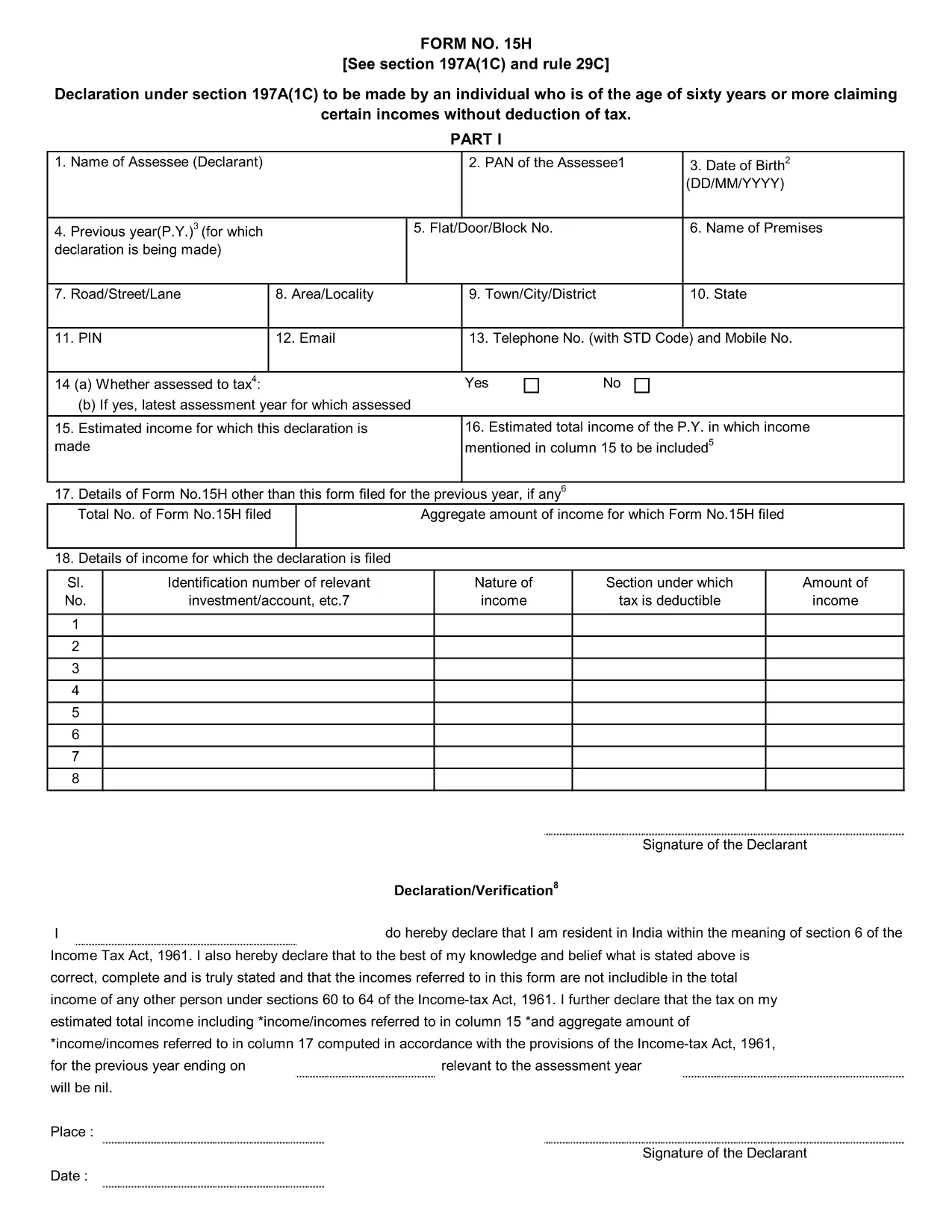
Form 15H – Senior Citizens’ Interest Income Declaration (Fillable PDF)

  1. 语言 英语
  2. 国家 印度
  3. 活动 税收
Form 15H – Senior Citizens’ Interest Income Declaration (Fillable PDF)

Form 15H is a declaration under sub‑section (1C) of section 197A of the Income‑Tax Act, 1961. It allows senior citizens (aged 60 years or more) to request that tax be **not deducted at source (TDS)** on interest earned from bank or post‑office deposits, provided they meet certain income thresholds.

Who Can Use Form 15H?

  • Resident individuals aged 60 years or above.
  • Those whose total taxable income does not exceed the limits set by the Act (₹3 lakhs for ages 60‑79, ₹5 lakhs for 80 years and above).
  • Taxpayers who receive interest income from banks, post offices, or cooperative societies.

Eligibility & Income Limits

The Income‑Tax Department defines two income caps:

  • Age 60‑79: Taxable income ≤ ₹300,000 per financial year.
  • Age 80 and above: Taxable income ≤ ₹500,000 per financial year.

If your interest earnings are below ₹50,000 in a year, you are not required to submit Form 15H – the bank will not deduct TDS automatically.

How to Fill Form 15H Online

Instead of downloading the PDF and editing it locally, simply click the "Fill out this form" button on this page. The Formize PDF Filler app will load in your browser, allowing you to complete the declaration in a few easy steps:

  1. Enter your name, PAN, and address as they appear on your PAN card.
  2. Provide your bank account details where the interest is credited.
  3. Declare the total interest earned and confirm it is within the eligible limit.
  4. Sign electronically (or print, sign, and scan if you prefer a hard copy).
  5. Submit the form to your bank or download it for manual submission.

Common Mistakes to Avoid

  • Entering an incorrect PAN – the bank will reject the form.
  • Mis‑calculating total taxable income; always include salary, rent, and other earnings.
  • Submitting the form after the interest has already been taxed – it must be given **before** the bank deducts TDS.
  • Leaving the "Signature" field blank; an electronic signature is acceptable in most banks.

Download & Save the Fillable PDF

If you prefer a local copy, you can download the official fillable PDF below. The file retains the original layout and can be opened with any modern PDF reader.

Download Form 15H – Fillable PDF

Using Formize’s online filler saves time, reduces errors, and lets you submit the declaration instantly to your bank.

常问问题
  • What is the purpose of Form 15H?

    Form 15H allows senior citizens (60 years or older) to request that TDS be **not deducted** on interest income when their total taxable income is below the specified thresholds.

  • Can I use Form 15H if I am below 60 years?

    No. Individuals under 60 should use Form 15G, which serves the same purpose for younger taxpayers.

  • Do I need to submit Form 15H every financial year?

    Yes. The declaration is valid only for the financial year in which it is submitted. A new Form 15H must be provided each year you wish to claim the exemption.

  • What if my interest income exceeds ₹50,000?

    If interest exceeds ₹50,000, the bank will automatically deduct TDS unless you submit a valid Form 15H before the interest is credited.

  • Is an electronic signature accepted?

    Most banks accept an electronic signature entered via the Formize PDF Filler. If your bank requires a handwritten signature, print, sign, and scan the completed form.

  • Can I submit Form 15H online to the Income‑Tax Department?

    Form 15H is submitted to the **bank or post‑office** where the interest is credited, not directly to the Income‑Tax Department.

  • What happens if I submit an incorrect PAN?

    The bank will reject the form and may still deduct TDS. Ensure the PAN matches the one on your PAN card.

  • Do I need to attach any supporting documents?

    Generally no. The form itself is sufficient, but keep your interest statements handy in case the bank requests verification.

如何

如何通过 5 个简单步骤在线免费填写 Form 15H:

  1. 1
    Click the Fill‑out Button
    Press the "Fill out this form" button on the page. The Formize PDF Filler loads instantly in your browser.
  2. 2
    Enter Your Details
    Provide your name, PAN, address, bank account number, and total interest earned as prompted.
  3. 3
    Verify Income Limits
    The filler will automatically check that your total taxable income is within the ₹3 Lakh or ₹5 Lakh limits based on age.
  4. 4
    Add Your Signature
    Use the electronic signature tool or upload a scanned signature image.
  5. 5
    Submit or Download
    Send the completed form directly to your bank via their portal, or download the PDF for manual submission.
Formize PDF Filler 应用程序
关于

所得税部门表格

Form 15H 是印度所得税部门用于管理和征收所得税的官方表格之一。纳税人使用这些表格向税务机关报告其收入、扣除额和纳税义务。

以下是印度一些常用的所得税部门表格:

ITR-1 (Sahaj):此表格由拥有工资收入、一处房产以及利息、养老金或家庭养老金等其他来源的个人。它适用于总收入不超过卢比的个人。 500万。

ITR-2:此表格供个人和印度教徒使用拥有商业或职业以外收入来源的未分割家庭 (HUF)。它适用于总收入超过卢比的个人。 500万或拥有外国资产/收入。

ITR-3:此表格供个人和 HUF 使用有商业或职业收入。它适用于从合伙公司获得收入的个人和从事专业工作的专业人士。

ITR-4 (Sugam):此表格由根据《所得税法》第 44AD、44ADA 或 44AE 条选择推定纳税计划的个人、HUF 和公司(LLP 除外)。

表格 16:此表格由雇主向雇员提供,包含详细信息工资、源头扣除税款 (TDS) 和其他相关信息。它可以帮助员工准确提交所得税申报表。

表格 26AS:这不是表格,而是年度综合税务报表它提供了纳税人缴纳的 TDS、预缴税和自我评估税等税务相关信息的摘要。它可以帮助纳税人在提交所得税申报表时交叉验证其纳税义务。

这些只是印度所得税部门表格的几个例子。具体表格和要求可能会根据收入性质、纳税人类别和印度现行税法而有所不同。请务必查阅印度所得税部门的官方网站 (www.venuetaxindia.gov.in) 或寻求专业建议,以获得有关以下方面的准确和最新信息:与您在印度的税务情况相关的具体所得税表格。

特征

PDF 填充器

在线填写 PDF 表单的最简单方法

  • 快速填写Form 15H
    正在寻找一种在线快速填写 Form 15H 的方法?使用我们的在线免费 PDF 填表工具,您将在不到一分钟的时间内了解如何编辑和填写此 pdf 文档。
  • 易于使用的在线 PDF 编辑器
    是否厌倦了打印 PDF 文件以便在重新扫描并发回之前对其进行编辑?免费在线编辑 PDF 文档。使用我们的在线 pdf 编辑器可以节省时间和纸张。
  • 伟大的工具,所有平台
    想知道如何在 Mac 上填写 Form 15H,或者如何免费使用 PDF 填充程序?我们的在线 PDF 工具适用于所有平台。
  • 安全文件存储
    完成的“Form 15H”文件存储在由亚马逊云托管管理的安全数据库中。您可以随时从我们的系统中删除您的文件。在任何情况下,这些文件都会在 24 小时后自动删除。
  • 与 Form 15H 聊天
    Chatize 上与“Form 15H”聊天,这是一个免费的 PDF 阅读器助手。提出问题并从“Form 15H”获得答案。只需点击上面的与文档聊天按钮即可。

删除填充会话

删除选定的填充会话?在这种情况下,您填写表格的进度将丢失。

删除编辑会话

删除选定的编辑会话?在这种情况下,您创建和编辑表单的进度将会丢失。