
选择语言

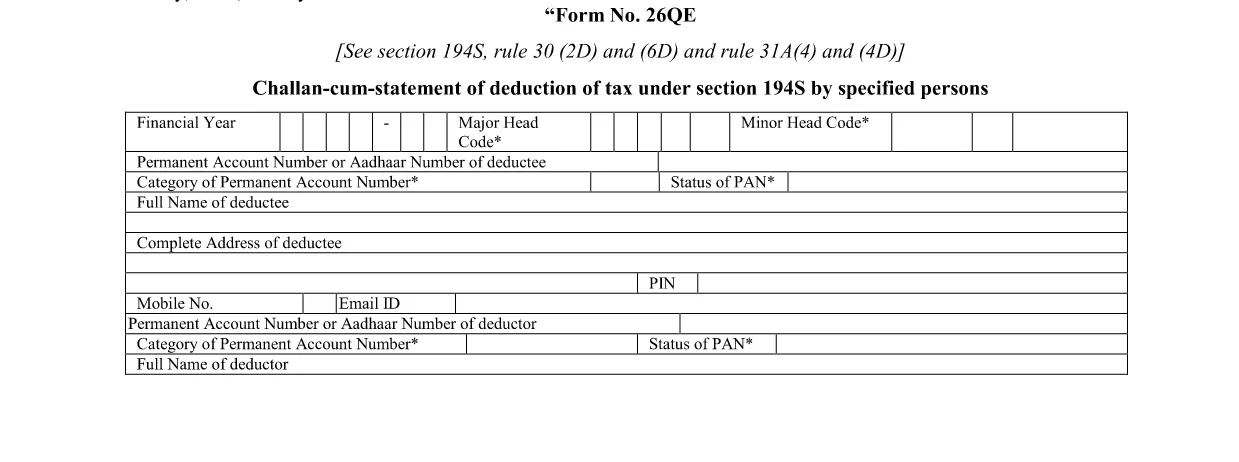
Form 26QE – Fillable PDF for Tax Deduction Statements

  1. 语言 英语
  2. 国家 印度
  3. 活动 税收
填这张表格
Form 26QE – Fillable PDF for Tax Deduction Statements

Form 26QE is the official statement used by specified persons to report tax deducted at source under Section 194S. The form must be filed electronically and submitted with the corresponding challan.

What Is Form 26QE?

Form 26QE captures details of deductions made on payments to non‑resident entities, such as interest, royalties, and technical fees. It is required when the payer is obligated to deduct tax under Indian law.

Key Sections and When to Use It

  • Section 194S: Tax deducted at source on payments to non‑residents.
  • Rule 30(2D) & 6D: Specifies the rates and thresholds.
  • Rule 31A: Details the filing timeline and penalties.

How to Fill Form 26QE Online

Instead of downloading and editing the PDF in a separate editor, simply click the “Fill out this form” button on this page. The Formize PDF Filler will load automatically, allowing you to:

  1. Enter payer and payee details.
  2. Specify the amount of tax deducted.
  3. Upload supporting documents.
  4. Validate the data and generate a completed PDF.

Common Mistakes to Avoid

  • Leaving the PAN of the payee blank – the form will be rejected.
  • Mismatching the deduction rate with the applicable rule.
  • Submitting after the statutory deadline, which incurs penalties.
  • Not attaching the required challan‑cum‑statement.

Download & Save the Official PDF

If you prefer to keep a copy of the original form, you can download the official fillable PDF below. It is the same document used by the Formize filler.

Download Form 26QE (Fillable PDF)

常问问题
  • What is the purpose of Form 26QE?

    Form 26QE is used to report tax deducted at source on payments made to non‑resident persons under Section 194S of the Indian Income Tax Act.

  • Who must file Form 26QE?

    Any specified person who deducts tax on payments to non‑resident entities (e.g., interest, royalty, technical fees) must file Form 26QE.

  • Can I edit the PDF after filling it online?

    Yes. Once you complete the form in the Formize filler, you can download the filled PDF and reopen it in any standard PDF editor if further changes are needed.

  • What is the filing deadline for Form 26QE?

    The form must be filed by the 15th day of the month following the month in which tax was deducted, unless an extension is granted.

  • Is there a fee to use the Formize PDF Filler?

    No. Formize provides a free online filler for this form; you only need an internet connection and a compatible browser.

  • What happens if I submit an incomplete Form 26QE?

    The tax authority will reject the submission, and you may be subject to penalties for late or inaccurate filing.

如何

如何通过 4 个简单步骤在线免费填写 Form 26QE:

  1. 1
    Click the Fill‑out Button
    On this page, locate the “Fill out this form” button and click it to launch the Formize PDF Filler.
  2. 2
    Wait for the Filler to Load
    The Formize app will open in a new window. A short loading indicator lets you know the form is being prepared.
  3. 3
    Enter the Required Information
    Complete each section – payer details, payee PAN, amount deducted, and attach any supporting documents.
  4. 4
    Save or Download the Completed Form
    After validation, click “Save” to store the PDF in your device or “Download” to keep a copy for your records.
Formize PDF Filler 应用程序
关于

所得税部门表格

Form 26QE 是印度所得税部门用于管理和征收所得税的官方表格之一。纳税人使用这些表格向税务机关报告其收入、扣除额和纳税义务。

以下是印度一些常用的所得税部门表格:

ITR-1 (Sahaj):此表格由拥有工资收入、一处房产以及利息、养老金或家庭养老金等其他来源的个人。它适用于总收入不超过卢比的个人。 500万。

ITR-2:此表格供个人和印度教徒使用拥有商业或职业以外收入来源的未分割家庭 (HUF)。它适用于总收入超过卢比的个人。 500万或拥有外国资产/收入。

ITR-3:此表格供个人和 HUF 使用有商业或职业收入。它适用于从合伙公司获得收入的个人和从事专业工作的专业人士。

ITR-4 (Sugam):此表格由根据《所得税法》第 44AD、44ADA 或 44AE 条选择推定纳税计划的个人、HUF 和公司(LLP 除外)。

表格 16:此表格由雇主向雇员提供,包含详细信息工资、源头扣除税款 (TDS) 和其他相关信息。它可以帮助员工准确提交所得税申报表。

表格 26AS:这不是表格,而是年度综合税务报表它提供了纳税人缴纳的 TDS、预缴税和自我评估税等税务相关信息的摘要。它可以帮助纳税人在提交所得税申报表时交叉验证其纳税义务。

这些只是印度所得税部门表格的几个例子。具体表格和要求可能会根据收入性质、纳税人类别和印度现行税法而有所不同。请务必查阅印度所得税部门的官方网站 (www.venuetaxindia.gov.in) 或寻求专业建议,以获得有关以下方面的准确和最新信息:与您在印度的税务情况相关的具体所得税表格。

特征

PDF 填充器

在线填写 PDF 表单的最简单方法

  • 快速填写Form 26QE
    正在寻找一种在线快速填写 Form 26QE 的方法?使用我们的在线免费 PDF 填表工具,您将在不到一分钟的时间内了解如何编辑和填写此 pdf 文档。
  • 易于使用的在线 PDF 编辑器
    是否厌倦了打印 PDF 文件以便在重新扫描并发回之前对其进行编辑?免费在线编辑 PDF 文档。使用我们的在线 pdf 编辑器可以节省时间和纸张。
  • 伟大的工具,所有平台
    想知道如何在 Mac 上填写 Form 26QE,或者如何免费使用 PDF 填充程序?我们的在线 PDF 工具适用于所有平台。
  • 安全文件存储
    完成的“Form 26QE”文件存储在由亚马逊云托管管理的安全数据库中。您可以随时从我们的系统中删除您的文件。在任何情况下,这些文件都会在 24 小时后自动删除。
  • 与 Form 26QE 聊天
    Chatize 上与“Form 26QE”聊天,这是一个免费的 PDF 阅读器助手。提出问题并从“Form 26QE”获得答案。只需点击上面的与文档聊天按钮即可。

删除填充会话

删除选定的填充会话?在这种情况下,您填写表格的进度将丢失。

删除编辑会话

删除选定的编辑会话?在这种情况下,您创建和编辑表单的进度将会丢失。