
选择语言

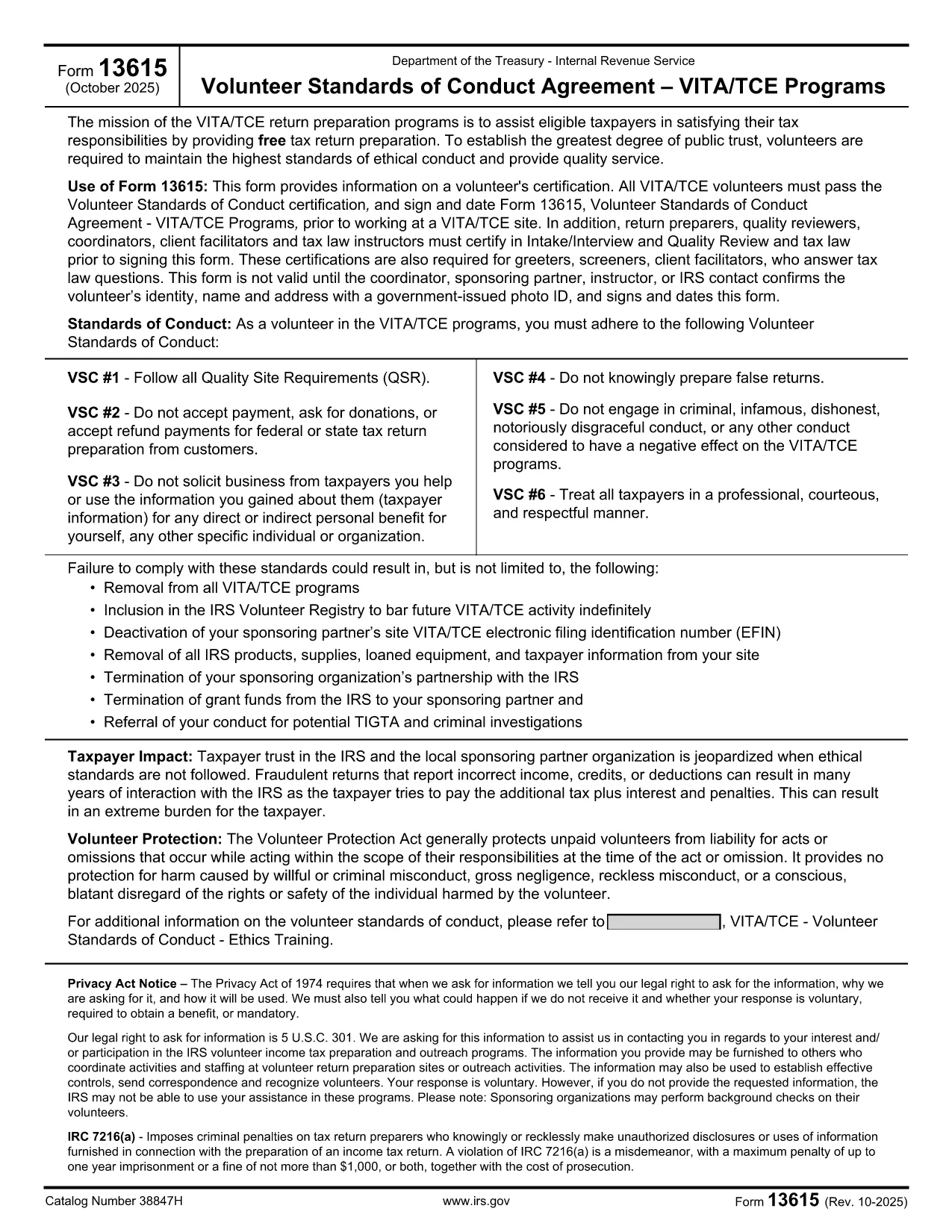
Form 13615 – Volunteer Standards of Conduct Agreement (Fillable PDF)

  1. 国家 美国
  2. 语言 英语
  3. 活动 税收
  4. 部门 国税局
Form 13615 – Volunteer Standards of Conduct Agreement (Fillable PDF)

Form 13615 is the Volunteer Standards of Conduct Agreement required for anyone participating in the IRS Volunteer Income Tax Assistance (VITA) or Tax Counseling for the Elderly (TCE) programs. This agreement confirms that volunteers have completed the required training, understand the ethical standards, and agree to follow them while assisting taxpayers.

What Is Form 13615?

The form captures:

  • Volunteer identification (name, address, phone, email)
  • Signature confirming completion of training and testing
  • Agreement to abide by the IRS Volunteer Standards of Conduct

All VITA/TCE volunteers—paid or unpaid—must sign Form 13615 before working at a site. The form is also required for return preparers, quality reviewers, and site coordinators.

Why Use a Fillable PDF with Formize?

Formize’s online PDF filler turns the static IRS PDF into an interactive, browser‑based form. Benefits include:

  • Instant loading – no need to download, install, or print.
  • Auto‑save functionality so you never lose entered data.
  • Secure, encrypted transmission to protect personal information.
  • One‑click printing or electronic submission after completion.

Step‑by‑Step Guide to Completing Form 13615

Follow the steps below to finish the agreement quickly and correctly.

Common Mistakes to Avoid

Even experienced volunteers can slip up. Here are the most frequent errors and how to prevent them:

  • Leaving required fields blank: The form will not submit if any mandatory field is empty.
  • Using an outdated version: Always verify the revision date (current version is Rev. 10‑2025).
  • Incorrect signature format: Use a clear, legible digital signature; avoid stylized fonts.

Where to Find Help

If you need assistance, contact your local VITA/TCE coordinator or consult the IRS Volunteer Training Materials. The Formize platform also includes a built‑in help tooltip for each field.

常问问题
  • Do I need to download Form 13615 before filling it out?

    No. With Formize you can fill out the form directly in your browser. Simply click the **Fill out this form** button and the fillable PDF loads automatically.

  • Is the online filler secure?

    Yes. Formize uses SSL encryption, and all data is stored locally in your browser until you choose to download or print the completed form.

  • Can I save my progress and finish later?

    Absolutely. The filler auto‑saves your entries. When you return, click **Load saved draft** to continue where you left off.

  • What version of Form 13615 should I use?

    Use the most recent revision (Rev. 10‑2025). The PDF linked on this page is always the latest official version from the IRS.

  • Who must sign Form 13615?

    All VITA/TCE volunteers, return preparers, quality reviewers, site coordinators, and tax law instructors must sign the agreement before beginning any volunteer work.

  • What happens if I make a mistake on the form?

    You can edit any field before finalizing. If you have already printed a copy, simply correct the error on a new form and submit the updated version.

  • Do I need a physical signature for IRS filing?

    A clear digital signature is acceptable for the volunteer agreement. If your organization requires a wet signature, print the completed PDF and sign it manually.

  • Where can I find training materials for VITA/TCE?

    Visit the IRS VITA/TCE website or contact your local volunteer coordinator for the latest training manuals and webinars.

如何

如何通过 5 个简单步骤在线免费填写 Form 13615:

  1. 1
    Open the Fillable Form
    Click the **Fill out this form** button on the page. The Formize PDF Filler app will load directly in your browser.
  2. 2
    Enter Your Information
    Complete each required field—name, address, phone, email, and training details. The filler highlights any missing information.
  3. 3
    Add Your Digital Signature
    Use the signature box to type or draw your signature. Make sure it is clear and matches the printed version.
  4. 4
    Review and Save
    Click **Review** to see a summary. Save a copy to your device or cloud storage for your records.
  5. 5
    Submit or Print
    When the form is complete, choose **Print** to produce a hard copy for your VITA/TCE site, or **Download** to send electronically.
Formize PDF Filler 应用程序
关于

税务表格

Form 13615 是一种税表,是用于向相关税务机关报告与税收相关的信息的文件。有多种类型的税表,包括联邦、州和地方税表,它们可能因纳税人的情况和地点而异。

特征

PDF 填充器

在线填写 PDF 表单的最简单方法

  • 快速填写Form 13615
    正在寻找一种在线快速填写 Form 13615 的方法?使用我们的在线免费 PDF 填表工具,您将在不到一分钟的时间内了解如何编辑和填写此 pdf 文档。
  • 易于使用的在线 PDF 编辑器
    是否厌倦了打印 PDF 文件以便在重新扫描并发回之前对其进行编辑?免费在线编辑 PDF 文档。使用我们的在线 pdf 编辑器可以节省时间和纸张。
  • 伟大的工具,所有平台
    想知道如何在 Mac 上填写 Form 13615,或者如何免费使用 PDF 填充程序?我们的在线 PDF 工具适用于所有平台。
  • 安全文件存储
    完成的“Form 13615”文件存储在由亚马逊云托管管理的安全数据库中。您可以随时从我们的系统中删除您的文件。在任何情况下,这些文件都会在 24 小时后自动删除。
  • 与 Form 13615 聊天
    Chatize 上与“Form 13615”聊天,这是一个免费的 PDF 阅读器助手。提出问题并从“Form 13615”获得答案。只需点击上面的与文档聊天按钮即可。

删除填充会话

删除选定的填充会话?在这种情况下,您填写表格的进度将丢失。

删除编辑会话

删除选定的编辑会话?在这种情况下,您创建和编辑表单的进度将会丢失。