
选择语言

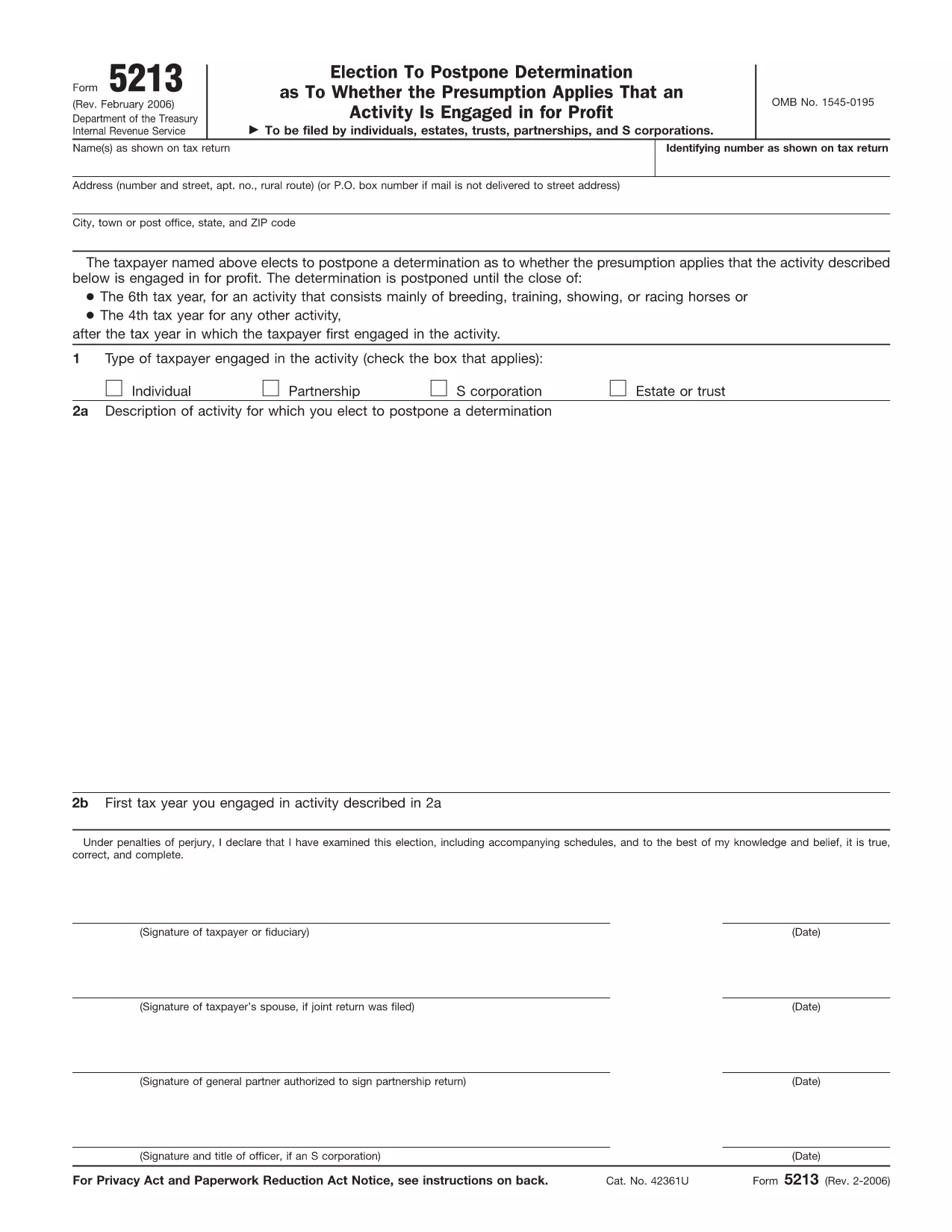
IRS Form 5213 – Election to Postpone Determination (Fillable PDF)

  1. 国家 美国
  2. 语言 英语
  3. 活动 税收
  4. 部门 国税局
IRS Form 5213 – Election to Postpone Determination (Fillable PDF)

The IRS Form 5213, titled Election to Postpone Determination, allows taxpayers to request a delay on the IRS’s decision about whether an activity is engaged in for profit. This can be critical for individuals, estates, trusts, partnerships, and S‑corporations that need extra time to gather documentation or demonstrate profitability.

Our fillable PDF version is hosted on Formize, so you can complete the form directly in your browser—no extra software required. Simply click the “Fill out this form” button, let the Formize PDF Filler load, and start entering your information.

Below you’ll find a quick guide, tips for avoiding errors, and answers to the most common questions about Form 5213.

常问问题
  • When is the deadline to file Form 5213?

    You must file within three years after the due date of the return for the first tax year the activity was engaged in, or within 60 days after receiving an IRS notice of potential disallowance.

  • Can I file Form 5213 electronically?

    Yes. Using Formize’s online fillable PDF lets you complete and save the form electronically, then print or email it to the IRS.

  • Do I need a professional to complete Form 5213?

    While not required, a tax professional can help ensure the election is appropriate for your situation and that all required information is included.

  • What happens after I submit Form 5213?

    The IRS will acknowledge receipt and grant a postponement period, allowing you additional time to substantiate that the activity is for profit.

  • Is there a fee to use Formize’s fillable PDF?

    No. Formize provides the fillable version of Form 5213 for free.

  • Can I amend a previously filed Form 5213?

    If you need to change information, you must file a new Form 5213 with updated details and reference the original filing.

  • What if I miss the filing deadline?

    Missing the deadline may result in the loss of the postponement election, and the IRS could disallow related deductions.

  • Do I need to attach supporting documents?

    Attach any documentation that demonstrates your intent to make a profit, such as business plans, financial statements, or contracts.

如何

如何通过 5 个简单步骤在线免费填写 IRS Form 5213:

  1. 1
    Open the Fillable Form
    Click the “Fill out this form” button on the page. The Formize PDF Filler app will load in a new window.
  2. 2
    Enter Your Information
    Type directly into each field—name, identifying number, activity description, and any supporting statements.
  3. 3
    Add Your Signature
    Use the built‑in e‑signature tool to sign electronically. If filing a joint return, both spouses must sign.
  4. 4
    Review and Submit
    Check all entries for accuracy, then click “Submit” to download the completed PDF or to email it directly to the IRS.
  5. 5
    Save a Copy
    After submission, save a copy of the filled PDF to your records for future reference.
Formize PDF Filler 应用程序
关于

税务表格

IRS Form 5213 是一种税表,是用于向相关税务机关报告与税收相关的信息的文件。有多种类型的税表,包括联邦、州和地方税表,它们可能因纳税人的情况和地点而异。

特征

PDF 填充器

在线填写 PDF 表单的最简单方法

  • 快速填写IRS Form 5213
    正在寻找一种在线快速填写 IRS Form 5213 的方法?使用我们的在线免费 PDF 填表工具,您将在不到一分钟的时间内了解如何编辑和填写此 pdf 文档。
  • 易于使用的在线 PDF 编辑器
    是否厌倦了打印 PDF 文件以便在重新扫描并发回之前对其进行编辑?免费在线编辑 PDF 文档。使用我们的在线 pdf 编辑器可以节省时间和纸张。
  • 伟大的工具,所有平台
    想知道如何在 Mac 上填写 IRS Form 5213,或者如何免费使用 PDF 填充程序?我们的在线 PDF 工具适用于所有平台。
  • 安全文件存储
    完成的“IRS Form 5213”文件存储在由亚马逊云托管管理的安全数据库中。您可以随时从我们的系统中删除您的文件。在任何情况下,这些文件都会在 24 小时后自动删除。
  • 与 IRS Form 5213 聊天
    Chatize 上与“IRS Form 5213”聊天,这是一个免费的 PDF 阅读器助手。提出问题并从“IRS Form 5213”获得答案。只需点击上面的与文档聊天按钮即可。

删除填充会话

删除选定的填充会话?在这种情况下,您填写表格的进度将丢失。

删除编辑会话

删除选定的编辑会话?在这种情况下,您创建和编辑表单的进度将会丢失。