选择语言

Form 8554‑EP – Enrolled Retirement Plan Agent Renewal (Fillable PDF)

  1. 国家 美国
  2. 语言 英语
  3. 活动 税收
  4. 部门 国税局
Form 8554‑EP – Enrolled Retirement Plan Agent Renewal (Fillable PDF)

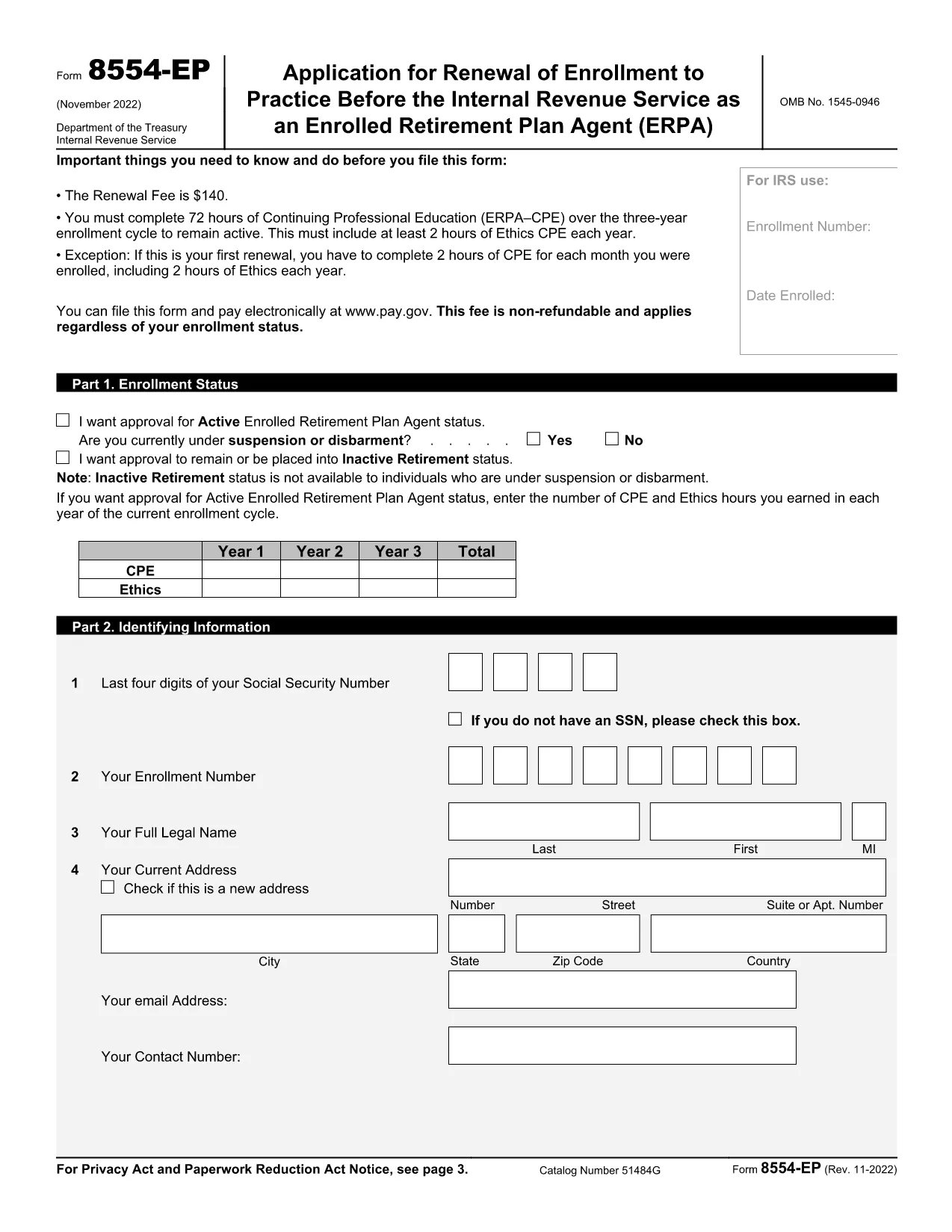
The Form 8554‑EP is the official IRS renewal application for Enrolled Retirement Plan Agents (ERPA). Every three years, ERPA‑qualified tax professionals must submit this form to maintain their ability to practice before the IRS on retirement plan matters.

What Is Form 8554‑EP?

Form 8554‑EP (Rev. 11‑2022) collects information about your credentials, continuing professional education (CPE) credits, and any changes to your practice. The form ensures you remain in good standing with the IRS.

Who Must File This Form?

  • Individuals who are currently enrolled as Retirement Plan Agents.
  • Those whose enrollment expired or will expire within the next three years.
  • Tax professionals seeking to reactivate an inactive ERPA status.

How to Complete the Fillable PDF

Our online Formize PDF Filler loads the official IRS PDF directly in your browser. No extra software is required.

Common Mistakes to Avoid

  • Leaving any required field blank – the IRS will reject incomplete submissions.
  • Failing to attach proof of CPE credits when required.
  • Signing the form with an unauthorized signature.

Submission & Deadlines

Submit the completed form to the IRS address listed on the last page of the PDF. Keep a copy for your records. The renewal deadline is the last day of the three‑year enrollment cycle.

Ready to start? Click the button below to launch the fillable version instantly.

常问问题
  • How often do I need to renew my ERPA enrollment?

    Renewal is required every three (3) years. The IRS will notify you when your current enrollment is approaching expiration.

  • Can I submit Form 8554‑EP electronically?

    The IRS currently accepts only paper submissions for Form 8554‑EP. Use the fillable PDF to ensure accuracy, then mail the printed form.

  • What CPE documentation must I attach?

    Attach copies of certificates or transcripts that verify you have completed the required 15 CPE hours in retirement plan practice for the enrollment cycle.

  • What happens if I miss the renewal deadline?

    Your ERPA status becomes inactive, and you cannot represent clients before the IRS on retirement‑plan matters until you re‑apply and receive approval.

  • Do I need a signature on the form?

    Yes. The form must be signed by the applicant or an authorized representative. Electronic signatures are not accepted; a handwritten signature is required.

  • Is there a fee to renew my ERPA status?

    No fee is required for the renewal of Form 8554‑EP. The IRS may assess penalties only if the form is incomplete or submitted late.

  • Where can I find the official instructions for Form 8554‑EP?

    The instructions are included in the PDF itself, beginning on page 3. Additional guidance is available on the IRS website under the Retirement Plan Community section.

如何

如何通过 5 个简单步骤在线免费填写 Form 8554-EP:

  1. 1
    Click the Fillable Form Button
    On this page, click the bright “Fill out this form” button. The Formize PDF Filler app will open the official Form 8554‑EP in your browser.
  2. 2
    Wait for the PDF Filler to Load
    A loading screen appears while the PDF is prepared. This only takes a few seconds.
  3. 3
    Enter Your Information
    Navigate through each field, entering your personal data, CPE credits, and any changes to your practice. Required fields are highlighted.
  4. 4
    Validate and Correct Errors
    The filler automatically checks for missing or incorrectly formatted entries. Fix any highlighted issues before proceeding.
  5. 5
    Save, Download, and Submit
    When all fields are complete, click “Save & Download.” Keep the saved copy for your records and mail the printed form to the IRS address shown on page 2.
Formize PDF Filler 应用程序
关于

美国国税局 (IRS) 表格

Form 8554-EP 是美国用于报告收入、申请扣除和抵免、计算纳税义务以及履行其他税务相关义务的官方纳税表格之一。美国国税局是负责管理和执行美国国内税收法的联邦机构。

以下是国税局表格的一些示例:

1040表:这是大多数纳税人使用的主要个人所得税申报表。它用于报告各种类型的收入、要求扣除和抵免、计算纳税义务以及确定纳税人是否欠附加税或有权获得退税。

表格 1099:表格 1099 有不同的变体,例如 1099-MISC1099-INT1099-DIV等。这些表格用于报告个人或企业从就业以外的各种来源(例如自营职业)获得的收入收入、利息收入、股息收入和租金收入。

W-2表格:雇主使用此表格报告支付给雇员的工资和税款扣留他们的工资。员工使用 W-2 表上的信息来完成个人纳税申报表。

表格 941:雇主使用此表格为其雇员申报就业税,包括联邦所得税预扣税、社会保障税和医疗保险税。

表格 1065:合伙企业使用此表格报告其收入、扣除额和纳税义务。合伙企业本身不缴纳所得税;相反,合伙人在个人纳税申报表上报告其在合伙收入中的份额。

1120表:这是C类公司用来报告其收入的企业所得税申报表,扣除额和纳税义务。

表格 990:该表格由免税组织(例如非营利组织和慈善机构)使用,以报告他们的财务信息、活动以及税法遵守情况。

表格 8862:此表格供之前申请过所得税抵免 (EITC) 的纳税人使用但之前被拒绝了,现在想再次申请。

这些只是 IRS 为履行各种税务相关义务而存在的众多表格中的几个例子。个人或企业所需的具体表格取决于其独特的情况、收入来源和扣除额。建议查阅国税局官方网站 (www.irs.gov) 或寻求专业税务建议,以获得有关特定国税局的准确和最新信息与您的税务情况相关的表格。

特征

PDF 填充器

在线填写 PDF 表单的最简单方法

  • 快速填写Form 8554-EP
    正在寻找一种在线快速填写 Form 8554-EP 的方法?使用我们的在线免费 PDF 填表工具,您将在不到一分钟的时间内了解如何编辑和填写此 pdf 文档。
  • 易于使用的在线 PDF 编辑器
    是否厌倦了打印 PDF 文件以便在重新扫描并发回之前对其进行编辑?免费在线编辑 PDF 文档。使用我们的在线 pdf 编辑器可以节省时间和纸张。
  • 伟大的工具,所有平台
    想知道如何在 Mac 上填写 Form 8554-EP,或者如何免费使用 PDF 填充程序?我们的在线 PDF 工具适用于所有平台。
  • 安全文件存储
    完成的“Form 8554-EP”文件存储在由亚马逊云托管管理的安全数据库中。您可以随时从我们的系统中删除您的文件。在任何情况下,这些文件都会在 24 小时后自动删除。
  • 与 Form 8554-EP 聊天
    Chatize 上与“Form 8554-EP”聊天,这是一个免费的 PDF 阅读器助手。提出问题并从“Form 8554-EP”获得答案。只需点击上面的与文档聊天按钮即可。

删除填充会话

删除选定的填充会话?在这种情况下,您填写表格的进度将丢失。

删除编辑会话

删除选定的编辑会话?在这种情况下,您创建和编辑表单的进度将会丢失。