
选择语言

IRS Form 8857 – Request for Innocent Spouse Relief (Fillable PDF)

  1. 国家 美国
  2. 语言 英语
  3. 活动 税收
  4. 部门 国税局
IRS Form 8857 – Request for Innocent Spouse Relief (Fillable PDF)

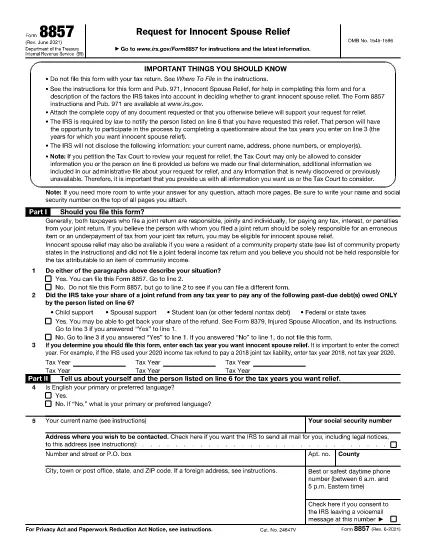
Form 8857, officially titled Request for Innocent Spouse Relief, lets taxpayers ask the Internal Revenue Service (IRS) to remove or reduce their joint tax liability when they believe the spouse or former spouse is solely responsible for an error or underpayment. This page provides a fillable PDF version, a simple step‑by‑step guide, and answers to the most common questions.

What Is Form 8857 and Who Can Use It?

Form 8857 is used when you filed a joint return and later discover that the tax liability is the result of:

  • Undisclosed income or fraudulent activity by your spouse,
  • Errors you were unaware of at the time of signing,
  • Coercion or duress that forced you to sign the return, or
  • Significant financial hardship if you were held liable.

If any of these situations apply, you may qualify for innocent spouse relief, equitable relief, or separation of liability relief.

How to Fill Out the Fillable PDF with Formize

Instead of downloading the PDF and editing it with a separate editor, use the built‑in Formize PDF Filler. Follow these easy steps:

  1. Click “Fill out this form” on this page.
  2. The Formize PDF Filler app loads directly in your browser.
  3. Enter your information in each fillable field – the form automatically saves your progress.
  4. When finished, click Save & Download to get a completed PDF.
  5. Print, sign, and mail the form to the IRS address shown in the instructions, or submit it electronically if you have an IRS e‑file account.

Common Mistakes to Avoid When Completing Form 8857

Even a small error can delay processing. Keep these tips in mind:

  • Don’t leave any required boxes blank. If a question does not apply, write “N/A”.
  • Provide supporting documentation. Attach copies of the joint return, notices, and any evidence of the spouse’s wrongdoing.
  • Use the correct tax year. The year you are requesting relief for must match the year on the joint return.
  • Sign both the taxpayer and spouse sections. If you have a paid preparer, they must also sign.
  • Check the address. Mail the form to the IRS location specified in the instructions for your state.

Following these guidelines will help the IRS process your request faster.

指示

  • 表8857 说明 - 关于申请无罪配偶救济的第8857号表格的说明
常问问题
  • What is IRS Form 8857 used for?

    Form 8857 is the Request for Innocent Spouse Relief. It allows a taxpayer to ask the IRS to remove or reduce liability on a joint return when the spouse is responsible for the tax debt.

  • Who qualifies for innocent spouse relief?

    You may qualify if you were unaware of the error, were coerced into signing, had no control over the financial matters, or would suffer significant hardship if held liable.

  • Can I file Form 8857 electronically?

    Yes, if you have an IRS e‑file account you can upload the completed PDF through the IRS portal. Otherwise, mail the signed form to the address in the instructions.

  • What supporting documents should I include?

    Attach a copy of the joint tax return, any IRS notices, proof of the spouse’s wrongdoing (e.g., fraud letters), and documentation of hardship (e.g., medical bills).

  • Is there a deadline to submit Form 8857?

    Generally, you must file within two years after the IRS issues a notice of liability, but it’s best to submit as soon as possible.

  • Do I need a tax professional to complete Form 8857?

    A professional can help, but the fillable PDF and step‑by‑step guide make it possible to complete the form on your own.

  • What happens after I submit the form?

    The IRS will review your request, may contact you for additional information, and will issue a determination letter with its decision.

  • Can I request relief for more than one tax year?

    Yes, you can file separate Form 8857 requests for each tax year you need relief for.

如何

如何通过 5 个简单步骤在线免费填写 Form 8857:

  1. 1
    Open the Fillable Form
    Click the “Fill out this form” button on the page. The Formize PDF Filler loads instantly in your browser.
  2. 2
    Enter Your Information
    Complete each field. The form auto‑saves as you type, so you won’t lose any data.
  3. 3
    Attach Supporting Documents
    Use the “Add Attachment” option to upload copies of the joint return, IRS notices, and any evidence of spouse misconduct.
  4. 4
    Save and Download
    When all sections are complete, click “Save & Download”. A completed PDF will be saved to your device.
  5. 5
    Print, Sign, and Submit
    Print the PDF, sign where required, and mail it to the IRS address listed in the form instructions, or submit electronically if eligible.
Formize PDF Filler 应用程序
关于

税务表格

Form 8857 是一种税表,是用于向相关税务机关报告与税收相关的信息的文件。有多种类型的税表,包括联邦、州和地方税表,它们可能因纳税人的情况和地点而异。

特征

PDF 填充器

在线填写 PDF 表单的最简单方法

  • 快速填写Form 8857
    正在寻找一种在线快速填写 Form 8857 的方法?使用我们的在线免费 PDF 填表工具,您将在不到一分钟的时间内了解如何编辑和填写此 pdf 文档。
  • 易于使用的在线 PDF 编辑器
    是否厌倦了打印 PDF 文件以便在重新扫描并发回之前对其进行编辑?免费在线编辑 PDF 文档。使用我们的在线 pdf 编辑器可以节省时间和纸张。
  • 伟大的工具,所有平台
    想知道如何在 Mac 上填写 Form 8857,或者如何免费使用 PDF 填充程序?我们的在线 PDF 工具适用于所有平台。
  • 安全文件存储
    完成的“Form 8857”文件存储在由亚马逊云托管管理的安全数据库中。您可以随时从我们的系统中删除您的文件。在任何情况下,这些文件都会在 24 小时后自动删除。
  • 与 Form 8857 聊天
    Chatize 上与“Form 8857”聊天,这是一个免费的 PDF 阅读器助手。提出问题并从“Form 8857”获得答案。只需点击上面的与文档聊天按钮即可。

删除填充会话

删除选定的填充会话?在这种情况下,您填写表格的进度将丢失。

删除编辑会话

删除选定的编辑会话?在这种情况下,您创建和编辑表单的进度将会丢失。