
选择语言

Form 8879‑F – Fillable IRS E‑File Signature Authorization

  1. 国家 美国
  2. 语言 英语
  3. 活动 税收
  4. 部门 国税局
Form 8879‑F – Fillable IRS E‑File Signature Authorization

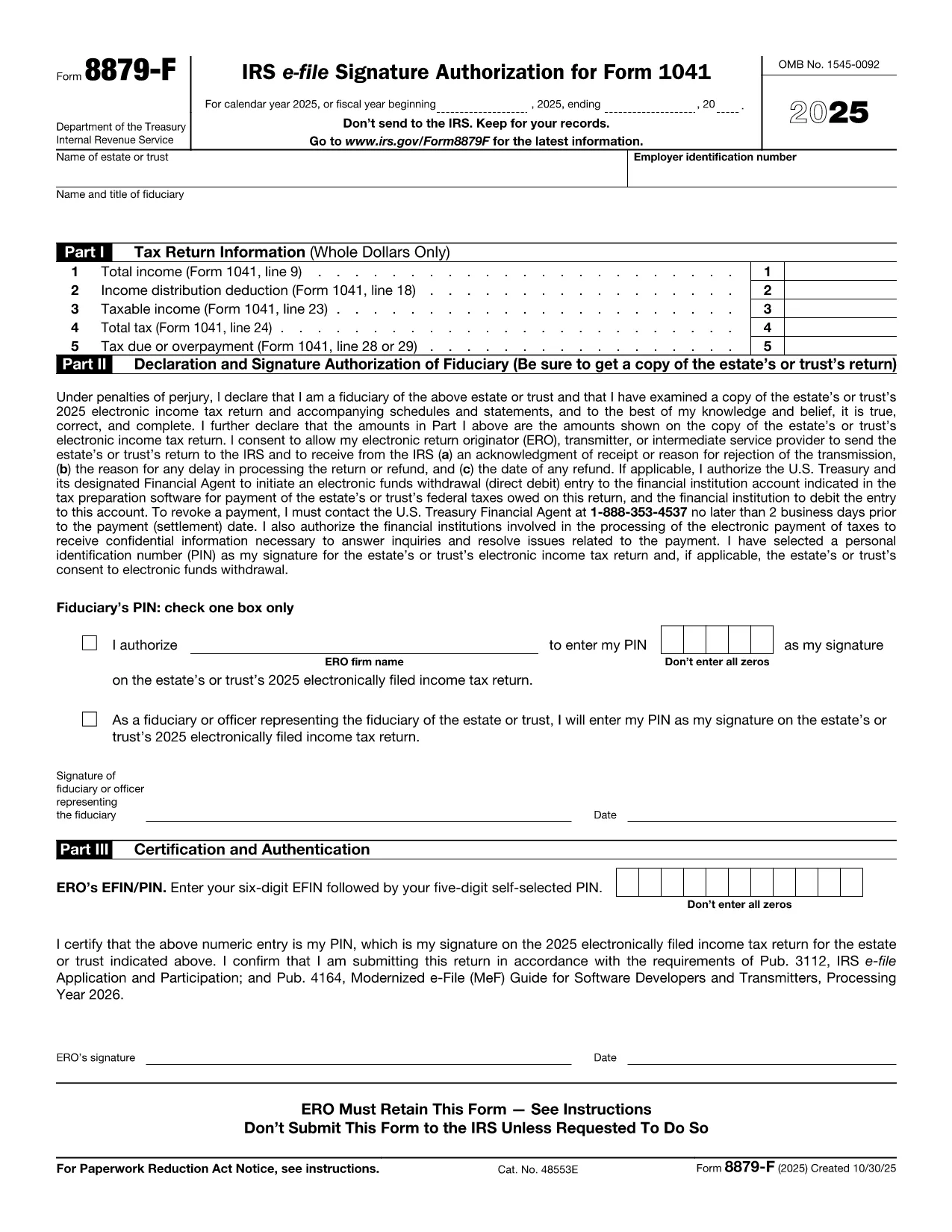
Form 8879‑F, IRS E‑File Signature Authorization for Form 1041, is used by fiduciaries of estates and trusts to give their tax professional permission to electronically sign and file the income‑tax return (Form 1041). This one‑page, fillable PDF lets you securely provide the required information without printing or scanning.

What Is Form 8879‑F?

The form consists of three parts:

  • Part I – Tax Return Information: Copies key figures from the 1041 (total income, taxable income, tax due, etc.).
  • Part II – Declaration and Signature Authorization: The fiduciary declares under penalty of perjury that the return is true and authorizes the electronic return originator (ERO) to sign.
  • Part III – Certification and Authorization: The tax professional certifies that the return was reviewed and that the fiduciary’s PIN is correct.

How to Complete the Fillable PDF with Formize

Instead of downloading the PDF and editing it in a separate editor, you can fill it out directly on our site using the Formize PDF Filler app. Follow the steps below.

Common Mistakes & Tips for Fiduciaries

Being a fiduciary carries legal responsibility. Avoid these pitfalls:

  • Enter the exact Fiscal Year dates – a mismatch will cause the IRS to reject the filing.
  • Double‑check the EIN and trust name; typos trigger processing delays.
  • Use a five‑digit PIN that you can remember but is not easily guessable.
  • Sign the form only after you have reviewed the entire Form 1041 for accuracy.

Where to Submit the Completed Form

After you finish the fillable form, you can:

  • Save a PDF copy for your records.
  • Send the signed PDF to your tax preparer – they will upload it with the electronic return.
  • Retain the form for at least three years in case the IRS requests it.

Remember, the IRS only requires the form when the ERO specifically asks for it. Otherwise, keep it on file.

常问问题
  • Do I need to print Form 8879‑F after filling it online?

    No. The fillable PDF can be saved and sent electronically. Printing is only required if the IRS explicitly asks for a hard copy.

  • Can I use the same PIN for multiple tax years?

    Yes, but it’s recommended to change the PIN each year for added security.

  • What if my estate uses a fiscal year that isn’t January 1 – December 31?

    Enter the exact beginning and ending dates of the fiscal year in the top section of Part I. The IRS will reject the form if the dates don’t match the return.

  • Who is allowed to act as the Electronic Return Originator (ERO)?

    A licensed tax professional, an authorized e‑file service provider, or an intermediate service provider that the fiduciary has hired.

  • Is Form 8879‑F required for every Form 1041 filing?

    It is required only when the fiduciary authorizes an ERO to sign the return electronically. If you file a paper return, the form isn’t needed.

  • What happens if I make a mistake on the form?

    Correct the error in the Formize filler, re‑sign, and resend the updated PDF to your preparer. The IRS will not accept a form with incorrect data.

  • Can I submit Form 8879‑F directly to the IRS?

    No. The form is sent to the tax professional who includes it with the electronic filing. The IRS receives it as part of the e‑file package.

如何

如何通过 5 个简单步骤在线免费填写 Form 8879-F:

  1. 1
    Open the Fillable Form
    Click the **"Fill out this form"** button on the page. The Formize PDF Filler app loads in your browser.
  2. 2
    Enter Required Information
    Fill in Part I with the figures from your Form 1041, then complete Part II and Part III. Use the drop‑down menus and date pickers for accurate entry.
  3. 3
    Set Your PIN
    Choose a five‑digit Personal Identification Number (PIN). You can let the ERO enter it for you or type it yourself.
  4. 4
    Review and Sign
    Review all fields for accuracy. Click the **"Sign"** button to apply an electronic signature that complies with IRS regulations.
  5. 5
    Save or Send
    After signing, download the completed PDF for your records or email it directly to your tax professional using the **"Send to preparer"** option.
Formize PDF Filler 应用程序
关于

联邦税表

Form 8879-F 是联邦税表之一,用于向美国国税局 (IRS) 报告和提交联邦所得税。个人、企业和组织使用这些表格来报告他们的收入、扣除额以及计算联邦纳税义务所需的其他相关信息。

最常用的联邦税表是1040表,个人纳税人用它来申报个人所得税。其他常用表格包括用于合作伙伴关系的表格 1065适用于公司的表格 1120,适用于免税组织的表格 990

联邦税表通常要求纳税人报告各种收入来源,例如工资、薪水和小费,以及来自投资、租赁房产和其他来源的收入。这些表格还允许纳税人申请各种费用的扣除和抵免,例如慈善捐款、抵押贷款利息和医疗费用。

准确、及时地提交联邦税表非常重要,因为不这样做可能会导致美国国税局的罚款和利息费用。

特征

PDF 填充器

在线填写 PDF 表单的最简单方法

  • 快速填写Form 8879-F
    正在寻找一种在线快速填写 Form 8879-F 的方法?使用我们的在线免费 PDF 填表工具,您将在不到一分钟的时间内了解如何编辑和填写此 pdf 文档。
  • 易于使用的在线 PDF 编辑器
    是否厌倦了打印 PDF 文件以便在重新扫描并发回之前对其进行编辑?免费在线编辑 PDF 文档。使用我们的在线 pdf 编辑器可以节省时间和纸张。
  • 伟大的工具,所有平台
    想知道如何在 Mac 上填写 Form 8879-F,或者如何免费使用 PDF 填充程序?我们的在线 PDF 工具适用于所有平台。
  • 安全文件存储
    完成的“Form 8879-F”文件存储在由亚马逊云托管管理的安全数据库中。您可以随时从我们的系统中删除您的文件。在任何情况下,这些文件都会在 24 小时后自动删除。
  • 与 Form 8879-F 聊天
    Chatize 上与“Form 8879-F”聊天,这是一个免费的 PDF 阅读器助手。提出问题并从“Form 8879-F”获得答案。只需点击上面的与文档聊天按钮即可。

删除填充会话

删除选定的填充会话?在这种情况下,您填写表格的进度将丢失。

删除编辑会话

删除选定的编辑会话?在这种情况下,您创建和编辑表单的进度将会丢失。