


税务表格
Form 970 是一种税表,是用于向相关税务机关报告与税收相关的信息的文件。有多种类型的税表,包括联邦、州和地方税表,它们可能因纳税人的情况和地点而异。
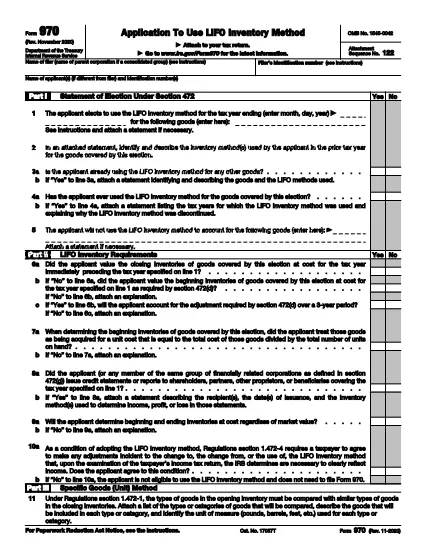
Form 970, Application to Use LIFO Inventory Method, is the official IRS document you file to elect the Last‑In, First‑Out (LIFO) inventory accounting method under Section 472 of the Internal Revenue Code. Whether you’re a corporation, partnership, or sole proprietor, filing Form 970 is the first step to start using LIFO and to protect your election for future tax years.
Form 970 is required the first year you intend to use LIFO for any inventory items. The election is irrevocable without IRS consent, so it’s critical to file accurately and on time with your tax return.
Instead of downloading a static PDF and editing it in a separate program, simply click the "Fill out this form" button on this page. The Formize PDF Filler app will load the fillable version of Form 970, allowing you to enter data directly in your browser.
Don’t forget the signature. An unsigned Form 970 is rejected.
Provide a detailed inventory analysis. Attach a separate statement showing opening and closing inventories for the first LIFO year.
Choose the correct LIFO method. Whether you use the specific‑goods (unit) method, dollar‑value method, or IPIC method, the corresponding parts of the form must be completed.
If you prefer the original IRS PDF, you can download it directly from the link below. The fillable version on Formize mirrors this official document, ensuring compliance with IRS requirements.
Form 970 is used to formally elect the LIFO (Last‑In, First‑Out) inventory method for tax purposes. The election is irrevocable without IRS consent.
Any taxpayer—individual, partnership, corporation, or S‑corporation—who wants to begin using LIFO for inventory valuation must file Form 970 with the tax return for the first LIFO year.
Form 970 must be filed with the tax return for the first year you intend to use LIFO. If missed, you can file an amended return within 12 months of the original filing date.
Yes, but only with IRS consent. You must submit a written request and may need to file Form 970 again, depending on the situation.
The IRS PDF is free to download. Using Formize’s online filler is also free for basic use; no additional fees are required to complete the form.
Missing signature, incomplete inventory analysis, selecting the wrong LIFO method, or failing to attach required statements are the most frequent reasons for rejection.
While you can complete it yourself, many taxpayers work with a CPA or tax advisor to ensure the election meets IRS requirements and to avoid costly mistakes.
Attach Form 970 to your federal income tax return and mail it to the same IRS address where you file your return, or submit it electronically if filing electronically.
在线填写 PDF 表单的最简单方法
删除填充会话
删除编辑会话